Public Holidays in Workforce Schedule Gantt
Schedule managers can now see public holiday events directly in the Workforce Scheduling Gantt for workers who aren’t scheduled on a given day. This added visibility helps explain why a worker may be unavailable, reducing manual research and making it easier to plan coverage and reallocate resources.
Public holiday details are displayed in:
- The Workers with No Shifts section in both Worker and Job views.
- The Workers with Shifts section in Worker view, for days when a worker does not have a scheduled shift.
When a worker’s scheduled shift overlaps with a public holiday event, the Gantt continues to show the shift and displays a warning to highlight the overlap. This helps schedule managers quickly identify potential scheduling conflicts and take appropriate action.
The default information displays the event category, event name, date, and—when applicable—start and end time. Hovering over an event provides additional details, such as the worker, event description, and whether the event is all-day.
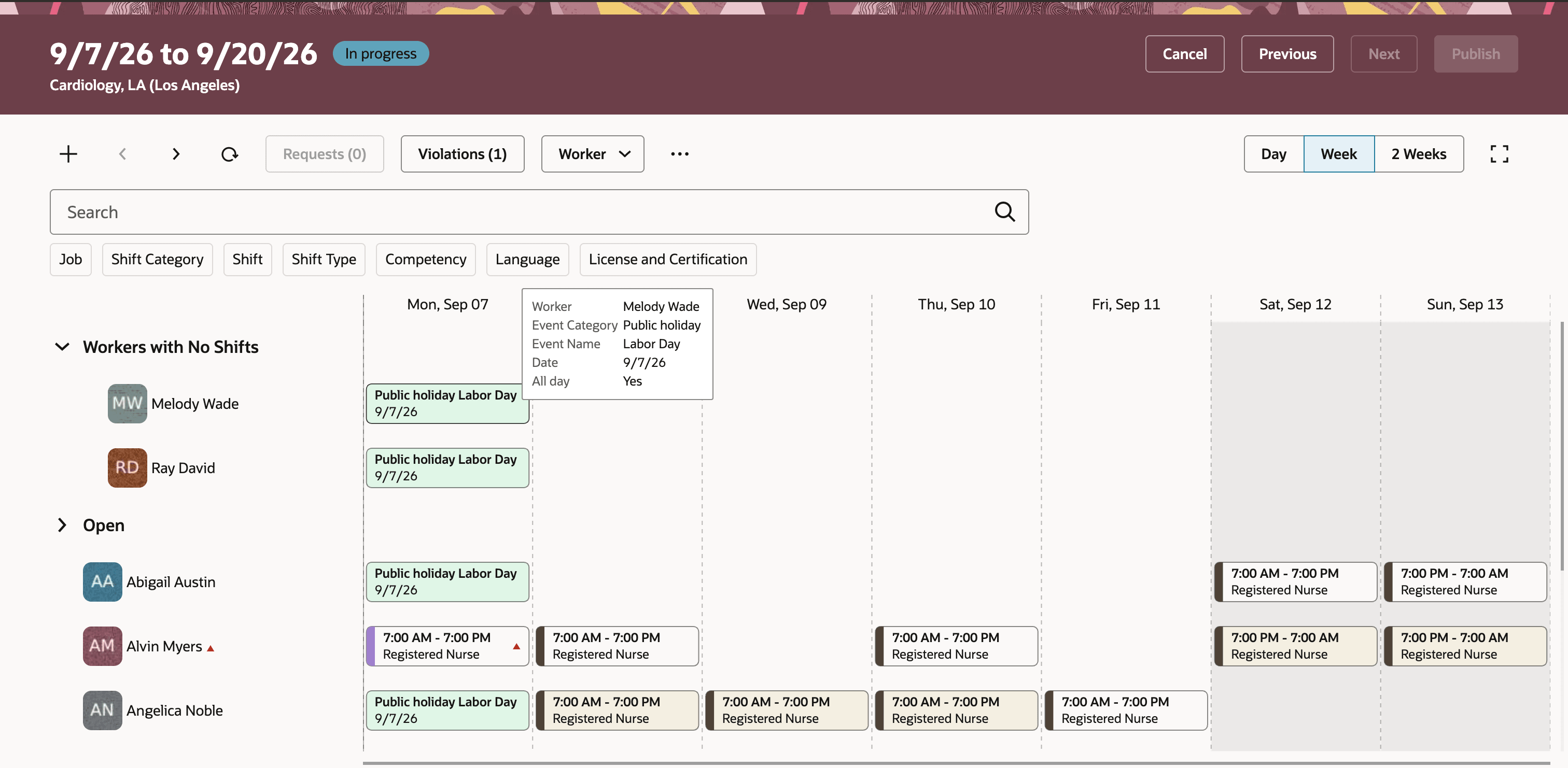
Public Holiday event showing for Workers who are not scheduled in the Workforce Schedule Gantt Page
Try it out
- Go to Workforce Scheduling > Workforce Schedules.
- Open the workforce schedule for the period and department.
- In Worker or Job view, review public holiday events for workers in the Workers with No Shifts section.
- In Worker view, review events on days when workers don’t have a scheduled shift.
Give schedule managers better visibility into public holidays that affect worker availability, reducing manual cross-referencing and helping them assess staffing coverage and reallocation options.
Steps to enable and configure
Ensure that public holiday calendar events are set up and assigned correctly before using this feature. The Workforce Schedule Gantt can display only events available for the worker and selected schedule period.
Tips and considerations
- Use the feature while reviewing unscheduled workers to distinguish holiday-related unavailability from other scheduling gaps.
- In Worker view, check days without a shift for workers who are otherwise scheduled during the period; public holiday events can provide useful context for those individual days.
- Review Gantt warnings for shifts that overlap public holiday events. The warning identifies a potential conflict. Schedule managers should determine whether the shift is appropriate or needs adjustment.
- Public holiday events and absences can both appear for the same worker, giving schedule managers a more complete view of availability.
- The current display scope supports all-day and timed public holiday events. Multi-day and overlapping public holiday display, as well as other calendar events categories aren't supported in this release.
Key resources
For more information, see this related What's New feature including definition of organization calendar events