Redwood: Manage Measures Using Additional Capabilities
In the previous update, the ability to maintain measures using the Redwood UI was released. However, not all the functionality in the classic UI was available. The update helps you to transition from the classic UI to the Redwood UI by making available the most critical functions, including defining the granularity of the measure that you’re creating instead of selecting a commonly used granularity.
In 25D, you could view, create, duplicate, and edit measures.
In 26A, the following functionality is added to the Redwood Measures page:
- Measure formatting, including specifying decimal places, graph colors, and conditional formatting.
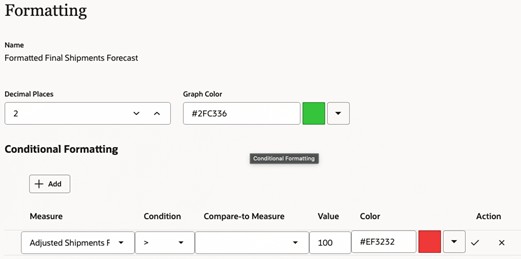
Formatting Step in Guided Process for Measures
- Edit locks
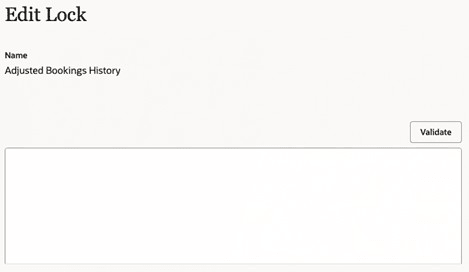
Edit Lock Step in Guided Process for Measures
- Data lookups
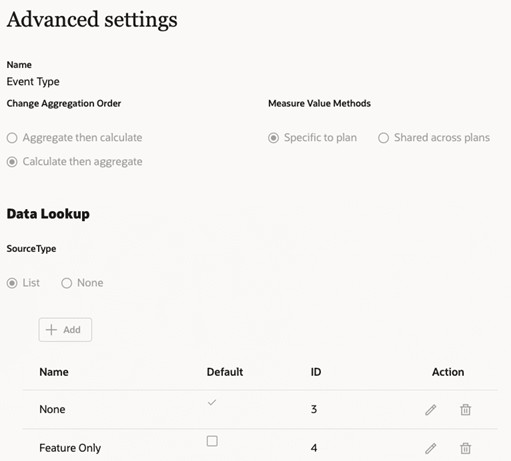
Advanced Settings Step in Guided Process for Measures
- Selection of dimensions and stored levels while creating a measure
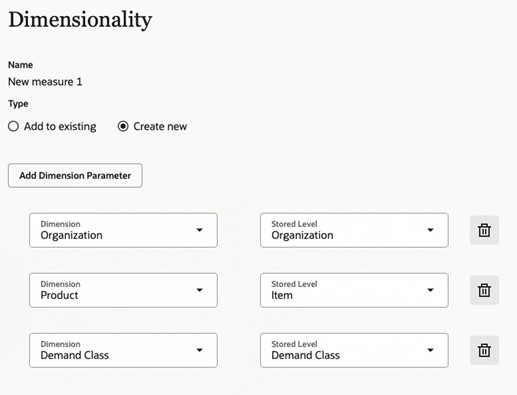
Dimensionality Step in Guided Process for Measures
Steps to Enable and Configure
Use the Opt In UI to enable this feature. For instructions, refer to the Optional Uptake of New Features section of this document.
Offering: Supply Chain Planning
Tips And Considerations
If you want to use the Redwood: Manage Measures Using Additional Capabilities feature, then you must opt in to its parent feature: Replenishment Planning. If you’ve already opted in to this parent feature, then you don’t have to opt in again.
The following settings are planned to be added in future updates:
- Enhanced editor for measure expressions and edit-lock expressions
- Selection of the measure context
- Change of the measure granularity
The profile option code named MSC_REDWOOD_ENABLE_MEASURES that was used to enable the Measures page in 25D is no longer needed. In 26A, the Measures page is automatically available in the Redwood work area named Supply Chain Planning to all users with the required privileges.
Key Resources
- Refer to the Cloud Applications Readiness content for the following 25D feature for Oracle Fusion Cloud Supply Chain Planning: Redwood: Manage Measures Using a New User Experience
- Visit https://redwood.oracle.com/ for more information about the Redwood experience.
Access Requirements
Users who are assigned a configured job role that contains these privileges can access this feature:
- Delete Measure Definition (MSC_DELETE_MEASURE_DEFINITION_PRIV)
- Edit Planning Analytics Configuration (MSC_EDIT_PLANNING_ANALYTICS_CONFIGURATION_PRIV)
- Maintain Measure Definition (MSC_MAINTAIN_MEASURE_DEFINITION_PRIV)
- View Measure Definition (MSC_VIEW_MEASURE_DEFINITION_PRIV)
These privileges were available prior to this update.