AI Agent: Inventory Tasking Assistant
When operations are running at full capacity across multiple shifts with a seemingly constant stream of tasks, manually assigning every new task can be time-consuming for you and other managers. As a result, you may decide to just depend on users self-assigning tasks as they arise. However, this method is not always effective as it assumes all operators are equally self-motivated, an unlikely scenario without consistent incentives or accountability. Instead, you need a fast, straightforward way to view open tasks, assess workforce availability, and assign tasks efficiently. Now you can use the Inventory Tasking Assistant to help you complete all of these steps with minimal effort.
The agent analyzes live warehouse data, operator performance, and throughput to recommend the best task-to-operator or operator-to-zone assignments. It helps managers reduce manual workload and empowers operators to self-select the most suitable tasks. For warehouse operators, the AI agent streamlines task selection by providing a prioritized list of tasks based on skill, urgency, and location. This empowers operators to self-assign tasks that best match their abilities without needing constant oversight. Additionally, if changes occur in task availability, operator schedules, or warehouse needs, the agent can recommend reassignments to maintain optimal workflow.
With the Inventory Tasking Assistant, you can ensure the right person is assigned to the right task at the right time, boosting productivity, reducing manual effort, and improving warehouse efficiency across shifts.
Key Capabilities:
-
Smart Task Assignment: Recommends optimal worker-task pairings based on performance, proximity, and workload, it also helps in unassigning tasks from workers.
-
Zone Optimization: Suggests how to deploy workers after warehouse layout changes or new zone creation.
-
Self-Assignment: Enables operators to pick or auto-assign tasks suited to their skills and location.
This AI agent significantly streamlines warehouse operations by reducing manual tasking effort for managers and enabling smarter, data-driven decisions. It improves overall throughput and resource utilization by automatically matching the right workers to the right tasks at the right time. By ensuring fair and transparent task distribution, it promotes balanced workloads and better workforce engagement. Additionally, the agent helps warehouses adapt quickly to layout changes or new zone creations, ensuring smooth transitions and sustained productivity.
Using the prebuilt AI Agent template for Inventory Tasking Assistant, you can create an agent team by making a copy of the template. This agent team can then be added to a guided journey on a Redwood page, such as the Inventory tasks in mobile inventory.
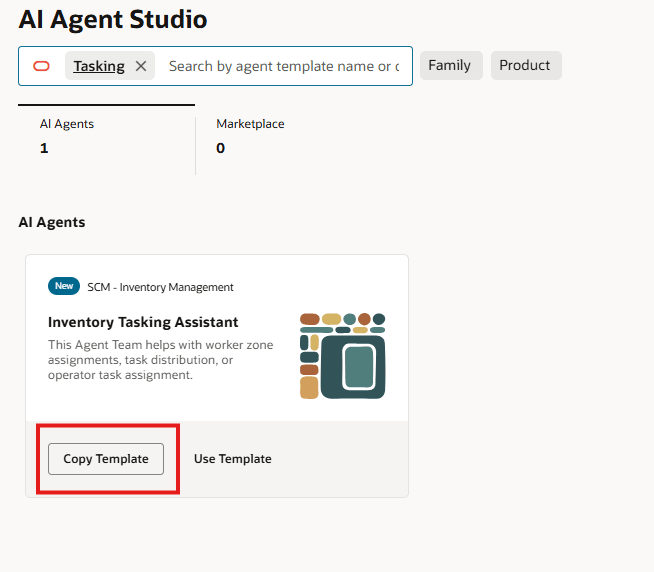
Inventory Tasking Assistant Agent Template
Here are the tasks that this agent can perform:
For Managers:
Administer Work assignment: The agent helps with the following activities.
-
Assign unassigned tasks to workers.
-
Unassign tasks from workers.
-
Reassign tasks from one worker to another.
Assign workers to zones: Automatically suggest and assign available workers to the right zones based on workload, throughput, and efficiency.
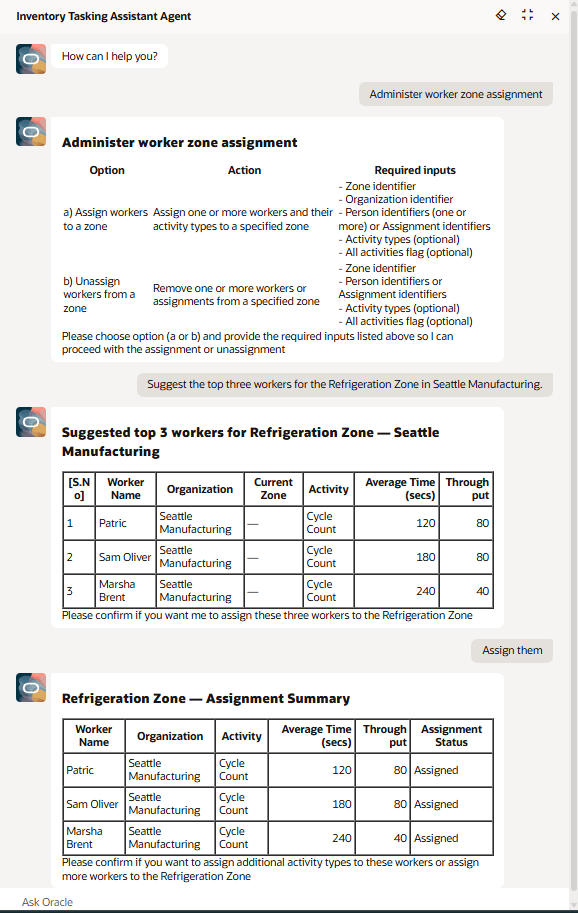
Zone Worker Assignment
For Operators:
-
Operators can self-assign tasks to themselves.
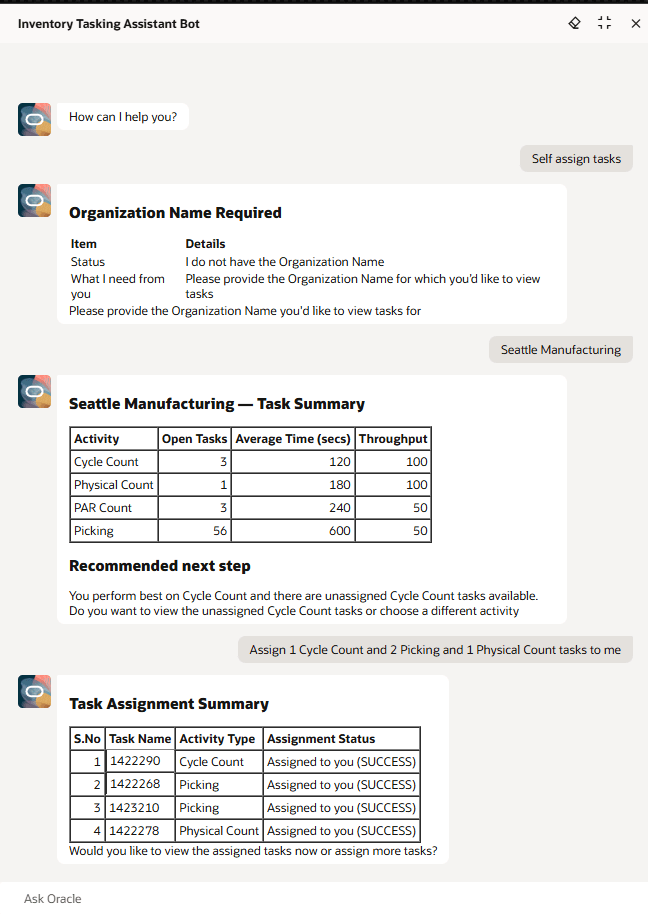
Operator Self Assignment View
This AI agent increases operational efficiency, balances the tasking workload, and ensures all tasks are assigned quickly, all while reducing the burden on managers.
Here's the demo of these capabilities:
Steps to enable and configure
To enable permission groups for roles, take these steps:
- In the Setup and Maintenance work area, search for the Manage Administrator Profile Values task using the search link in the Tasks panel tab.
- Search for the Enable Security Console External Application Integration (ORA_ASE_SAS_INTEGRATION_ENABLED) profile option and set the Site profile level to Yes.
You can use AI Agent Studio to use or copy the preconfigured agent template to create Agents for your business processes. To automatically add a suffix to all artifacts in your agent team, you can Copy Template instead of Use Template. When you copy a template, you're directly taken to the agent team canvas where you can edit the agent team settings, agents, tools, and topics. The Use Template option takes you through a step-by-step process for configuring each artifact in the agent team.
For information on using AI Agent Studio, see How do I use AI Agent Studio?
Tips and considerations
- After publishing your agent, you can add it to a page by including it in the guided journey of that page. To do this, create an Agent task of type Workflow Agent for the agent, and add it to the guided journey.
Key resources
- Oracle Fusion Cloud SCM: Using Inventory Management guide, available on the Oracle Help Center.
- For information on using AI Agent Studio, see How do I use AI Agent Studio?
- For information on the access requirements for AI Agent Studio, see Access Requirements for AI Agent Studio.
- For guidance on how to create AI agents, see Create AI Agents.
Access requirements
To access the Oracle AI Agent Studio for Fusion Applications and manage SCM AI agents, users must be assigned a configured job role that contains these duty roles:
- SCM Intelligent Agent Management Duty (ORA_RCS_SCM_AI_AGENT_MANAGEMENT_DUTY)
- SCM Intelligent Agent Management Duty (ORA_RCS_SCM_AI_AGENT_MANAGEMENT_DUTY_HCM)
- Fai Genai Agent SCM Administrator Duty (ORA_DR_FAI_GENERATIVE_AI_AGENT_SCM_ADMINISTRATOR_DUTY)
To interact with AI agents in product pages, users must be assigned a configured job role that contains this duty role:
- Fai Genai Agent Runtime Duty (ORA_DR_FAI_GENERATIVE_AI_AGENT_RUNTIME_DUTY)
To allow users to interact with agents, you must also enable permission groups in the Security Console on those users' configured job roles that contain the Fai Genai Agent Runtime Duty role. You can enable permission groups when you manage the basic information of your configured job roles.
Users' configured job roles must also contain privileges that allow access to the pages where AI agents are enabled.
See Access Requirements for AI Agent Studio (for administrators) and How can I give users access to AI agents (for end-users) for more information.