AI Agent: Operations Assignment Assistant
Operations Assignment Assistant recommends the assignment and reassignment of work order operations in a work center during the shift to ensure schedule adherence, increase productivity, and to mitigate the impact of unplanned outages.
Supervisors are responsible for production continuity on the shop floor and are required to timely mitigate any production risks caused by equipment or labor issues. Supervisors need to make informed decisions that can be implemented quickly to recover from issues and stay on track with the production schedule. The Operations Assignment Assistant is an AI agent that looks at the contextual information of a work center in real time to understand the scheduled work order operations and their current assignments along with the statuses of the workstations. The agent then recommends assignments or reassignments to improve the workstation utilization, mitigate delays in impacted work order operations, and prioritize operations of higher importance, consequently saving time by reducing manual decision making. The agent provides its rationale to the supervisor and can take inputs from the supervisor to fine-tune the recommendations. The agent can also automatically perform the recommended changes once the supervisor confirms the action.
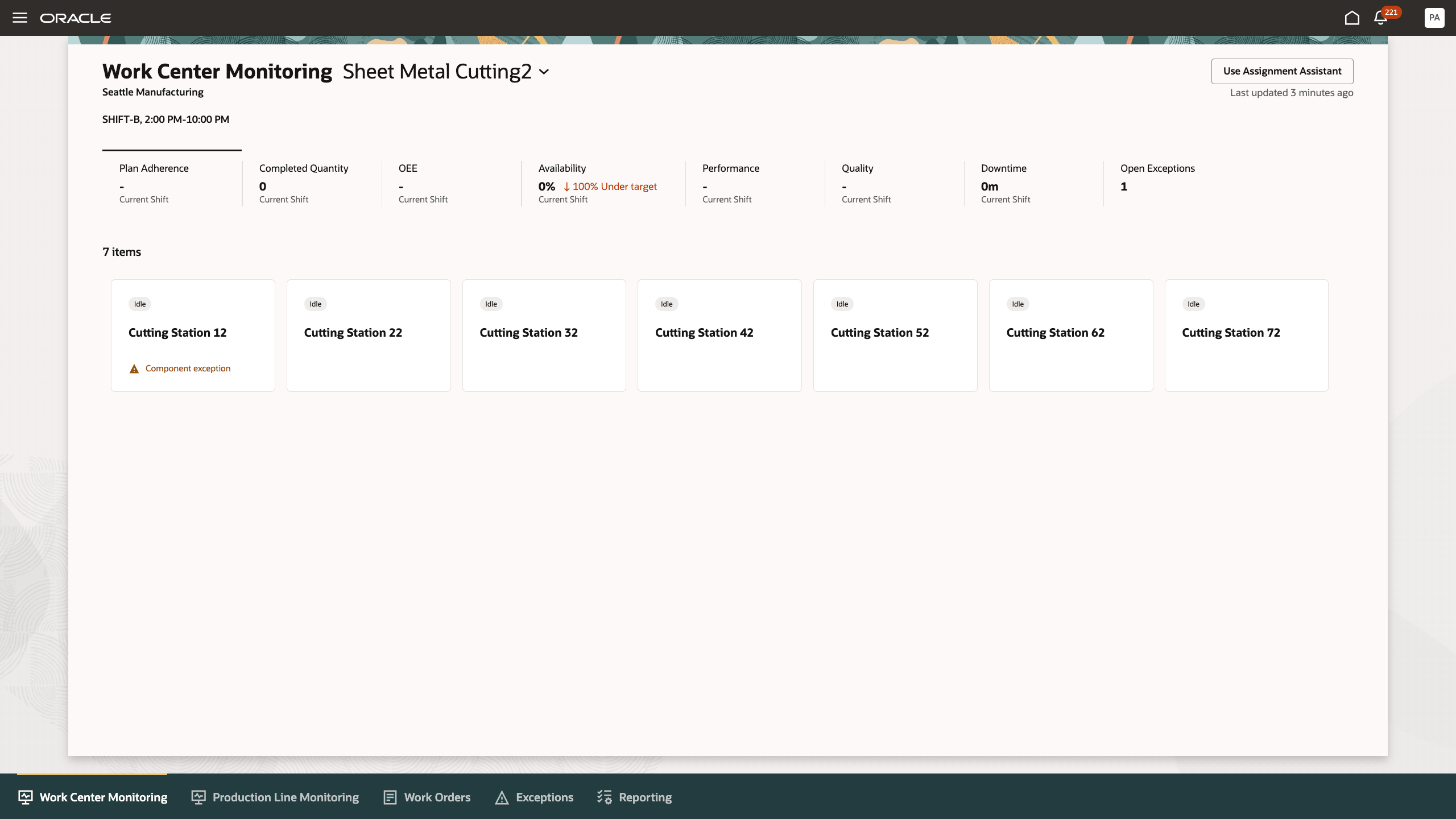
Launch Assignment Assistant from the Work Center Monitoring Page
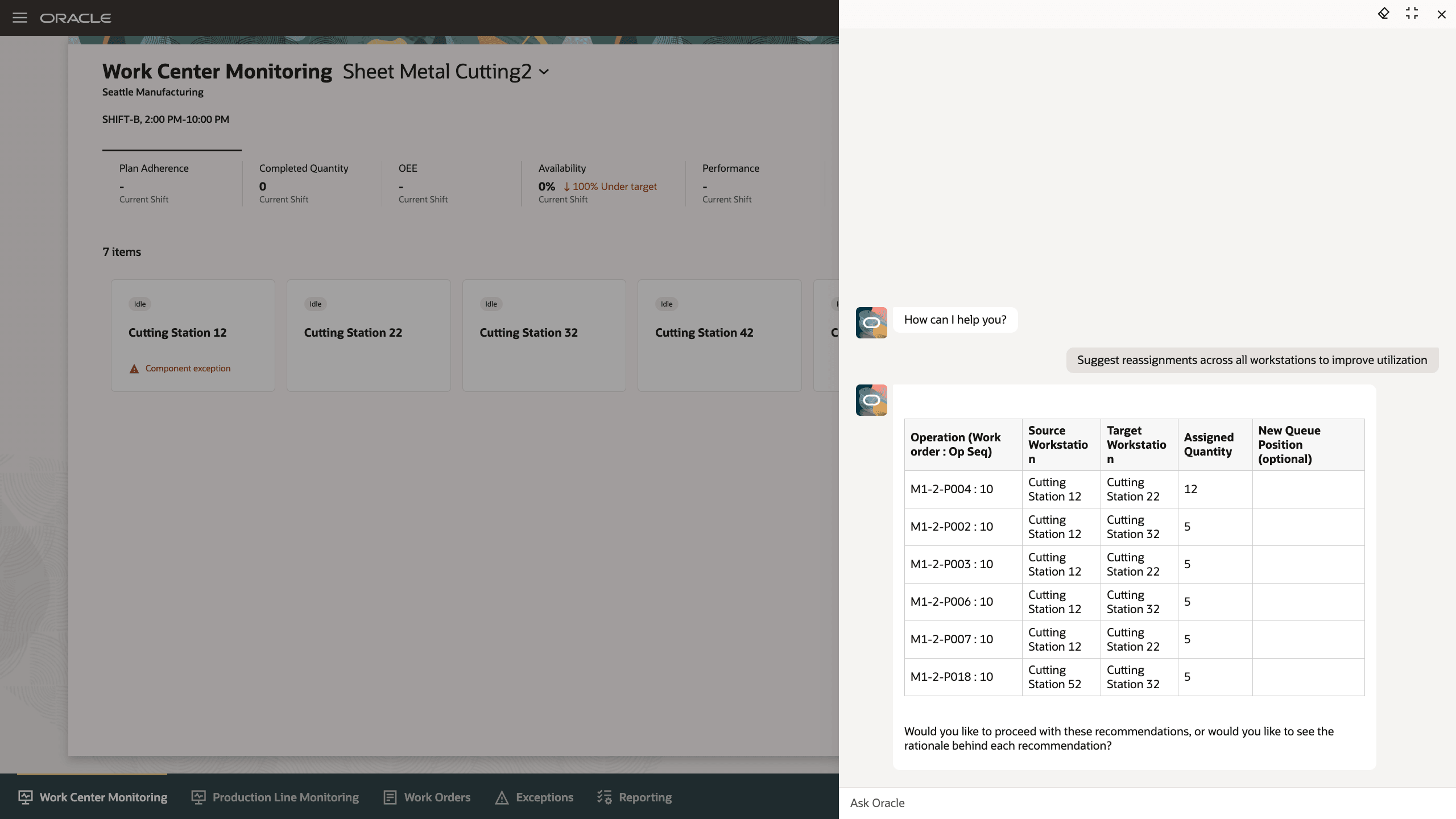
Get Reassignment Recommendations for your Work Center
Agent Name:
Operations Assignment Assistant
Agent Description:
Operations Assignment Assistant recommends the assignment and reassignment of work order operations in a work center during the shift to ensure schedule adherence, increase productivity, and to mitigate the impact of unplanned outages. Operations Assignment Assistant can also assign work orders that are not manually assigned.
Agent Use Case:
The Operation Assignment Assistant provides recommendations in the following scenarios where it prioritizes, assigns, or reassigns work orders to improve production efficiency and on-time delivery.
- Provides optimum reassignments for operations across workstations to improve the utilization of workstations.
- Provides reassignment recommendations for operations impacted by a workstation that is down due to an exception.
- Provides assignment recommendations for work order operations that are currently unassigned.
Agent Tools:
| Tool Name | Tool Type | Tool Description | Specifications |
|---|---|---|---|
|
Work center operation assignments query |
Business Object |
Provides a snapshot of a work center at a given point in time. |
Contains the following details:
|
|
Operations Assignment Actions |
Business Object |
Implements the recommended changes in the work center |
Implements one or more of the following changes for each recommended operation action:
|
The Operations Assignment Assistant helps maximize factory production and production supervisor efficiency.
Here's the demo of these capabilities:
Steps to Enable and Configure
1. Create and Publish Agents Using AI Agent Studio
You can use AI Agent Studio to use or copy a preconfigured agent template to create Agents for your business processes. To automatically add a suffix to all artifacts in your agent team, you can Copy Template instead of Use Template. When you use a template, you're directly taken to the agent team canvas, where you can edit the agent team settings, agents, tools, and topics. After creating the Agent Team, publish the agent team.
For information on using AI Agent Studio, see How do I use AI Agent Studio?
2. Add the Agent Team to the Manufacturing Production Supervisor Workbench
- Navigate to Visual Builder from any Redwood page.
- Find the page Work Center Monitoring under Production Supervisor Workbench.
- Add the Agent Team Code to the field as shown in this image and publish the changes.
- After the changes are published the option to Use Assignment Assistant should appear on the page when selecting work centers with workstations.
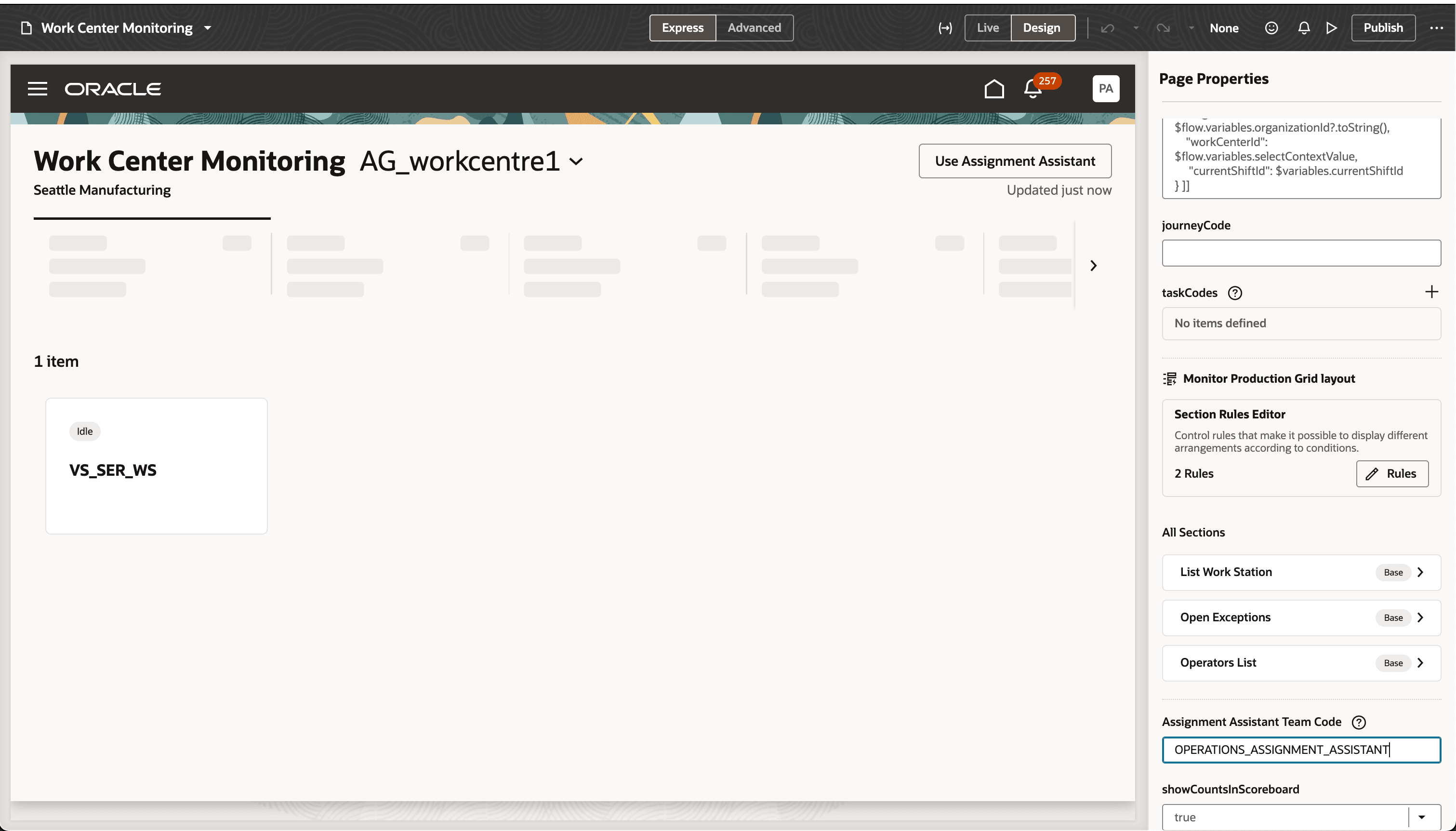
Add the Agent Team to the Work Center Monitoring Page
Tips And Considerations
- This agent is available in the Work Center Monitoring page in Production Supervision.
- This feature requires the use of workstations in production execution.
Key Resources
- To learn about how to use the Operations Assignment Assistant, click to see the feature demo.
- To learn more about the AI Agent Studio, refer to the feature release update.
Access Requirements
See Access Requirements for AI Agent Studio (for administrators) and How can I give users access to AI agents (for end-users) for more information.
To access the Oracle AI Agent Studio for Fusion Applications and manage SCM AI agents, users must be assigned a configured job role that contains these duty roles:
- SCM Intelligent Agent Management Duty (ORA_RCS_SCM_AI_AGENT_MANAGEMENT_DUTY and ORA_RCS_SCM_AI_AGENT_MANAGEMENT_DUTY_HCM – both duty role codes are required)
- Fai Genai Agent SCM Administrator Duty (ORA_DR_FAI_GENERATIVE_AI_AGENT_SCM_ADMINISTRATOR_DUTY)
To interact with AI agents in product pages, users must be assigned a configured job role that contains this duty role:
-
Fai Genai Agent Runtime Duty (ORA_DR_FAI_GENERATIVE_AI_AGENT_RUNTIME_DUTY)
To access the Production Supervision, users must be assigned the following privilege
- Supervise Production (WIP_SUPERVISE_PRODUCTION_PRIV)
- To learn about the access requirements of other features with in Production Supervision, please refer to the access requirements for the earlier release.