 Modify the Start Date for a Work Definition Version in Draft Status
When making changes to a new work definition version, manufacturing engineers need the flexibility to make it effective on a certain date for manufacturing work order management and execution, planning, and costing. Currently, the work definition version start date can't be updated once the version is created.
With this update, you can now modify the start date of the latest work definition version in draft status before submitting it for approval using the e-records and e-signatures process using the Redwood user experience.
Using the Manage Versions action in the Manufacturing Work Definitions user interface, you can now edit the Start Date when a work definition version is in Draft status. You can set the version start date to today's date or a future date, which automatically synchronizes the start date of new or duplicated operations created in the version. This enhancement is useful when you’ve spent several days making updates to a draft version and need to adjust the start date before submitting the work definition version for approval.
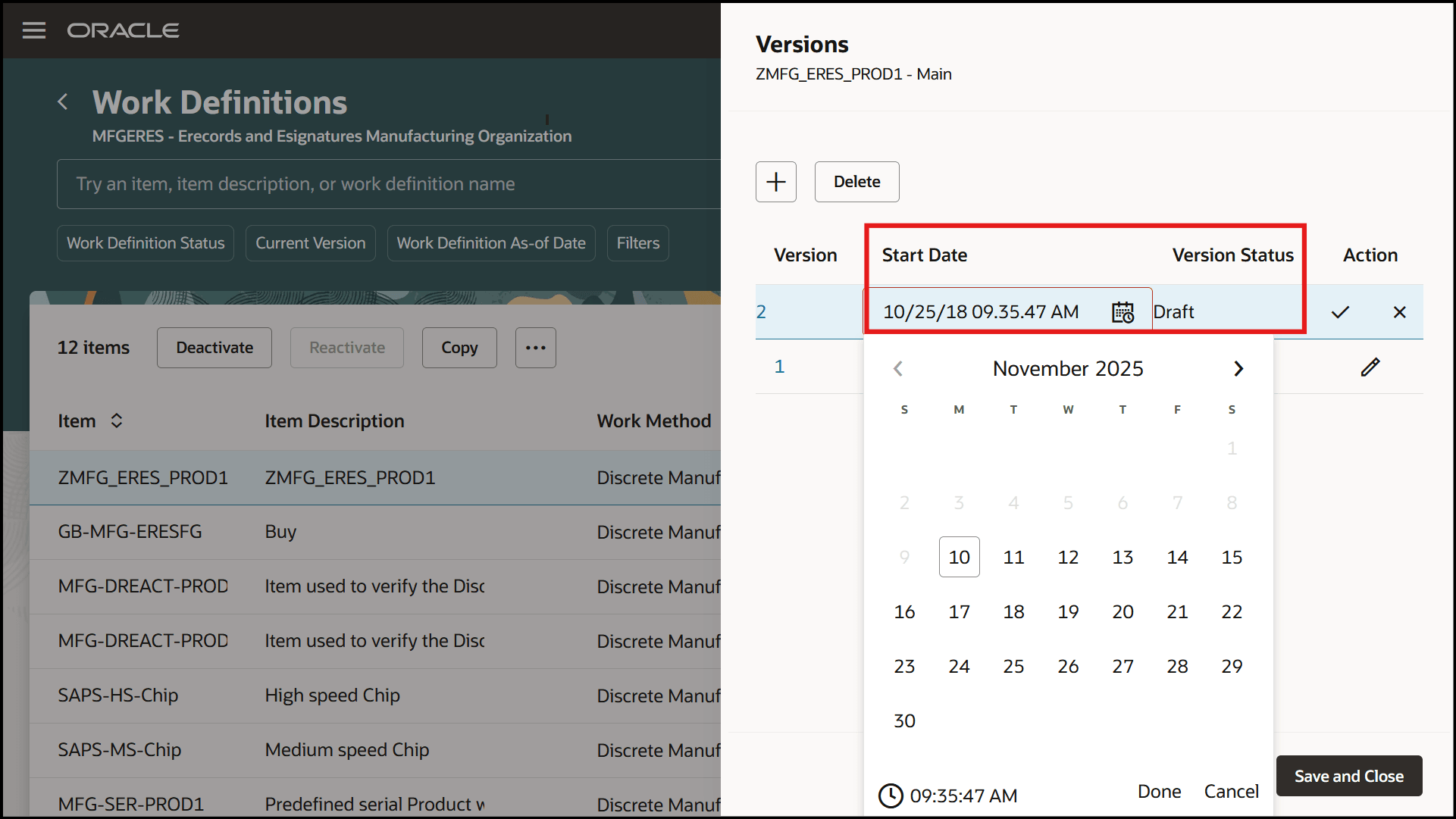
Manage Versions Action in Manage Work Definitions
This enhanced flexibility ensures that the timing of a new or updated work definition is aligned between authoring and approval stages, reducing the risk of operational delays.
Steps to Enable and Configure
If you are already using Electronic Record and Electronic Signature for Manufacturing Work Definitions Using the Redwood User Experience, then no additional setups are required.
To enable Deferred Electronic Record and Electronic Signature for Manufacturing Work Definitions Using the Redwood User Experience, follow these steps:
- Set up the Profile to enable the Redwood experience for work definitions, as follows:
- In the Setup and Maintenance work area, search for and select the Manage Administrator Profile Values task.
- On the Manage Administrator Profile Values page, search for and select the ORA_WIS_WORK_DEFINITIONS_REDWOOD_ENABLED profile option code.
- In the Profile Values section, set the Site level to Y or N. The default value of the profile option is N.
- Y = Enables the feature.
- N = Disables the feature
- Click Save and Close. Changes in the profile value affect users the next time they sign in.
- Enable the Opt In for the "Capture Electronic Records and Electronic Signatures for Supply Chain Management Transactions" feature.
- Configure e-signature preferences by enabling Manufacturing Work Definition Management for deferred electronic signature approval for an organization under the task "Configure Electronic Signature Preferences". Refer to Configure E-Signature Preferences.
- After you enable electronic signatures for a transaction, you should also define configurable business process rules in Oracle Business Process Management using the Manage Task Configurations for Supply Chain Management task, and the Manage Approval Groups task in the Setup and Maintenance work area to determine the approvers for each transaction.
Tips And Considerations
- Refer to How You Manage Work Definition Versions for more information about start dates and managing operations aligned to a version.
- Refer to Overview of Electronic Signatures and Electronic Records for Work Definition Management and How You Capture E-Signatures and Generate E-Records for Work Definition Management for more information about how to manage draft and approved work definition versions.
Key Resources
- Refer to the 25B feature Redwood: Enable Deferred Electronic Record and Electronic Signature for Manufacturing Work Definitions Using the Redwood User Experience
Access Requirements
Users who are assigned a configured job role that contains these privileges and codes can access this feature:
Work Definition Privileges:
- Manage Work Definitions (WIS_MANAGE_WORK_DEFINITIONS_PRIV)
- View Work Definitions (WIS_VIEW_WORK_DEFINITIONS_PRIV)
- Get Work Definitions by Service (WIS_GET_WORK_DEFINITIONS_SERVICE_PRIV)
- Manage Work Definitions by Service (WIS_MANAGE_WORK_DEFINITIONS_SERVICE_PRIV)
- Get Manufacturing Plant Set Up Data by Service (WIS_GET_MFG_PLANT_SETUP_SERVICE_PRIV)
- Get Standard Operations by Service (WIS_GET_STANDARD_OPERATIONS_SERVICE_PRIV)
Electronic Signature Approval Privileges:
- Electronic Signatures (EDR_ADD_ESIGNATURES_TRANSACTIONS_PRIV)
- View Electronic Records and Signatures (EDR_VIEW_RECORDS_ESIGNATURES_PRIV)
These privileges were available prior to this update.