AI Agent: Use the Improved Component Replacement Assistant
You can now use the improved Component Replacement Assistant, an AI agent that can identify the item based on the manufacturer part number (MPN) that is shared by the manufacturer. This internal item is used to perform a component search across all structures that are impacted.
Here’s what the agent can do now, in addition to the capabilities in the previous update:
-
Read the MPN provided by the manufacturer through product change notification.
-
Discover the internal item number based on the MPN.
-
Perform supply chain analysis on Sales Order and Planning use-up date.
-
Include Sales Order and Planning details in the email notification.
-
Include more than one person in the To and CC list.
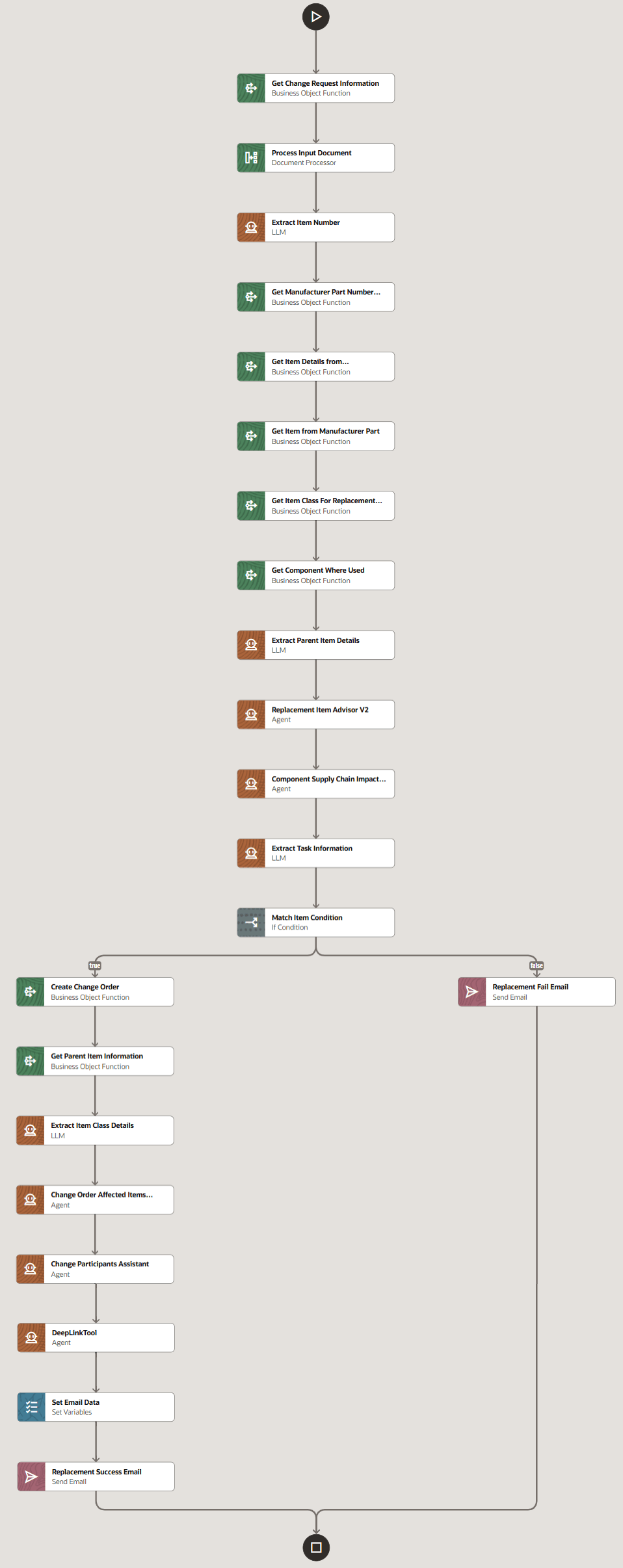
Modifications in the Agent Team for Component Replacement Assistant

Sales Order and Planning Details in Supply Chain Impact Analysis
Here's how this feature benefits your business:
- Improves efficiency and automation by auto-searching for the Product Management Item Number based on the Manufacturer Part Number.
- Provides a more comprehensive understanding of the change impact across your SCM modules.
- Centralizes information to allow for quick analysis and faster decision-making.
- Increases productivity by decreasing navigation to multiple supply chain applications.
Steps to enable and configure
-
Prerequisite: Ensure that you complete the steps listed in the feature AI Agent: Component Replacement Assistant released in update 25D. Note that you must skip the step to enable the Component Replacement Assistant button.
-
Enable the Component Replacement Assistant button. This step is different from the steps specified in the What's New for update 25D.
-
Here’s how:
-
Enable the following code in the business rule in the visual builder: Component Replacement Code
Component Replacement Code: the name of the component replacement assistant in the AI Studio with the unique suffix
-
-

Enable Component Replacement Assistant Button Using Business Rules in Visual Builder
Tips and considerations
-
You can conditionally show or hide the button using business rules.
-
Component Replacement Assistant button is available in Open and Pending change requests and not in Completed change requests.
Key resources
Access requirements
Users who are assigned a configured job role that contains these functional privileges can access this feature:
To access the AI Agent Studio:
-
SCM Intelligent Agent Management Duty (ORA_RCS_SCM_AI_AGENT_MANAGEMENT_DUTY)
To access change request:
-
Manage Change Request (ACA_MANAGE_CHANGE_REQUESTS_PRIV)
To perform the Where Used search:
-
Manage Item Redwood Structures (EGP_MANAGE_REDWOOD_ITEM_STRUCTURE_PRIV)
To query item and perform the replacement:
-
Manage Item Redwood Items (EGP_MANAGE_REDWOOD_ITEM_PRIV)
To generate the SCM Analysis summary, user must have Read access:
-
Procurement Rest Service (ORA_PO_PROCUREMENT_REST_SERVICE_DUTY)
-
View Purchase Order (PO_VIEW_PURCHASE_ORDER_PRIV)
-
View Purchase Agreement (PO_VIEW_PURCHASE_AGREEMENT_PRIV)
-
View Work Orders (WIP_VIEW_WORK_ORDERS_PRIV)
-
View Sales Order (ZCA_VIEW_SALES_ORDER_PRIV)
-
View Planning Items (MSC_VIEW_PLANNING_ITEMS_PRIV)
To create and manage change order:
-
Create Change Order (EGO_CREATE_CHANGE_ORDER_PRIV)
-
Manage Change Orders (ACA_MANAGE_CHANGE_ORDERS_PRIV)
These privileges were available prior to this update.