Redwood: Notify Buyers of Requisition Lines Reassigned to Them
Notify buyers about the requisition lines that have been reassigned to them. This notification will show all requisition lines within a specific requisition that have been reassigned to a new buyer.
Oracle Analytics Publisher allows you to configure the notification content to meet your specific business requirements. You can use the Requisition Lines Buyer Reassignment FYI Notification Report to configure this notification.
The Requisition Lines Buyer Reassignment FYI Notification is sent to the new buyers when one or more requisition lines are reassigned to them.
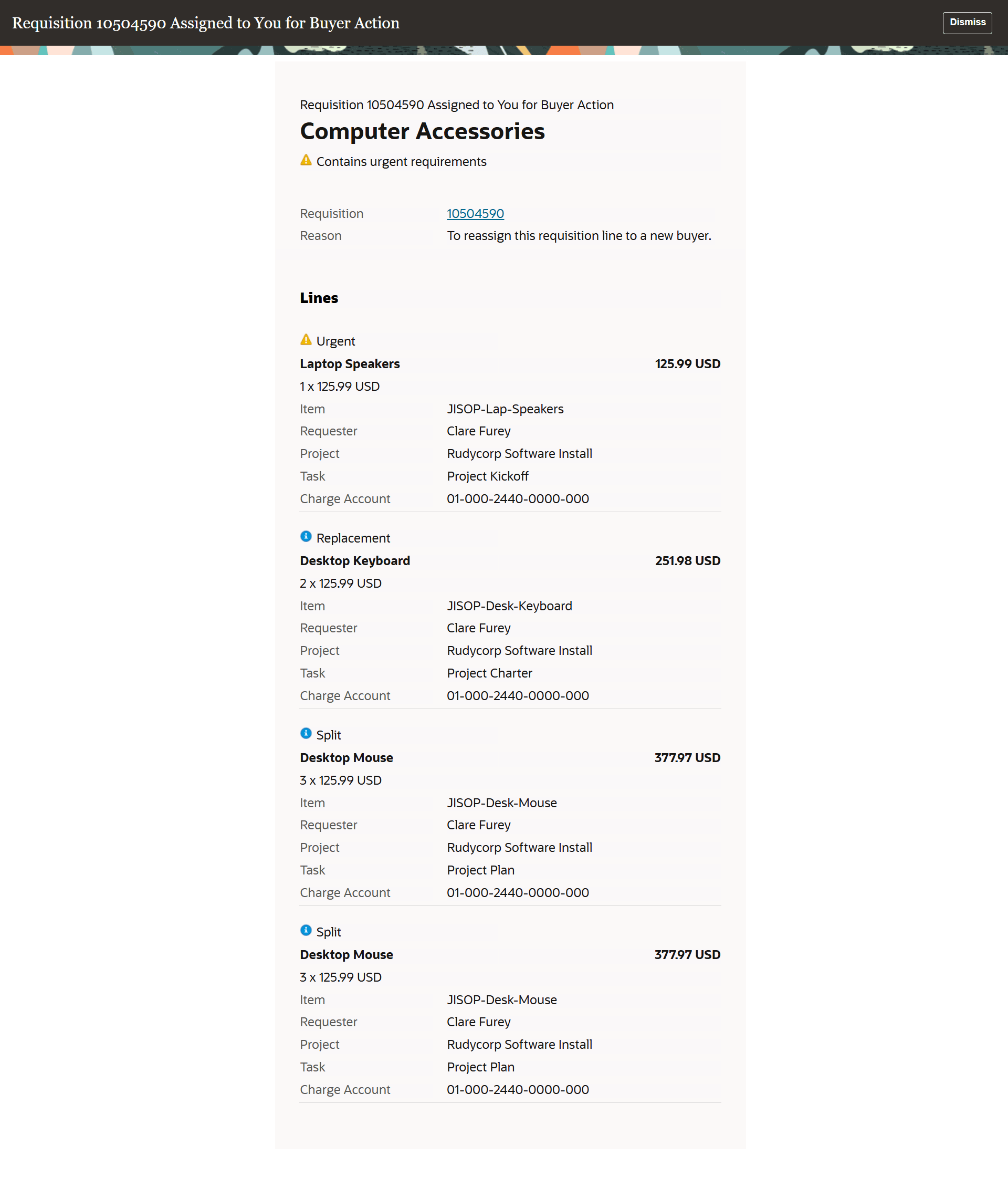
Requisition Lines Buyer Reassignment FYI Notification
Steps to enable and configure
Use the Opt In UI to enable this feature. For instructions, refer to the Optional Uptake of New Features section of this document.
Offering: Procurement
After you enable the feature, follow these steps to configure the template for requisition lines buyer reassignment FYI notification:
- Sign in to the Analytics Publisher server directly (for example: http://hostname.com:7001/xmlpserver) and click the Catalog tab.
- In the Folders pane, locate the Requisition Lines Buyer Reassignment FYI Notification Report under this path: Shared Folders > Procurement > Self Service Procurement. Click More and then click Customize. This creates a copy of the template in the Shared Folders > Custom > Procurement > Self Service Procurement folder.
- Access this template in the Custom folder.
- Edit the template with your required changes.
- Upload the template (select the appropriate locale for your instance).
- For this template, the data model is Requisition Approval E-Mail Data Model.
Tips and considerations
The seeded report template is configured to hide notification attributes if they have no data.
Key resources
- To know more on how to create and edit reports, refer to the Overview of Analytics Publisher topic.
- To view an updated prebuilt report after your upgrade, refer to the View an Updated Prebuilt Report topic.
Access requirements
Users who are assigned a configured job role that contains this role can view the notification:
- View Purchase Order (PO_VIEW_PURCHASE_ORDER_PRIV)
Administrators who are assigned a configured job role that contains this duty role can configure the notification with Oracle Analytics Publisher:
- BI Author Role (BIAuthor)
This role was available prior to this update.