Redwood: Use Additional Search Capabilities When Creating and Updating Subinventories
Subinventories and locators are essential components in a warehouse as they enable precise organization and tracking of inventory. Subinventories represent the physical or logical areas within a warehouse, allowing you to segregate stock based on usage, ownership, or value. Locators further divide subinventories into specific storage locations, such as aisles or bins, making it easy to pinpoint where items are stored. Together, they enhance inventory accuracy, streamline picking and put-away processes, and help prevent stock discrepancies. When managing a large number of subinventories and locators, you need ample search criteria to quickly find the location you need to edit. Now you have the ability to search for subinventories, locators, and associated items using additional filtering criteria.
Enhanced Search Capabilities on the Configure Subinventories Page
You can now use enhanced search and filtering capabilities, including filter chips, to quickly locate and manage subinventories and related configurations. These enhancements improve discoverability and streamline navigation across the Configure Subinventories page. These enhanced search capabilities are available on both the Subinventories tab and Item Associations tab.
Subinventories Tab
- Subinventories tab > Landing page
- Subinventories tab > Select Subinventory > Locators
- Subinventories tab > Select Subinventory > Select Locator > Associated Items
- Subinventories tab > Select Subinventory > Associated Items
- Subinventories tab > Select Subinventory > Associated Items > Select Item
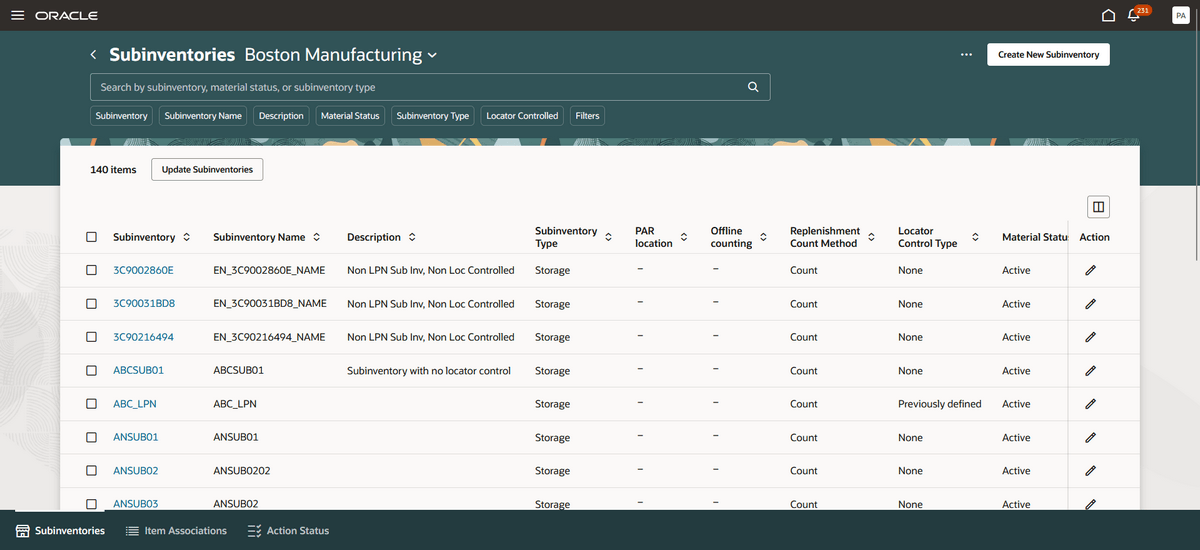
Subinventories Tab
Item Associations Tab
- Item Associations tab > Landing page
- Item Associations tab > Select Item > Associated Subinventories
- Item Associations tab > Select Item > Associated Locators
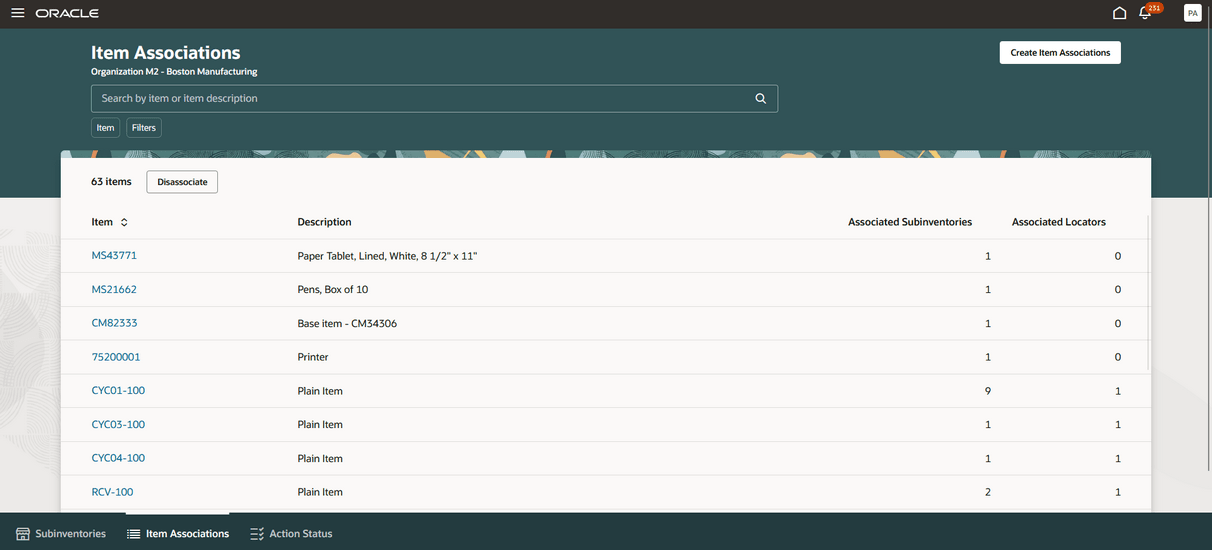
Item Associations Tab
These enhancements enable users to apply more precise filters, reducing manual effort and improving overall configuration efficiency.
Descriptive Flexfield (DFF) Support in Mass Maintenance
You can now populate descriptive flexfields (DFFs) during mass maintenance by uploading CSV files when creating or updating subinventories.
Here are the newly supported descriptive flexfields:
- Attribute Category
- DFF Attributes: Attribute 1 through Attribute 15
DFF values can be provided through CSV files in the following areas:
- Configure Subinventories Page
- Create and update subinventories
- Update locators
- Update item subinventories
- Create and update item subinventory associations
- Configure Subinventories using Export to CSV files
- Subinventories
- Locators
- Item subinventories
This enhancement allows users to capture and maintain additional business specific information consistently across bulk operations.
This feature improves overall warehouse efficiency by making it faster and easier to manage the stocking location setups in your warehouse.
Steps to enable and configure
You don't need to do anything to enable this feature.
Key resources
- Oracle Fusion Cloud SCM: Manage Subinventories and Locators on Redesigned Pages available on the Oracle Help Center.
- Watch the Manage Subinventories and Locators on Redesigned Pages Demo.
- Oracle Fusion Cloud SCM: Perform Mass Maintenance on Subinventories and Locators available on the Oracle Help Center.
- Watch the Perform Mass Maintenance on Subinventories and Locators Demo.
- Oracle Fusion Cloud SCM: Create Multiple New Subinventories and Locators Simultaneously available on the Oracle Help Center.
- Watch the Create Multiple New Subinventories and Locators Simultaneously Demo.
- Oracle Fusion Cloud SCM: Using Inventory Management guide, available on the Oracle Help Center.
- Oracle Fusion Cloud SCM: Implementing Product Management guide, available on the Oracle Help Center.
Access requirements
Users who are assigned a configured job role that contains these privileges can access this feature:
- Get Item Rest (EGP_GET_ITEM_REST_PRIV)
- Manage Inventory Status (INV_MANAGE_INVENTORY_STATUS_PRIV)
- Manage Subinventory and Locator (INV_MANAGE_SUBINVENTORY_AND_LOCATOR_PRIV)
- Manage Unit of Measure Usage (INV_MANAGE_UNIT_OF_MEASURE_USAGE_PRIV)
- View Inventory On-Hand Balance Web Service (INV_VIEW_INVENTORY_ONHAND_BALANCE_WEB_SERVICE_PRIV)
- View Subinventory and Locator List of Values by Web Service (INV_VIEW_SUBINVENTORY_LOCATOR_LOV_WEB_SERVICE_PRIV)
- View Inventory Organizations List of Values by Web Service (RCS_VIEW_INV_ORG_LOV_WEB_SERVICE_PRIV)
- View Units of Measure List of Values by Web Service (RCS_VIEW_UNITS_OF_MEASURE_LOV_WEB_SERVICE_PRIV)
These privileges were available prior to this update.
Users who are assigned a configured job role that contains this duty role can access this feature:
- Configure Subinventory Using Responsive Inventory (ORA_INV_CONFIGURE_SUBINVENTORY_PWA_DUTY)
This duty role was available prior to this update.