Group Maintenance Work Orders for Material Availability, Reservation, and Picking
Group your work orders and perform key actions such as search, reserve, release, and pick materials for the entire group in Material Availability. Group-based filters and actions enable planners and supervisors to efficiently check and reserve material availability, as well as release or pick materials for multiple work orders.
Here is a screenshot that shows the new action in the Redwood Material Availability Assignments page.
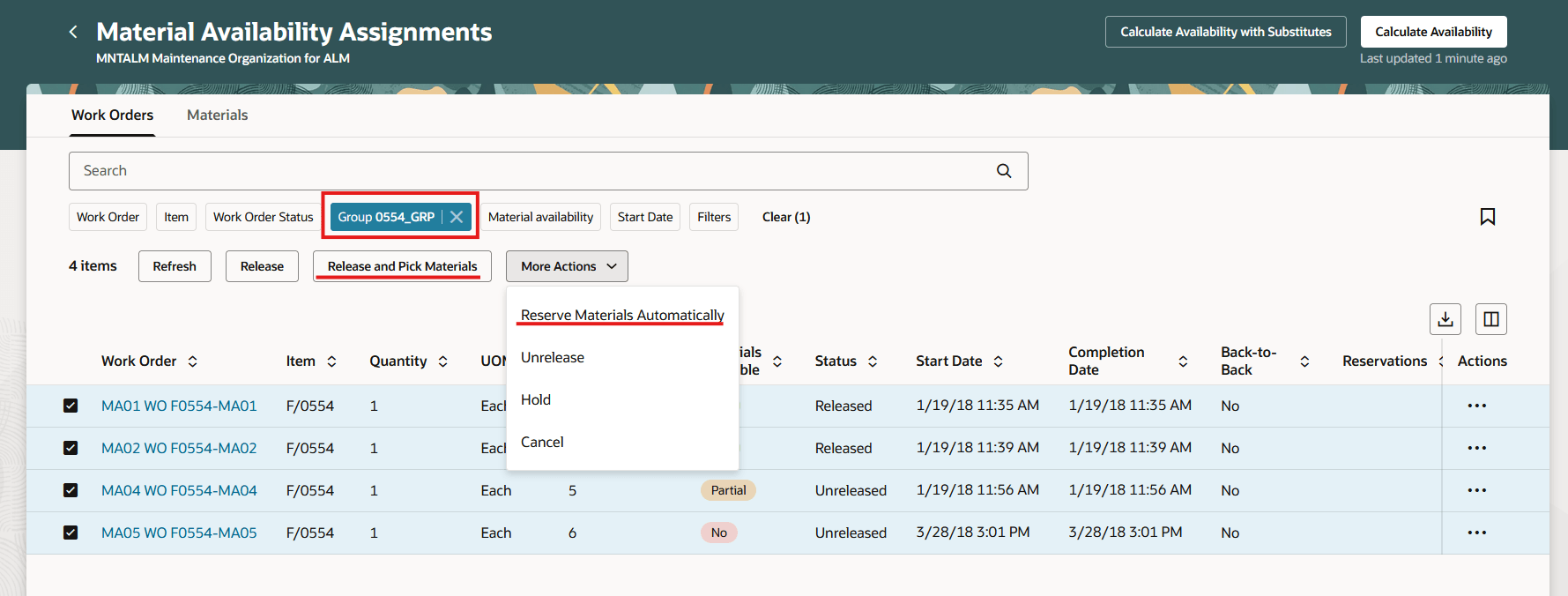
New Action to Reserve Materials Automatically for a Group of Work Orders
By assigning work orders to a group based on the common materials they use, organizations can automate the reservation, release, and picking of materials for the entire group within Material Availability Assignments.
Steps to enable and configure
You don't need to do anything to enable this feature.
Tips and considerations
- Use the new Redwood Material Availability Assignments to access reservation and picking for work order groups. These actions aren't available from the Maintenance Supervision page.
- Manual reservations can only be performed on individual work orders and group reservations must be performed in Material Availability Assignments.
- Ensure all work orders in the selected work order group are available on the Material Availability Assignments page to perform group reservation and pick actions. If any are missing, review your Material Availability Configuration settings.
Key resources
Oracle Fusion Cloud Maintenance 26A What's New: Redwood: Manage Materials Availability and Allocation
Access requirements
Users who are assigned a configured job role that contains this priviledge WIP_MANAGE_WORK_ORDER_HEADERS_PRIV will be able to enable mass actions, such as reserving or picking materials for multiple work orders.