Print Product or LPN Labels from Handheld Devices
In update 26B, Manufacturing introduces the ability to print Product and License Plate Number (LPN) labels directly from mobile manufacturing transactions. Production operators can now print labels while performing manufacturing transactions on mobile devices. The feature uses Oracle Inventory’s printer setup and BI Publisher label templates to deliver a consistent, configurable label output. Label printing is available during operation completion (discrete and process manufacturing), last operation completion with automatic product completion, intermediate operation completion, manual output completion, orderless completion, and flow schedule completion.
The key capabilities are as follows:
- Print Product Labels and LPN Labels directly from mobile manufacturing transactions.
- Select a configured printer at runtime.
- Specify the number of labels to print.
- Use standard BI Publisher label templates along with customization support.
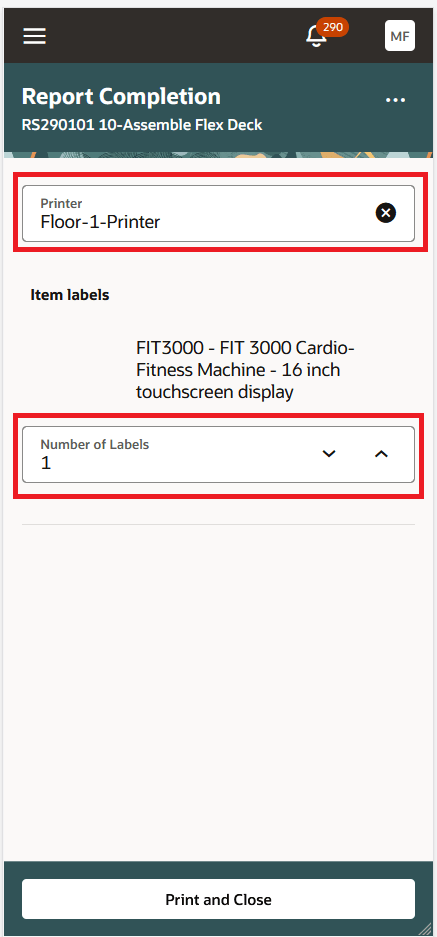
Select a Printer and Print Product Label
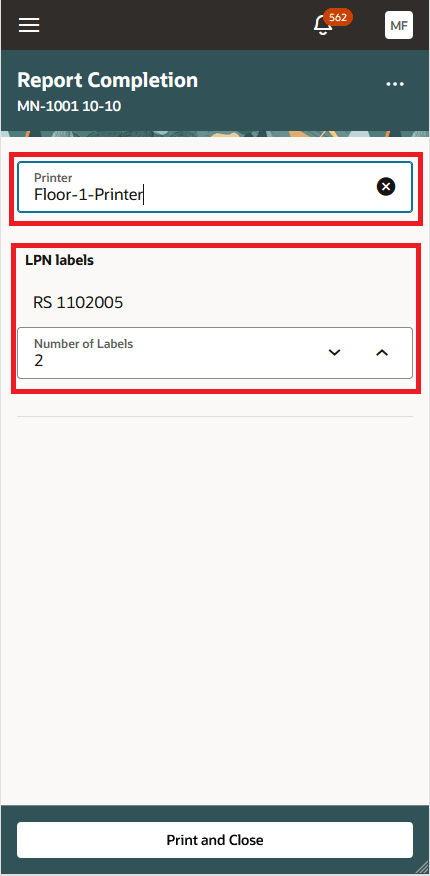
Select a Printer and Print LPN label
This enhancement streamlines shop floor operations by enabling operators to generate labels at the point of completion without navigating to separate desktop flows or external integrations.
Here's the demo of these capabilities:
Steps to enable and configure
- In "Manage Plant Parameters", ensure that the parameter Print product labels using external applications is not selected.
- Define and configure printers for the environment. Then use the 'Label Output Preferences' task for Inventory label printing setup for Product Label.
- Optionally customize the Product and LPN label templates in BI Publisher.
- You can optionally set the default printer.
Tips and considerations
- You cannot reprint a specific product by transaction ID.
- Selective product label reprint using scheduled processes is not included in this release.
Key resources
- Oracle Fusion Cloud SCM: Implementing Manufacturing and Supply Chain Materials Management, available on the Oracle Help Center.
- Oracle Fusion Cloud SCM: REST API for Oracle Fusion Cloud SCM guide, available on the Oracle Help Center.
- Refer to the Tips and Considerations for the 24B Inventory Management feature “Print Item or Location Labels and Define Barcode Configurations for Scanning Labels”.
- Watch the Print Item or Location Labels demo.
- Watch the Define Barcode Configurations for Scanning Labels demo.
Access requirements
Users who are assigned a configured job role that contains this duty role can configure barcode formats:
- Configure Inventory Barcode Formats Using Responsive Inventory Duty (ORA_INV_CONFIGURE_INVENTORY_BARCODE_PWA_DUTY)
This duty role is new in this update.
Users who are assigned a configured job role that contains these privileges can print labels:
- Print Label Requests (INV_PRINT_LABEL_REQUESTS_PRIV)
These privileges are new in this update.