Automatically Generate Purchasing Change Orders for Contract Amendments
Generate change orders automatically in purchasing for contracts that have been amended.
You can now automate the creation of change orders in purchasing from the Redwood contract page when you amend a contract that is associated with a purchasing document. This new Redwood feature reduces manual effort, ensures data consistency, and accelerates procurement processes.
A purchasing change order is automatically created each time a contract amendment is approved when the following conditions are met:
- The Opt In for the feature Automatically Generate Purchasing Change Orders for Contract Amendments is enabled.
- The contract was originally fulfilled using the Redwood Contract page using the Create Purchasing Document action and is associated with a single purchasing document.
- The contract amendment is performed with versioning.
- The changes made in the amendment pertain to attributes that are relevant to purchasing (attributes are listed below).
- The purchasing document is in a status that allows a change order to be created, and there is no pending change order for the document.
Purchasing Relevant Attributes for Outcome Purchase Order
When the outcome of the contract is a purchase order, then the following attributes when modified on the contract amendment trigger the creation of a change order in purchasing:
|
Contract Header Attributes |
Contract Line Attributes |
|---|---|
| Payment Terms | Shipping Location |
| Freight Terms | Quantity |
| FOB | Line Amount |
| Carrier | Unit Price |
| Description |
Purchasing Relevant Attributes for Outcome BPA/CPA
When the outcome of the contract is an agreement, then the following attributes when modified on the contract amendment trigger the creation of a change order in purchasing:
|
Contract Header Attributes Relevant for BPA/CPA |
Contract Line Attributes (Relevant for BPA only) |
|---|---|
| Payment Terms | Description |
| Start Date | Agreement Price Override |
| End Date | Agreed Amount |
| Agreed Amount | Minimum Release Amount |
| Amount Limit | Agreed Quantity |
| End Date | |
| Agreement Unit Price | |
| Price Limit |
After the contract amendment is approved, the Fulfillment section on the Contract Overview page displays the change order details which you can drill down to. When the change order status is Incomplete, the fulfillment status appears as In Progress. Once the change order is approved and applied to the purchasing document, the fulfillment status changes to Success.
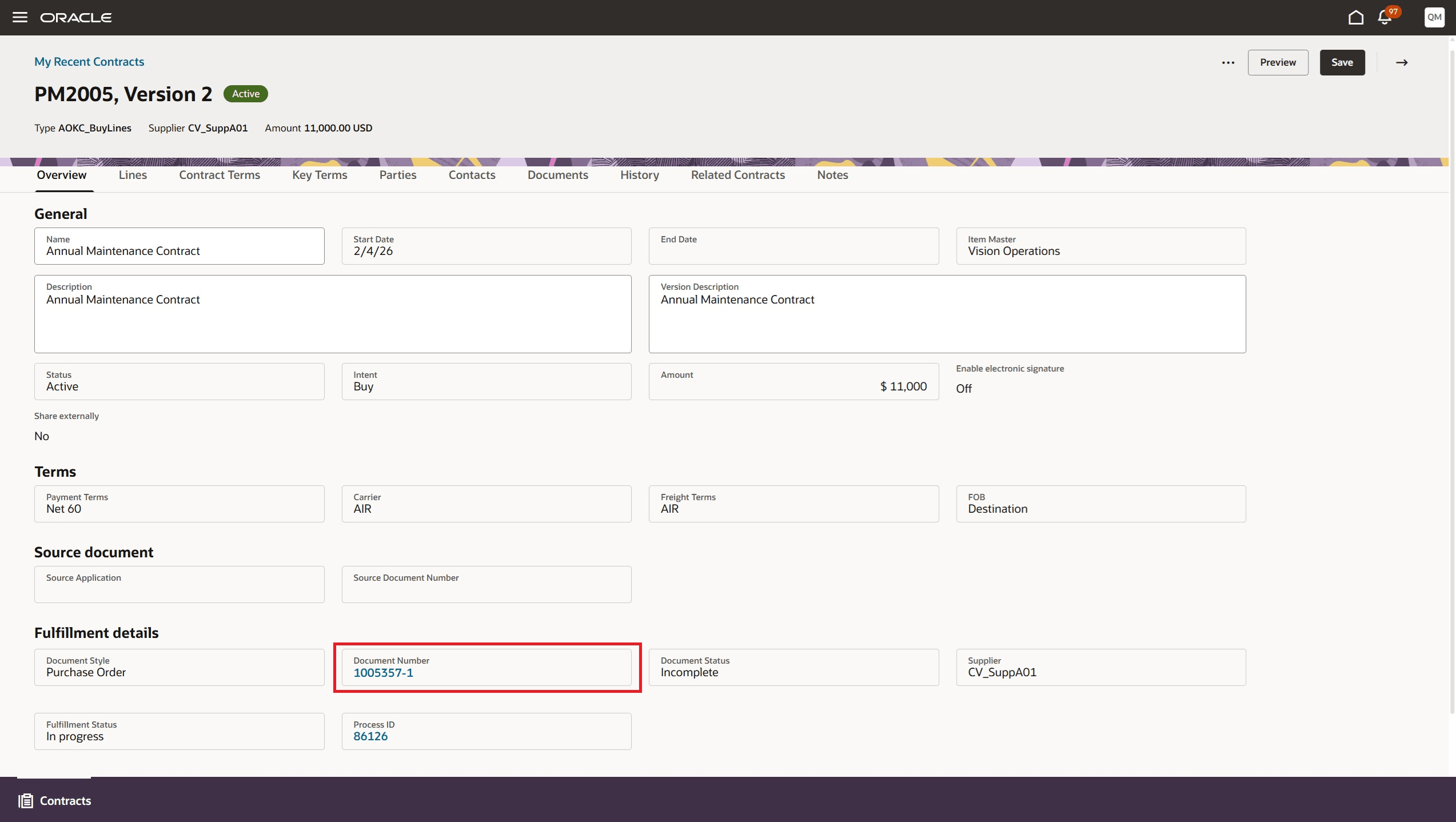
Fulfillment details on Contract Overview Page
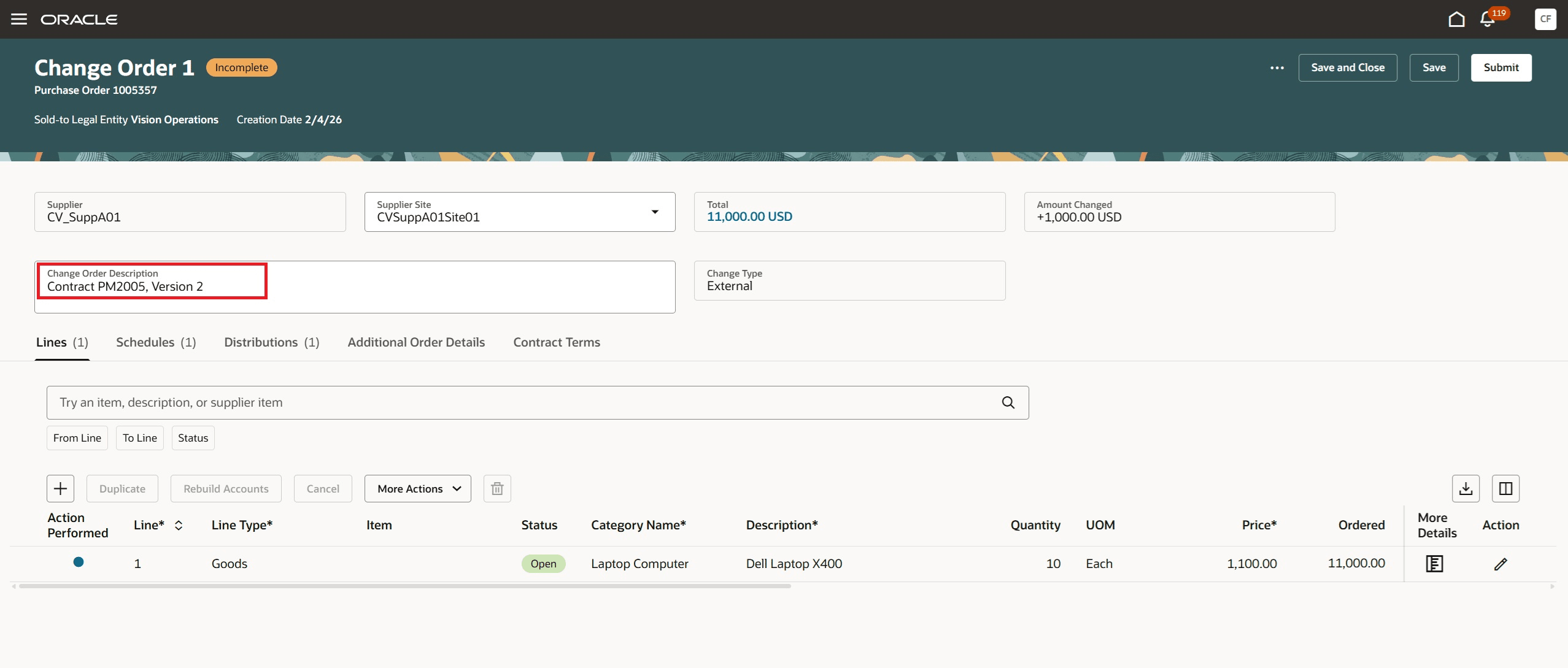
Purchasing Change Order Created From Contract
Notifications
If change order creation fails after approval of the contract amendment, the buyer listed on the purchasing document is notified.
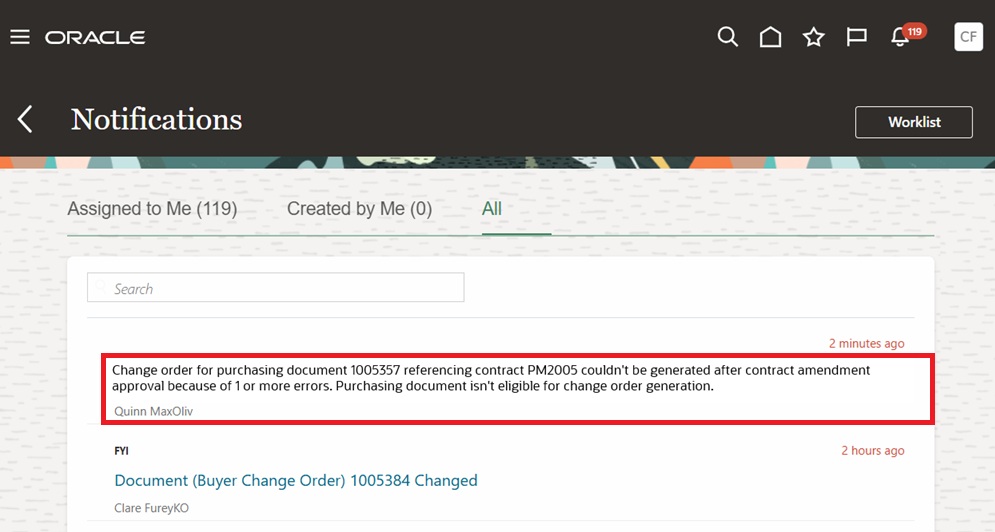
Change Order Creation Failure Notification to Buyer
Steps to enable and configure
Use the Opt In UI to enable this feature. For instructions, refer to the Optional Uptake of New Features section of this document.
Offering: Enterprise Contracts
- Enable the Opt In Automatically Generate Purchasing Change Orders for Contract Amendments within the Procurement Contracts functional area under the Enterprise Contracts offering.
- You must also opt in to the feature Redwood Contract Management within the Procurement Contracts functional area under the Enterprise Contracts offering if not already enabled.
Tips and considerations
- If the contract is associated with a purchasing document then amend the contract with versioning if a change order in purchasing is required.
- If the purchasing document’s status or a pending change order prevents automation, you’ll see warning messages when you validate or submit the contract for approval. Before amending a contract, confirm that the purchasing document is in a status that allows change order creation.
- When you amend the contract, any new line you add will be added to the change order and applied to the existing purchasing document.
- Currently, Contract Redwood supports creating a single purchasing document from a contract and propagates header-level terms—such as Payment Terms, FOB, Freight Terms, and Carrier—to the purchasing document. To keep these terms synchronized between the contract and the purchasing document, maintain them at the contract header level. Change order created through this feature will also propagate the updated terms to the purchasing document.
- If the change order details don’t appear immediately after the contract amendment is approved, wait a short time and then refresh the page.
- If you are not opted into this new feature then buyers need to create change orders manually in purchasing.
Key resources
For details on creating and managing procurement contracts Redwood pages, refer to the Redwood: Create and Manage Procurement Contracts feature, available in Oracle Fusion Cloud Procurement What's New, update 26A.
Access requirements
You don't need any specific privilege to use this feature. If you have opted into this feature, a change order is automatically generated when a contract associated with a purchasing document is successfully amended.