Schedule Considering Manufacturing Production Line Calendars
Create more accurate production schedule for your flow production lines by considering production-line specific calendars. Previously, the organization calendar was considered for all production lines.
The schedule refresh retrieves production line specific availabilities maintained in SCM Execution. The solve action considers the corresponding constraints when calculating the schedule for the production lines.
To support what-if scenarios, you can adjust the production line calendars directly in Production Scheduling using the Edit Resource Availability feature in the Gantt chart. Note that calendar changes are not released back to SCM Execution.
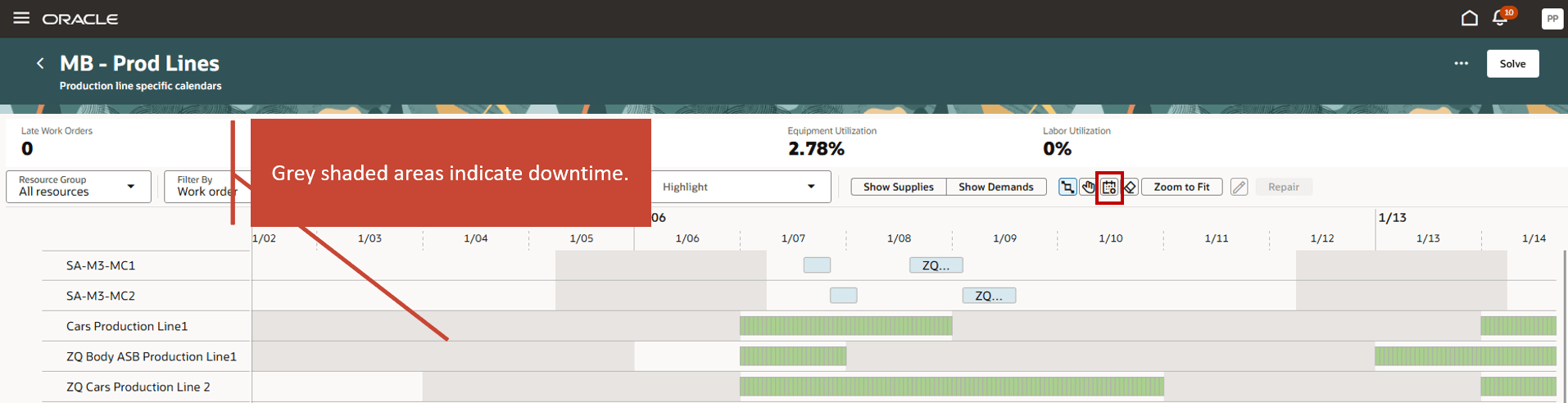
Displaying Production Line Specific Calendars in the Gantt Chart
Steps to enable and configure
Use the Opt In UI to enable this feature. For instructions, refer to the Optional Uptake of New Features section of this document.
Offering: Supply Chain Planning
Tips and considerations
If you want to use the Schedule Considering Manufacturing Production Line Calendars feature, then you must opt in to its parent feature: Production Scheduling. If you’ve already opted in to this parent feature, then you don’t have to opt in again
Key resources
For information about how to setup a production line calendar, see 26A feature Define a Production Line Calendar for Flow Schedule Execution.
Access requirements
Users who are assigned a configured job role that contains this privilege can access this feature:
- Edit Production Schedule (MSC_EDIT_PRODUCTION_SCHEDULE_PRIV)
This privilege was available prior to this update.