AI Agent: Inventory Reservation Assistant - View Proactive Recommendations
Effectively managing order reservations is critical to meeting demand and maintaining high levels of customer satisfaction. To ensure reservations are truly supporting fulfillment goals, organizations must confirm that demand is fully reserved ahead of its scheduled ship date and that any reserved incoming supply is expected to arrive on time. When these conditions aren’t met, reservations may need to be created or adjusted to keep orders on track.
The Inventory Reservation Assistant AI agent now helps streamline this process by identifying demand that's approaching its ship date but isn't fully reserved, highlighting reservations tied to incoming supply that will arrive too late, and proactively recommending adjustments to ensure demand is fulfilled smoothly and on time.
Here are some sample prompts:
- Fetch demand documents with past due dates in Organization Seattle Manufacturing
- Fetch past due unreserved demand lines in Organization Seattle Manufacturing
- Fetch unreserved demand lines in the next 1 week in M1 organization
You can invoke the agent from the Redwood page to search past-due reservations reserved to late supplies and update the reservations, search past-due unreserved demand lines in an organization, or search unreserved demand lines for the next few days in an organization.
This agent also lets your view, update, delete, or transfer reservations.
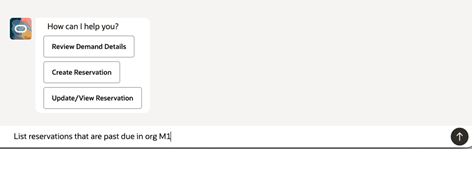
Prompts to Search for Past-Due Reservations
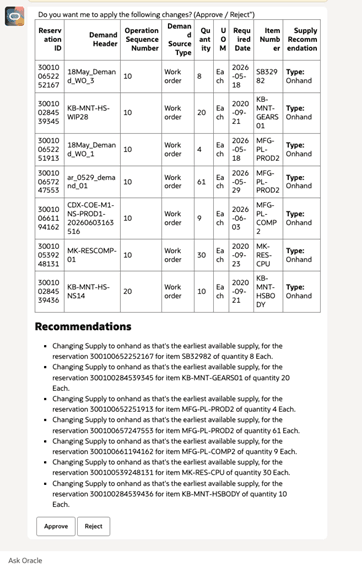
Past-Due Reservation in an Organization
This feature increases operational efficiency by providing proactive recommendations that you can act on directly, helping you take full advantage of AI agents without requiring additional prompts.
Steps to enable and configure
To enable permission groups for roles, take these steps:
- In the Setup and Maintenance work area, search for the Manage Administrator Profile Values task using the search link in the Tasks panel tab.
- Search for the Enable Security Console External Application Integration (ORA_ASE_SAS_INTEGRATION_ENABLED) profile option and set the Site profile level to Yes.
You can use AI Agent Studio to use or copy a preconfigured agent template to create agents for your business processes. To automatically add a suffix to all artifacts in your agent team, you can use the Copy Template instead of Use Template button. When you copy a template, you're directly taken to the agent team canvas where you can edit the agent team settings, agents, tools, and topics. The Use Template option takes you through a step-by-step process for configuring each artifact in the agent team.
Agent Template: Inventory Reservations Assistant AI Agent (workflow)
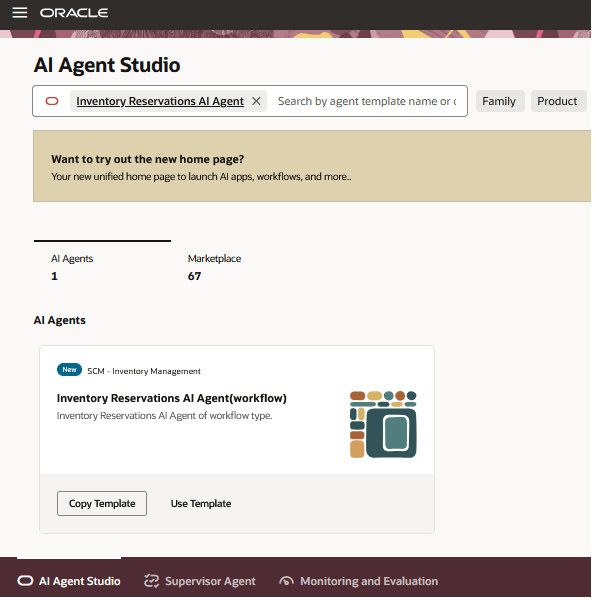
Inventory Reservations Assistant AI Agent (Workflow)
Tips and considerations
- After publishing the agent, you can add it to a page by including it in that page’s Guided Journey. To do this, create an Agent task of type Workflow Agent and add it to the Guided Journey.
- This is a workflow agent, so it doesn't hold a conversation with the user or retain information from previous requests. Each request is processed independently.
Key resources
Access requirements
Users assigned a configured job role that contains the following duty role and SAS role can access this feature:
- Manage Inventory Reservation Using Responsive Inventory (ORA_INV_MANAGE_INVENTORY_RESERVATION_PWA_DUTY)
- View Inventory Reservation Using Responsive Inventory (ORA_INV_VIEW_INVENTORY_RESERVATION_PWA_DUTY)
To access the Oracle AI Agent Studio for Fusion Applications and manage SCM AI agents, users must be assigned a configured job role that contains these duty roles:
- SCM Intelligent Agent Management Duty (ORA_RCS_SCM_AI_AGENT_MANAGEMENT_DUTY)
- SCM Intelligent Agent Management Duty (ORA_RCS_SCM_AI_AGENT_MANAGEMENT_DUTY_HCM)
- Fai Genai Agent SCM Administrator Duty (ORA_DR_FAI_GENERATIVE_AI_AGENT_SCM_ADMINISTRATOR_DUTY)
To interact with AI agents in product pages, users must be assigned a configured job role that contains this duty role:
- Fai Genai Agent Runtime Duty (ORA_DR_FAI_GENERATIVE_AI_AGENT_RUNTIME_DUTY)
In the Security Console, filter by Roles and Permission Groups to find this duty role.
To allow users to interact with agents, you must also enable permission groups in the Security Console on those users' configured job roles that contain the Fai Genai Agent Runtime Duty role. You can enable permission groups when you manage the basic information of your configured job roles.
Users' configured job roles must also contain privileges that allow access to the pages where AI agents are enabled.
See Access Requirements for AI Agent Studio (for administrators) and How can I give users access to AI agents (for end-users) for more information.