AI Agentic App: Warehouse Operations Workspace - Use Improved Stockout and Outbound Recommendations
The Warehouse Operations workspace provides warehouse managers a unified experience for keeping warehouse operations running smoothly and efficiently by bringing together operational insights, AI-driven recommendations, and intelligent assistance in a single place. In this update, the Warehouse Operations workspace now includes analysis and recommendations for slow moving inventory and expired lots. Additionally, it provides proactive recommendations for reallocating reservations to help ensure you fulfill priority orders on time and in full.
In this update, Oracle has enhanced the Warehouse Operations workspace with new AI-driven and autonomous capabilities to help warehouse managers better manage inventory, reduce manual effort, and ensure priority orders are fulfilled on time and in full.
In this release, the Item Quantity Monitor is enhanced with two new AI-powered advisors:
- Slow-Moving Item Advisor
- Expiring Lot Advisor
These tools help you move away from manual monitoring by providing intelligent, actionable insights into your stock health.
Slow-Moving Item Advisor
A new Slow-Moving Item Advisor helps identify items that are not moving quickly, giving you better visibility into slow-moving inventory. The initial dashboard provides a high-level view of the top slow-moving items across the organization. Users can expand the dashboard to view detailed insights for each item, including:
- Supply trends
- Demand trends
- Inventory aging bucket days
- Inventory quantities
The dashboard highlights items that need attention and helps users decide whether to transfer, liquidate, scrap, or adjust stock levels to improve inventory turnover and reduce excess inventory carrying costs.
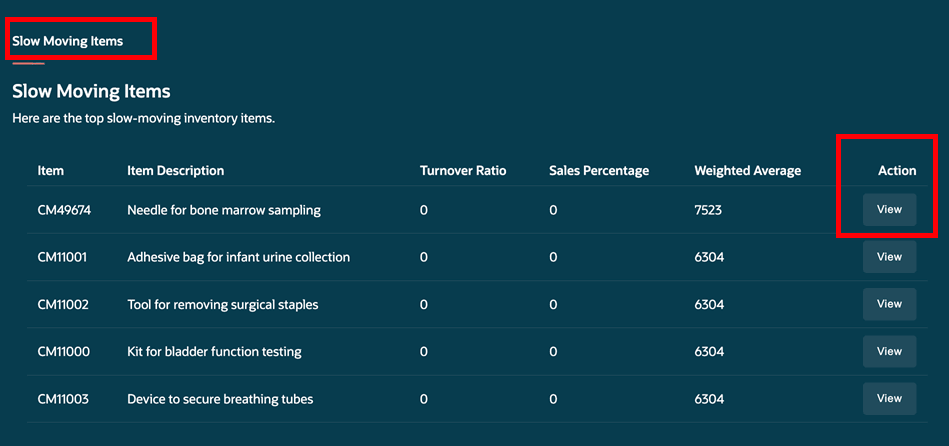
Slow-Moving Items
To refresh and populate the dashboard data, users must run the Populate Inventory Aging Analysis Data scheduled process. Access to this scheduled process job requires the Inventory Aging Analysis (INV_INVENTORY_AGING_ANALYSIS_PRIV) functional privilege. This privilege must be added to the appropriate job role and assigned to users who need access to the Slow-Moving Item Advisor and related inventory aging analysis capabilities.
The advisor also provides intelligent recommendations such as:
- Transferring inventory to other organizations with higher demand
- Scraping obsolete or excess inventory
- Rebalancing inventory based on supply and demand trends
- Providing subinventory and locator details
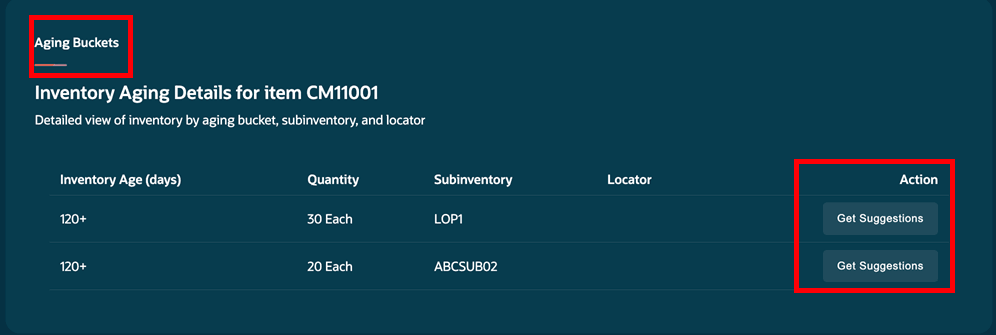
Aging Buckets
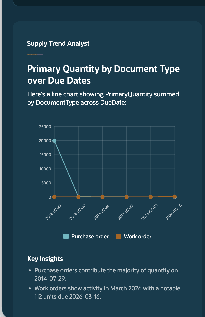
Supply Trend for Slow-Moving Item
Expiring Lot Advisor
A new Expiring Lot Advisor, available under the Item Quantity Monitor, helps warehouse managers proactively identify inventory that's nearing expiration. Users can expand the advisor to view lots that are approaching expiration as well as expired inventory, along with detailed information to support faster decision-making.
The advisor helps users:
- Identify inventory with low or negative days to expiration
- Prioritize consumption of expiring inventory
- Reduce waste and inventory write-offs
- Maintain inventory quality and compliance
For materials nearing expiration, the advisor can intelligently recommend actions based on existing demand conditions:
- If demand exists, users can directly create reservations to ensure expiring inventory is consumed before expiration.
- If no demand exists, inventory availability can be published to other organizations so they can request the material through transfer orders.
For expired inventory, the advisor provides corrective actions such as:
- Moving inventory to a quarantine subinventory
- Creating movement requests for disposition handling
These capabilities help organizations minimize waste while ensuring operational and compliance requirements are met.
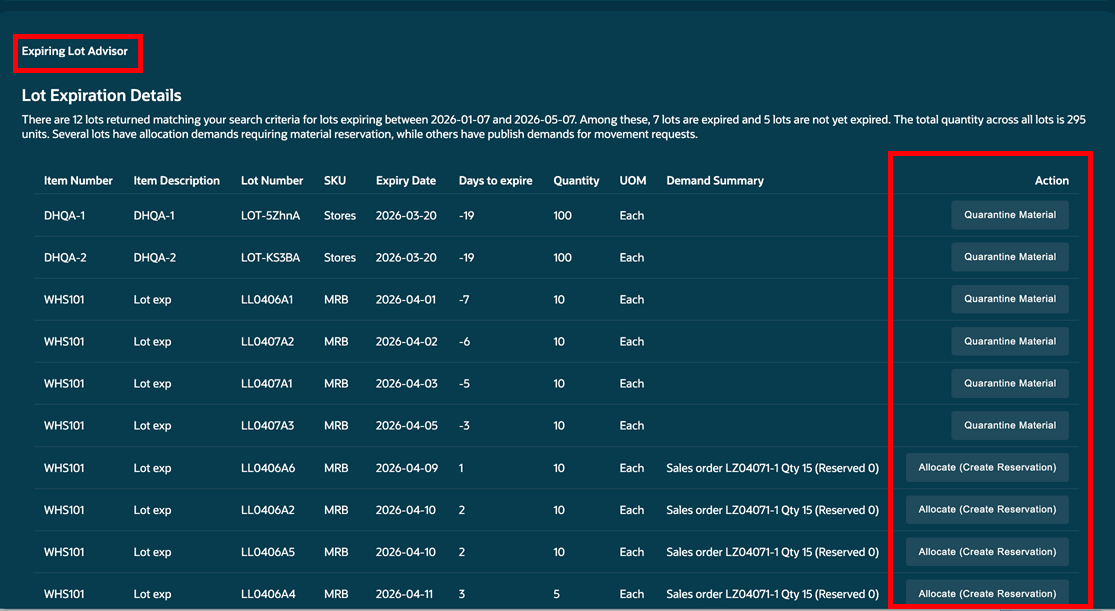
Expiring Lot Advisor
Ask Oracle Enhancements
Ask Oracle now provides a more conversational and intelligent experience, that allows warehouse managers to use simple, natural-language questions to quickly access information and perform actions across warehouse operations. Users can retrieve order, inventory, shipment, and purchase order details without navigating across multiple pages, improving productivity and operational efficiency.
For orders (outbound), users can ask questions such as:
- What is the status of order <Order_Number>?
- Who is the customer for order <Order_Number>?
- Expedite order <Order_Number>
- What items are in order <Order_Number>?
- Is stock available for order<Order_Number>?
For purchase orders (inbound), users can ask questions such as:
- Show me details about purchase order <Order_Number>
- Give me shipments in the next <N> days
- Show shipments by supplier
The supported inbound document types include:
- Purchase Orders
- Transfer Orders
For inventory (on hand), users can ask questions such as:
- Show me recommendations for expiring lots in the next <N> days
- What is the pending demand for item <Item_Number>?
For item details, users can ask questions such as:
- What is the demand for item <Item_Number>?
- What is the supply for item <Item_Number>?
- What is the availability for item <Item_Number>?
For workspace actions, users can ask questions such as:
- Change my organization to <Organization_Name>
Autonomous Decision-Making Capabilities
The application now introduces autonomous capabilities, especially within the Item Quantity Advisor and Outbound Advisor. These agents can proactively analyze data, identify issues such as stock shortages, slow-moving inventory, expiring lots, delayed shipments, or high-priority outbound demand, and recommend or take actions with minimal user intervention. This helps improve efficiency, reduce manual effort, and ensure timely order fulfillment.
For the Outbound Advisor, customers can enable autonomous outbound processing using the Autonomous Processing for Outbound Advisor Enabled profile option (ORA_INV_OUTBOUND_ADVISOR_AUTONOMOUS_ENABLED ). When enabled, the system can autonomously evaluate outbound conditions and execute recommendations such as:
- Automatically pick releasing urgent orders
- Processing high-priority or high-value orders
- Executing scheduled outbound actions
- Processing expedite requests received through email triggers
- Displaying actionable notifications in Priority Actions
Additionally, outbound recommendations can now be processed autonomously from email-based requests.
The Item Quantity Monitor also introduces autonomous replenishment capabilities through configurable schedules and triggers. Users can:
- Create monitoring schedules
- Automatically detect shortages
- Generate replenishment orders without manual intervention
- Manually execute recommendations before scheduled runs when needed
Users can configure schedules by navigating to the AI Agent Studio and clicking Try Now to open the new home page, if required. From the Workflow section, users can search for Item Quantity Monitor, click View, and then select Go to Customization. Under Settings > Triggers, users can scroll to the Schedule section and add a repeating schedule. Once scheduled, the Item Quantity Monitor can run autonomously based on the configured schedule.
Overall, this update helps warehouse managers reduce waste, improve inventory turnover, automate repetitive operational tasks, and ensure priority orders are fulfilled on time and in full.
These additions to the Warehouse Operations workspace give warehouse managers more power and capability to make faster decisions, reduce manual effort, and maintain smooth, reliable warehouse operations.
Steps to enable and configure
Follow these steps to enable the Warehouse Operations workspace agentic app:
- Navigate to the Setup and Maintenance work area.
- Search for and select the Manage Inventory Profile Options task.
- On the Manage Inventory Profile Options page, search for and select the ORA_INV_WAREHOUSE_OPERATIONS_WORKSPACE_ENABLED profile option code.
- In the Profile Values section, set the Site level to Yes. The default value is No.
- Click Save and Close. The changes will take effect the next time users sign in.
To access the Warehouse Operations workspace agentic app:
- Navigate to Supply Chain Execution.
- Under the Quick Actions section, click Show More to view the complete list of available actions.
- In the expanded list, go to the Inventory Balances section, where you can locate the quick action link for the Warehouse Operations Workspace Agentic App. Selecting this link launches the application.
To enable permission groups for roles, take these steps:
- In the Setup and Maintenance work area, search for the Manage Administrator Profile Values task using the search link in the Tasks panel tab.
- Search for the Enable Security Console External Application Integration (ORA_ASE_SAS_INTEGRATION_ENABLED) profile option and set the Site profile level to Yes.
Tips and considerations
- AI recommendations depend on inventory, demand, lot, reservation, and shipment data. Make sure the data in the system is accurate and regularly updated.
- Run the Populate Inventory Aging Analysis Data scheduled process monthly to refresh the Slow-Moving Item Advisor dashboard and analysis.
- Users need the Inventory Aging Analysis (INV_INVENTORY_AGING_ANALYSIS_PRIV) privilege to access the Slow-Moving Item Advisor. This privilege must be added to the required job role and assigned to users.
- Review recommendations before taking actions such as transferring, scrapping, quarantining, reserving, or reallocating inventory.
- Expiring lot recommendations work best when lot expiration dates are properly maintained in the system.
- Review reservation reallocation suggestions carefully to avoid impacting customer orders or warehouse operations.
- The Outbound Processing Assistant works best when warehouse picking and shipment data is updated regularly.
- To use autonomous outbound processing, enable the Autonomous Processing for Outbound Advisor Enabled profile option (ORA_INV_OUTBOUND_ADVISOR_AUTONOMOUS_ENABLED).
- It's recommended to introduce autonomous actions gradually and monitor the results before fully enabling them.
- The Item Quantity Monitor automatic replenishment process works best when monitoring schedules and replenishment rules are configured correctly.
- Ask Oracle works best when users provide complete and accurate order numbers, item numbers, purchase order numbers, or organization names.
- To publish availability information for items near expiration and with no demand to other organizations, you must properly configure interorganization transfers. Verify transfer order configurations before using this feature.
- When the Autonomous Processing profile option is set to No, email-triggered expedite requests won't automatically process. Confirm the profile option is enabled before testing email-based automation.
- Email-triggered autonomous outbound processing requires the order status to be updated to Released to Warehouse. Monitor priority action notifications to confirm successful processing.
- Charts and trend analysis in the Slow-Moving Item Advisor and Expiring Lot Advisor display only when sufficient historical data exists. New implementations may initially see limited insights.
- Schedule triggers for the Item Quantity Monitor should be tested manually before enabling full automation to validate replenishment order creation.
Key resources
Access requirements
Users assigned a configured job role that contains the following duty role and SAS role can access this feature:
- Warehouse Operations Workspace Duty (ORA_INV_WAREHOUSE_OPERATIONS_WORKSPACE_DUTY)
- Warehouse Operations Workspace SAS (ORA_DR_INV_WAREHOUSE_OPERATIONS_WORKSPACE_DUTY)
To interact with AI agents in product pages, users must be assigned a configured job role that contains this duty role:
- Fai Genai Agent Runtime Duty (ORA_DR_FAI_GENERATIVE_AI_AGENT_RUNTIME_DUTY)
For advanced inventory users, the respective duty role and SAS role must also be assigned based on the inventory functionality they need to access.
- Advanced Inventory Management (ORA_DR_INV_ADVANCED_INVENTORY_MANAGEMENT_DUTY)
- Advanced Inventory Management (ORA_INV_ADVANCED_INVENTORY_MANAGEMENT_DUTY)
To access the Slow-Moving Item Advisor and related inventory aging analysis capabilities, users must also be assigned a configured job role that contains the following privilege:
- Inventory Aging Analysis (INV_INVENTORY_AGING_ANALYSIS_PRIV)