Redwood: Manage Configurator Rules in Commercial Change Orders
In update 25D, you were able to use effective dates to control when new or updated configurator rules take effect. Starting in update 26C, rule creation and updates must be managed through a Commercial Change Order (CCO), which governs when the rule logic becomes effective.
Realize these benefits:
- Planned Updates: Schedule, track, and review upcoming configurator rule changes to align with business priorities.
- Prevents Unintended Changes: Protect products by ensuring only authorized and reviewed changes are implemented.
- Centralized Control: Manage all configurator rule modifications through a single, approved change order process.
- Audit Readiness: Maintain a clear record of pending and approved changes to support compliance and simplify audits.
- Enhanced Visibility: Easily monitor and review the status of all rule changes in one place, improving oversight and coordination.
Try it:
-
Create a New Commercialization Change Order
Initiate a commercialization change order from within Product Management. -
Add the Model as an Affected Object
Include the relevant ATO or PTO model as an affected object in a new change order line. -
Set the Effective Date
Specify the effective date for the change order line corresponding to your ATO or PTO model. -
Modify Configurator Rules
Create, update, or delete configurator rules as needed for your model. -
Test and Validate Changes
Test and verify the model’s configurator behavior to ensure intended results. -
Schedule for Production
Schedule the finalized change order for deployment to production.
The following screenshot shows the configurator rules in the context of a change order.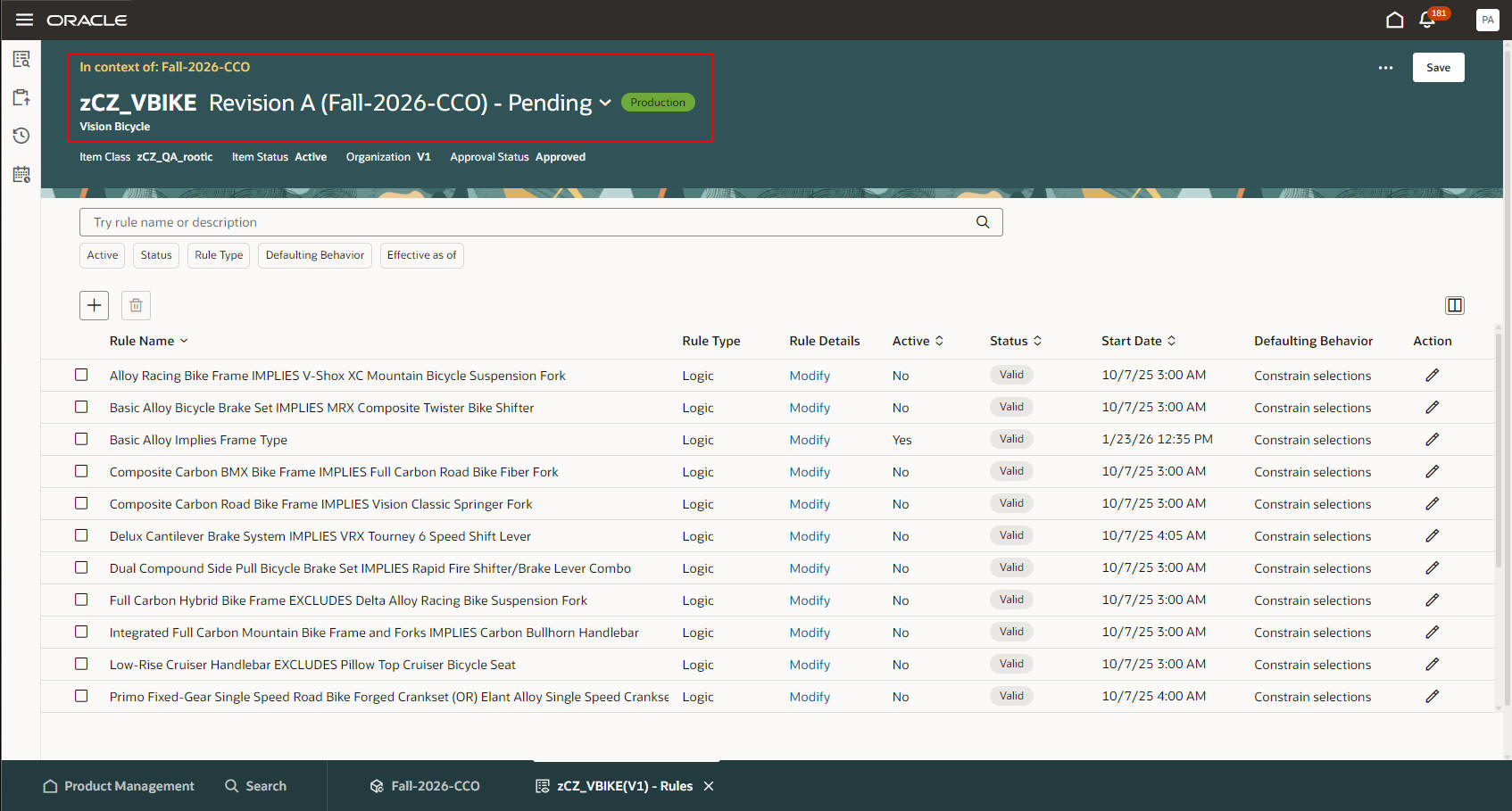
Configurator Rules in Change Order Context
Steps to enable and configure
To use the Redwood: Manage Configurator Rules in Commercial Change Orders feature, opt in to the Redwood: Author Configurator Rules in Product Management feature. If you've already opted in to this feature, no further action is required.
You must also complete the steps to enable the Redwood: Create and Edit Items and Redwood: Create and Edit Workflows features.
Tips and considerations
Reference Organization Models: You can't specify configurator rules in a Commercial Change Order for models associated with reference organizations.
Key resources
- Refer to the Change Orders chapter in the Oracle Fusion Cloud SCM: Using Product Master Data Management guide, available on the Oracle Help Center.
- Refer to the Change Orders chapter in the Oracle Fusion Cloud SCM: Implementing Product Management guide, available on the Oracle Help Center.
Access requirements
Users who are assigned a job role that contains these duty roles and privileges can access this feature:
- Configurator privileges or duty roles:
- Configurator privileges:
- Manage Configurator Rules (CZ_MANAGE_RULES_PRIV)
- Test Configurator Model (CZ_TEST_MODEL_PRIV)
- Access Configurator Runtime (CZ_CONFIGURATOR_RUNTIME_ACCESS_PRIV)
- Access HCM Common Components (HRC_ACCESS_HCM_COMMON_COMPONENTS_PRIV)
- Manage HCM Rules (HRC_MANAGE_HCM_RULES_PRIV)
- Configurator duties:
- Redwood Configurator Manager (ORA_CZ_REDWOOD_MANAGER_DUTY)
- Redwood Configurator Manager (ORA_REDWOOD_MANAGER_DUTY_HCM) – For access to the Rule Builder details
- Redwood Configurator Reviewing (ORA_CZ_REDWOOD_REVIEWING_DUTY) – Optional for read-only access to the Configurator Rule details
- Redwood Configurator Reviewing (ORA_CZ_REDWOOD_REVIEWING_DUTY_HCM) – Optional for read-only access to the Rule Builder detail
- Configurator privileges:
- Duties and privileges for Product Management:
- View Item Redwood Items (EGP_VIEW_REDWOOD_ITEM_PRIV)
- View Item Redwood Attachments (EGP_VIEW_REDWOOD_ITEM_ATTACHMENT_PRIV)
- View Item Redwood Associations (EGP_VIEW_REDWOOD_ITEM_ASSOCIATION_PRIV)
- View Item Redwood Structures (EGP_VIEW_REDWOOD_ITEM_STRUCTURE_PRIV)
- View Item Redwood Changes (EGP_VIEW_REDWOOD_ITEM_CHANGE_PRIV)
- View Item Redwood Item Categories (EGP_VIEW_REDWOOD_ITEM_CATEGORIES_PRIV)
- View Item Redwood Relationships (EGP_VIEW_REDWOOD_ITEM_RELATIONSHIP_PRIV)
- View Item Redwood Quality (EGP_VIEW_REDWOOD_ITEM_QUALITY_PRIV)
- Supply Chain Common View Web Service (ORA_RCS_SCM_COMMON_VIEW_WEB_SERVICE_DUTY)
- Enter Trading Community Organization Information (HZ_ENTER_TRADING_COMMUNITY_ORGANIZATION_INFORMATION_PRIV)
- Get Failure Condition Event Codes (MNT_GET_FAILURE_CONDITION_EVENT_CODE_BY_SERVICE_PRIV)
- Get Item Attribute Control REST (EGP_ITEM_ATTRIBUTE_CONTROL_READ_PRIV)
- Get Item Lifecycle Phases Read Rest (EGP_ITEM_LIFECYCLE_PHASES_READ_REST_PRIV)
- Get Item Status REST (EGP_ITEM_STATUSES_READ_PRIV)
- Get New Item Request Rest (EGI_NEW_ITEM_REQUEST_REST_PRIV)
- Get Template REST (EGP_TEMPLATE_READ_PRIV)
- Manage Material Planner (MSP_MANAGE_MATERIAL_PLANNER_PRIV)
- Manage Subscription Setup (OSS_MANAGE_SUBSCRIPTION_SETUP_PRIV)
- Remove Trading Community Organization (HZ_REMOVE_TRADING_COMMUNITY_ORGANIZATION_PRIV)
- Set Up Receivables Payment Terms (AR_SET_UP_RECEIVABLES_PAYMENT_TERM_PRIV)
- Update Trading Community Organization (HZ_UPDATE_TRADING_COMMUNITY_ORGANIZATION_PRIV)
- Verify Tax Configuration (ZX_VERIFY_TAX_CONFIGURATION_PRIV)
- View Procurement Buyers List of Values using REST Service (PO_VIEW_BUYER_LOV_REST_SERVICE_PRIV)
- View Purchasing Hazard Classes List of Values using REST Service (PO_VIEW_HAZARD_CLASSES_LOV_REST_SERVICE_PRIV)
- View Purchasing UN Numbers List of Values using REST Service (PO_VIEW_UNNUMBER_LOV_REST_SERVICE_PRIV)
- View Trading Community Organization (HZ_VIEW_TRADING_COMMUNITY_ORGANIZATION_PRIV)
- View Trading Community Person (HZ_VIEW_TRADING_COMMUNITY_PERSON_PRIV)
- Manage Item Redwood Items (EGP_MANAGE_REDWOOD_ITEM_PRIV)
- Manage Item Redwood Attachments (EGP_MANAGE_REDWOOD_ITEM_ATTACHMENT_PRIV)
- Manage Item Redwood Associations (EGP_MANAGE_REDWOOD_ITEM_ASSOCIATION_PRIV)
- Manage Item Redwood Item Categories (EGP_MANAGE_REDWOOD_ITEM_CATEGORY_PRIV)
- Manage Item Redwood Relationships (EGP_MANAGE_REDWOOD_ITEM_RELATIONSHIP_PRIV)
- Manage Item Redwood Structures (EGP_MANAGE_REDWOOD_ITEM_STRUCTURE_PRIV)
- Get New Item Request Rest (EGI_NEW_ITEM_REQUEST_REST_PRIV)
- Manage Item Status REST (EGP_ITEM_STATUSES_PRIV)
These privileges were available prior to this update.