AI Agent: Research Suppliers Using Products and Services Categories
Use natural language to research suppliers. The results now include suppliers matched with products and services categories in their supplier profile. In update 26B, you can research suppliers based on transaction history and other supplier information. Here are the enhancements in the 26C update:
- Search for suppliers based on their products and services categories in profile.
- Search results now include Confidence Rating, and matched category name for suggestions based on products and services.
Products and services in supplier profile and Business relationship
You can now research suppliers based on the products and services categories maintained in the supplier profile. You can also look for suppliers in a specific business relationship in your request, such as Spend Authorized or Prospective. The AI interprets the relationship and uses it to focus the supplier list. For example, you can enter inventory management suppliers that are authorised for spends to find suppliers that match a relevant products and services category such as Smart Inventory systems and returns suppliers with the matching business relationship of spend authorized.
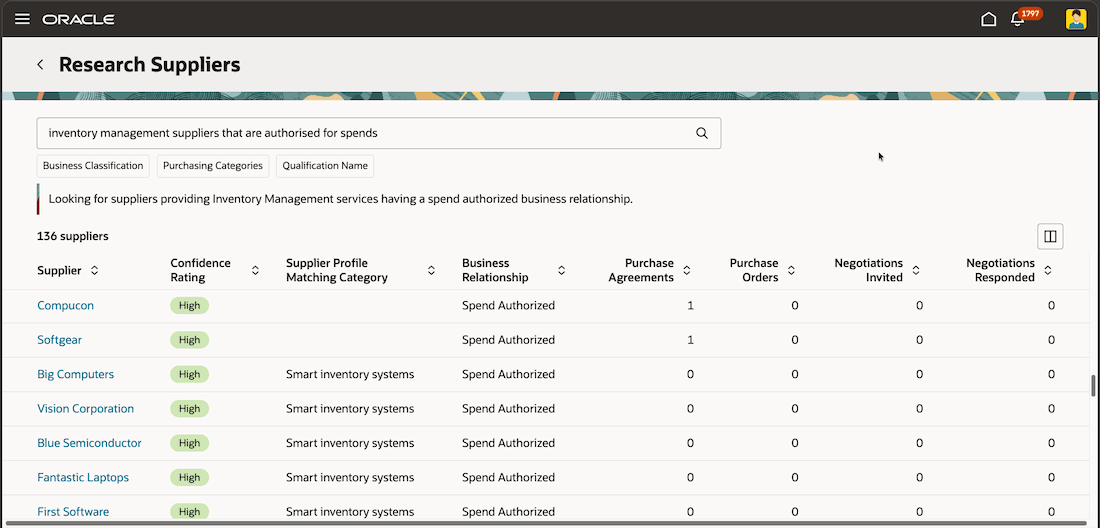
Searching for Suppliers Based on Products and Services Categories and Specific Business Relationship
Enhanced search using filters and Additional information in search results
You can use business classification, purchasing category, qualification name, or qualification outcome filters as primary criteria to find relevant suppliers. This is typically helpful when you don't remember the exact values of certain criteria like the qualification name. You can remove applied filters, add more filters, or clear the filters to adjust the supplier list as needed. The filters can be used together with the natural language based search too.
Search results now include additional information that help you evaluate suppliers directly from the results page. Depending on the result type and available data, you can review:
- Confidence rating for products and services category matches
- Supplier profile matching category
- Business relationship
- Sourcing eligibility
- Sourcing-only status
- Purchase order hold information
- Approved supplier list status summary
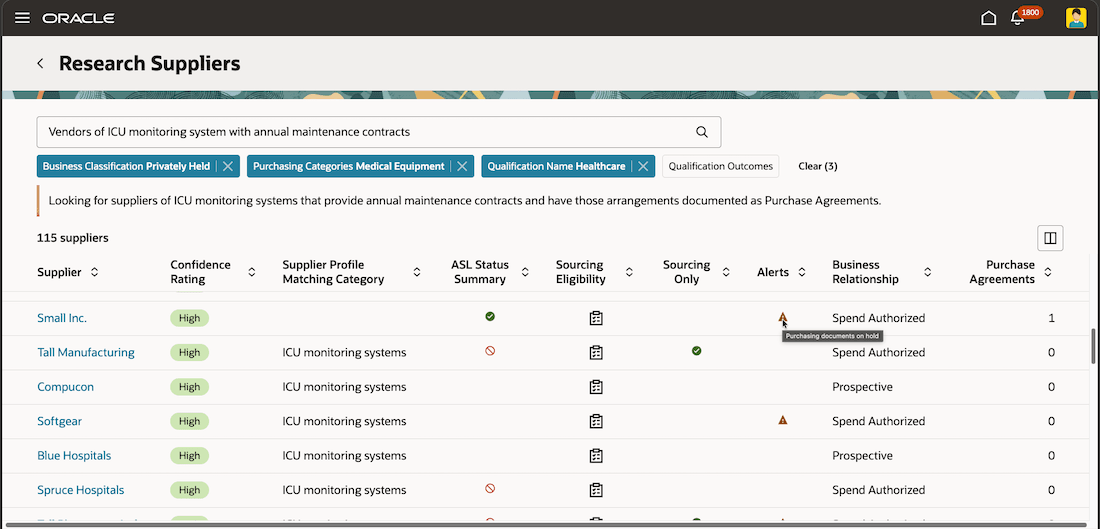
Using Filters and Viewing More Supplier Information in Search Results
More results per query
With this enhancement, you can see an increased number of supplier results for your queries. You can also extend your application to modify the size of the result set.
These enhancements help category managers make better decisions. They can use supplier profile products and services categories, business relationship, procurement BU, and qualification criteria to find suppliers that more closely fit the sourcing need.
The additional result columns make the supplier list easier to evaluate. Users can see why a supplier was returned, how strongly the supplier matched a products and services category, whether the supplier is eligible for sourcing, and whether operational constraints such as purchase order holds or sourcing-only status may affect next steps.
Filter chips make AI interpreted criteria transparent and adjustable. Users can quickly fine-tune a result set by removing or adding criteria, which helps them reach a more relevant supplier shortlist.
Steps to enable and configure
Use the Opt In UI to enable this feature. For instructions, refer to the Optional Uptake of New Features section of this document.
Offering: Procurement
For information on enabling this feature, see AI Agent: Research Suppliers with AI
You no longer need to enable the Redwood: Add Suppliers Suggested by Oracle AI feature to run the Prepare Smart Supplier Suggestions scheduled process.
Tips and considerations
- You can use filters only, natural language only, or a combination of both to find suppliers. The order of input doesn't matter.
- Search using Qualification name and outcome is only supported using filters.
- Use the Maximum Supplier Result Count constant under Page Properties in Visual Builder Studio to modify the maximum number of results. The value of this parameter applies a limit to suggestions based on transactions and products and services independently.
- The values of ASL Summary, Sourcing only, Sourcing Eligibility and PO on hold statuses depend on the procurement BU context provided with the natural language input. The transactions counts based on specific procurement BU will be supported in a future release.
Key resources
- For information about using Oracle Visual Builder Studio to extend your Redwood application pages, see Oracle Fusion Cloud HCM and SCM: Extending Redwood Applications for HCM and SCM Using Visual Builder Studio.
- For information on enabling and using add suppliers suggested by the Oracle AI feature, see Redwood: Add Suppliers Suggested by Oracle AI.
- For information on enabling the Redwood experience for searching for suppliers, see Search Suppliers with a New User Experience.
- For information on enabling AI Agent Studio for Administrators, see Access Requirements for AI Agent Studio.
Access requirements
Users who are assigned a configured job role that contains this existing privilege can access this feature:
- Research Suppliers (PON_ANALYZE_NEGOTIATION_SUPPLIER_PRIV)
Users who are assigned a configured job role that contains this new duty role can use this AI enabled feature:
- Research Suppliers Workflow Duty (ORA_DR_PON_RESEARCH_SUPPLIERS_WORKFLOW_DUTY)
In the Security Console, filter by Roles and Permission Groups to find this duty role.