Cost Accounting Close Workspace: Analyze gross margin using Oracle Fusion Claw
Understand why gross margin changed and where to investigate next. The Gross Margin outcome explains period-to-period movement, highlights the items and customers driving the change, and helps you investigate unusual sales orders. You can start the analysis using any of these options:
- In the Cost Accounting Close Workspace, select Analyze Gross Margin Change on the Gross Margins card.
- From Fusion Claw Outcomes, select Top Drivers for Gross Margin Change or ask why gross margin changed between two periods.
Review the cost organization, cost book, and comparison periods in the proposed investigation. Edit the scope if needed, then select Start.
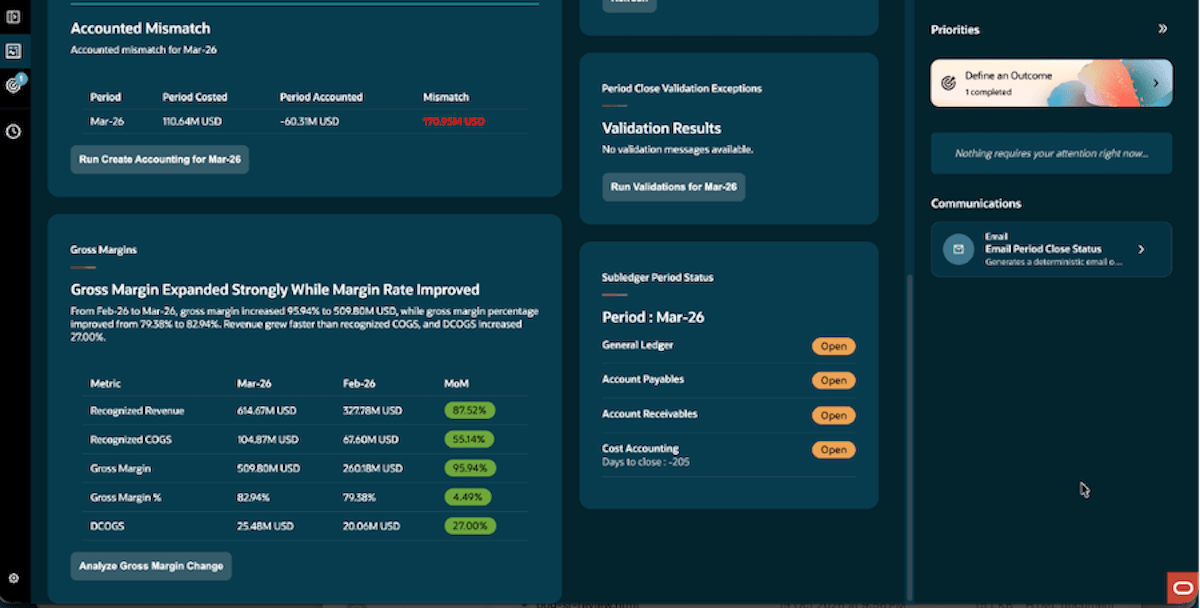
Analyze gross margin change from the Cost Accounting Close Workspace
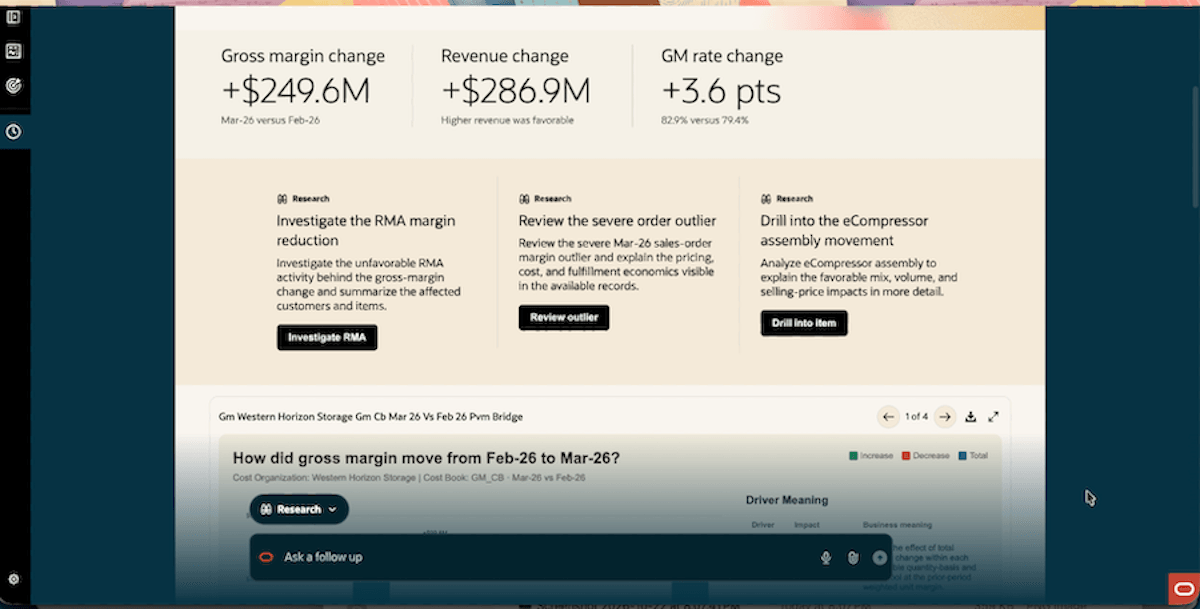
Review summary of the changes in the Gross Margin
Explain the change in gross margin
Review a summary of the gross margin change, revenue movement, and change in margin rate. The Price Volume Mix (PVM) bridge shows how volume, product mix, selling price, unit cost, and return activity contributed to the movement between the selected periods.
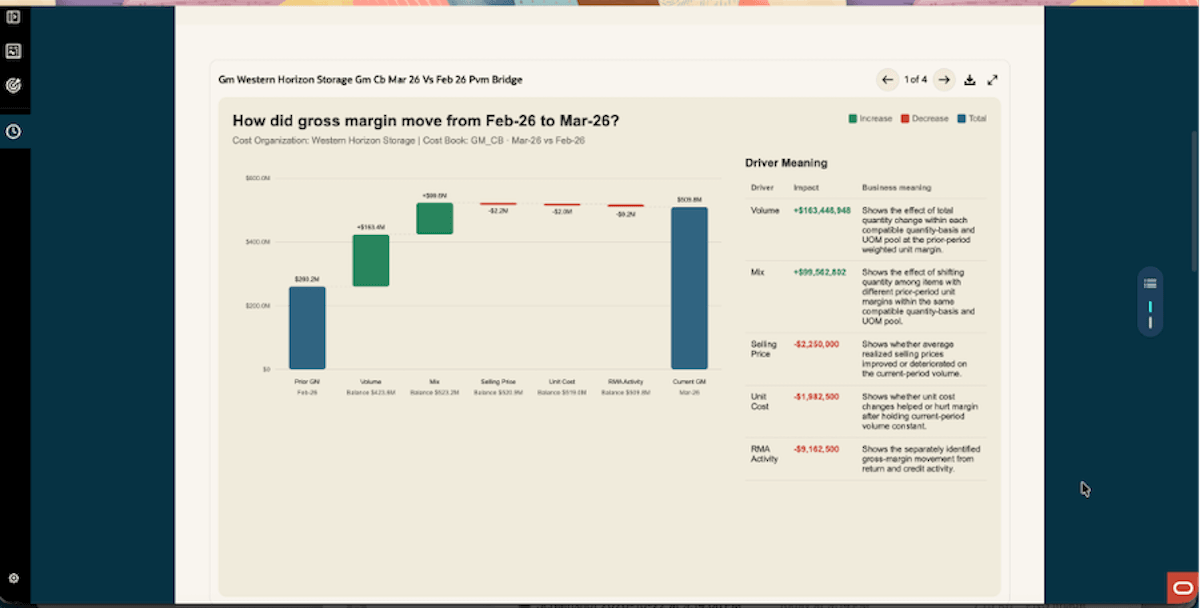
Gross margin bridge with the financial impact and meaning of each driver
Find the items and customers behind the change
Use item and customer contribution views and the customer-item heatmap to see where favorable and unfavorable movements are concentrated. These views help you identify the combinations that explain the overall result and focus further investigation.
For example, an increase in gross margin may come from higher volume and a shift toward higher-margin items, while lower selling prices or higher unit costs offset part of the gain.
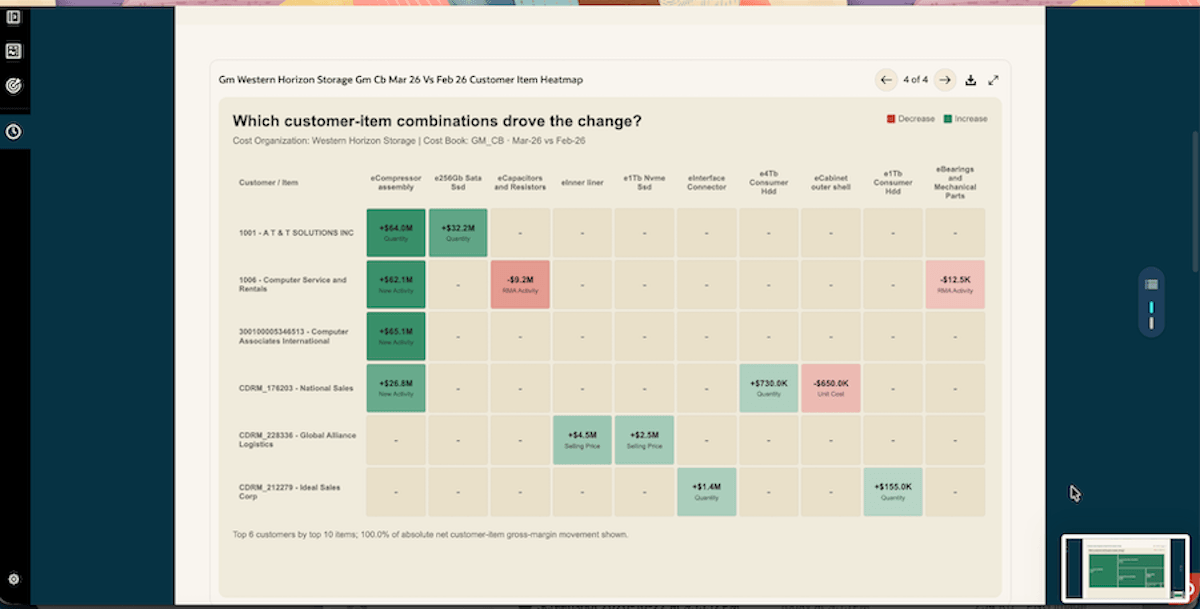
Items and customers behind the gross margin change
Investigate outliers and ask follow-up questions
Use the suggested investigations or ask a follow-up question to review return activity, examine an item, or investigate a sales order with an unusual margin. Compare the order with peers to understand differences in selling price, unit cost, and margin, supported by the available order and fulfillment details.
Example questions you can ask:
- Which items and customers contributed most to the gross margin change?
- Why is this sales order’s margin below its peers?
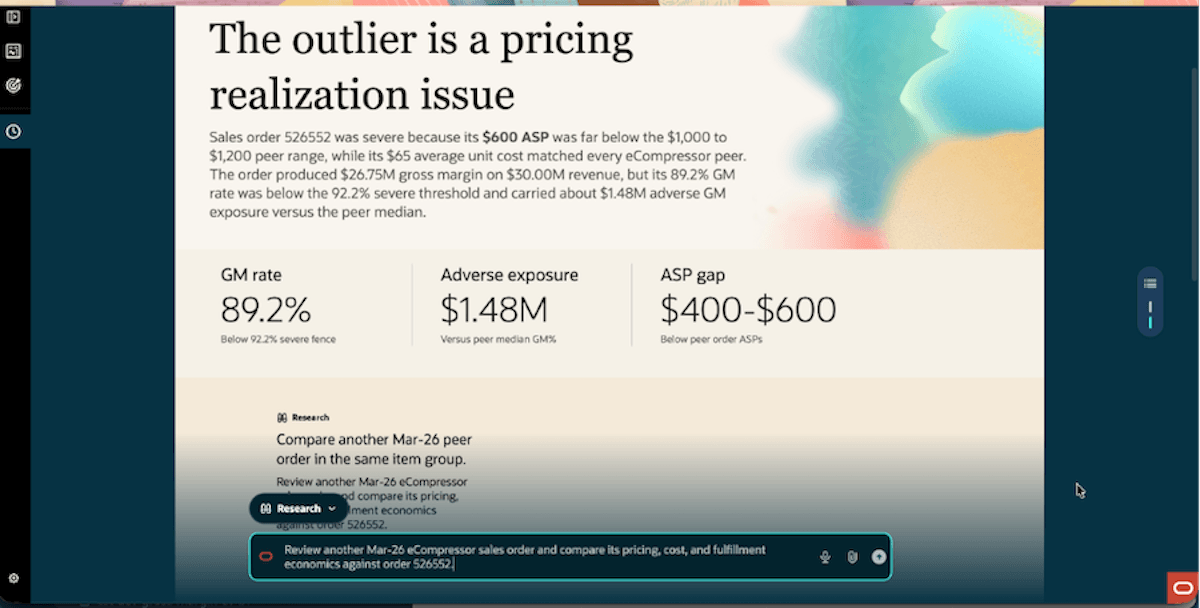
Sales order outlier explanation with a suggested peer comparison
Some of the benefits of this feature include:
- Reduces the effort needed to explain gross margin movement for period close and business reviews.
- Connects the overall margin change to item, customer, and sales order evidence.
- Helps focus investigation on material drivers and unusual margin behavior.
Steps to enable and configure
To use this feature, you must enable this profile option:
- Navigate to the Setup and Maintenance work area.
- Search for and select the Manage Cost Accounting Profile Options task.
- On the Manage Cost Accounting Profile Options page, search for and select the ORA_CST_PERIOD_CLOSE_AGENTIC_APP_ENABLED profile option code.
- In the Profile Values section, set the Site level to Yes. The default value is No.
- Click Save and Close.
The changes will take effect the next time you sign in.
Tips and considerations
- Confirm the cost organization, cost book, periods, and currency before interpreting the results.
- Review the supporting evidence and data limitations before deciding on corrective action.
- The analysis supports third-party gross margin; intercompany COGS and DCOGS aging analysis are outside this scope.
Key resources
Access requirements
Users need all of the following duty roles to access the Oracle AI Agent Studio for Fusion Applications and manage SCM AI agents. Duty roles marked as new were introduced in this update.
| Duty Role Status | Duty Role Name and Code |
|---|---|
| Previously delivered |
SCM Intelligent Agent Management Duty ORA_RCS_SCM_AI_AGENT_MANAGEMENT_DUTY |
| Previously delivered |
SCM Intelligent Agent Management Duty ORA_RCS_SCM_AI_AGENT_MANAGEMENT_DUTY_HCM |
| Previously delivered |
Fai Genai Agent SCM Administrator Duty ORA_DR_FAI_GENERATIVE_AI_AGENT_SCM_ADMINISTRATOR_DUTY |
| Previously delivered |
Costing Period Close Workspace Duty ORA_CST_COST_ACCOUNTING_CLOSE_WORKSPACE_DUTY |
| Previously delivered |
Gross Margin Explorer Duty ORA_CST_GROSS_MARGIN_EXPLORER_DUTY |
Users need the following duty roles to interact with AI agents in product pages.
| Duty role status | Duty role name and code |
|---|---|
| Previously delivered |
Fai Genai Agent Runtime Duty ORA_DR_FAI_GENERATIVE_AI_AGENT_RUNTIME_DUTY |
In the Security Console, filter by Roles and Permission Groups to find this duty role.
To allow users to interact with agents, you must also enable permission groups in the Security Console on those users' custom job roles that contain the Fai Genai Agent Runtime Duty role. You can enable permission groups when you manage the basic information of your custom job roles.
Users' custom job roles must also contain privileges that allow access to the pages where AI agents are enabled.
See Access Requirements for AI Agent Studio (for administrators) and How can I give users access to AI agents (for end-users) for more information.