Create dispensing instructions and enforce operator compliance
Manufacturers need dispensing operators to follow the correct instructions and standard operating procedures. The operators must acknowledge compliance before measuring and dispensing materials for batch execution. With this update, you can now create and manage dispensing instructions. Based on the dispense rules, the right set of instructions is presented to the operators during dispense operations.
Key Capabilities
- Create instruction steps for dispensing activities in Material Dispensing.
- Associate instructions with dispense rules so that the instructions are shown based on the context during dispensing.
- Leverage supported instruction artifacts such as documents, external URLs, and videos.
- Require operators to acknowledge the mandatory instructions before proceeding to add the measurements.
- Use optional comments on instruction tasks and verify dispensing instructions using Electronic Records and Electronic Signatures approval step after task completion.
You can create new instructions with multiple tasks from the Dispensing Instructions page.
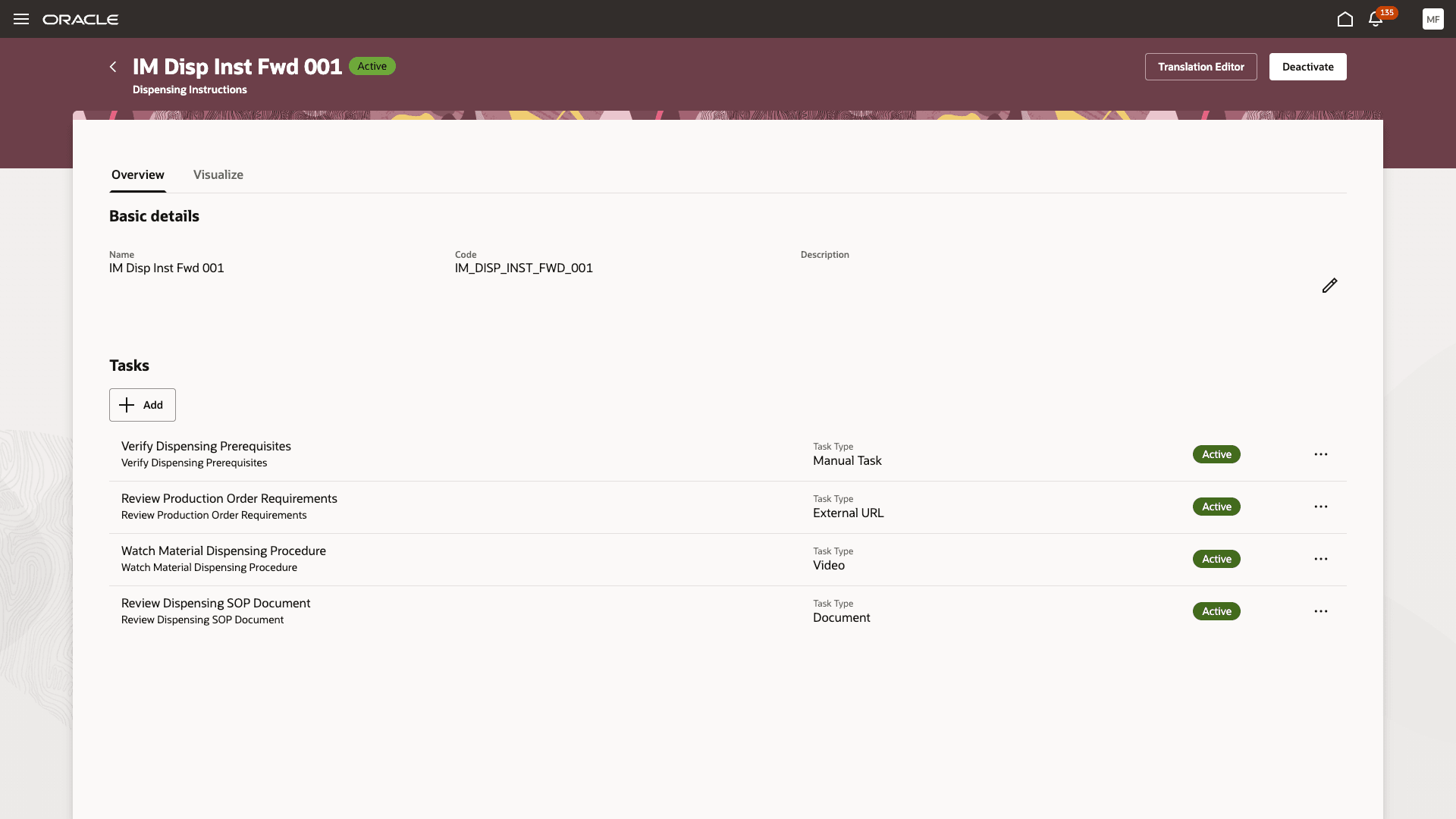
Create dispense instructions
You can configure various types of instruction tasks, mark one or more tasks as mandatory, set up a task sequence, and decide if you want the operators to be able to attach documents and comments at the time of dispensing.
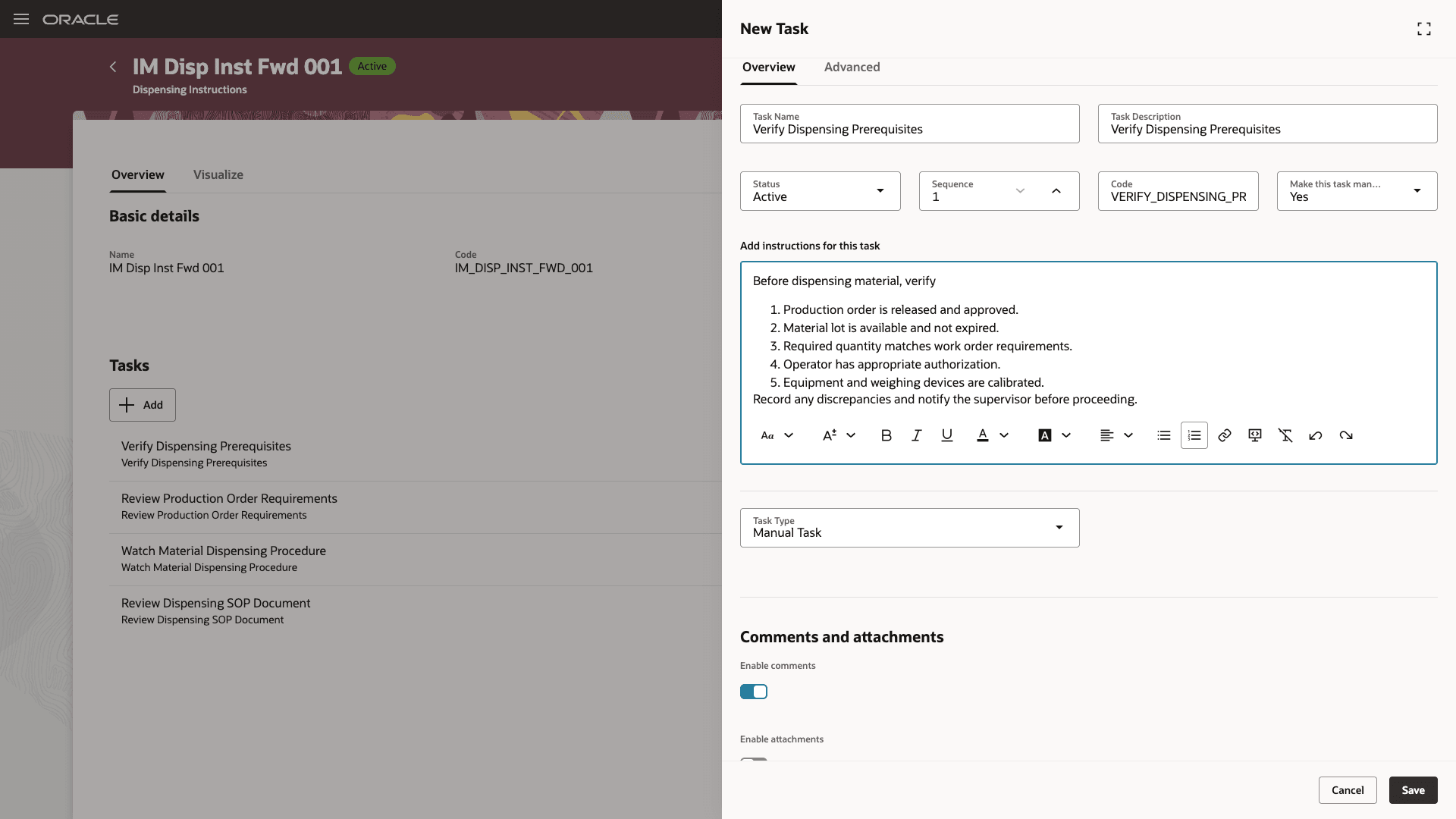
Instruction tasks setup
To determine the items and dispense areas that require the instructions, associate the dispense instructions and reversal instructions with the appropriate dispense rules.
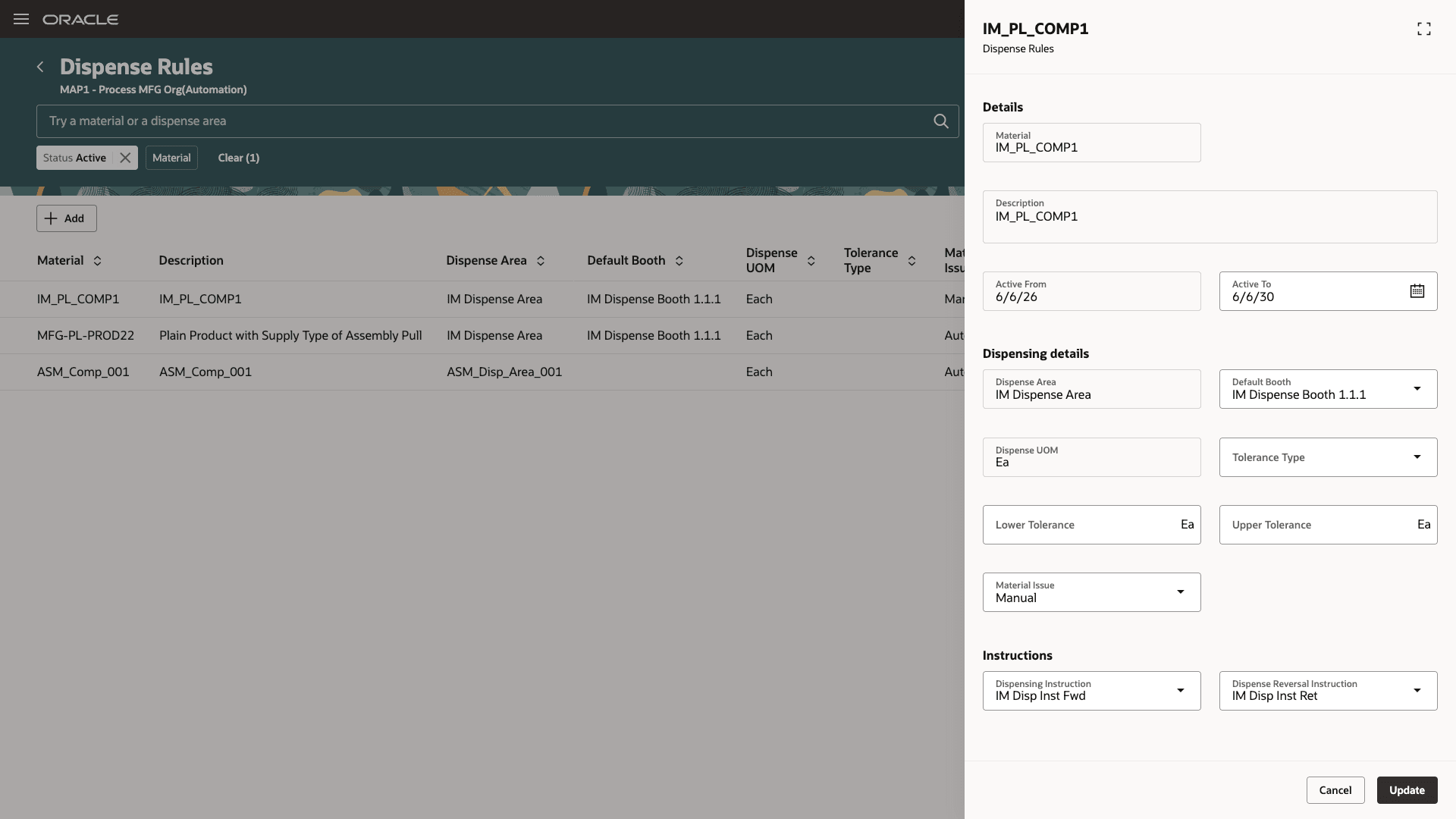
Dispense rule with instructions linked for dispense and reversal
If there are instructions attached to an item that needs dispensing, the dispense action can't be initiated until the operator reviews all the instructions.
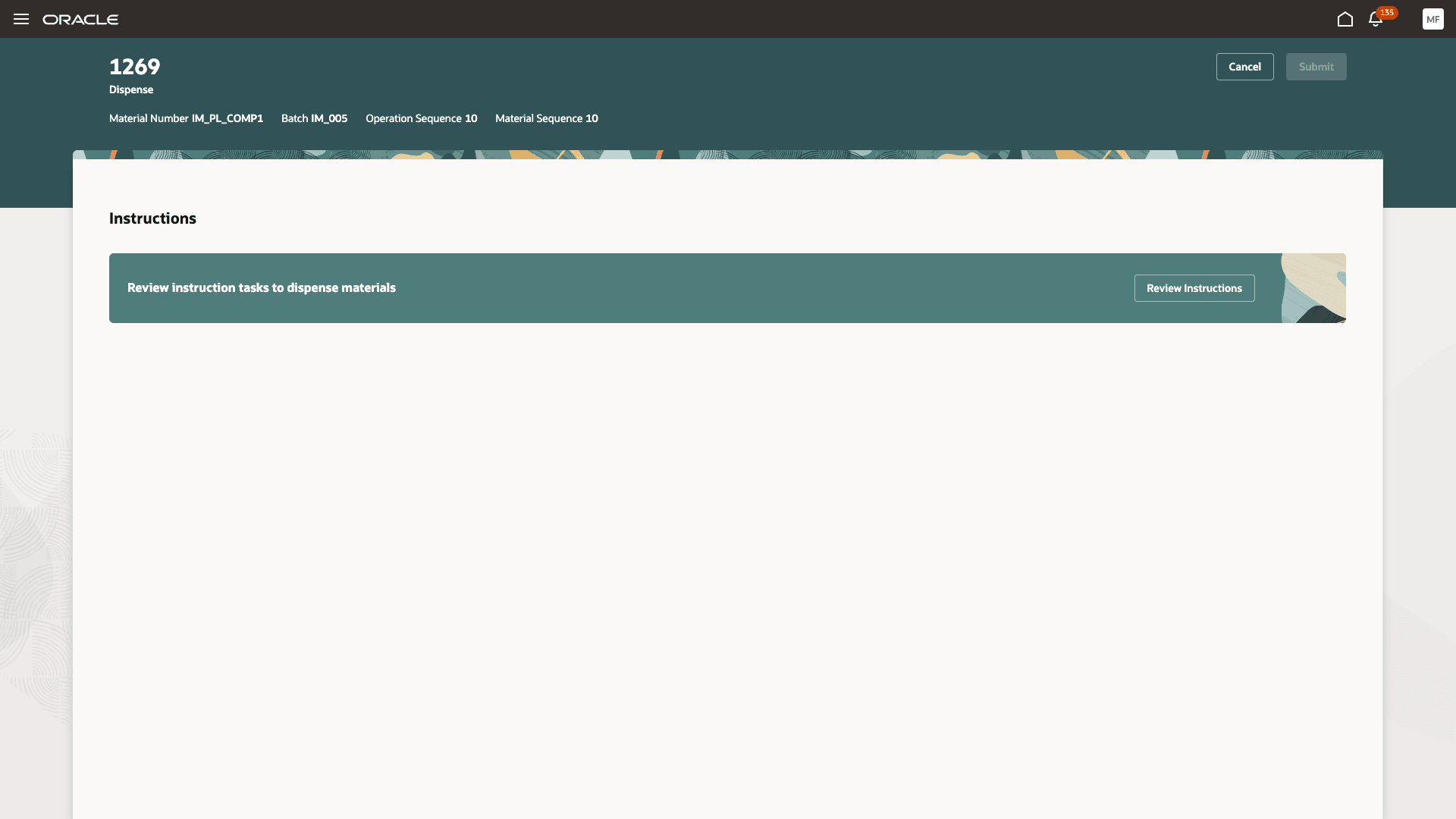
Complete instructions before you dispense materials
The associated instruction tasks are shown based on the sequence chosen when defining the tasks. If there are duplicate sequence numbers defined, then the task order is determined alphabetically. Operators can review the instructions, documents, and videos for the task and click Continue to indicate that they have reviewed the instruction.
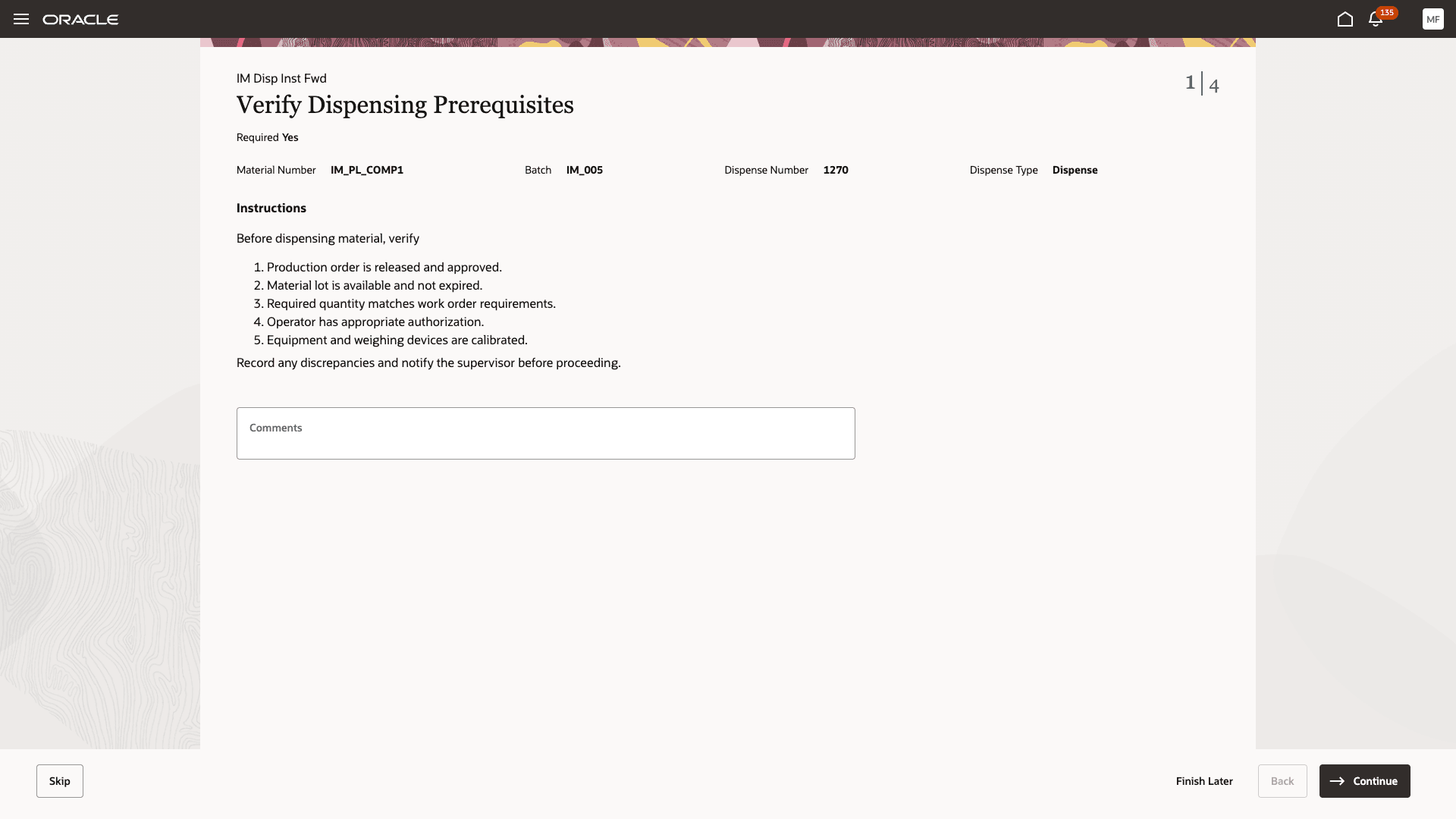
Review tasks, videos, and links before dispensing
The details of the instruction tasks reviewed and acknowledged are linked to the dispense transaction. You can review these from the Dispense Transactions page.
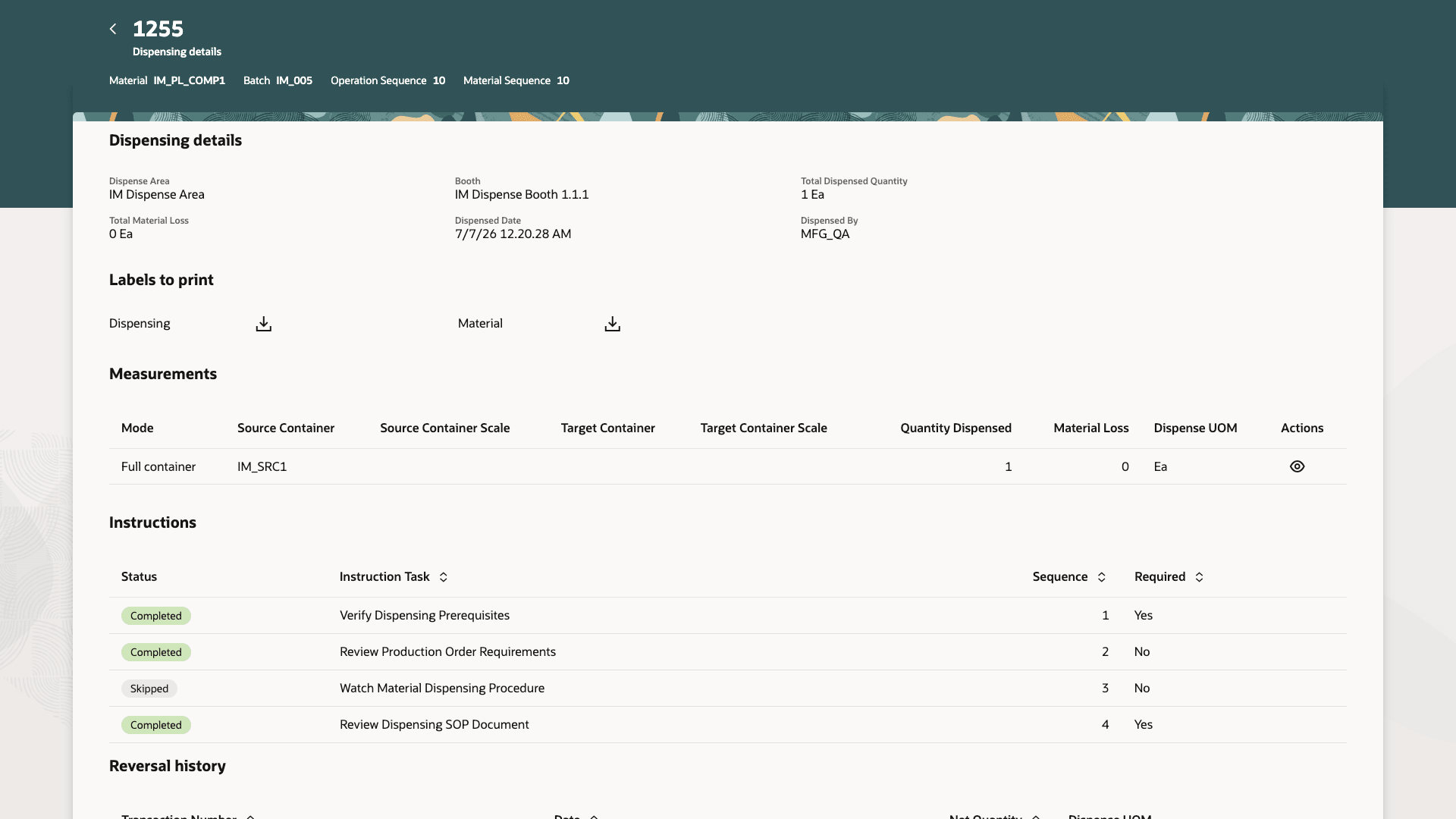
Review instruction tasks in completed dispense transactions
Dispensing instructions provide the following business benefits:
- Improve accuracy and consistency by guiding operators through standardized dispensing instructions.
- Support compliance and audit needs by recording operator acknowledgment.
- Reduce execution errors by embedding standard operating procedures and supporting documents directly in the dispensing flow.
- Provide process engineers, formulators, and production supervisors a reusable way to manage dispensing instructions.
Steps to enable and configure
- Create a dispense instruction using the Dispense Instructions task, which is available from the Recipes or Work Definition work area.
- Link dispense instructions to dispense rules from the Dispense Rules page. You can have different instructions for dispensing and reversals.
Tips and considerations
- The following task types are currently supported:
- Defining a manual task.
- Attaching a document such as Standard Operating Procedures.
- Attaching URLs for the operator to review standard operating procedures stored externally.
- Attaching videos, which can be played during dispensing.
- If there is an instruction attached to a dispense rule, then the operator will need to visit the instruction tasks even if all of them are marked as optional.
- Operators can skip a task, but unless they acknowledge all the mandatory tasks by selecting Continue, they can't dispense the materials.
- Unless the operator clicks through and reviews all the mandatory instructions, they can't start the dispensing process.
- If a dispensing task is interrupted and the operator needs to start dispensing afresh, they would have to review the instructions again, as a new dispense transaction is created every time the operator clicks Dispense.
- You can create a dispense transaction only from the Dispensing Instructions page. Creation through REST APIs or through File Based Data Import (FBDI) isn't supported currently.
Key resources
- Oracle Fusion Cloud SCM: Refer to the Using Manufacturing guide, available on the Oracle Help Center.
- Oracle Fusion Cloud SCM: Refer to the Implementing Manufacturing and Supply Chain Materials Management guide, available on the Oracle Help Center.
- Oracle Fusion Cloud SCM: Refer to the What's New documentation for Dispense Materials to Batches, available on the Oracle Help Center.
Access requirements
Authoring Dispense Instructions
Users who are assigned a configured job role that contains the following privilege and duty role can author instructions and associate them with dispense rules:
| Privilege Status | Privilege name and code |
|---|---|
| Previously delivered |
Manage Dispense Rules WIS_MANAGE_DISPENSE_RULES |
| Duty role status | Duty role name and code |
|---|---|
| New |
Dispense Instructions Builder ORA_PER_SCM_DISPENSE_INSTRUCTIONS_BUILDER_DUTY |
Reviewing Dispense Instructions when dispensing material
Users who are assigned a configured job role that contains the following privilege and duty role can review and acknowledge instruction completion:
| Privilege Status | Privilege name and code |
|---|---|
| Previously delivered |
Dispense Materials to Work Orders WIP_DISPENSE_MATERIALS |
| Duty role status | Duty role name and code |
|---|---|
| New |
Dispense Instructions Access ORA_PER_SCM_DISPENSE_INSTRUCTIONS_ACCESS_DUTY |