Capture parent lot and lot information for production transactions
Manufacturers need to accurately track and transact smaller, physical lots of a production lot, such as rolls, containers, or partial outputs, while preserving their relationship to the originating parent lot. Capturing parent lot information in selected lot processing flows was already supported. In this release, the existing parent lot capability is enhanced and extended across product completion, product return, ingredient issue, ingredient return, and backflush transactions.
The enhancements include required parent lot validation for selected items, automatic display of the associated parent lot when an existing lot is selected, the ability to search for eligible lots by parent lot number, and support for these capabilities on applicable desktop and mobile pages. A lot remains the transactable entity and is associated with a parent lot. The parent lot provides a common grouping and traceability reference but is non-transactable and doesn't carry on-hand quantity. Inventory balances and batch transactions are recorded against the individual lots. Some of the key highlights of this feature include:
Enhanced parent lot processing
The Parent Lot field and the association between a parent lot and a transaction lot existed before this enhancement. Previously, parent lot information could be captured in selected manufacturing flows, but the behavior wasn't consistently available across batch product and ingredient transactions, and users couldn't search for transaction lots using a parent lot number.
With this enhancement, you can:
- Apply parent lot validation during product completion transactions.
- Automatically display the associated parent lot when you select an existing lot.
- Create or select an existing parent lot when creating a new lot in supported flows.
- Search for eligible lots using either the lot number or the parent lot number.
Define parent lots and lots for preassigned batch products
For batch products with preassigned lots, you can define the parent lot and lot from the Lot Numbers tab on the Batches page. Depending on the item and lot setup, you can generate or enter a parent lot and create the associated lots, or select an existing parent lot or lot. When you select an existing lot, the system automatically displays its associated parent lot. You can search by either the parent lot number or the lot number and select the required lot. You can also search for an existing parent lot and then generate or manually enter a new lot number to associate with it.
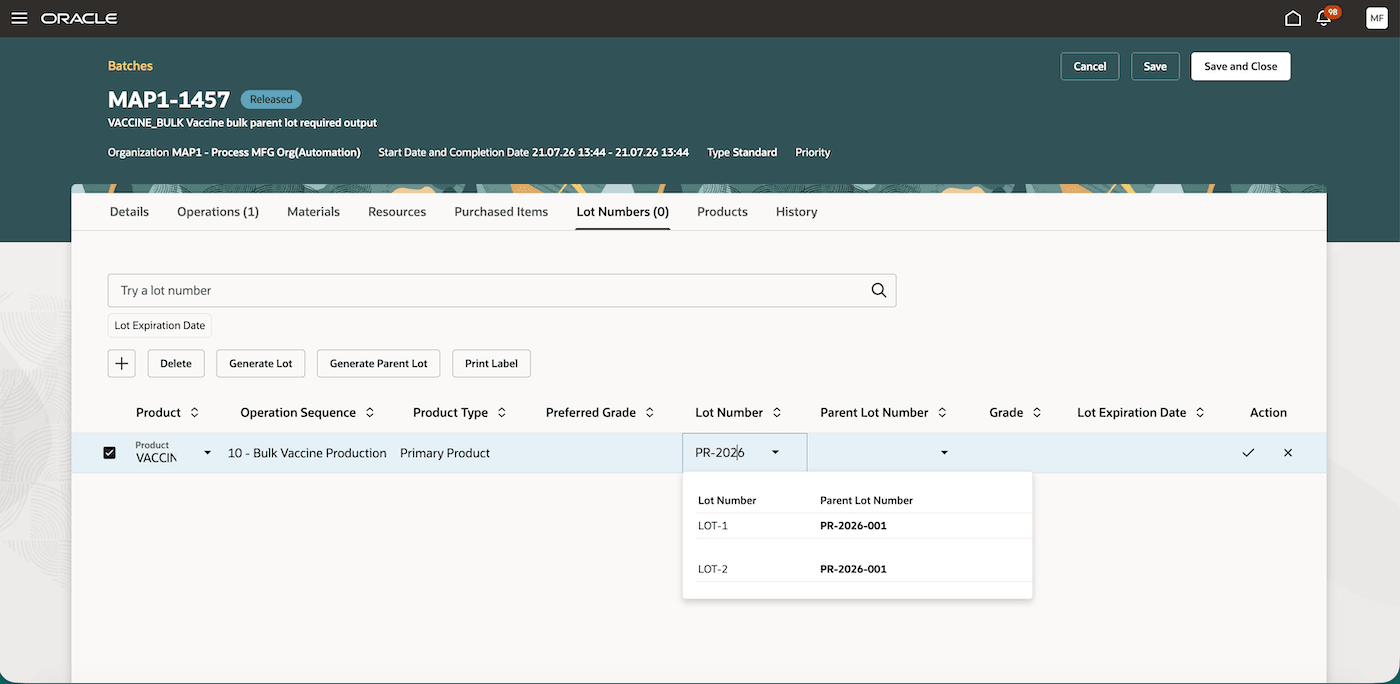
Search by either lot or parent lot number and view parent lot information while selecting the lot
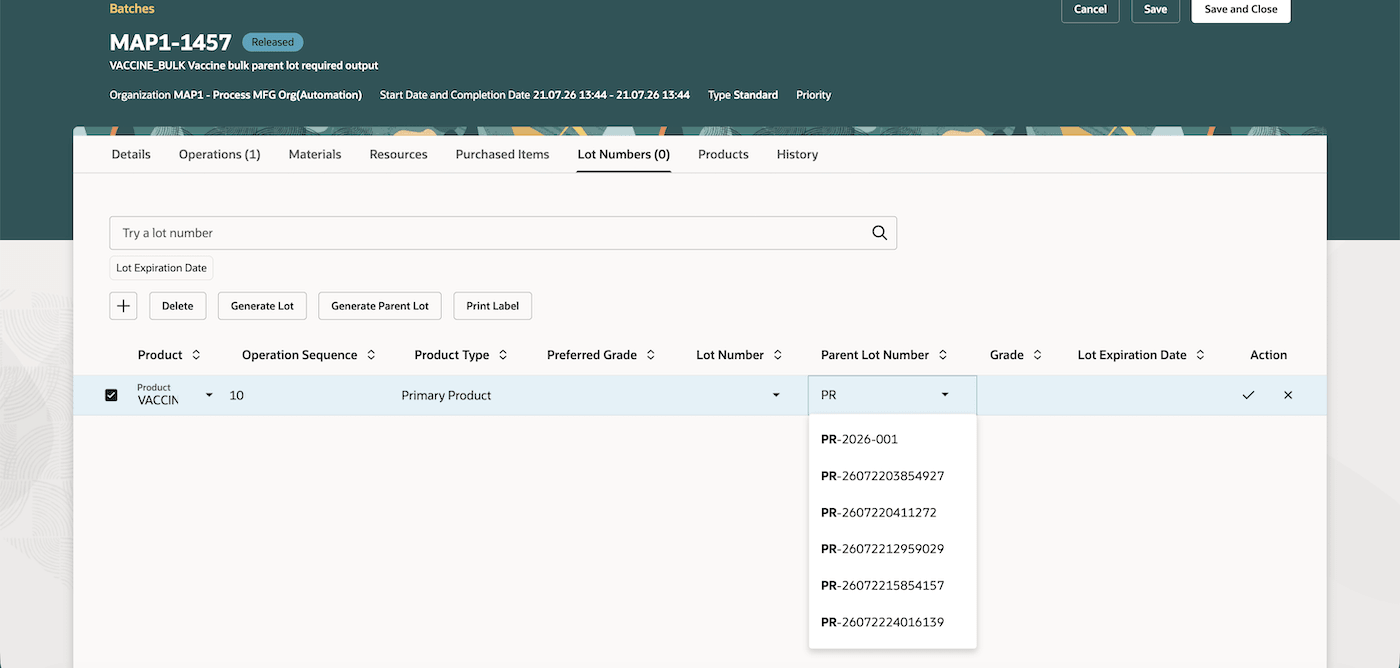
Search and select an existing parent lot
If a parent lot is required and isn't provided, the system prevents you from saving the lot information. When you change or generate the parent lot while creating a new lot, the previously entered lot is cleared. This prevents the lot from being associated with an incorrect parent lot.
Capture parent lots during product completion
You can use the enhanced parent lot behavior when reporting completion for a batch product from Production Execution, Postproduction Reporting, and the Report Product mobile page.
- For batch products with preassigned lots, select an existing lot. The system automatically displays the associated parent lot as a read-only value.
- For batch products without preassigned lots, you can create a new lot and provide the applicable parent lot, or select an existing lot that already has a parent lot association.
- When you select an existing lot, the system automatically displays its associated parent lot number. You can search for an existing lot using its lot number or the parent lot number.
- You can also search for an existing parent lot and then generate or manually enter a new lot number to associate with it.
- If a parent lot is required and isn't provided, the system prevents you from saving the lot information.
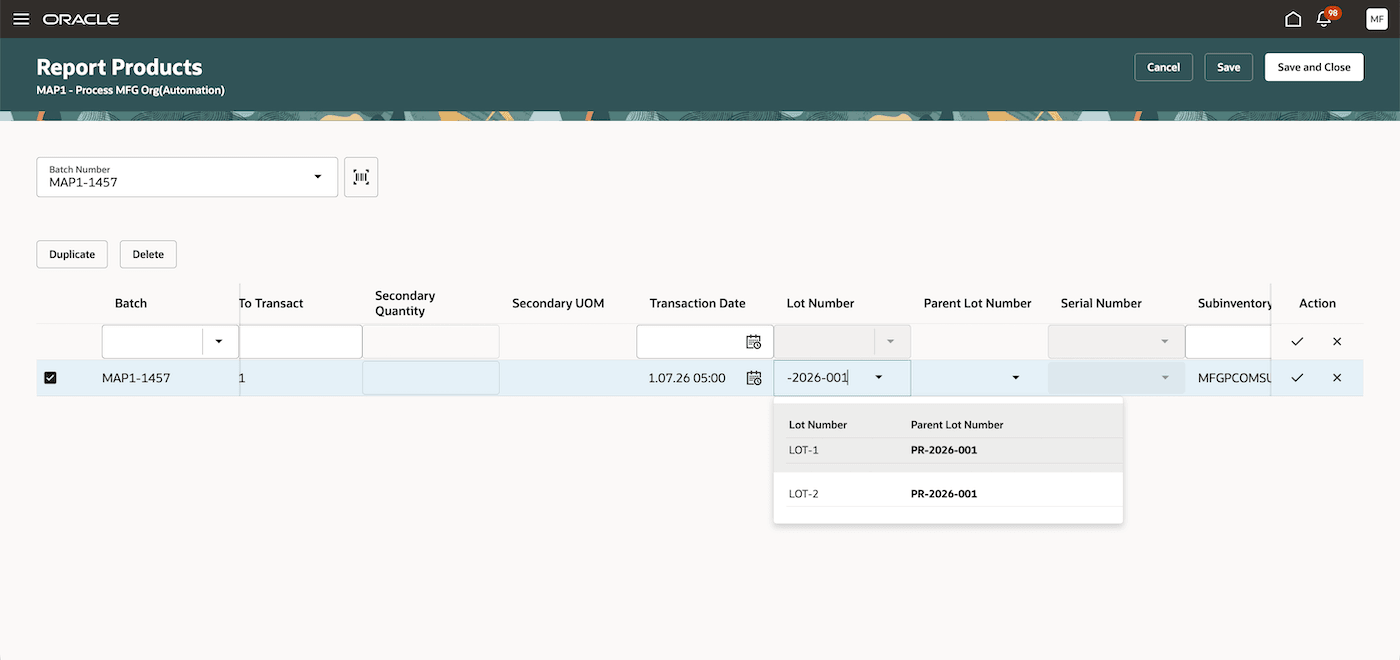
Search by either the lot or the parent lot number and view parent lot information while selecting a lot in the Postproduction Reporting page
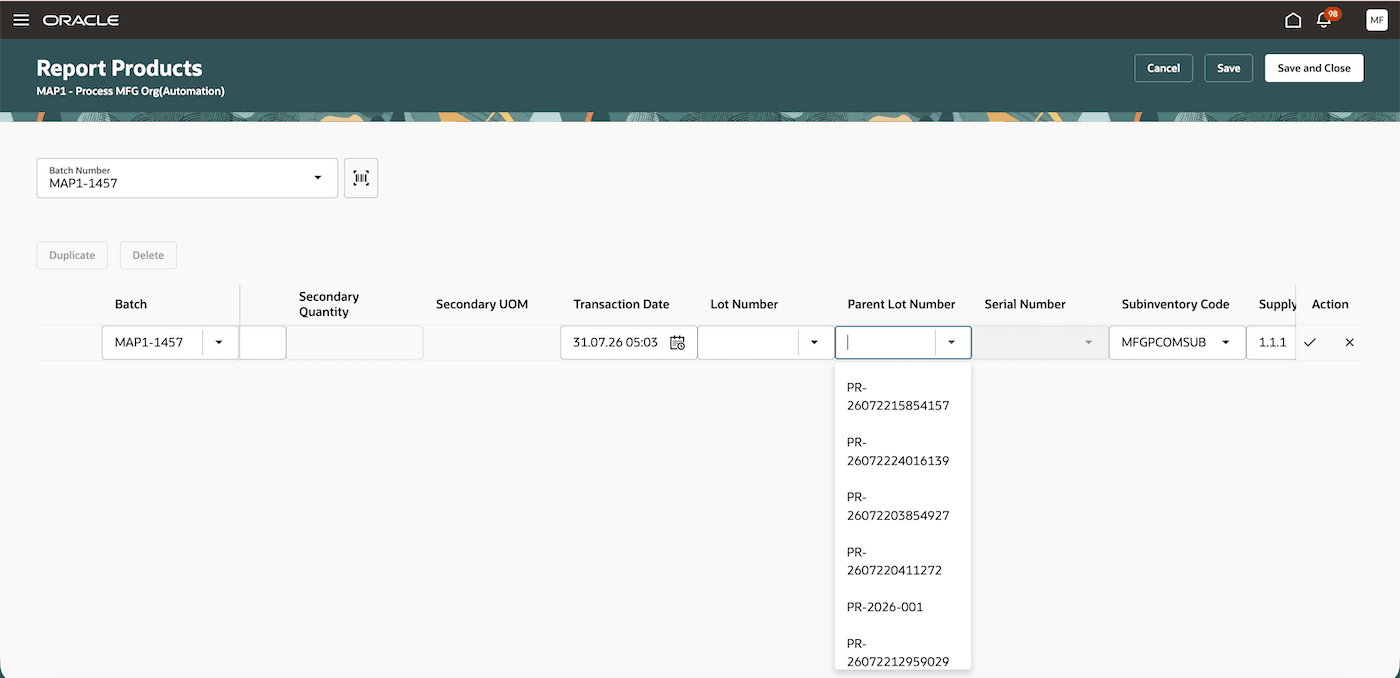
Search and select an existing parent lot in the Postproduction Reporting page
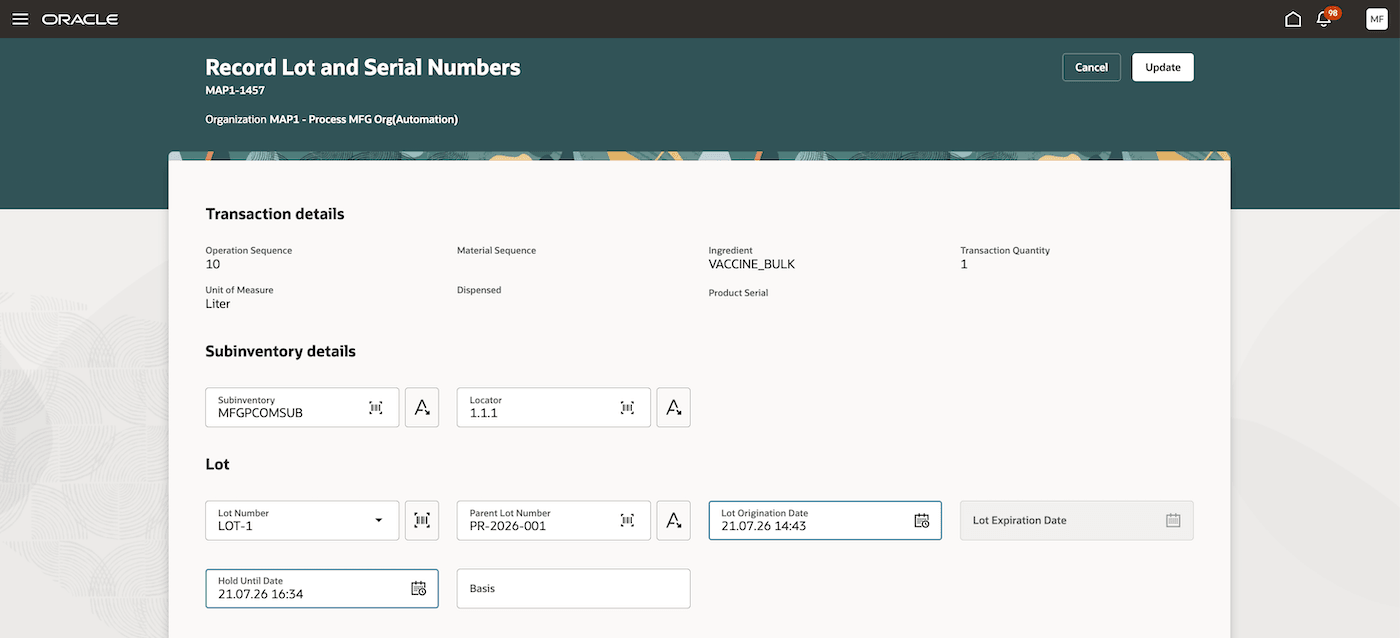
Search and select an existing parent lot in the Record Lot and Serial Numbers page in Postproduction Reporting
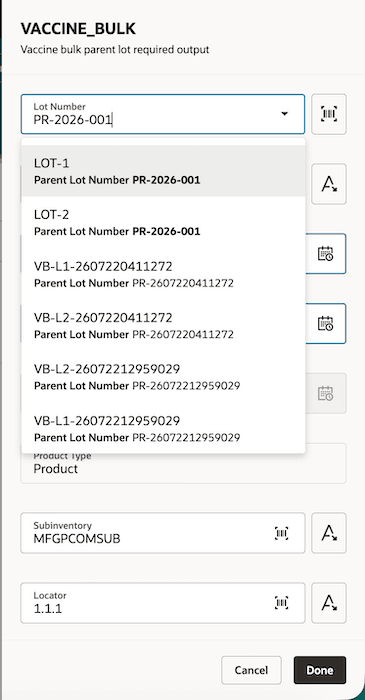
Search by either the lot or the parent lot number and view parent lot information while selecting a lot in the Report Product mobile UI
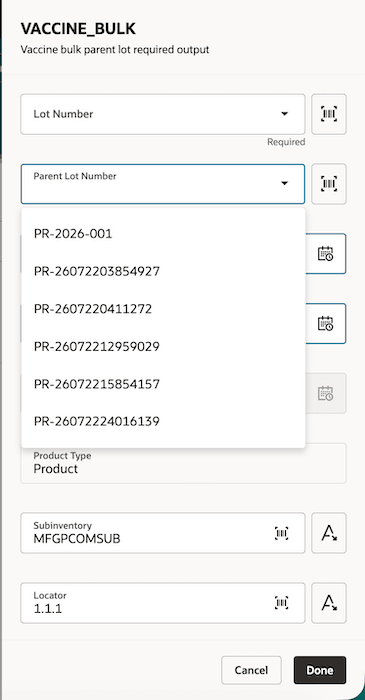
Search and select an existing parent lot in the Report Product mobile UI
Parent lots during material issue transactions
The existing parent lot capability is extended to ingredient issue transactions from Production Execution, Postproduction Reporting, Report Material Transactions, and mobile pages.
When you select or scan an existing lot for an ingredient, the system automatically derives and displays its parent lot. A new column is also added to display the parent lot number as a read-only value. You can also search using a parent lot number to view all eligible transactable lots associated with it and select the ingredient lot to issue to the batch.
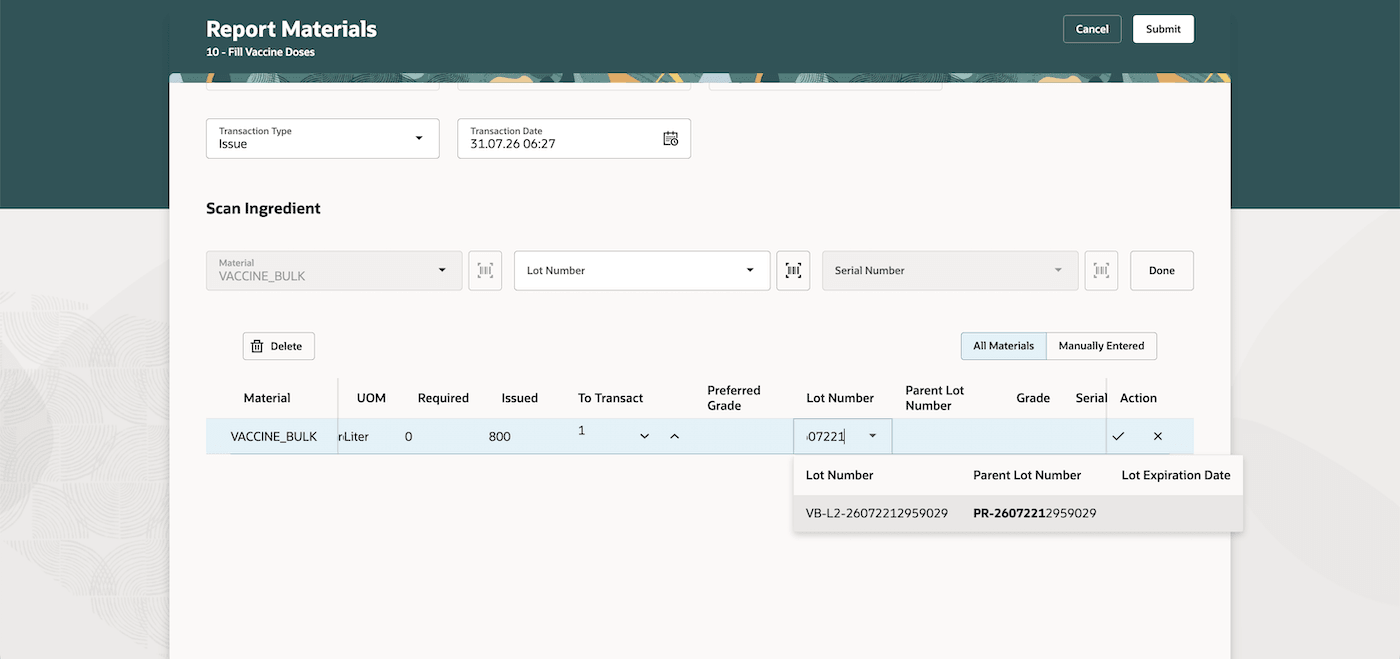
Search by either the lot or the parent lot number and view the parent lot information while selecting a lot in the Production Execution (Report Material Transactions) UI
Parent lots during other transactions
The enhanced parent lot behavior is also available for the product return, material return, scrap, and return scrap transactions in production execution, postproduction reporting, and applicable Manufacturing mobile pages. When you select or scan an existing lot, the system automatically displays its associated parent lot as a read-only value. You can search for the required transaction lot using either the lot number or the parent lot number.
Changes to File-Based Data Import (FBDI)
Parent lot and lot information can also be provided for supported batch product and ingredient transactions submitted through File-Based Data Import. If a parent lot is required but not provided during product completion or preassigned lots, then the system prevents you from saving the lot information.
Changes to REST APIs
Parent lot and lot information can also be provided for supported batch product and ingredient transactions submitted through REST APIs. If a parent lot is required but not provided during product completion or preassigned lots, then the system prevents you from saving the lot information.
Change to Business Intelligence Publisher (BIP) reports
Applicable BIP reports now display the parent lot number for material transactions, while the product completion transactions continue to display the existing parent lot information.
- Batch Material Transaction E-Record
- Batch Operation Transaction E-Record
- Print Batch Ticket
- Generate Extensible Batch Ticket
This update provides the following advantages:
- Improves transaction accuracy by capturing the parent lot and child lot information during production transactions.
- Improves on-hand visibility by using child lots as the operational execution units while retaining the parent lot as the common traceability record.
- Strengthens genealogy and quality traceability across related lots.
- Helps locate and transact the correct lot efficiently by enabling you to search using the associated parent lot number.
Here's the demo of these capabilities:
Steps to enable and configure
Enable parent lot management for the inventory organization:
- In the Setup and Maintenance work area, search for, and select the Manage Inventory Organizations task.
- Select your organization and select Manage Organization Parameters.
- Ensure that the flag Allow Parent Lot Management is enabled.
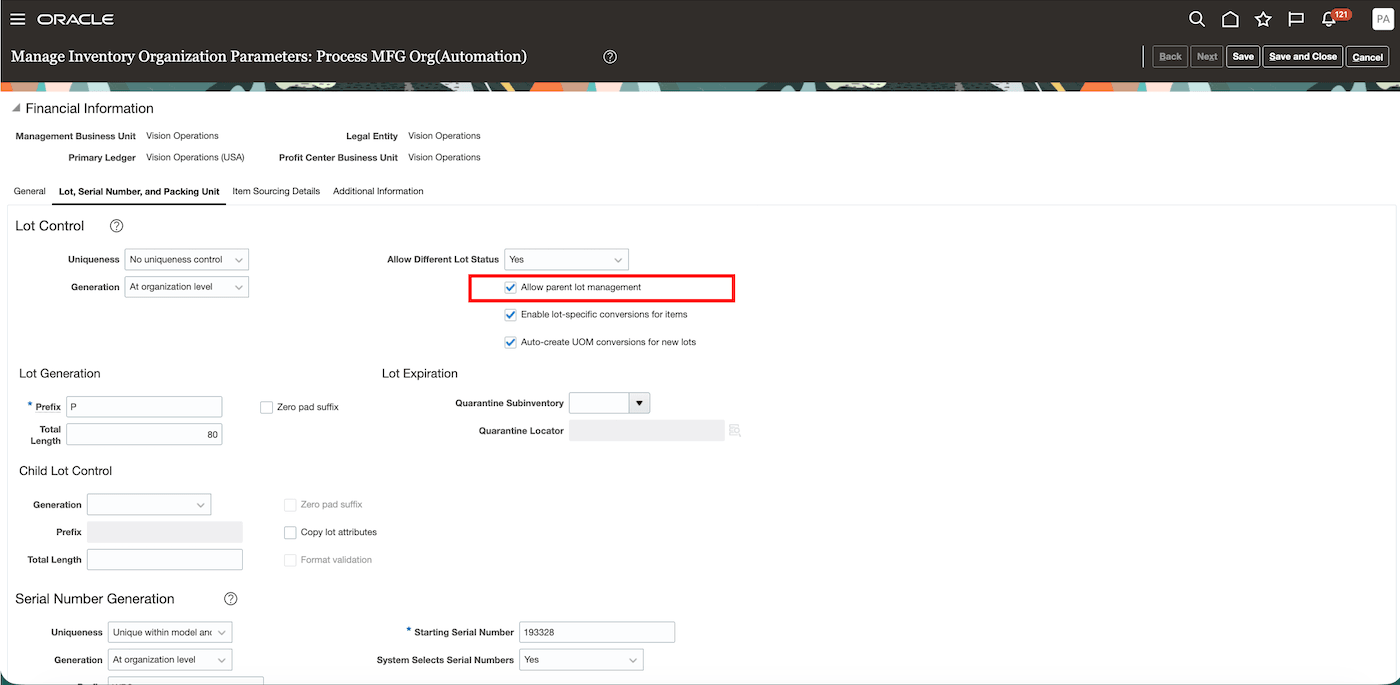
Allow parent lot management inventory organization parameter
Enable the Parent Lot Required attribute for the item:
- After configuring the inventory organization, navigate to the Product Information Management work area and enable the Parent Lot Required item attribute for applicable items configured for child lot control.
- For existing items and lots, ensure that the item has no on-hand inventory, and then run the Correct Lots for Parent Lot Compliance scheduled process before using those lots in parent lot required batch transactions. The Correct Lots for Parent Lot Compliance scheduled process creates missing parent lot records, makes applicable parent lots non-transactable, validates existing relationships, and makes corrected lots eligible for selection. You can also correct existing relationships manually from the Manage Lots page.
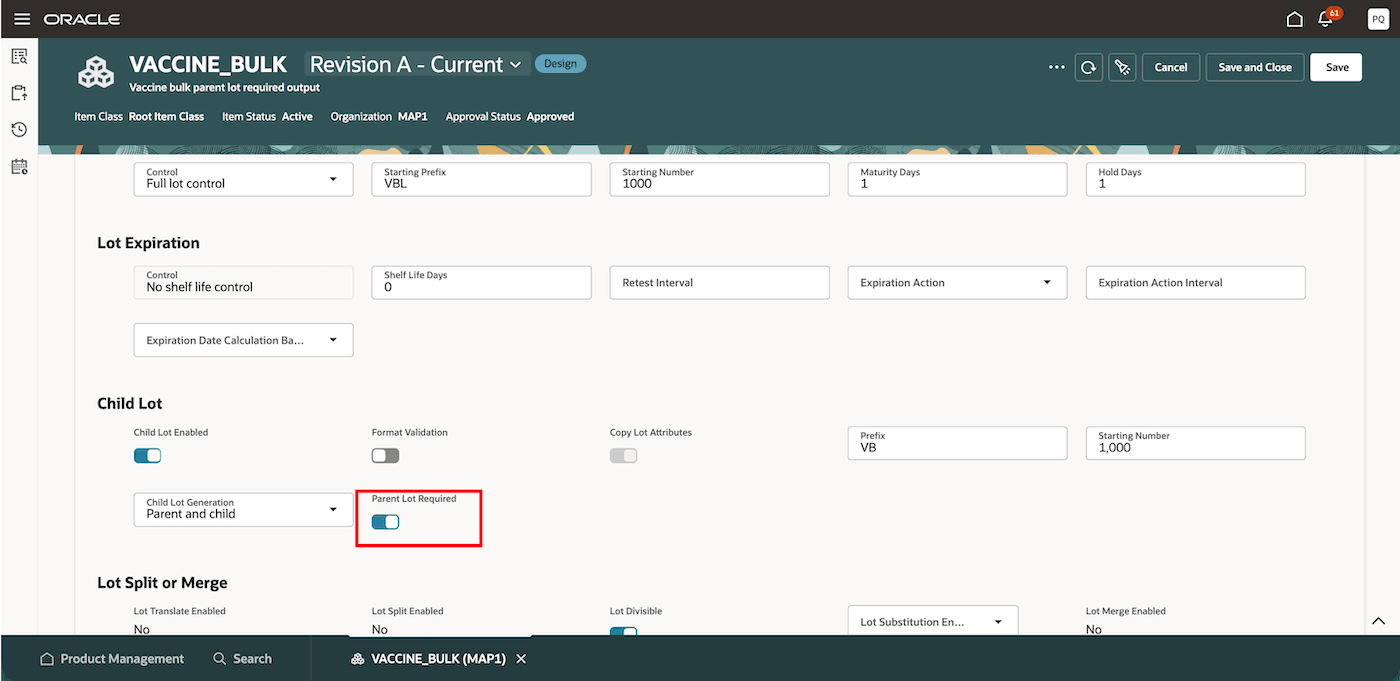
Parent Lot Required item attribute
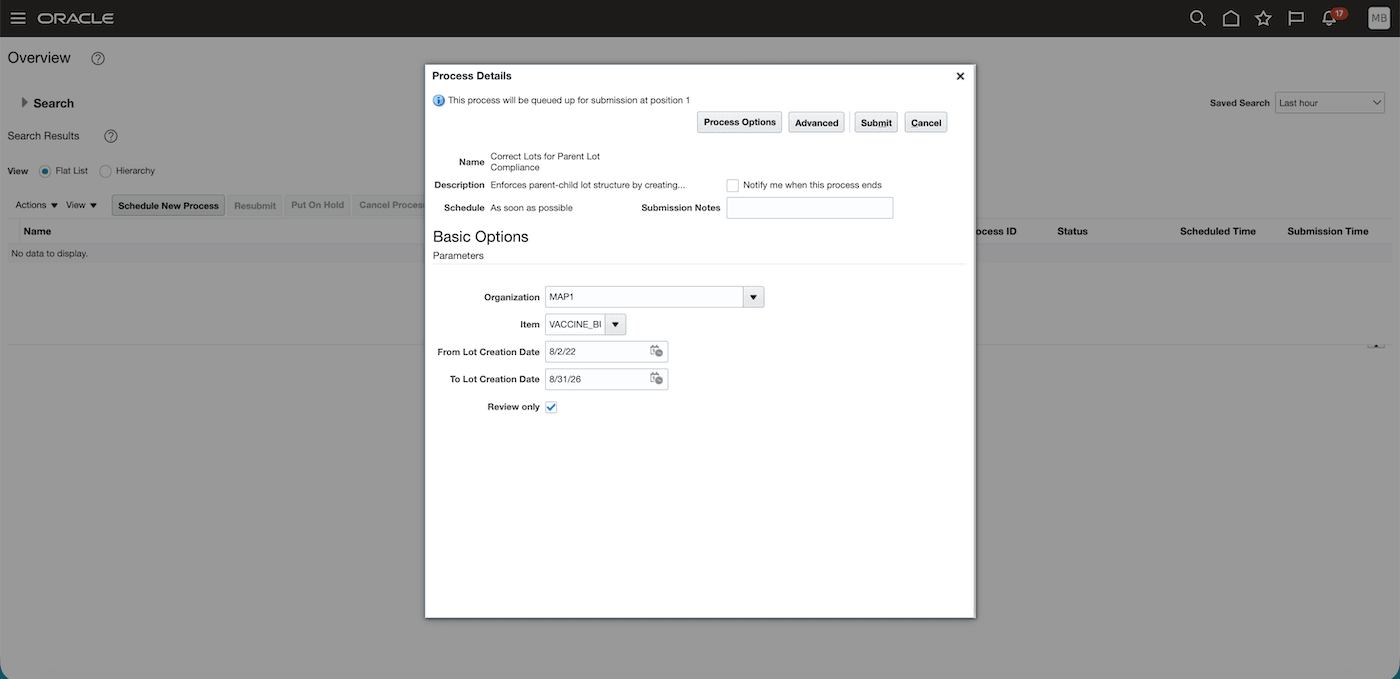
Correct Lots for Parent Lot Compliance scheduled process
Tips and considerations
- Feature scope and supported user experience
- This feature is also applicable for discrete manufacturing.
- Don't use legacy ADF pages for parent lot required transactions. Use the Redwood desktop and mobile pages.
- Setup and configuration
- You can enable or disable the item attribute only when the item has no on-hand inventory.
- When the item attribute is enabled, Copy Lot Attributes defaults to Yes and can't be updated.
- A lot inherits default attributes from its parent lot; inherited values can be overridden at the lot level
- Existing lots and data correction
- Existing lot records may remain when on-hand quantity is zero and may not meet the new parent lot validation requirements. You can either correct the lots through the scheduled process or correct them manually. Until a lot is corrected and validated, it isn't available in parent lot required transaction flows.
- Refer to the 26D feature Configure and Use Parent Lot in Lot-Controlled Items in Inventory Management for additional information.
Key resources
- Oracle Fusion Cloud SCM: Refer to the Using Manufacturing guide, available on the Oracle Help Center.
- Oracle Fusion Cloud SCM: Refer to the Implementing Manufacturing and Supply Chain Materials Management guide, available on the Oracle Help Center.
- Oracle Fusion Cloud SCM: Refer to the Process Manufacturing Terminology What's New, available on Oracle Help Center.
Access requirements
No new privileges have been introduced with this feature. Users with the existing privileges required to configure inventory organizations and items, manage lots, run scheduled processes, manage batches, and perform the applicable batch product and ingredient transactions can use this feature. Existing security requirements continue to apply to mobile transactions, REST API, and File-Based Data Import transactions.