Implement recipe changes with redlining, versioning, and approval
In the previous release, the recipe approval process was available only when electronic signature was enabled for Manufacturing Recipe Management. With this update, you can enable recipe approvals without requiring electronic signatures by using the new Enable Recipe Change Approval plant parameter.
When this plant parameter is enabled, newly created recipes are assigned a Draft version status. After you finish defining the recipe, you must submit it for approval, which changes the version status to Pending Approval. Once approved, the version status changes to Approved, making the recipe available for downstream processes such as batch creation and cost rollup.
Approved recipe versions are read-only. To modify an approved recipe, you must create a new draft version.
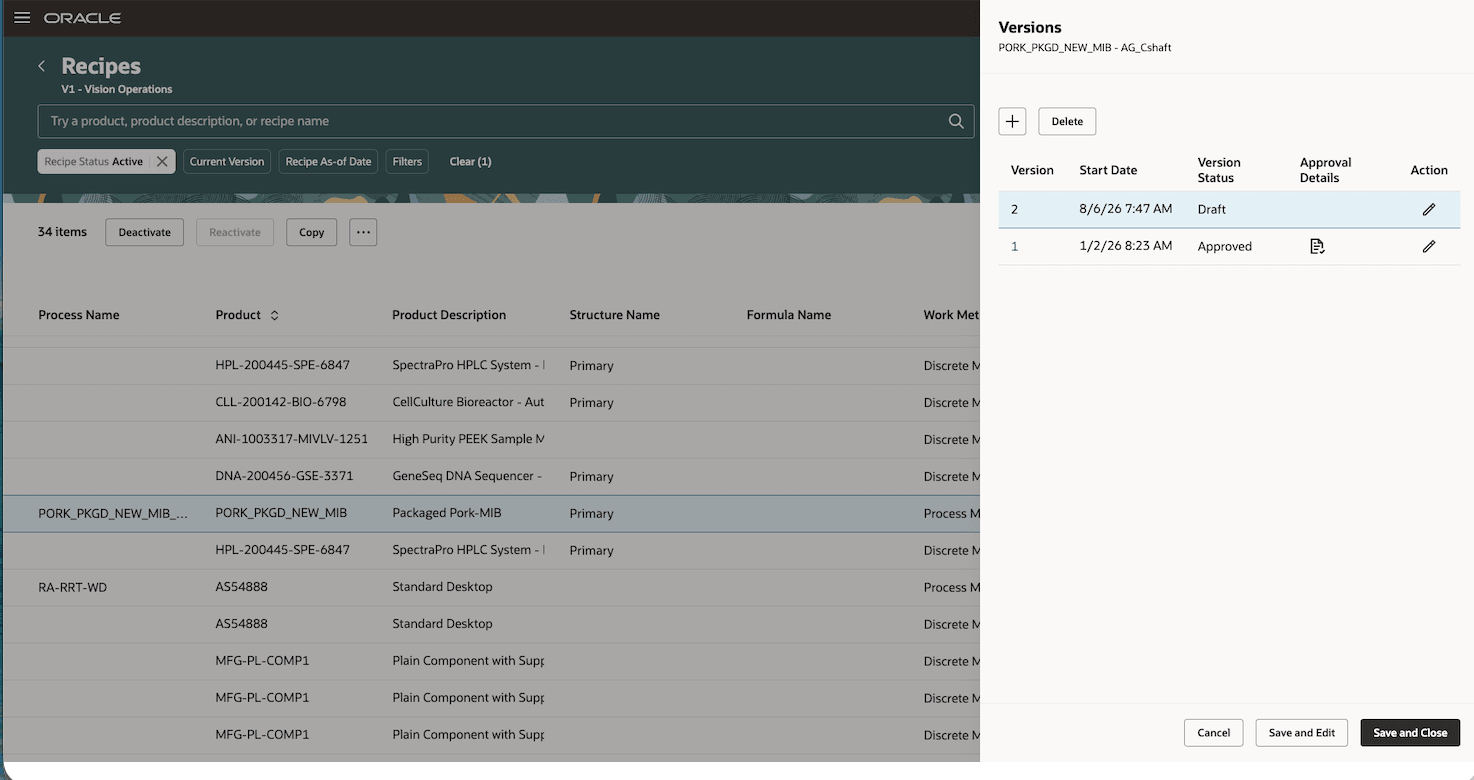
A new draft version
All changes made in the draft version are displayed as redlined changes, making it easy to review the changes to the approved version. When an attribute is updated, both the new and previous values are displayed, with the previous value shown as redlined. Newly added rows are highlighted in green, while deleted rows are highlighted in red with their values struck through. A badge indicating the number of changed rows is also displayed next to each data grid label. User interfaces that do not support redlined changes are listed in the Tips and Considerations section.
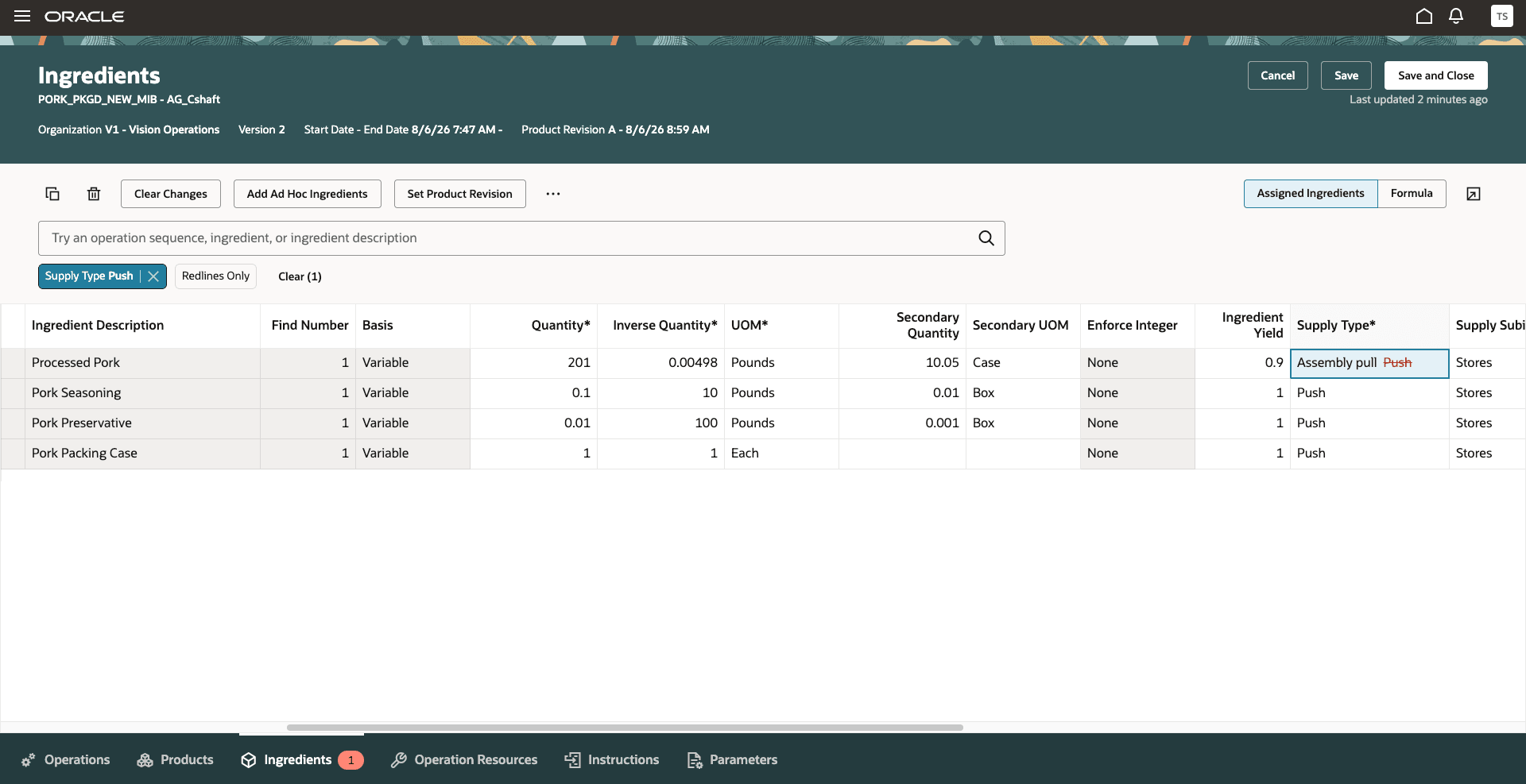
Redline change for supply type update
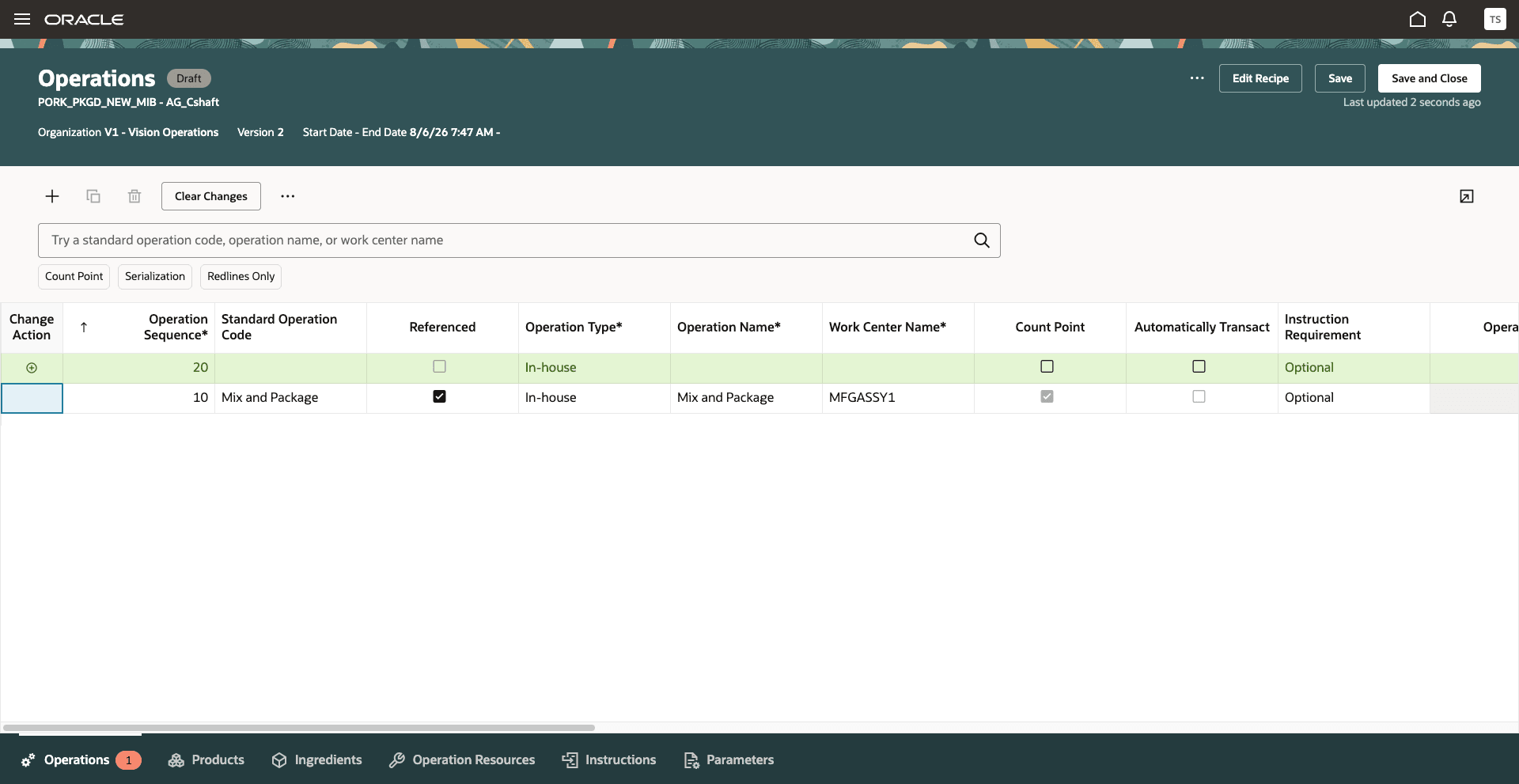
Redline changes for operation addition
When you update attributes of operation child entities, such as supply type, the affected operation is automatically copied in the draft version. The copied operation's start date is aligned with the recipe version start date, ensuring that the changes apply only to the new version while preserving the integrity of previous versions. This eliminates the need to manually duplicate operations.
After a recipe version is submitted for approval, it becomes read-only. Approvers receive an approval notification that includes a deep link to the pending approval version, enabling them to review the redlined changes directly in the application. The notification also includes a recipe report so that approvers can review the changes offline.
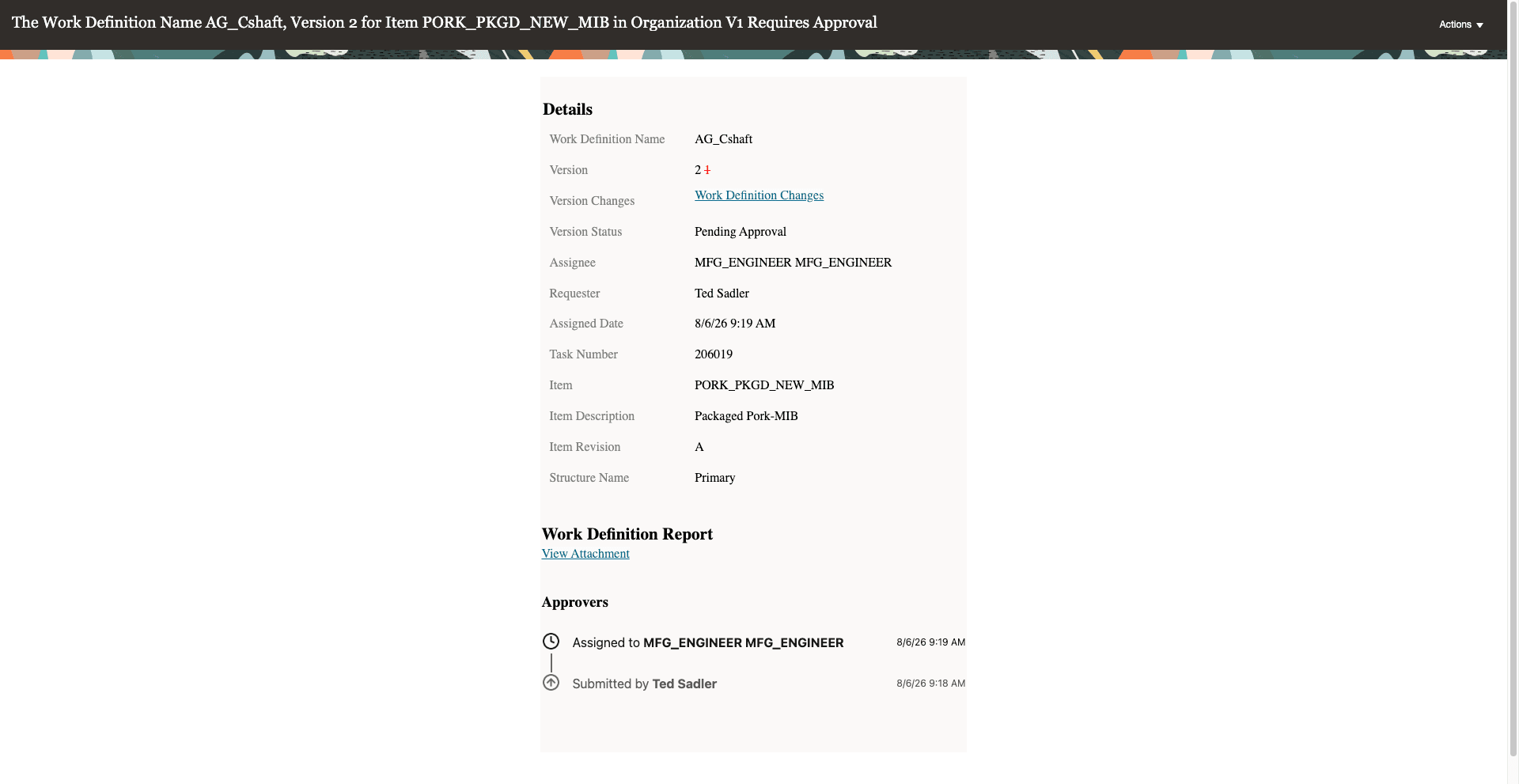
Approval notification containing deep link and recipe report attachment
Once the version is approved, the redlined changes are no longer displayed. If the version is rejected, its status changes from Pending Approval back to Draft. The initiator can update the recipe to address the feedback and resubmit it for approval. You can view the approval outcome for the current approval cycle from the Approval Details page, which is accessible from the Versions page.
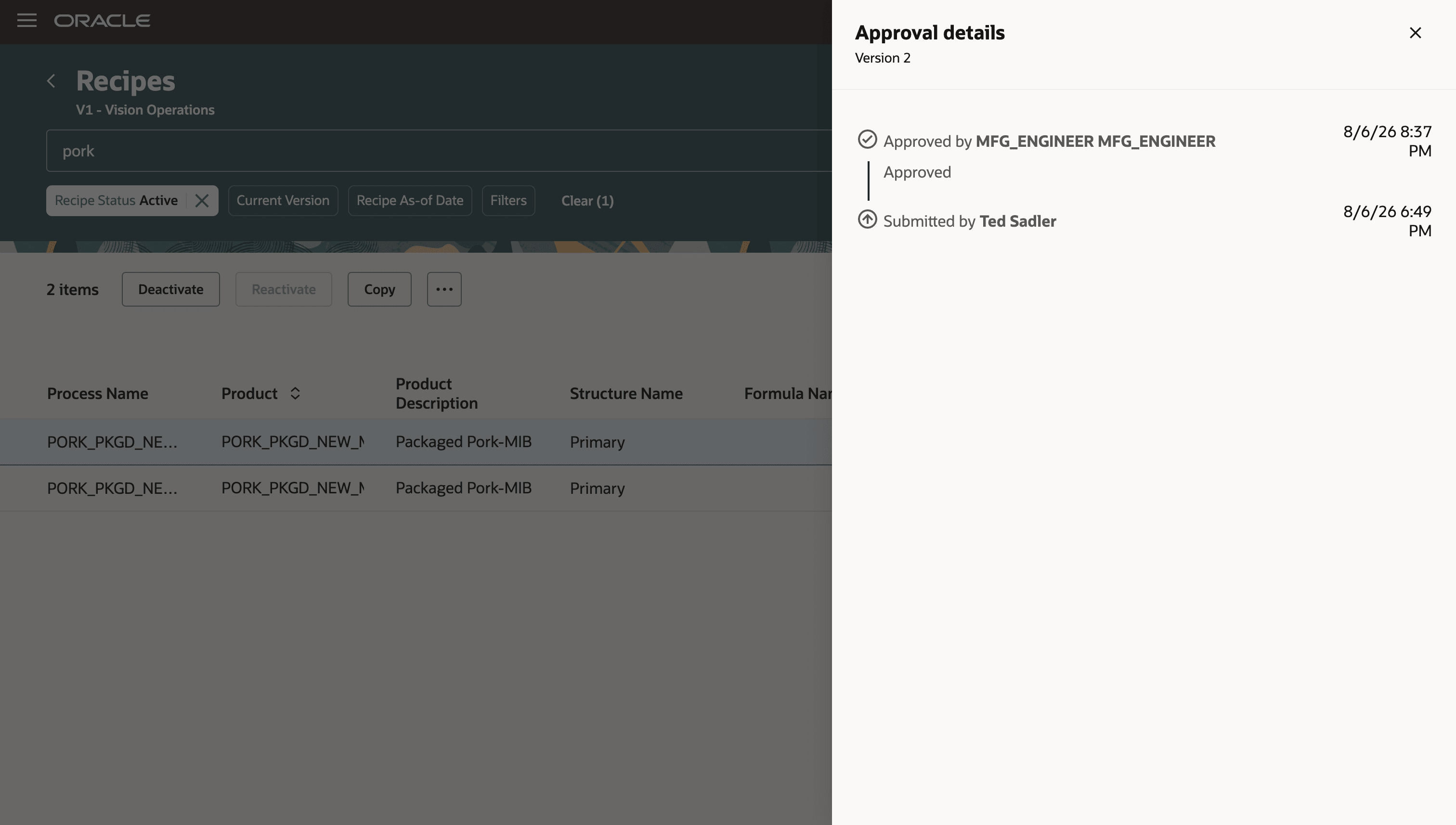
Approval details
Controlled approval of recipe changes without requiring electronic signatures provides organizations with greater flexibility in implementing governance based on their business and compliance needs. Version-based approvals and redlined change tracking improve change visibility, protect approved production data, and ensure that only approved recipes are used for downstream manufacturing processes such as batch creation and cost roll up.
Steps to enable and configure
To enable this feature, select the plant parameter Enable recipe change approval.
Define approval rules using the setup task Manage Task Configurations for Supply Chain Management and select the task Recipe ChangeApproval.
Tips and considerations
- These enhancements are available only with the Redwood experience, which can be enabled using the profile option, Redwood Recipes Enabled.
- These enhancements are supported only in the user interface.
- Plant Parameter
- The plant parameter Enable Recipe Change Approval is disabled by default.
- You can't enable the plant parameter if electronic signatures are configured for manufacturing recipes.
- You can't disable the plant parameter if there are draft or pending approval recipe versions.
- You can't use Recipe Import (FBDI) and REST APIs if the plant parameter is enabled in the organization.
- Approval Process
- Define approval rules using the setup task Manage Task Configurations for Supply Chain Management and select the task RecipeChangeApproval.
- You can define an auto-approval rule where a recipe version will be automatically approved after it's submitted for approval.
- If the approval process results in rejection, then the recipe version status reverts from Pending Approval to Draft.
- Draft and Pending Approval recipe versions aren't eligible for downstream processes such as batch creation or cost rollup. Only approved recipe versions can be used by downstream processes.
- Recipe Versions
- Existing recipe versions created before the 26D upgrade are updated to Approved status and become read-only. To make changes to a recipe, create a new version in Draft status.
- Only one draft version of a recipe is allowed at a time.
- Changes made to a draft version are applicable only to that version. The system automatically copies the affected operations, and you don't need to duplicate operations manually.
- Redline Changes
- Redline changes aren't displayed for the first recipe version.
- Redline changes are displayed in the following user interfaces: Operations, Products, Ingredients, Resources, Alternate Resources, and Parameters.
- The Edit Recipe, Supplier Operation, and Additional Information pages use messages to indicate the changes in place of redline changes.
- Redline changes aren't supported in the following user interfaces: Operation Dependencies, Instructions, and Attachments.
- Enable the process manufacturing terminology profile option for a more consistent process manufacturing user experience.
Key resources
- Oracle Fusion Cloud SCM: Refer to the Using Manufacturing guide, available on the Oracle Help Center.
- Oracle Fusion Cloud SCM: Refer to the Implementing Manufacturing and Supply Chain Materials Management guide, available on the Oracle Help Center.
- Oracle Fusion Cloud SCM: Refer to the Process Manufacturing Terminology What's New, available on Oracle Help Center.
Access requirements
If you are using custom job roles, then you need to validate that you have the previously delivered privileges listed.
| Privilege status | Privilege name and code |
|---|---|
| Previously delivered | Manage Work Definitions WIS_MANAGE_WORK_DEFINITIONS_PRIV |
| Previously delivered | View Work Definitions WIS_VIEW_WORK_DEFINITIONS_PRIV |
| Previously delivered | Get Work Definitions by Service WIS_GET_WORK_DEFINITIONS_SERVICE_PRIV |
| Previously delivered | Manage Work Definitions by Service WIS_MANAGE_WORK_DEFINITIONS_SERVICE_PRIV |