Get substitution recommendations for high-risk, unreleased batches using the Batch Conformance Guide
In process manufacturing, variability in ingredient composition can cause conformance parameter values for a batch’s primary product to fall outside the acceptable range. You can now use the Batch Conformance Guide to get guided recommendations for eligible, unreleased batches with out-of-range conformance results.
The agent identifies an eligible ingredient that contributes to an out-of-range conformance parameter and recommends either an alternate lot or a substitute ingredient available in the plant. You can review the recommendation, compare the simulated conformance values with the current batch conformance values, and decide whether to apply the recommendation to the unreleased batch or perform your own simulation to resolve conformance issues prior to execution.
The agent takes into account the available-to-reserve quantity when determining whether an alternate lot or substitute ingredient is eligible. A recommendation is provided only when the candidate has sufficient quantity for the required replacement, and the simulated change brings the affected conformance parameter into range.
Review guided recommendations
For an unreleased batch with an out-of-range conformance result, open the Batch Conformance Guide from the Batch Process Manufacturing Workspace and review the recommendation.
The recommendation includes:
-
The ingredient or lot that contributes to the out-of-range conformance parameter.
-
The recommended alternate lot or substitute ingredient.
-
The available quantity for the recommended replacement.
-
The actual conformance parameter values for the candidate.
-
The calculated conformance parameter values for the primary product after simulating the recommendation.
You can compare the calculated values from the current batch with the values from the recommended scenario before deciding whether to use the recommendation.
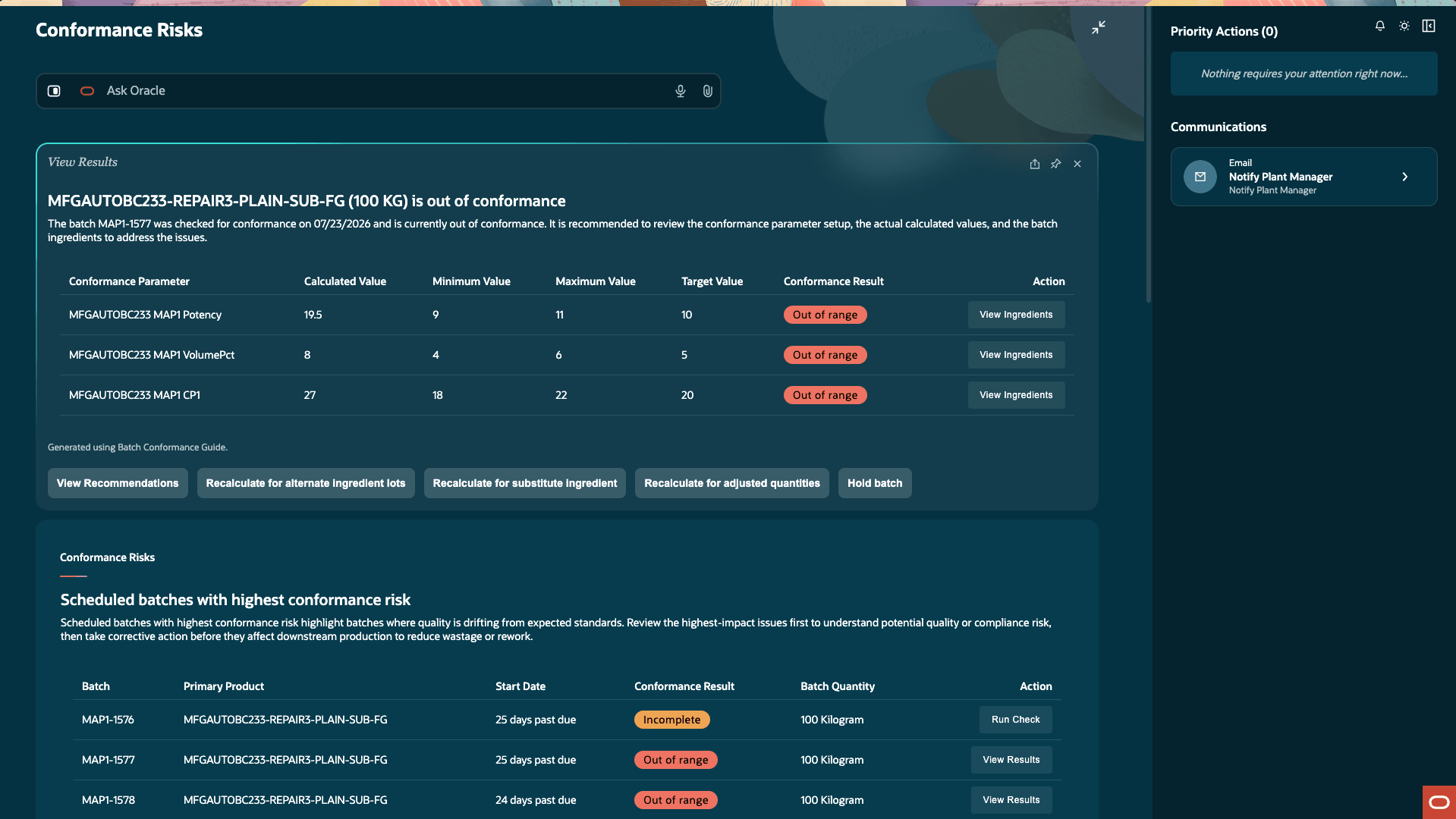
View recommendations for batches with out-of-range conformance values
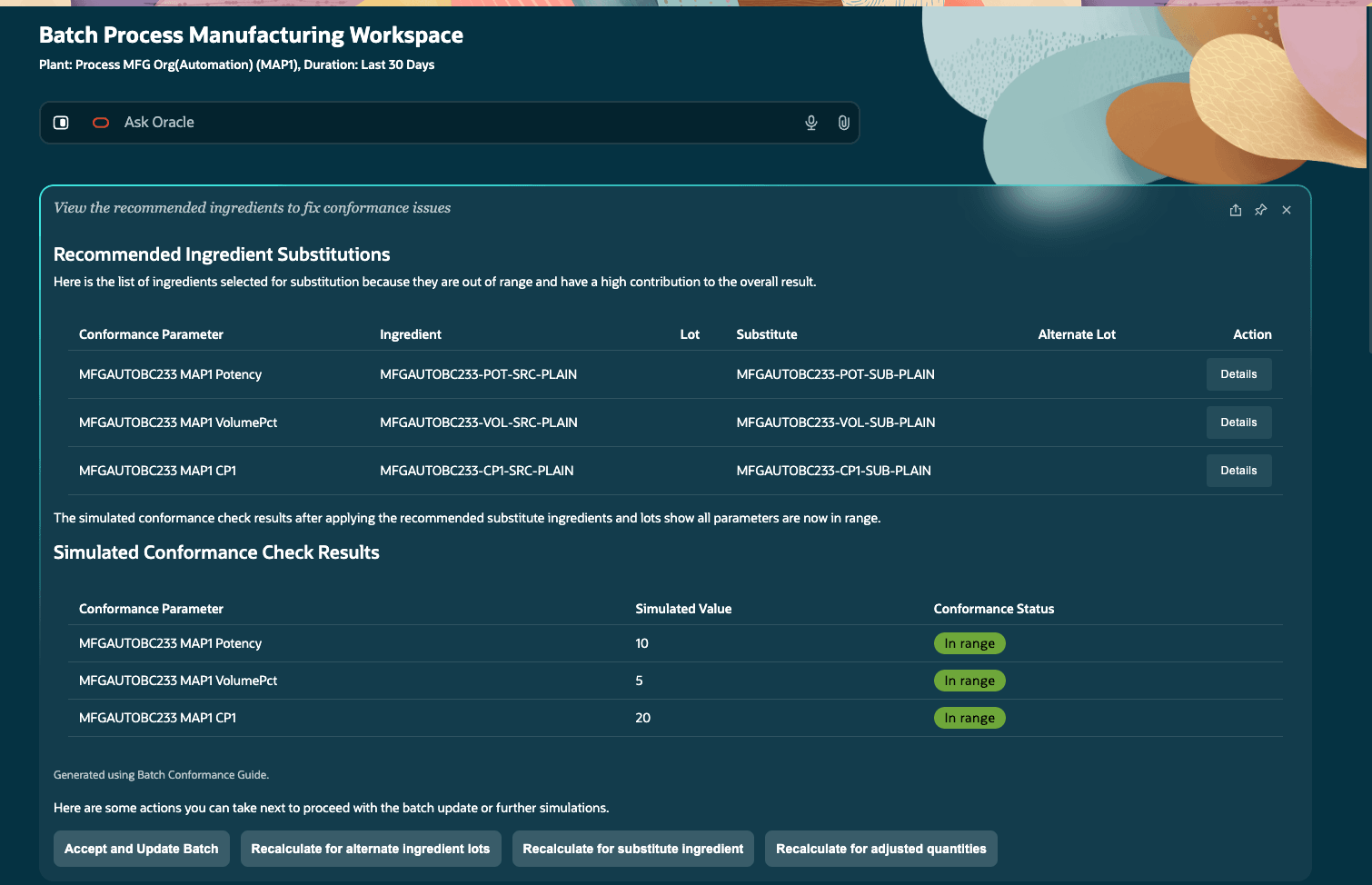
Recommendations from the agent to resolve conformance issues
Apply recommended batch corrections
After you accept an eligible recommendation, you can instruct the agent to update the unreleased batch.
For a lot-controlled ingredient, the agent reserves the recommended lot for the required quantity and replaces the original lot in the batch. For a substitute ingredient, the agent reserves the substitute for the required quantity and replaces the original ingredient in the batch.
The agent commits the batch correction only after the replacement reservation succeeds. If the reservation or related batch update cannot be completed, the agent doesn’t apply the correction to the batch.
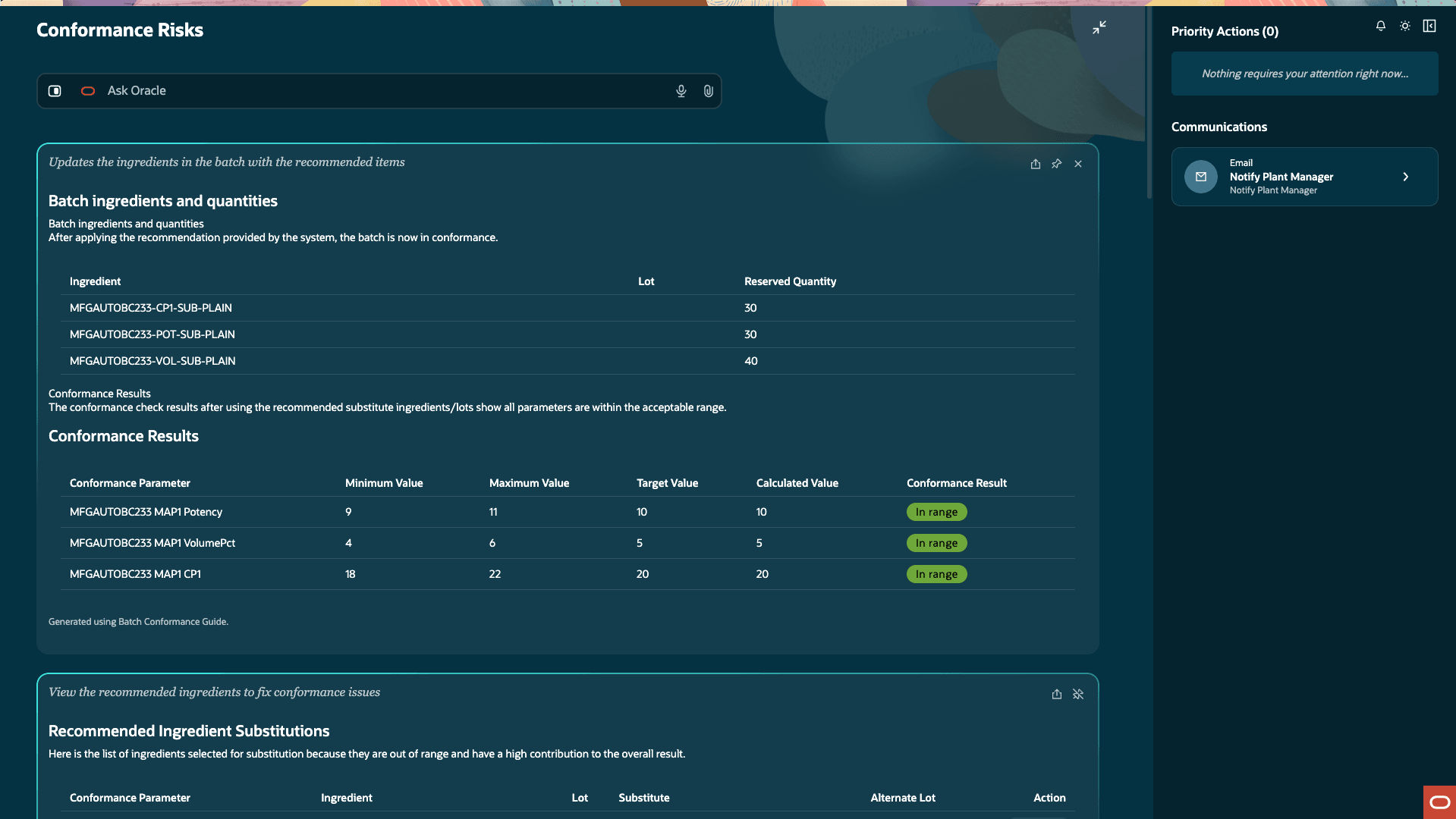
Batch updated with recommendations
After a successful correction, you can review the updated batch and the conformance results.
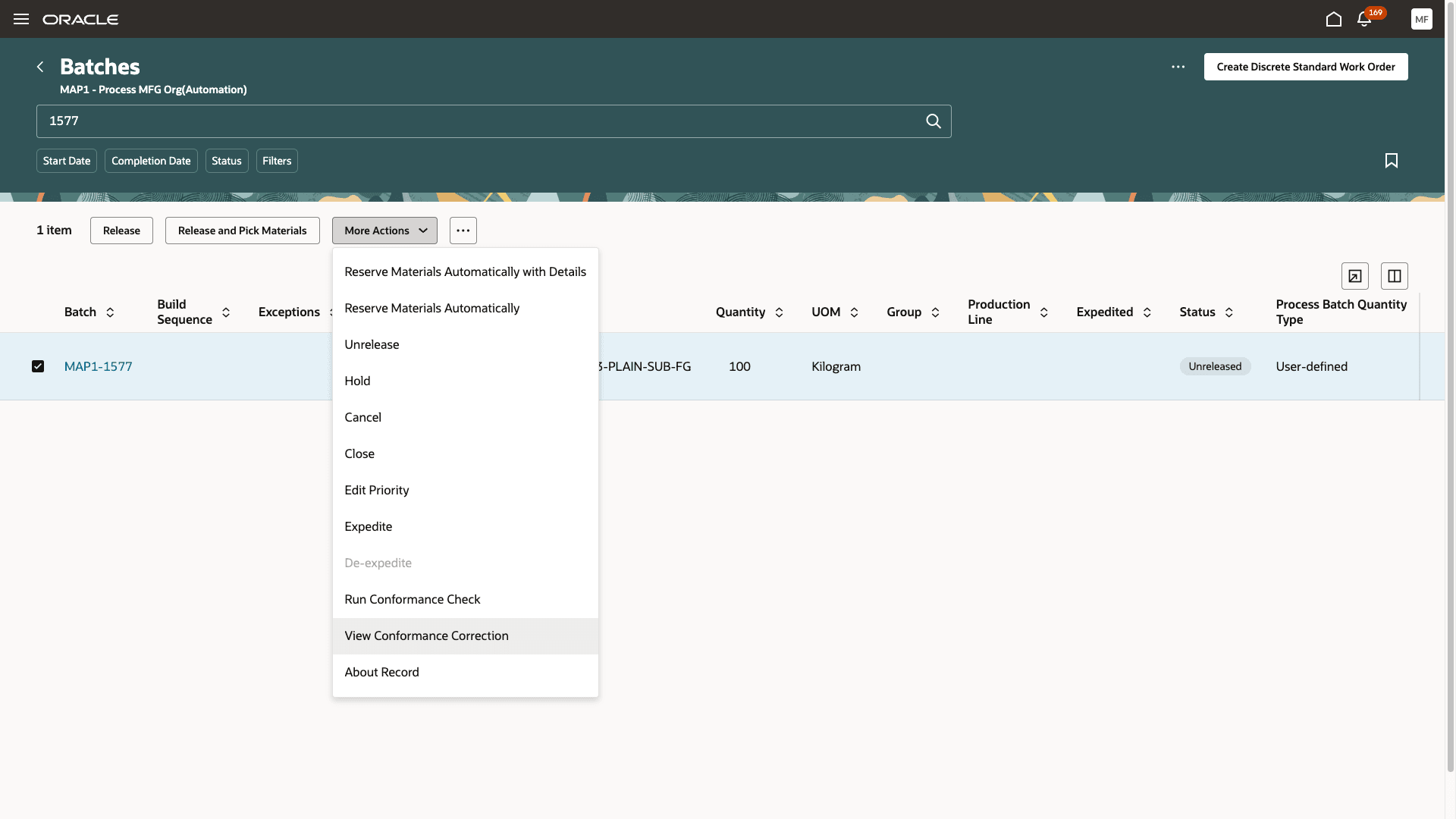
Review conformance corrections for the batch
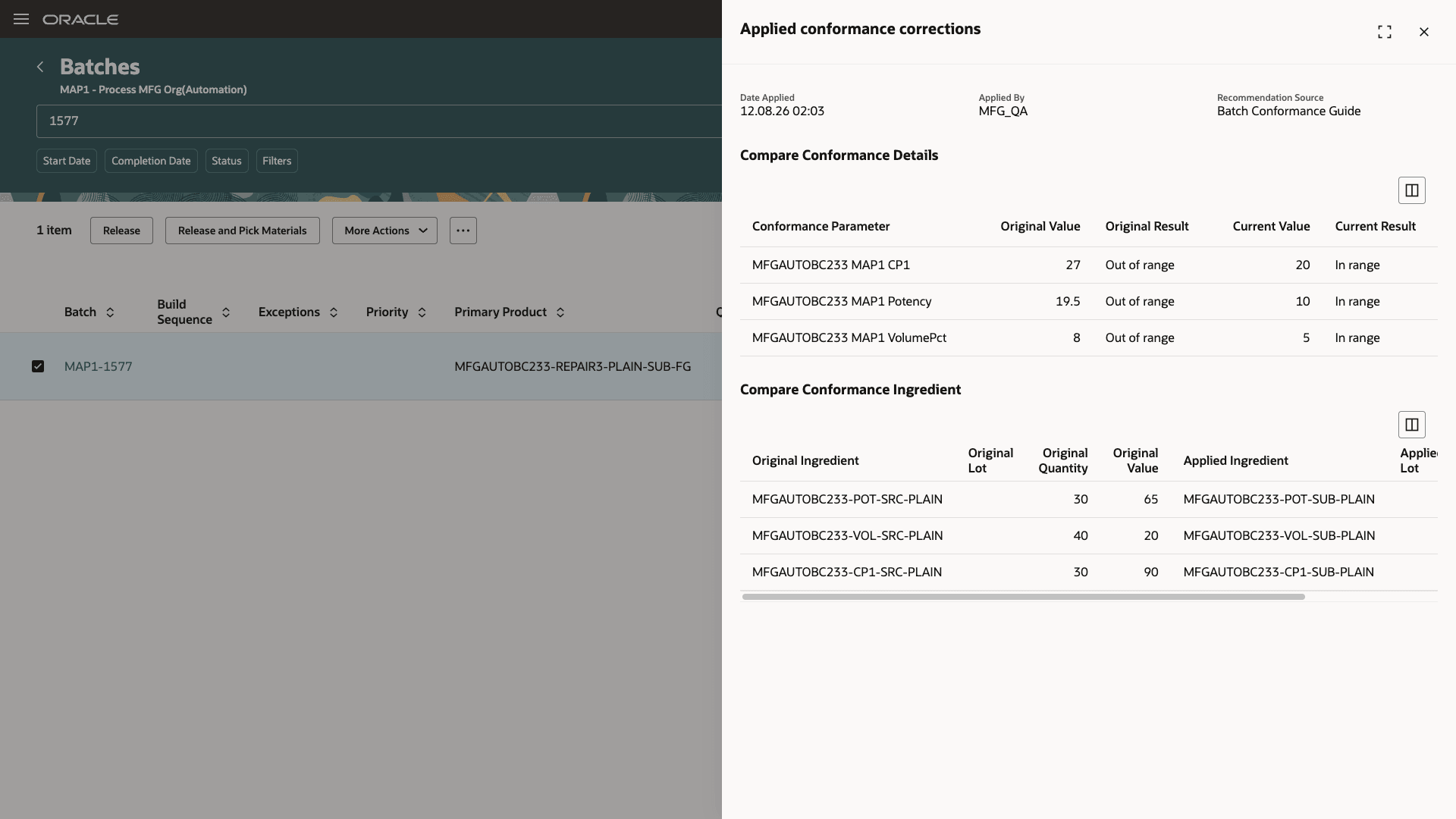
Batch corrections audit screen
Ask Oracle
You can ask questions about guided recommendations and available correction options. For example:
-
Recommend a solution for batch <<PM-BerryShake-001>> to resolve conformance issues.
-
Why are you recommending this alternate lot?
-
Which ingredient is contributing most to the moisture issue?
-
Do we have enough available quantity for the recommended replacement?
-
Show me the before and after conformance values for the recommended scenario.
-
What will change in the batch if I apply this recommendation?
-
Why can’t you recommend a correction for this batch?
-
Show me the updated batch after correction.
This feature provides the following benefits:
-
Helps production supervisors identify eligible corrective actions before releasing a batch.
-
Reduces the time required to evaluate alternate lots and substitute ingredients.
-
Maintains an audit record of agent-recommended batch corrections.
Here's the demo of these capabilities:
Steps to enable and configure
You don't need to do anything to enable this feature.
Tips and considerations
- Refer to the 26C What's New for this feature AI Agent: Batch Conformance Guide for more information.
- The AI Agent: Batch Conformance Guide also interacts with the Batch Process Manufacturing Workspace and the Batches UI in the Redwood user experience.
- Refer to the 26C feature AI Agentic App: Batch Process Manufacturing Workspace to enable the workspace.
- The Batches page in the Redwood experience is enabled through the Redwood Manage Work Orders Enabled and Use Process Manufacturing Terminology with the Redwood User Experience profile options. Refer to the 25B feature Redwood: Search and Perform Mass Actions for Work Orders Using a New User Experience and 26B feature Use Process Manufacturing Terminology with the Redwood User Experience.
-
This feature applies only to the Process Manufacturing work method.
-
Guided recommendations and corrections to resolve conformance issues are available only for unreleased batches.
-
The conformance check applies only to the primary product of the batch.
-
The enhancement doesn’t change the existing conformance parameter calculation logic from the 26C update.
-
The recommendation logic supports one out-of-range conformance parameter and one contributing ingredient at a time. If multiple ingredients contribute to a parameter, or multiple parameters in the batch are out of range, review and resolve the affected parameters manually.
-
The recommendation logic prefers an eligible alternate lot before recommending a substitute ingredient.
- The recommendation logic identifies the substitute ingredient defined in the recipe.
-
A candidate is eligible only when its available-to-reserve quantity is sufficient for the required replacement. On-hand quantity alone doesn’t establish eligibility.
-
Expired lots are eligible for recommendation. However, the reservation would fail and hence, the batch will not get updated if the recommendation was accepted.
-
The recommendation logic can only suggest lot or ingredient replacements to resolve conformance issues. It can’t change conformance setups, create conformance parameter values, correct released batches, or apply partial corrections.
-
If no recommendation can be provided by the agent, use manual simulation to evaluate an alternative lot, substitute ingredient, or quantity change.
-
A batch correction is committed only after the required reservation and batch update steps complete successfully. If any of these steps is not completed, the batch remains unchanged.
Key resources
-
Oracle Fusion Cloud SCM: Implementing Manufacturing and Supply Chain Materials Management guide, available on the Oracle Help Center.
-
Oracle Fusion Cloud SCM: Security Reference for Manufacturing and Supply Chain Materials Management guide, available on the Oracle Help Center.
Access requirements
| Privilege status | Privilege name and code |
|---|---|
| Previously delivered | Batch Process Manufacturing Workspace agentic app
WIP_ACCESS_BATCH_PROCESS_MANUFACTURING_WORKSPACE |