Use Takt-Time based scheduling for discrete production lines
For high-volume discrete production, manufacturers commonly schedule production lines per a defined takt time, so that the product is aligned with the demand and the available capacity. This enables predictable material flow and on-time delivery.
Before this update, discrete work orders on production lines were scheduled based on standard resource usages. Now, you can enable takt-time scheduling for discrete work orders referencing a production line to schedule line operations and their associated operations and resources.
Key capabilities
- Schedules production line operations using a uniform takt time.
- Schedules related work order operations and resources within a line operation.
- Supports both forward and backward scheduling.
- Uses minimum transfer quantity to enable overlap between line operations, work order operations, and resources.
- Considers all calendar constraints, including working and non-working periods, shift definitions, shift exceptions, and planned shift breaks.
- Calculates accurate work order start and completion dates based on scheduled line operation, operation, and resource timings.
Scheduling behavior
When work orders that include production lines are scheduled, the system first schedules the line operations using a uniform takt time calculated from the production line rate. Within each line operation, individual operations and resources are scheduled based on resource usage and operation dependency relationships. If a work order start date is specified, the system performs forward scheduling and aligns the start of each line operation with the start of its first operation. If a work order completion date is specified, the system performs backward scheduling and aligns the completion of each line operation with the completion of its last operation.
If a Minimum Transfer Quantity (MTQ) is defined in the work definition header, the specified value is honored while scheduling work orders. If the work order quantity is greater than one and no MTQ is specified, the system automatically uses an MTQ of 1. The MTQ enables overlapping of line operations, work order operations, and operation resources executed on the production line. Although line operation dates are used internally for scheduling, they aren't displayed in the UI.
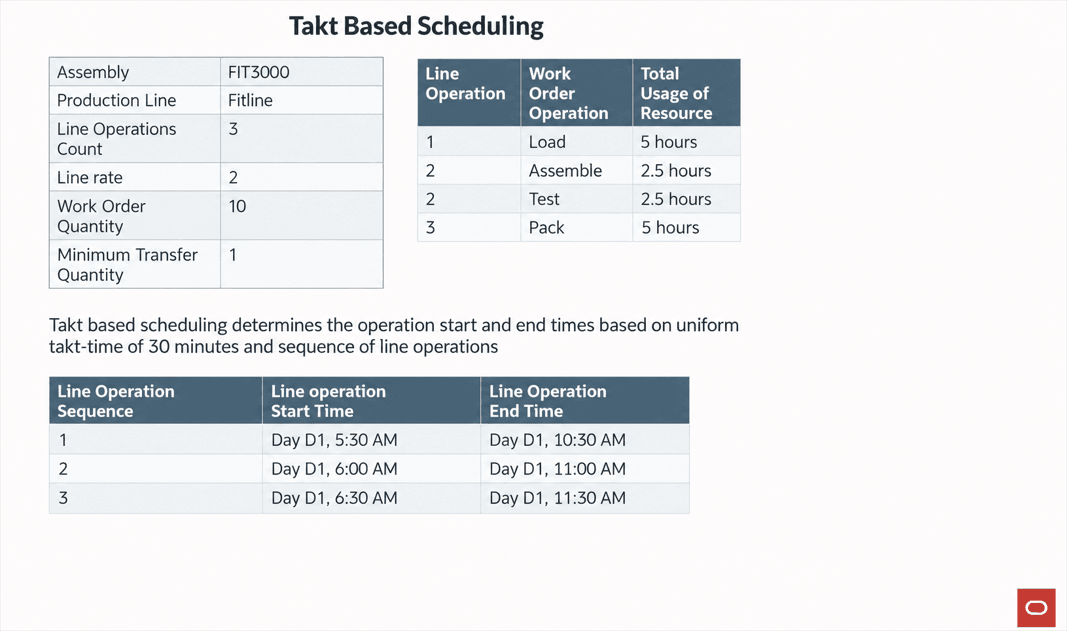
Takt-based scheduling of line operations
Takt-based forward scheduling
The following Gantt chart example illustrates how takt-based scheduling applies forward scheduling across a production line.
-
Line operation start times are staggered by the production line’s uniform takt time.
-
The first work order operation within each line operation starts at the corresponding line operation start time; its associated resources are then forward scheduled.
-
With an MTQ of 1, downstream operations and resources can begin when the first unit is available, creating overlaps across the production flow.
-
The work order completion time is the later of the final operation completion time and the existing work order completion time.
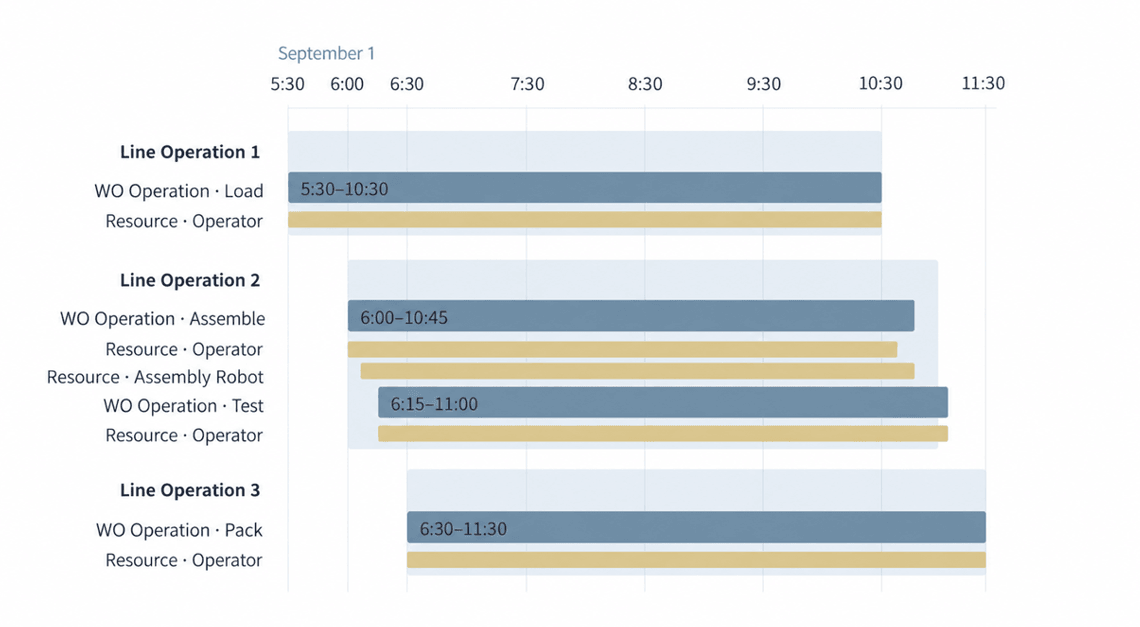
A sample illustration of forward, takt-based scheduling for a work order
Review the Operations tab to see the takt-based schedule for each work order operation. The staggered start and completion dates reflect the production line’s takt time, MTQ-based overlap, and forward resource scheduling.
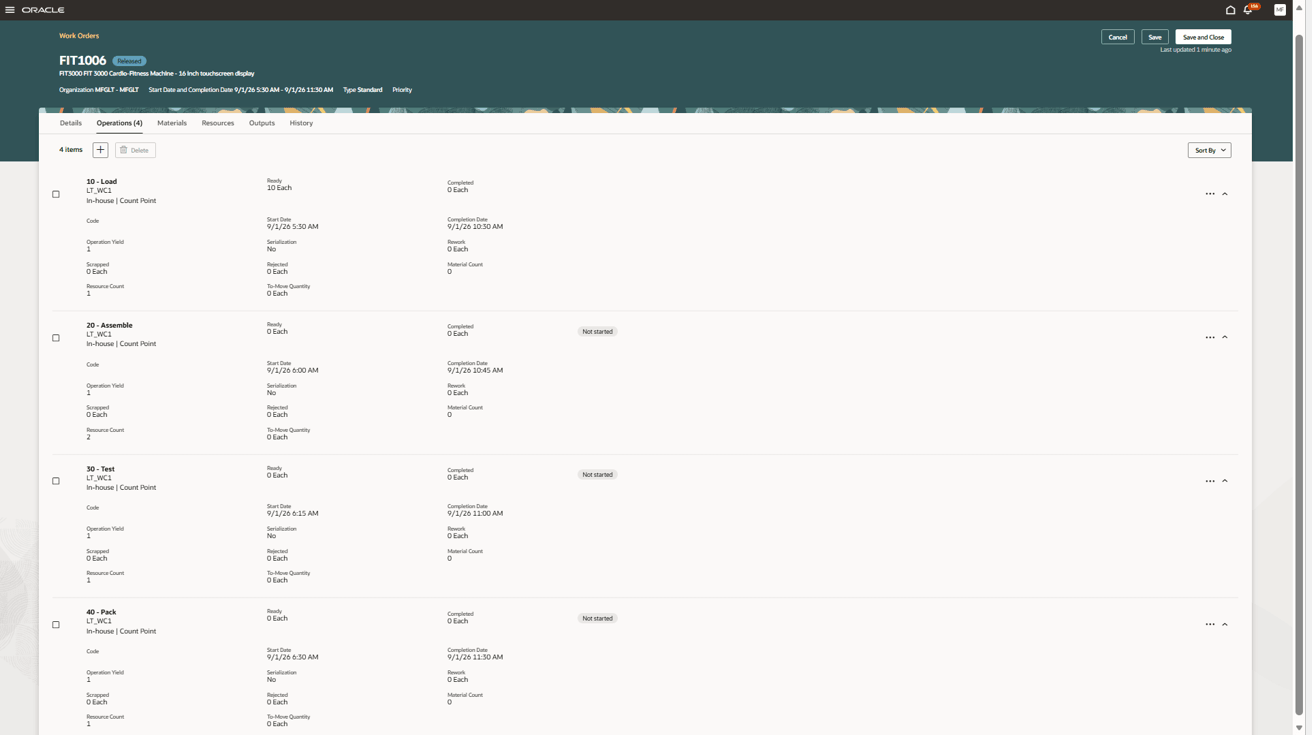
Work order with takt-based scheduling of line operations along with resource based forward scheduling of work order operations
Resource durations overlap because the minimum transfer quantity is applied at the resource level.
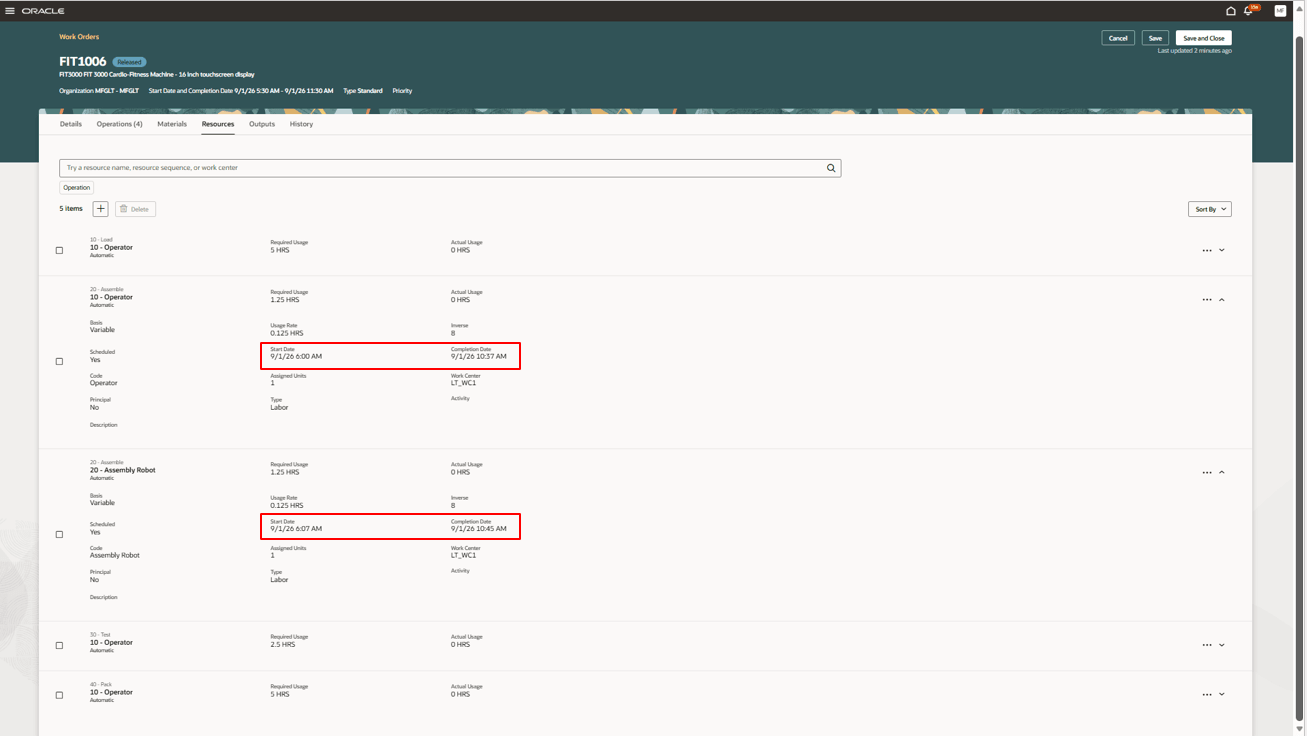
Minimum Transfer Quantity applied at the resource level
Takt-based backward scheduling
The following Gantt chart example illustrates how takt-based scheduling applies backward scheduling across a production line.
-
Line operation start times are staggered by the production line’s uniform takt time.
-
The last work order operation within each line operation ends at the corresponding line operation end time; its associated resources are then backward scheduled.
-
With an MTQ of 1, downstream operations and resources can begin when the first unit is available, creating overlaps across the production flow.
-
The work order start time is the earlier of the first operation start time and the existing work order start time.
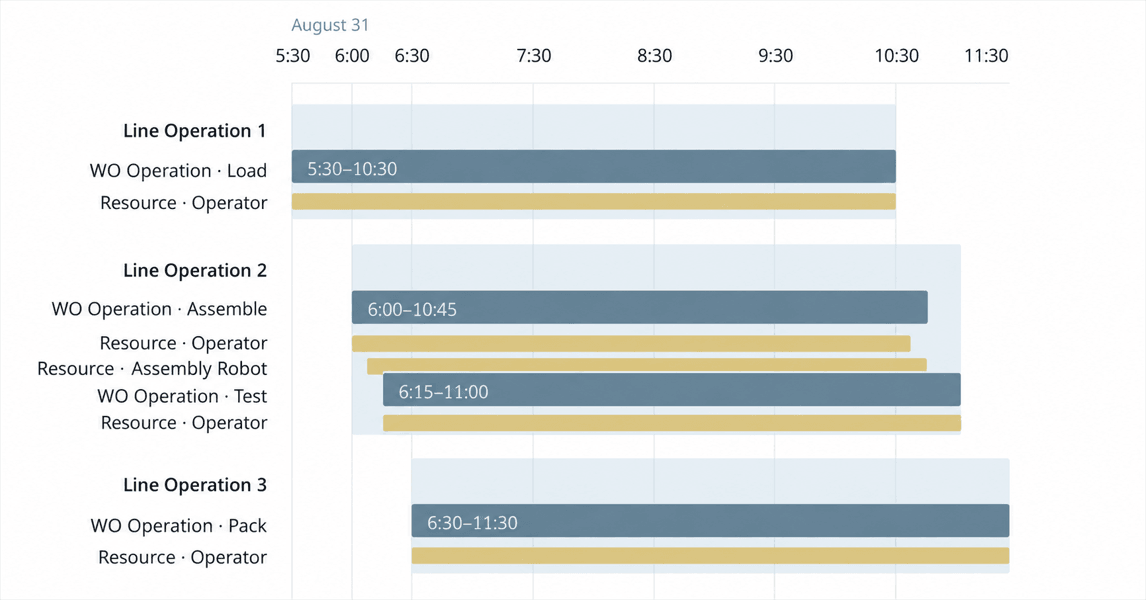
A sample illustration of takt-based, backward scheduling for a work order
Review the Operations tab to see the takt-based schedule for each work order operation. The staggered start and completion dates reflect the production line’s takt time, MTQ-based overlap, and backward resource scheduling.
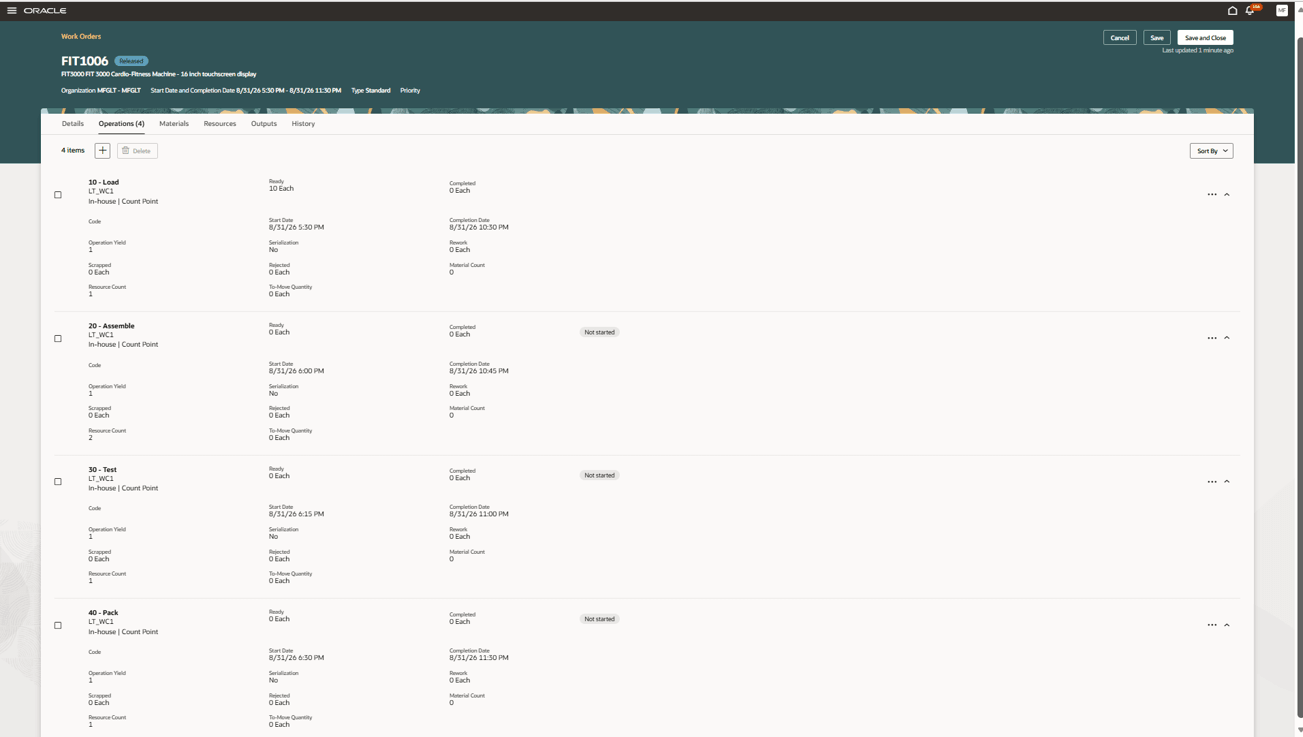
Takt-based scheduling of line operations and backward resource based scheduling of operations
Resource durations overlap because the minimum transfer quantity is applied at the resource level.
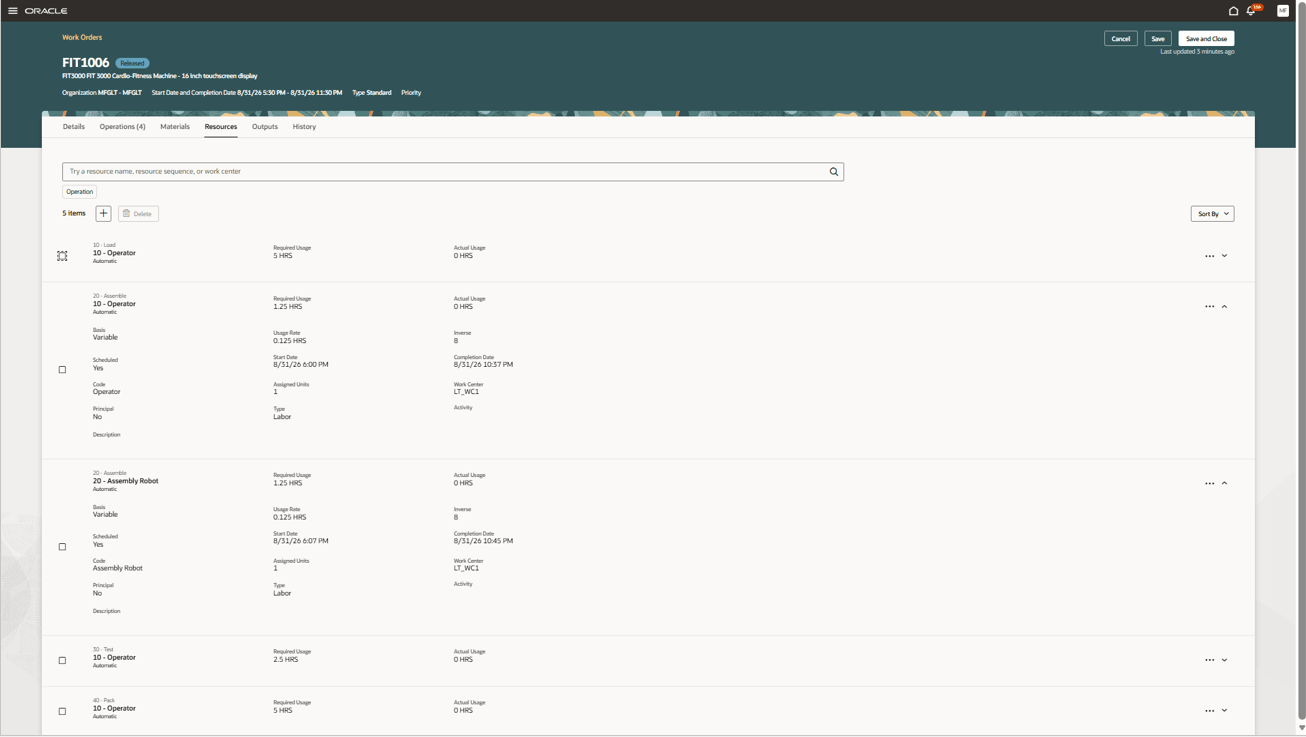
Resource durations overlap due to application of Minimum Transfer Quantity
Enable takt-time-based scheduling for production line work orders to align work order schedules with the production line rate.
Here's the demo of these capabilities:
Steps to enable and configure
There are no additional steps to enable this feature. For discrete work orders that reference a production line:
-
When the scheduling method is Default Scheduling (DEFAULT_SCHEDULER), takt-based scheduling is automatically applied to newly created or updated work orders.
-
When the scheduling method is No Scheduling (NO_SCHEDULING), the work orders continue to follow the existing behavior without takt-based scheduling.
Tips and considerations
- As a best practice, configure work definitions so that the total resource usage duration of scheduled resources for operations associated with a line operation closely aligns with the production line takt time. Significant differences between resource usage duration and takt time can result in overlaps or gaps between scheduled resources.
- Takt based scheduling is not applicable to:
- Discrete work orders that do not reference a production line.
- Process Manufacturing work orders.
- Flow Schedules.
- Maintenance work orders.
- Midpoint Scheduling is not supported for takt-based scheduling.
- Manual Scheduling method, "User or external scheduling" is not supported for discrete work orders associated with a production line.
- Manufacturing lead-time calculation is skipped for items whose primary work definition references a production line.
- Campaign resources can’t be added to a work definition associated with a production line, as this configuration isn’t supported by the production scheduling integration.
Key resources
- Watch the Use Takt-Time based scheduling for discrete production lines demo.
- Watch the Use Production Lines in Discrete Manufacturing demo.
- Refer to the 26C feature, Use Production Lines in Discrete Manufacturing.
- Oracle Fusion Cloud SCM: Refer to the Using Manufacturing guide, available on the Oracle Help Center.
- Oracle Fusion Cloud SCM: Refer to the Implementing Manufacturing and Supply Chain Materials Management guide, available on the Oracle Help Center.
Access requirements
If you are using custom job roles, then you need to validate that you have the previously delivered privileges listed.
| Privilege status | Privilege name and code |
|---|---|
| Previously delivered |
Manage Work Order Headers WIP_MANAGE_WORK_ORDER_HEADERS_PRIV |
| Previously delivered |
Manage Work Order Operations WIP_MANAGE_WORK_ORDER_OPERATIONS_PRIV |
| Previously delivered |
View Work Orders WIP_VIEW_WORK_ORDERS_PRIV |