Define sales structure for configurator models
You can define sales-driving structures for configurator models in Product Management, alongside the model's primary item structure. Use sales structure components such as choice groups, choices, numeric inputs, yes or no questions, and text entries to capture guided-selling inputs, store intermediate calculation values, and reference those values in configurator rules that drive selections and influence configuration outcomes.
Realize these benefits:
- Faster sales cycles: Use guided-selling questions to help users reach a valid configuration with fewer clicks.
- Improved quote and order accuracy: Use sales structure values in rules to guide compatible item selections and reduce invalid configurations.
- Built-in product guidance: Capture product knowledge in questions and rules so users don’t need to memorize complex product compatibility.
- Support for complex offerings: Store choices, Integer Number, Decimal Number, Yes or No, and Text Entry values for calculations and advanced configuration logic.
- Rules-driven automation: Use guided-selling responses and stored intermediate values in configurator rules to select compatible items, exclude incompatible items, and drive additional selections or calculations.
Try it:
-
Open Configurator Modeling
In Product Management, open the model in an editable Commercial Change Order. From the Structures tab, select Configurator Modeling. -
Create sales structure components
On the Configurator Structure tab, select the Add Sales Structure Component icon. Select Sales Structure Type as Choice group, Integer number, Decimal number, Yes or no, or Text entry. If you’ve selected Choice group, then in the Add Choices section, add the choices. -
Define the components
Enter the name, description, default values, and other settings for each component. -
Use the sales structure components in rules
On the Rules tab, create or edit a formula-based configurator rule. Add Sales Structure components by dragging them into the formula or by typing $ to search for them. Use their values to drive item selections, exclude incompatible items, and support other selections or calculations. -
Test and schedule the change order for release to production
Select More Actions on the top of the page and select Test Configurator Model. Set the Root Quantity, Session Effective Date, and Pricing Strategy for the test session, and then select Apply. Enter representative responses and verify the resulting selections, calculations, and model behavior. After testing and verification are complete, schedule the change order containing the model changes for release to production.
The following screenshot shows an example of a Choice Group Sales Structure component.
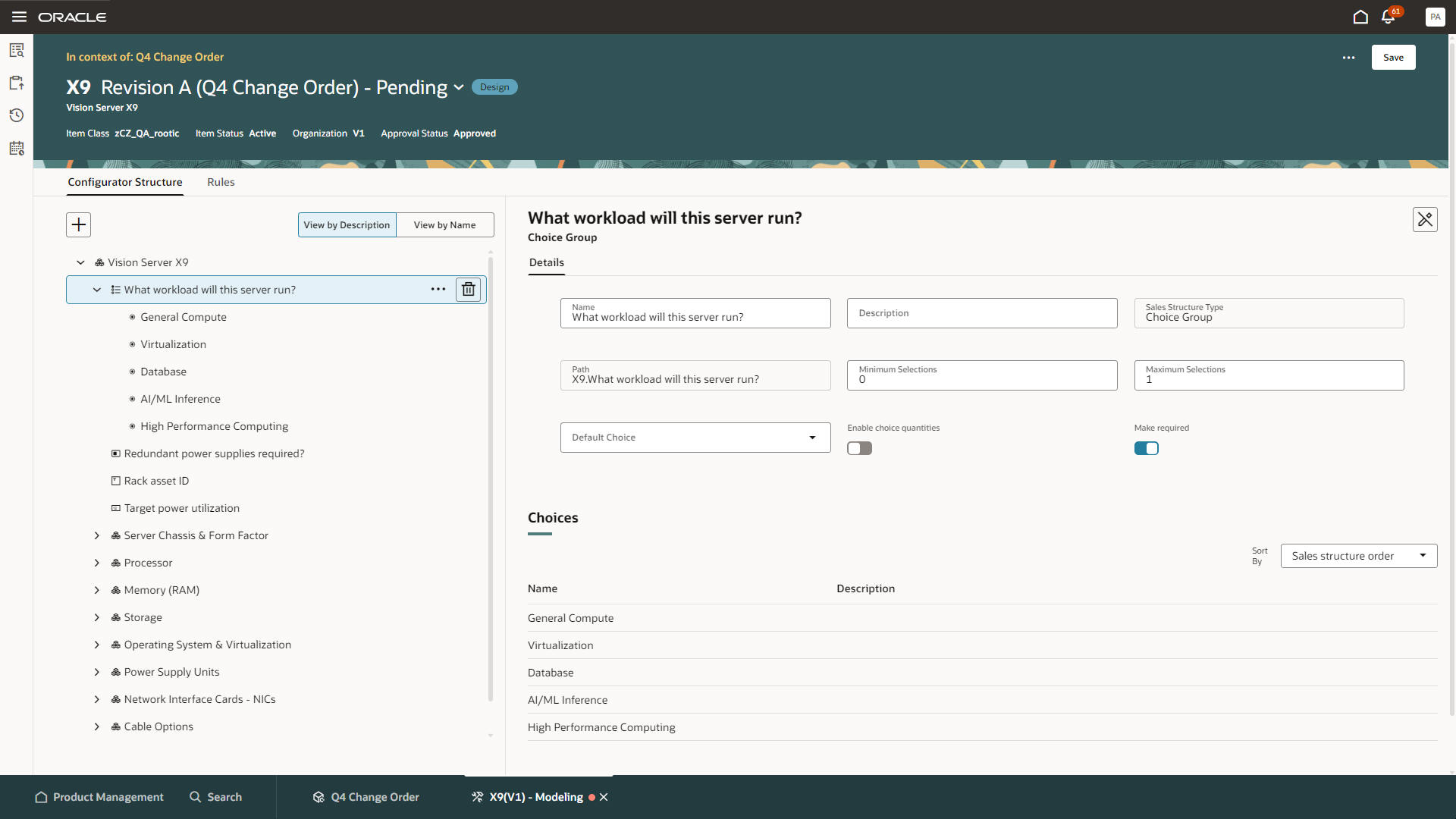
Configurator Modeling: Sales structure component (Choice Group)
Steps to enable and configure
To use the Redwood: Manage Configurator Rules in Commercial Change Orders feature, opt in to the Redwood: Author Configurator Rules in Product Management feature. If you've already opted in to this feature, no further action is required.
You must also complete the steps to enable the Redwood: Create and Edit Items and Redwood: Create and Edit Workflows features.
Tips and considerations
- Formula-based rules only: Use Sales Structure components in formula-based configurator rules. Configurator Logic (When/Then) rules don’t support Sales Structure components in this update.
- Use supported operators: Match the rule operator to the component type. Integer number and Decimal number support numeric comparisons, while Yes or no and Text entry support equality-based comparisons. Invalid or missing operators prevent rule validation.
- Review rule dependencies: Before deleting a Sales Structure component, review the rules that reference it. Invalid or deleted references can prevent model testing and change order scheduling until they’re resolved.
Access requirements
If you're using custom job roles, then you need to add privileges identified as new in this update as well as validate that you've the existing privileges listed.
Configurator privileges:
| Privilege status | Privilege name and code |
|---|---|
| Previously delivered |
Manage Configurator Model Structure CZ_MANAGE_MODEL_STRUCTURE_PRIV |
| Previously delivered |
Manage Configurator Rules CZ_MANAGE_RULES_PRIV |
| Previously delivered |
Test Configurator Model CZ_TEST_MODEL_PRIV |
| Previously delivered |
Access Configurator Runtime CZ_CONFIGURATOR_RUNTIME_ACCESS_PRIV |
| Previously delivered |
Access HCM Common Components HRC_ACCESS_HCM_COMMON_COMPONENTS_PRIV |
| Previously delivered |
Manage HCM Rules HRC_MANAGE_HCM_RULES_PRIV |
Configurator duties:
| Privilege status | Duty role name and code |
|---|---|
| Previously delivered |
Redwood Configurator Manager ORA_CZ_REDWOOD_MANAGER_DUTY |
| Previously delivered |
Redwood Configurator Manager – For access to the Rule Builder details ORA_REDWOOD_MANAGER_DUTY_HCM |
| Previously delivered |
Redwood Configurator Reviewing – Optional for read-only access to the Configurator Rule details ORA_CZ_REDWOOD_REVIEWING_DUTY |
| Previously delivered |
Redwood Configurator Reviewing – Optional for read-only access to the Rule Builder detail ORA_CZ_REDWOOD_REVIEWING_DUTY_HCM |
Product Management privileges:
| Privilege status | Privilege name and code |
|---|---|
| Previously delivered |
View Item Redwood Items EGP_VIEW_REDWOOD_ITEM_PRIV |
| Previously delivered |
View Item Redwood Attachments EGP_VIEW_REDWOOD_ITEM_ATTACHMENT_PRIV |
| Previously delivered |
View Item Redwood Associations EGP_VIEW_REDWOOD_ITEM_ASSOCIATION_PRIV |
| Previously delivered |
View Item Redwood Structures EGP_VIEW_REDWOOD_ITEM_STRUCTURE_PRIV |
| Previously delivered |
View Item Redwood Changes EGP_VIEW_REDWOOD_ITEM_CHANGE_PRIV |
| Previously delivered |
View Item Redwood Item Categories EGP_VIEW_REDWOOD_ITEM_CATEGORIES_PRIV |
| Previously delivered |
View Item Redwood Relationships EGP_VIEW_REDWOOD_ITEM_RELATIONSHIP_PRIV |
| Previously delivered |
View Item Redwood Quality EGP_VIEW_REDWOOD_ITEM_QUALITY_PRIV |
| Previously delivered |
Enter Trading Community Organization Information HZ_ENTER_TRADING_COMMUNITY_ORGANIZATION_INFORMATION_PRIV |
| Previously delivered |
Get Failure Condition Event Codes MNT_GET_FAILURE_CONDITION_EVENT_CODE_BY_SERVICE_PRIV |
| Previously delivered |
Get Item Attribute Control REST EGP_ITEM_ATTRIBUTE_CONTROL_READ_PRIV |
| Previously delivered |
Get Item Lifecycle Phases Read REST EGP_ITEM_LIFECYCLE_PHASES_READ_REST_PRIV |
| Previously delivered |
Get Item Status REST EGP_ITEM_STATUSES_READ_PRIV |
| Previously delivered |
Get New Item Request REST EGI_NEW_ITEM_REQUEST_REST_PRIV |
| Previously delivered | Get Template REST EGP_TEMPLATE_READ_PRIV |
| Previously delivered |
Manage Material Planner MSP_MANAGE_MATERIAL_PLANNER_PRIV |
| Previously delivered |
Manage Subscription Setup OSS_MANAGE_SUBSCRIPTION_SETUP_PRIV |
| Previously delivered |
Remove Trading Community Organization HZ_REMOVE_TRADING_COMMUNITY_ORGANIZATION_PRIV |
| Previously delivered |
Set Up Receivables Payment Terms AR_SET_UP_RECEIVABLES_PAYMENT_TERM_PRIV |
| Previously delivered |
Update Trading Community Organization HZ_UPDATE_TRADING_COMMUNITY_ORGANIZATION_PRIV |
| Previously delivered |
Verify Tax Configuration ZX_VERIFY_TAX_CONFIGURATION_PRIV |
| Previously delivered |
View Procurement Buyers List of Values using REST Service PO_VIEW_BUYER_LOV_REST_SERVICE_PRIV |
| Previously delivered |
View Purchasing Hazard Classes List of Values using REST Service PO_VIEW_HAZARD_CLASSES_LOV_REST_SERVICE_PRIV |
| Previously delivered |
View Purchasing UN Numbers List of Values using REST Service PO_VIEW_UNNUMBER_LOV_REST_SERVICE_PRIV |
| Previously delivered |
View Trading Community Organization HZ_VIEW_TRADING_COMMUNITY_ORGANIZATION_PRIV |
| Previously delivered |
View Trading Community Person HZ_VIEW_TRADING_COMMUNITY_PERSON_PRIV |
| Previously delivered |
Manage Item Redwood Items EGP_MANAGE_REDWOOD_ITEM_PRIV |
| Previously delivered |
Manage Item Redwood Attachments EGP_MANAGE_REDWOOD_ITEM_ATTACHMENT_PRIV |
| Previously delivered |
Manage Item Redwood Associations EGP_MANAGE_REDWOOD_ITEM_ASSOCIATION_PRIV |
| Previously delivered |
Manage Item Redwood Item Categories EGP_MANAGE_REDWOOD_ITEM_CATEGORY_PRIV |
| Previously delivered |
Manage Item Redwood Relationships EGP_MANAGE_REDWOOD_ITEM_RELATIONSHIP_PRIV |
| Previously delivered |
Manage Item Redwood Structures EGP_MANAGE_REDWOOD_ITEM_STRUCTURE_PRIV |
| Previously delivered |
Get New Item Request Rest EGI_NEW_ITEM_REQUEST_REST_PRIV |
| Previously delivered |
Manage Item Status REST EGP_ITEM_STATUSES_PRIV |
| Previously delivered |
Manage Change Orders ACA_MANAGE_CHANGE_ORDERS_PRIV |
| Previously delivered |
Modify Change Status EGO_MODIFY_CHANGE_STATUS_PRIV |
Product Management duty:
| Privilege status | Duty role name and code |
|---|---|
| Previously delivered |
Supply Chain Common View Web Service ORA_RCS_SCM_COMMON_VIEW_WEB_SERVICE_DUTY |