View negotiation line details in Supplier Portal
Review supplier negotiation line details directly from Supplier Portal pages in the Redwood experience. On supported pages, suppliers can select a line description in the Lines section to open a drawer and view the details. This helps you review requirements and supporting information without leaving the response, negotiation review, monitoring, amendment, or compare versions flow.
The drawer shows only information for the selected line, such as lot or group context, item and quantity details, pricing-related information, supplier notes, attachments, price breaks or quantity-based price tiers, cost factors, retainage, and line attributes. This gives suppliers a consistent way to inspect line information while preparing responses, reviewing negotiation details, monitoring negotiations, and reviewing amendments or new round changes.
Pages that support viewing line details:
- Supplier Portal > Negotiations > Create Response > Lines
- Supplier Portal > Negotiations > Edit Response > Lines
- Supplier Portal > Negotiations > View Negotiation > Lines > More Details
- Supplier Portal > Negotiations > Monitor Response > Lines
- Supplier Portal > Negotiations > Acknowledge Amendments > Lines
- Supplier Portal > Negotiations > Compare Versions > Lines
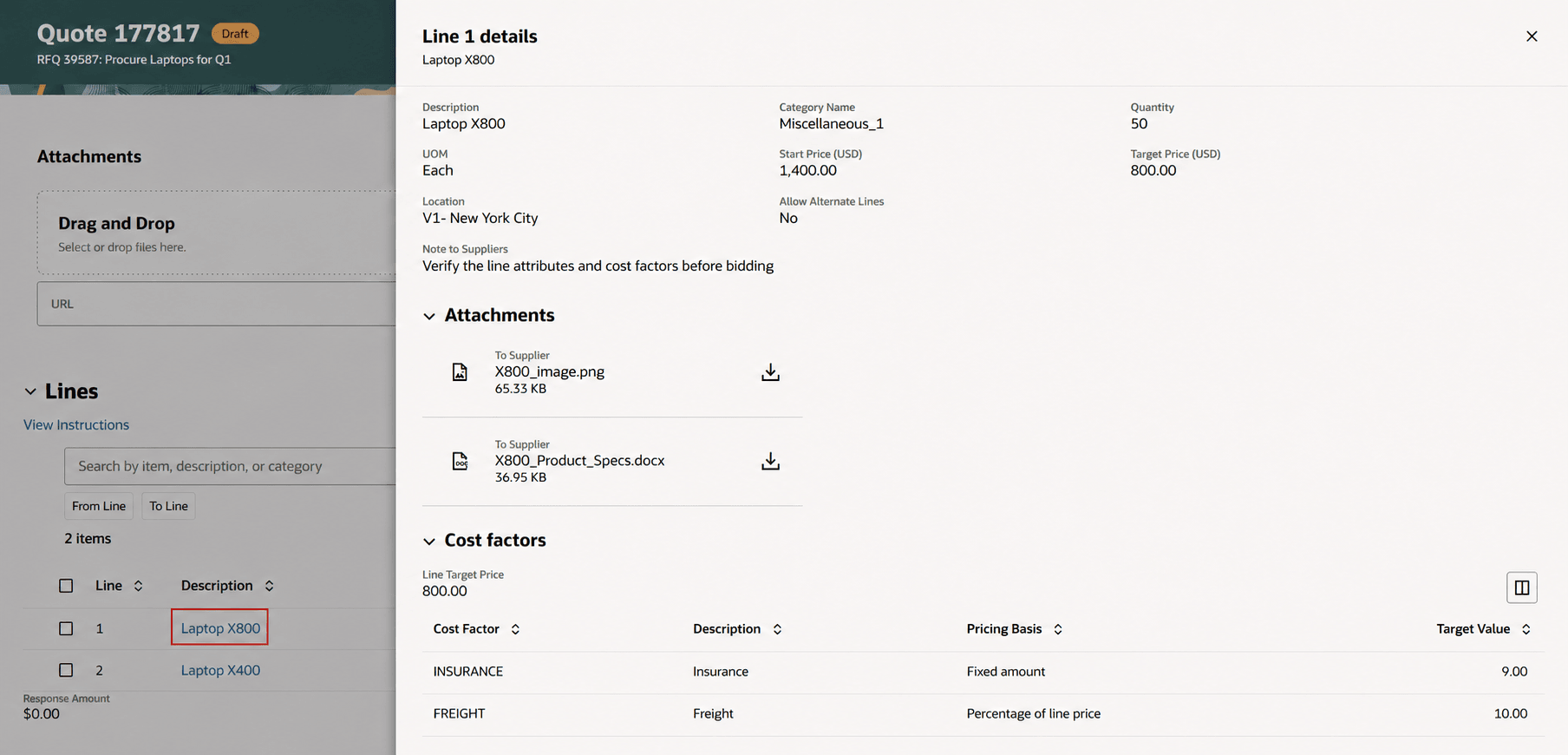
View line details
Reviewing line details directly from supplier negotiation pages reduces page switching and helps suppliers understand line requirements before responding, monitoring, or reviewing changes. Suppliers can make more informed responses because relevant line context and supporting line information are available from the same Redwood flow.
Steps to enable and configure
Use the Opt In UI to enable this feature. For instructions, refer to the Optional Uptake of New Features section of this document.
Offering: Procurement
To use this feature, you must opt in to the Update 25A feature, Redwood: Enable the New Supplier Portal Home Page Experience in Supplier Portal functional area. If you previously opted in, then this feature is automatically enabled.
Refer to the What's New for the detailed instructions on Steps to Enable.
Key resources
- Refer to the What's New for the Redwood: Use New Supplier Experience for Sourcing feature.
- Refer to the What's New for the Redwood: Enable the New Supplier Portal Home Page Experience in Supplier Portal functional area.
- For information about using Oracle Visual Builder Studio to extend your Redwood application pages, see Oracle Fusion Cloud HCM and SCM: Extending Redwood Applications for HCM and SCM Using Visual Builder Studio.
- Refer to Overview of Guided Journeys in the Oracle Fusion Cloud Human Resources: Implementing and Using Journeys guide, available on the Oracle Help Center.