Confirm Prerequisites for Configuring the Fusion Service Application in Oracle Field Service
Note
This enhancement only applies to Oracle Field Service environments. You can verify whether you've Oracle Field Service or Oracle Fusion Field Service, by signing in and checking on the About page.
Starting in Release 26C, administrators can add an Oracle Fusion Service and Service Logistics application in Oracle Field Service to enable integration with Oracle Fusion Service and Service Logistics. This integration connects Oracle Field Service with Oracle Fusion Service information and processes used throughout the service workflow.
As part of this enhancement, Oracle Field Service now displays a Confirm Prerequisites dialog box when administrators perform setup or maintenance actions for an Oracle Fusion Service and Service Logistics application. The dialog box helps ensure that all required Oracle Fusion Service prerequisite setup tasks are completed before configuration continues.
Before proceeding, administrators must confirm completion of these Oracle Fusion Service prerequisite tasks:
- Expose Work Order Setup
https://docs.oracle.com/en/cloud/saas/fusion-service/faefs/expose-the-work-order-setup.html - Create SOA Operator Job Role
https://docs.oracle.com/en/cloud/saas/fusion-service/faefs/create-a-b2b-service-integration-user-account.html#Create-the-SOA-Operator-Job-Role
These setup tasks are required for the integration to function correctly. The dialog box includes links to the related Oracle Fusion Service documentation so administrators can review and complete any required setup steps before continuing.
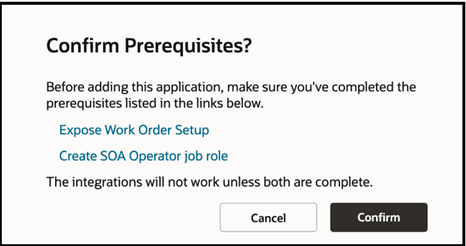
Confirm Prerequisites
The Confirm Prerequisites dialog box appears when administrators perform any of the following actions for an Oracle Fusion Service and Service Logistics application in Oracle Field Service:
- Add a new Fusion Service application
- Retry application configuration after a failure
- Reconfigure an existing Fusion Service application
- Modify an existing Fusion Service application
For example, when an implementation consultant adds an Oracle Fusion Service and Service Logistics application from the Applications page, Oracle Field Service displays the Confirm Prerequisites dialog box before proceeding with the configuration. The consultant can use the provided links to verify the required Oracle Fusion Service setup, complete any missing prerequisite tasks, and then return to Oracle Field Service to continue the configuration process.
Business Benefits
- Minimize setup delays and errors by ensuring all Oracle Fusion Service prerequisites are completed in advance.
- Guide administrators through the required Oracle Fusion Service setup steps before proceeding with application configuration.
- Provide quick access to prerequisite documentation through direct reference links.
- Enable a more streamlined and user-friendly setup experience for administrators, consultants, and implementation teams.
Steps to enable and configure
You don't need to do anything to enable this feature.
Tips and considerations
- The Confirm Prerequisites dialog box does not complete the Oracle Fusion Service prerequisite tasks automatically.
- Administrators should complete the required setup in Oracle Fusion Service before confirming the dialog.