Manage A2A Agents
Agent2Agent (A2A) is a standard protocol that enables AI agents to discover and communicate, even when they use different frameworks or run in different environments.
Use A2A to delegate work across agent or platform boundaries and to expose a published Agent Factory agent to external clients.
| Use case | What you do |
|---|---|
| Delegate work to an external agent | Register a trusted external A2A agent, then add it to a workflow by using the External Agent node. |
| Expose an Agent Factory agent | Enable A2A access for a published Agent Factory agent so that an authorized external A2A client can discover and invoke it. |
For an end-to-end client and server example, see Math Help Assistant and Basic Math Service.
An A2A integration has two main parts:
| Part | Description |
|---|---|
| Agent Card | Describes an agent’s identity, purpose, skills, supported protocol interfaces, content types, and authentication requirements. |
| A2A endpoint | Accepts standardized requests so another agent or application can send work, retrieve task status, continue a conversation, or request cancellation. |
An A2A client uses the Agent Card and supported protocol operations to interact with the agent through a consistent contract. This helps you use a capability owned by another agent without rebuilding it as a local tool, data source, or nested Agent Builder agent.
Use A2A to:
- Let an Agent Builder workflow delegate a specialized request to an external agent.
- Make a published Agent Factory agent available to an authorized external agent or orchestrator.
- Combine agents built with different frameworks without moving them into one workflow or deployment.
- Keep the remote agent independently owned and deployed while controlling discovery, authentication, and access from Agent Factory.
Before You Begin
Before you configure A2A, complete the prerequisites for the use case you need.
- For outbound delegation to an external agent, obtain the remote agent’s reachable Agent Card URL and any required authentication credential. Make sure Agent Factory can reach the Agent Card and the remote agent endpoint.
- For inbound access to an Agent Factory agent, publish the workflow first. The workflow cannot contain an External Agent node.
- To invoke an Agent Factory agent from an external A2A client, generate an agent-specific A2A API key and provide it to the client as a Bearer token. Store the key securely.
- Verify that the external client supports the protocol and authentication method advertised in the target agent’s Agent Card.
Register an External A2A Agent
Register an external agent when you want a local workflow to delegate work to a trusted remote A2A agent.
- From the navigation menu, select Utilities > A2A Agents > External agents.
- Click Add external agent.
- Enter the Agent Card URL for the external agent.
- Select the authentication method required by the agent: None, Bearer token, API key, Auth Request, or OAuth. Enter the credential when required.
- Click Discover agent and review the discovered name, description, supported skills, endpoint, and authentication information. Verify that the badge on the card UI reads “External agent is compatible”.
- Click Add. The external agent is added in the Disabled state.
- Enable the agent before you use it in a workflow. Its status changes to Connected when Agent Factory can communicate with it.
You can view, edit, rediscover, enable, or disable an external agent from the External agents tab. If you change the Agent Card URL or authentication configuration, rediscover the agent before using it again. Agent Factory stores credentials securely and does not display or copy them after you save the agent.
For a client configuration example, see Configure the Math Help Assistant.
The External agents tab shows the current state of each registered remote agent.
| Status | Meaning | Action |
|---|---|---|
| Disabled | The agent is registered but cannot be selected in an External Agent node. | Enable the agent after you verify its Agent Card and authentication configuration. |
| Connected | Agent Factory can communicate with the enabled remote agent. | You can select the agent in an External Agent node. Rediscover it after its Agent Card or authentication configuration changes. |
| Warning | The agent is enabled, but Agent Factory detected a condition that needs attention. | Review the Agent Card, endpoint, and authentication configuration, then rediscover the agent. |
| Unavailable | Agent Factory cannot currently communicate with the remote agent. | Verify that the remote endpoint is running and reachable, then verify the Agent Card URL and authentication configuration. |
Add an External Agent to a Workflow
- Open the workflow in Agent Builder.
- In Components, expand Agents, then add an External Agent node.
- Select an enabled external agent.
- To delegate through a local Agent, connect the External Agent node Agent output to the local Agent node Sub-agents input.
- Configure the local Agent instructions to delegate the appropriate task to the external agent.
You can also use the External Agent node directly by sending it a message and using its Message output. For node inputs, outputs, configuration details, and example flows, see External Agent.
Enable A2A Access for a Published Agent Factory Agent
Enable A2A only after you publish the workflow. Publishing alone does not expose the agent through A2A.
- Open the published agent in the chat window.
- Select Integration options, then select A2A.
- Enable A2A access.
- Copy the Agent Card URL for the external client.
- Generate an agent-specific A2A API key. The external client must send this key as a Bearer token.
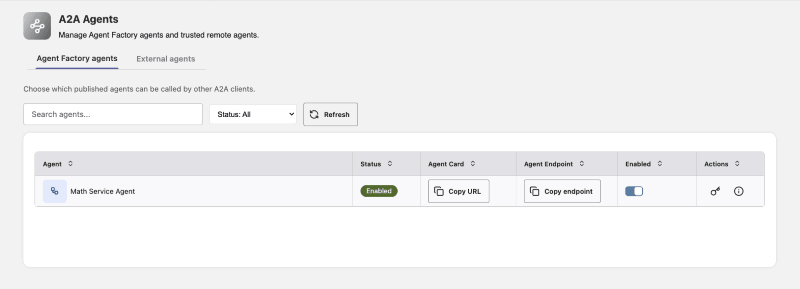
You can also manage published agents from Utilities > A2A Agents > Agent Factory agents. This view shows the A2A status, Agent Card, and endpoint. It also lets you enable or disable A2A access and create or manage agent-specific API keys. Administrators can also generate workflow API keys from Integration Options. See API Key.
For a server configuration example, see Configure the Basic Math Service.
Do not share an A2A API key in a URL, request body, log, or screenshot. Store it securely. Agent Factory displays the raw key only when you generate it.
The Agent Factory agents tab shows the A2A availability of published Agent Factory agents.
| Status | Meaning | Action |
|---|---|---|
| Enabled | The published agent accepts authorized inbound A2A requests. | Provide the Agent Card URL or endpoint URL and an agent-specific API key to the external client. |
| Disabled | The agent is published but does not accept inbound A2A requests. | Enable A2A from Integration options or from the Agent Factory agents tab. |
| Unavailable | The published agent is not currently available for A2A access. | Verify that the workflow is available and published, then review its A2A configuration. |
Supported in the Current Release
The current release supports the following A2A capabilities.
| Capability | Support |
|---|---|
| Outbound delegation | Register, authenticate, and use a trusted external A2A agent in an External Agent node. |
| Inbound A2A access | Enable an eligible published Agent Factory agent for authorized external A2A clients. |
| Protocol | A2A 1.0, with compatibility for A2A 0.3, using JSON-RPC over HTTP(S). |
| Authentication | External-agent authentication by None, Bearer token, API key, Auth Request, or OAuth. Inbound Agent Factory access by agent-specific API key as a Bearer token. |
| Content | Plain text requests and responses. |
| Agent discovery | Discover a registered external agent from its Agent Card URL and view the Agent Card and endpoint for an enabled Agent Factory agent. |
| Endpoint operations | Send work, retrieve task status, continue a conversation, and request task cancellation through supported A2A protocol operations. |
Use the Agent Card URL, protocol, and authentication method advertised by the target agent.
Not Supported in the Current Release
- Streaming responses, subscriptions, and push notifications
- gRPC transport
- Files, images, data parts, or other structured content; use plain text only
- Multiple advertised skills in an Agent Factory Agent Card; Agent Factory advertises one sanitized high-level skill
- A global public catalog of Agent Cards
- Inbound A2A access for a workflow that contains an External Agent node
Disabling A2A access blocks A2A requests without unpublishing the workflow.
Troubleshoot A2A Agents
| Issue | Action |
|---|---|
| Agent discovery fails. | Verify that the Agent Card URL is complete, reachable from Agent Factory, and points to an A2A Agent Card. Verify the required authentication method and credential, then try discovery again. |
| The external agent remains disabled or cannot connect. | Verify the Agent Card URL, authentication method, and credential. Rediscover the agent, then enable it. If the agent remains unavailable, verify that its endpoint is running and accessible. |
| The external agent returns an authentication or authorization error. | Update the configured credential to match the authentication method in the Agent Card, then rediscover the agent. |
| The external agent’s capabilities have changed. | Rediscover the agent to refresh its Agent Card information. |
| The external agent status is Warning. | Review the Agent Card URL, endpoint, and authentication configuration. Rediscover the agent, review the updated card, and enable it again. |
| Refresh does not show updated skills or Agent Card information. | Refresh updates only the table. Select Rediscover agent to retrieve and validate the current Agent Card. |
| The External Agent picker is empty. | Add and enable the external agent, then close and reopen the picker. Confirm that the source status is Connected. |
| Delegation does not occur. | Connect the External Agent node Agent output to the local Agent node Sub-agents input. Update the local Agent instructions to state when to delegate and what information to send. |
| An external client cannot invoke a published Agent Factory agent. | Verify that the workflow is published, A2A is enabled in Integration options, and the client uses the agent-specific API key as a Bearer token. |
| The Agent Factory agent status is Unavailable. | Verify that the workflow is available and published. If needed, disable and re-enable A2A after you correct the workflow issue. |
| The Agent Card works, but the remote call fails. | Use the endpoint, protocol version, method, and request format advertised by the Agent Card. Do not mix A2A 1.0 and 0.3 method names or request formats. |
| An A2A request is rejected because of unsupported content or protocol features. | Send plain text content only. Do not use files, images, structured data parts, streaming, push notifications, or gRPC. |
| A task remains in progress. | Retrieve the task status no more than once per second. After a transient transport error or HTTP 429 response, retry with backoff. |
| A cancellation request is rejected. | Retrieve the task status. If the task is no longer cancelable, allow it to reach a terminal state. |
| A follow-up request does not include the expected conversation context. | Wait for the current task to reach a terminal state, then retry the follow-up with the returned context information. |
| One chat thread receives another thread’s A2A state. | Disable A2A, verify that Share between chat threads is turned off, and contact support before enabling A2A again. |
| A workflow cannot be enabled for inbound A2A. | Remove the External Agent node from the workflow, or use the workflow only for outbound delegation. |