Using ORDS Model Context Protocol (MCP)
This chapter describes how to use the ORDS Model Context Protocol (MCP) endpoint after it has been enabled and configured by an ORDS administrator. ORDS MCP makes selected database resources and services available to MCP-compatible tools, enabling users to securely discover and interact with ORDS capabilities through a standardized protocol.
Oracle REST Data Services (ORDS) Model Context Protocol (MCP) enables authenticated AI clients and developer tools to discover authorized ORDS MCP databases, inspect schema metadata, and execute SQL through standardized MCP tools.
ORDS MCP provides seamless integration between Oracle Database and AI applications, allowing you to query Oracle Database using natural language through AI-powered interactions.
Caution:
Granting a large language model (LLM) access to your database can expose sensitive data if the LLM is configured with excessive privileges.
To reduce this risk, follow these security best practices:
-
Grant least-privilege access: Configure the database user account used by the ORDS MCP connection pool with only the privileges required to perform the intended tasks.
-
Avoid direct access to production databases: Use a sanitized, read-only replica or a dedicated subset of data whenever possible.
-
Monitor and audit LLM activity: Regularly review the SQL statements executed through ORDS MCP to detect unexpected or unauthorized access attempts.
-
Audit LLM activity: Regularly audit the queries executed by the LLM. This helps you detect anomalies or the attempts to access restricted data. To support your auditing efforts, the ORDS MCP Server provides the following built-in monitoring capabilities:
-
Session tracking: It populates
VSESSION.MODULEwith the LLM name, andV$SESSION.ACTIONwith the MCP tool name. -
Activity logging: Records every interaction and SQL execution in the
DBTOOLS$MCP_LOGtable.
-
-
About ORDS MCP
This section provides an overview of the Model Context Protocol (MCP) and explains how ORDS implements it to enable authenticated AI applications to interact with Oracle Database. It also describes the ORDS MCP endpoint, authorized database targets, and how AI clients discover and access them. -
About ORDS MCP Server Tools
This section describes the tools provided by the ORDS MCP Server and how they enable AI applications to discover authorized databases, inspect schema metadata, and execute SQL and PL/SQL through the standardized MCP interface. -
Understanding the ORDS MCP Workflow
This section explains how the ORDS MCP Server processes requests from AI applications, from interpreting natural language prompts to executing SQL against Oracle Database and returning the results to the client. -
Configure MCP Deep Data Security
This section explains how to configure an MCP database pool for Oracle Deep Data Security. It describes password-based local end-user access, application-token authentication, end-user security-context propagation, and the database administrator responsibilities for data roles and data grants -
Preparing the Environment for ORDS MCP
This following sections describe how to prepare your environment for ORDS MCP by installing the required software and configuring database connections. -
MCP Authentication and Discovery
This section describes how ORDS MCP authenticates clients using OAuth 2.0 Bearer JWT access tokens and how clients discover the required authentication metadata. -
Configure MCP Deep Data Security
This section explains how to configure an MCP database pool for Oracle Deep Data Security. It describes password-based local end-user access, application-token authentication, end-user security-context propagation, and the database administrator responsibilities for data roles and data grants.
-
MCP Protocol Requests
This section describes the ORDS MCP endpoint, required request headers, supported protocol versions, and request validation behavior. -
Connecting to the ORDS MCP Server
This section explains how to configure an MCP client to connect to the ORDS MCP Server. -
Discover ORDS MCP Tools
This section describes the tools available in the ORDS MCP Server. -
Discover Authorized Databases
This section explains how to discover the databases that the caller is authorized to access. -
Inspect Schema Metadata
This section describes how to retrieve schema metadata with configurable levels of detail. -
Execute SQL
This section describes how to execute SQL or PL/SQL statements using thesql_runtool. -
Understanding Authorization Failures
About ORDS MCP Server Tools -
Monitoring the ORDS MCP Server
This section explains how to monitor and audit ORDS MCP Server activity using database logs, session views, and application context information. -
Database Session Identity Attributes
This section explains how to retrieve the request ECID and correlate database activity with ORDS logs. -
Correlating Database Activity with ORDS Logs
This section describes how to retrieve the request ECID and use it to correlate database activity with ORDS logs.
See Also: Monitoring the ORDS MCP Server
About ORDS MCP
This section provides an overview of the Model Context Protocol (MCP) and explains how ORDS implements it to enable authenticated AI applications to interact with Oracle Database. It also describes the ORDS MCP endpoint, authorized database targets, and how AI clients discover and access them.
The Model Context Protocol (MCP) is an open standard that provides a consistent method for applications to supply contextual information to AI models. MCP standardizes the connection between AI systems and external tools or data sources, such as databases and APIs. After establishing a connection, an AI client can use natural language to perform the full range of database operations. This includes executing SQL queries and invoking PL/SQL procedures.
ORDS MCP is an authenticated MCP server available at the /mcp endpoint on the ORDS host. It enables AI applications to interact with Oracle databases through the standardized MCP interface, providing a structured way to discover and use authorized databases.
In MCP client responses, ORDS identifies each authorized MCP target as a database. Each database corresponds to an ORDS direct database pool configured by an administrator.
See Also: Model Context Protocol
About ORDS MCP Server Tools
This section describes the tools provided by the ORDS MCP Server and how they enable AI applications to discover authorized databases, inspect schema metadata, and execute SQL and PL/SQL through the standardized MCP interface.
The ORDS MCP Server provides a set of tools that enable AI applications to interact with Oracle databases.
These tools enable AI applications to perform sophisticated database tasks through natural language interactions, including executing SQL queries, invoking PL/SQL procedures, running complex analytical queries, and automating administrative tasks. By providing a standardized interface to Oracle databases, the ORDS MCP Server reduces the need for specialized database expertise and simplifies the execution of complex database operations.
The following tools are currently available through the ORDS MCP Server:
-
database_list: Discovers and lists all accessible MCP database targets. Each database corresponds to a single database schema. Use this tool to identify thedatabaseargument required by the other MCP tools. -
schema_information: Provides detailed schema information for the specified database. -
sql_run: Runs SQL queries and PL/SQL code blocks against the specified database. -
report_list: Lists predefined reports visible for the selected authorized MCP database. -
report_list: Lists the predefined reports available in the selected authorized MCP database. -
report_sql: Returns the saved SQL or PL/SQL source for an authorized report without running it. -
report_execute: Runs an authorized predefined report. -
Custom SQL tool: ORDS administrator-defined SQL or PL/SQL scripts published as individual MCP tools.
Understanding the ORDS MCP Workflow
This section explains how the ORDS MCP Server processes requests from AI applications, from interpreting natural language prompts to executing SQL against Oracle Database and returning the results to the client.
The ORDS MCP Server provides a standardizes protocol between AI systems and your Oracle Database.
The following steps describe the ORDS MCP Server workflow:
-
User request: The user submits a natural language request to an MCP client (for example, Claude Desktop), such as, “Retrieve all employees hired last month from the HR schema.”
-
MCP client processing: The MCP client performs the following tasks:
-
Interprets the natural language request, identifies the user’s intent, and determines the appropriate ORDS MCP Server tool to invoke.
-
Sends the interpreted request to an AI model, which translates it into the appropriate SQL statement or PL/SQL code.
-
Uses the Model Context Protocol (MCP) to issue a structured tool call to the ORDS MCP Server, including the generated SQL statement or PL/SQL code for execution.
-
-
Database operation: The ORDS MCP Server receives the request and executes the corresponding SQL query against the Oracle Database using the selected ORDS Database Pool configuration.
-
Response formatting and delivery: ORDS processes the query results, formats the response in compliance with MCP standards, and sends it back to the MCP client. The client then renders the information in clear, natural language for the user.
Figure 1: ORDS MCP Server Workflow
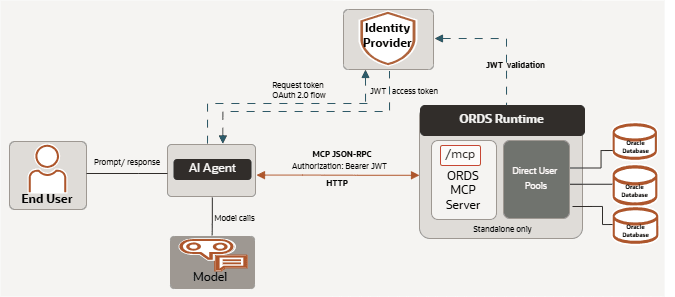
Description of the illustration ords_mcp_server.png
Preparing the Environment for ORDS MCP
This following sections describe how to prepare your environment for ORDS MCP by installing the required software and configuring database connections.
-
Installing the Required Software
This section describes the software requirements for the ORDS MCP Server and the versions you must install before configuring and using ORDS MCP. -
Authorization Server for ORDS MCP
This section describes how to configure an authorization server for ORDS MCP authentication. -
Configuring ORDS MCP
This section describes how to enable and configure ORDS MCP, including JWT authentication and optional Role-Based Access Control (RBAC). -
Creating an MCP-Compatible ORDS Database Pool
This section describes how to create and configure an MCP-compatible ORDS database pool.
Installing the Required Software
This section describes the software requirements for the ORDS MCP Server and the versions you must install before configuring and using ORDS MCP.
Install the following software before you configure and use the ORDS MCP Server:
-
Oracle REST Data Services (ORDS) 26.2.0 or later
-
Oracle Java Runtime Environment (JRE) 17, 21, or 25
Authorization Server for ORDS MCP
This section describes how to configure an authorization server for ORDS MCP authentication.
Access to ORDS MCP requires a valid JWT bearer token. Configure an authorization server that can issue JWT tokens with either {{urn:oracle:dbtools:ords:mcpserver:all scope}} for scope based access or ORDS_MCP_SERVER role for role based access.
Configuring ORDS MCP
This section describes how to enable and configure ORDS MCP, including JWT authentication and optional Role-Based Access Control (RBAC).
The MCP feature is disabled by default. Enable it by running the following command:
ords --config /path/to/conf config set feature.mcp trueUse the following global ORDS settings to configure how ORDS can validate the JWT Bearer token:
ords --config /path/to/conf config  set --global mcp.security.jwt.profile.issuer "https://idp.example.comm/"
ords --config /path/to/conf config  set --global mcp.security.jwt.profile.audience "https://ords.example.com/mcp"
ords --config /path/to/conf config  set --global mcp.security.jwt.profile.jwk.url "https://idp.example.com/.well-known/jwks.json"
ords --config /path/to/conf config  set --global mcp.security.jwt.profile.authorization.server.url "https://idp.example.com"
Optionally, a claim in the JWT can be used to suppport Role Based Access Control in conjunction with an MCP Database Pool configured with mcp.role setting.
ords --config /path/to/conf config set --global mcp.security.jwt.profile.role.claim.name "/roles"Creating an MCP-Compatible ORDS Database Pool
This section describes how to create and configure an MCP-compatible ORDS database pool.
The ORDS MCP Server relies on preconfigured database pools that are dedicated to MCP use.
Note: For an ORDS database pool to be accessible to an MCP client, it must:
-
Connect directly to the target database user (for example,
HR). It must not connect through an ORDS runtime user such asORDS_PUBLIC_USER. -
Specify either
mcp.scopeormcp.role, depending on your preferred security model.
To create an MCP-compatible database pool, run a command similar to the following example:
ords --config /path/to/conf config --db-pool mcp-hr set db.connectionType basic
ords --config /path/to/conf config --db-pool mcp-hr set db.hostname databaseserver
ords --config /path/to/conf config --db-pool mcp-hr set db.port 2600
ords --config /path/to/conf config --db-pool mcp-hr set db.servicename orcl
ords --config /path/to/conf config --db-pool mcp-hr set db.username HR
ords --config /path/to/conf config --db-pool mcp-hr set db.description "Human Resources MCP Acccess"
ords --config /path/to/conf config --db-pool mcp-hr set mcp.scope "urn:oracle:dbtools:ords:mcpserver:all"
ords --config /path/to/conf config --db-pool mcp-hr secret db.password
Note: In this example, mcp.scope is set to the global scope, urn:oracle:dbtools:ords:mcpserver:all, which is required to access the MCP service. Alternatively, you can configure a custom scope for each database pool to control access individually.
Configure MCP Deep Data Security
Oracle Deep Data Security (Deep Sec) enables Oracle Database to authorize ORDS MCP database access by using an application identity and, when configured, the authenticated ORDS MCP end-user identity. Database policies can restrict the rows, columns, and operations available to each end user and application.
If your organization chooses to use Oracle Deep Data Security with ORDS MCP, configure the database and identity-provider resources described in this section.
Configure Database and Identity Provider Prerequisites
Before you configure an ORDS MCP database pool for Deep Sec, configure the required database and identity-provider resources.
For a local end-user pool that uses password authentication, the database administrator creates the local end user, assigns local data roles, and creates the required data grants.
For an application-token pool that uses authenticated end-user context, the database and identity administrator is responsible for:
- Registering the application with the identity provider.
- Creating the database application identity.
- Assigning application roles to end users in the identity provider.
- Creating Deep Sec data roles that correspond to application roles.
- Creating data grants that define permitted database rows, columns, and operations.
ORDS establishes the database connection and propagates the authenticated MCP user context when required. ORDS does not create or manage identity-provider users or roles, database data roles, or database data grants.
See the Oracle AI Database documentation:
- Application Registrations, Users, and Roles
- Configure the Security Context
- Configure Data Access Control
- Create Data Grants
Configure an ORDS MCP Deep Sec Database Pool
Use the db.authentication pool setting to choose the database authentication mode.
| Value | Description |
|---|---|
PASSWORD |
Uses the configured db.username and secure db.password for a fixed database identity, including a database-managed local end user. This is the default. It does not propagate the individual MCP caller identity. |
APP_TOKEN |
ORDS obtains a database access token for the configured application and connects with the application identity. It does not propagate the individual MCP caller identity. |
APP_TOKEN_WITH_END_USER_TOKEN |
ORDS obtains a database access token for the configured application and attaches the authenticated MCP user token as the Oracle Database end-user security context. |
Use a Database-Managed Local End User with Password Authentication
Use PASSWORD authentication when the ORDS MCP database pool connects with a database-managed local end-user account.
Configure the Local End-User Credentials in the Database Pool
ords --config /path/to/conf config --db-pool mcp-hr set db.authentication PASSWORD
ords --config /path/to/conf config --db-pool mcp-hr set db.username mcp_hr_end_user
ords --config /path/to/conf config --db-pool mcp-hr secret db.password
PASSWORD is the default value for db.authentication.
The configured db.username and db.password identify the database principal for every connection borrowed from the pool. All MCP callers authorized to use the pool access the database as the same local end user.
Create a Local End User and Grant Data Access
The following example creates a database-managed local end user, grants the database session privilege required for direct logon, and grants a Deep Sec data role. The data grant permits the role to query selected columns of the HR.EMPLOYEES table.
CREATE END USER mcp_hr_end_user IDENTIFIED BY <password>;

CREATE ROLE direct_logon_role;
GRANT CREATE SESSION TO direct_logon_role;
GRANT direct_logon_role TO mcp_hr_end_user;

CREATE DATA ROLE hrapp_employees;
GRANT DATA ROLE hrapp_employees TO mcp_hr_end_user;
GRANT direct_logon_role TO hrapp_employees;

CREATE OR REPLACE DATA GRANT hr.hrapp_employee_access
  AS SELECT (first_name, last_name, email)
  ON hr.employees
  TO hrapp_employees;
Run the following query to verify the data-role assignments:
SELECT data_role, role_type, grantee, grantee_type
FROM dba_data_role_grants
WHERE grantee IN ('MCP_HR_END_USER', 'HRAPP_EMPLOYEES');
Configure Application Token Authentication
Use APP_TOKEN when the database authorizes access using only the application identity. Use APP_TOKEN_WITH_END_USER_TOKEN when the database must authorize each authenticated MCP user individually through the end-user security context.
For either mode, configure the following pool settings:
| Setting | Description |
|---|---|
db.authentication |
Specifies the authentication mode for the MCP pool. PASSWORD is the default. APP_TOKEN uses a database access token for the configured application identity. APP_TOKEN_WITH_END_USER_TOKEN uses the application token and propagates the authenticated MCP user token as the Oracle Database end-user security context. |
db.access.token.endpoint |
The trusted HTTPS OAuth token endpoint that issues the application database access token. |
db.access.client.id |
The OAuth client identifier for the application. |
db.access.client.secret |
The secure OAuth client secret for the application. |
db.access.scope |
One or more OAuth scopes requested for the database access token. Separate multiple scopes with spaces. |
For example, run the following ORDS CLI commands:
ords --config /path/to/conf config --db-pool mcp-hr set db.authentication APP_TOKEN_WITH_END_USER_TOKEN
ords --config /path/to/conf config --db-pool mcp-hr set db.access.token.endpoint https://idp.example.com/oauth2/v1/token
ords --config /path/to/conf config --db-pool mcp-hr set db.access.client.id mcp-hr-application
ords --config /path/to/conf config --db-pool mcp-hr set db.access.scope https://database.example.com/.default
ords --config /path/to/conf config --db-pool mcp-hr secret db.access.client.secret
Store db.access.client.secret as an ORDS secure configuration value. Configure only a trusted HTTPS identity-provider endpoint.
For APP_TOKEN_WITH_END_USER_TOKEN, ORDS authenticates the MCP request, obtains a separate database access token for the configured application, and attaches the authenticated MCP user token as the Oracle JDBC end-user security context. ORDS clears that context before returning the connection to the pool.
Configure Data Roles and Data Grants
Deep Sec data roles represent database authorization assigned to application users. For externally managed users, create data roles that correspond to the roles issued by the identity provider. Then create data grants to define the permitted data access.
The following example maps a Microsoft Entra ID application role to a Deep Sec data role. Mapping syntax depends on the configured identity provider.
CREATE DATA ROLE employee_role MAPPED TO 'AZURE_ROLE=EMPLOYEE';The following data grant permits users with the employee_role data role to query only the row that matches their end-user identity. It prevents access to the ssn column.
CREATE OR REPLACE DATA GRANT hr.employees_own_record
  AS SELECT (ALL COLUMNS EXCEPT ssn)
  ON hr.employees
  WHERE email = ORA_END_USER_CONTEXT.username
  TO employee_role;
Data grants are database security policies. Design and test them according to your organization’s authorization requirements. For complete syntax and privilege requirements, see CREATE DATA GRANT.
Verify the End-User Security Context
For an APP_TOKEN_WITH_END_USER_TOKEN request, use the sql_run tool to verify that the database receives the expected end-user identity and data roles.
SELECT ORA_END_USER_CONTEXT.username AS end_user
FROM dual;
Query V$END_USER_DATA_ROLE only when the configured database identity has the required database privilege:
SELECT role_name
FROM v$end_user_data_role;
Use these queries and representative application queries to verify that:
- The expected end-user identity is present.
- The expected data roles are enabled.
- Row-level filtering returns only authorized rows.
- Protected columns are unavailable or masked as intended.
If the configured database identity cannot query the dynamic performance view, a database administrator can use the Deep Sec administrative views to validate security-context and data-role state. For additional runtime diagnostics, see End-User Security Context Views.
MCP Authentication and Discovery
This section describes how ORDS MCP authenticates clients using OAuth 2.0 Bearer JWT access tokens and how clients discover the required authentication metadata.
ORDS MCP requires a bearer JWT access token for authentication. An unauthenticated request to /mcp returns a bearer challenge that identifies the protected-resource metadata location. MCP clients can use the following protected-resource metadata endpoint during OAuth discovery:
/.well-known/oauth-protected-resource/mcpWhen the ORDS administrator provides an authorization server URL, the client uses the associated metadata to discover the authorization server, obtain a JWT access token for the /mcp resource, and invoke the /mcp endpoint with an Authorization: Bearer <access_token> header.
An ORDS administrator may choose not to configure an authorization server URL. In this case, ORDS omits the authorization_servers field from the protected-resource metadata to keep the authorization server private. The MCP client must therefore be configured with the authorization server details outside of ORDS discovery.
The token must contain the global ORDS MCP access scope:
urn:oracle:dbtools:ords:mcpserver:allDepending on the server configuration, the token might also require a pool-specific scope or role to access a specific MCP database.
MCP Protocol Requests
This section describes the ORDS MCP endpoint, required request headers, supported protocol versions, and request validation behavior.
The ORDS MCP endpoint accepts JSON-RPC requests over HTTP POST at the /mcp endpoint.
Include the following headers:
Authorization: Bearer access-token
Content-Type: application/json
Accept: application/json, text/event-stream
MCP-Protocol-Version: 2025-06-18
ORDS MCP supports the following MCP protocol versions:
-
2025-06-18
-
2025-11-25
ORDS rejects unsupported MCP-Protocol-Version header values, invalid origins, and JSON-RPC batch requests. If an initialize request body contains an unsupported protocol version, ORDS negotiates to the latest supported protocol version.
Connecting to the ORDS MCP Server
This section explains how to configure an MCP client to connect to the ORDS MCP Server.
The ORDS MCP Server supports any MCP client that implements the Streamable HTTP transport and OAuth 2.0 authentication. If your MCP client supports only the local stdio transport, then use a proxy such as mcp-remote to provide OAuth authentication and remote HTTP connectivity.
To use the ORDS MCP Server, configure your preferred MCP client, such as Claude Desktop or Cline, by specifying the server endpoint and the required authentication details. Once configured, the client automatically manages the connection and enables natural language interactions with Oracle Database through the ORDS MCP Server.
- Configuring Claude Desktop
This section describes the ORDS MCP endpoint, required request headers, and supported protocol versions.
Configuring Claude Desktop
This section describes the ORDS MCP endpoint, required request headers, and supported protocol versions.
Perform the following steps to configure Claude Desktop for ORDS MCP Server. After configuration, Claude Desktop automatically uses the ORDS MCP Server, enabling you to perform Oracle Database operations through your conversations with Claude.
Claude Desktop uses mcp-remote to handle OAuth authentication and remote HTTP communication with the ORDS MCP Server.
-
Use the following command to install
mcp-remote:npm install -g mcp-remote -
Install Claude Desktop.
Note: Installing Claude for Desktop.
-
Download the configuration file.
-
From the Claude Desktop menu, select File and then Settings
-
In the Settings window, select the Developer tab
-
Click Edit Config to download the
claude_desktop_config.jsonconfiguration file
-
-
Edit the
claude_desktop_config.jsonfile in a text editor. Add the following JSON configuration snippet, replacing"https://ords.example.com/mcp"with the absolute path of your ORDS server, and save the configuration file.{ "mcpServers": { "ords-mcp": { "command": "npx", "args": [ "mcp-remote@latest", "https://ords.example.com/mcp", "--allow-http" ] } } } -
Verify the configuration
Click Search and tools in the prompt box. Verify that the ORDS MCP Server tools are listed and enabled. If necessary, restart Claude Desktop for the changes to take effect.
Discover ORDS MCP Tools
This section describes the tools available in the ORDS MCP Server.
Connect your LLM to the ords-mcp MCP server to discover the available tools and interact with your Oracle Database using natural language. Use the tools/list method to retrieve the tools exposed by ORDS MCP.
ORDS MCP provides the following tools:
-
database_list: Lists the MCP database connections that the caller is authorized to access -
schema_information: Returns schema metadata for an authorized MCP database -
sql_run: Executes SQL or PL/SQL for an authorized MCP database -
report_list: Lists predefined reports visible for the selected authorized MCP database. -
report_list: Lists the predefined reports available in the selected authorized MCP database. -
report_sql: Returns the saved SQL or PL/SQL source for an authorized report without running it. -
report_execute: Runs an authorized predefined report. -
Custom SQL tool: ORDS administrator-defined SQL or PL/SQL scripts published as individual MCP tools.
Discover Authorized Databases
This section explains how to discover the databases that the caller is authorized to access.
Use the database_list tool to discover the MCP databases that the caller is authorized to access.
You can optionally specify the name argument to filter the results by database name. The filter is case-insensitive.
When show_details is set to true, ORDS includes configured database descriptions, if available. If a database is not returned, either the caller is not authorized to access it or the corresponding connection pool is not configured for MCP.
Inspect Schema Metadata
This section describes how to retrieve schema metadata with configurable levels of detail.
Use the schema_information tool to inspect the schema metadata of an authorized database. The level, objects_list, filter, and model parameters are optional. Specify BRIEF to retrieve a concise summary or DETAILED to include comprehensive metadata.
Execute SQL
This section describes how to execute SQL or PL/SQL statements using the sql_run tool.
To run SQL or PL/SQL statements against an authorized database, use sql_run tool. SQL statements run with the privileges of the underlying ORDS database connection pool. The sql_run tool can run statements that modify database state. Client applications should present this capability with caution and should not treat it as a read-only operation.
ORDS records MCP SQL execution details for auditing purposes. The optional model value can be used to attribute the operation to the AI model or client workflow that requested it.
sql_run is intended for interactive tool use. It is not a bulk export or pagination API.
Understanding Authorization Failures
This section explains how ORDS MCP authorizes requests and describes the most common causes of authorization failures.
ORDS MCP authorizes access in two stages. First, the bearer token must satisfy the global MCP JWT profile and include the global MCP access scope (urn:oracle:dbtools:ords:mcpserver:all). Second, the token must be authorized to access the target database. Depending on how the ORDS administrator configured MCP, authorization is based on either a scope or a role. The target database can be configured with either a custom mcp.scope value (which is not discoverable by clients) or the global MCP access scope (which is discoverable).
If database_list does not include a database, the caller cannot infer whether the corresponding connection pool exists. If a tool call targets a database that the caller is not authorized to access, ORDS denies the operation.
Common causes of authorization failure include:
-
Missing bearer token
-
Token issuer, audience, or signature does not match the ORDS MCP JWT profile
-
Token does not contain the global MCP access scope
-
Token does not contain the pool-specific scope or role required for the requested database
-
Requested database is not configured as an MCP pool
Monitoring the ORDS MCP Server
This section explains how to monitor and audit ORDS MCP Server activity using database logs, session views, and application context information.
ORDS MCP Server provides database-side monitoring and auditing capabilities that allow administrators to observe MCP activity, identify the authenticated caller, and correlate database operations with ORDS request processing.
Monitoring information is available through the following sources:
-
DBTOOLS$MCP_LOGtable -
Database session views such as
V$SESSION -
CLIENTCONTEXTapplication context namespace -
Monitoring MCP Activity
This section explains how to review persisted MCP audit entries and maintain the audit log. -
Monitoring Live Sessions
This section explains how to view active MCP-backed database sessions and correlate them with MCP requests.
Monitoring MCP Activity
This section explains how to review persisted MCP audit entries and maintain the audit log.
ORDS MCP records database-connected MCP tool activity in the DBTOOLS$MCP_LOG table. You can query this table to review persisted MCP audit entries.
Custom SQL tools and report_execute activity are included with the other database-connected MCP tools.
For example, the sql_run tool records the executed SQL statement after ORDS injects a sanitized model comment, while the schema_information tool records a summary such as get schema metadata for <schema>. To protect the integrity of the audit trail, ORDS rejects non-SELECT statements that target DBTOOLS$MCP_LOG.To maintain database performance, regularly prune the DBTOOLS$MCP_LOG table. For example, retain only the most recent entries or schedule a periodic cleanup job to prevent unbounded growth.
To view persisted audit entries, run a query similar to the following:
SELECT
    id,
    mcp_client,
    model,
    end_point_type,
    end_point_name,
    log_message
FROM dbtools$mcp_log
ORDER BY id DESC
Custom SQL tools and report_execute activity are included with the other database-connected MCP tools.
Monitoring Live Sessions
This section explains how to view active MCP-backed database sessions and correlate them with MCP requests.
If you have database administrator (DBA) privileges, you can monitor active MCP-backed database sessions in real time by querying the V$SESSION view.
To display active MCP-backed database sessions, run a query similar to the following:
SELECT
    sid,
    serial#,
    username,
    module,
    action,
    client_identifier,
    status
FROM v$session
WHERE module IS NOT NULL
ORDER BY sid;
Read the CLIENTCONTEXT values to correlate an active database session with its MCP request. Custom SQL tools and report_execute use the same session monitoring information as built-in database-connected MCP tools.
Database Session Identity Attributes
This section explains how to retrieve the request ECID and correlate database activity with ORDS logs.
When you run a database-connected MCP tool, such as sql_run, schema_information, a custom SQL tool, or report_execute, through ORDS MCP Server, ORDS propagates the authenticated end-user identity to the database session. These identity attributes are stored in the CLIENTCONTEXT application context namespace.You can capture these attributes using Oracle Database Unified Auditing and correlate them with ORDS logs to provide end-to-end traceability for MCP requests.
The following table describes the identity attributes available in the CLIENTCONTEXT namespace:
Table 1 Database Session Identity Attributes
| Attribute | Description |
|---|---|
OAUTH_PRINCIPAL |
Specifies the identity of the authenticated caller. |
OAUTH_SUB |
Specifies the OAuth subject value. |
OAUTH_ISSUER |
Specifies the OAuth token issuer. |
OAUTH_MODE |
Specifies the authorization mode used for the request, such as scope or role. |
REQUEST_ECID |
Specifies the ORDS request ECID used to correlate with ORDS logs. |
OAUTH_APP_ROLES |
Specifies the application roles assigned to the authenticated subject. |
OAUTH_APP_SCOPES |
Specifies the application scopes assigned to the authenticated subject. |
You can retrieve these attributes by using the SYS_CONTEXT function:
SELECTSYS_CONTEXT('CLIENTCONTEXT','<PARAMETER_NAME>')FROMdual;Correlating Database Activity with ORDS Logs
This section describes how to retrieve the request ECID and use it to correlate database activity with ORDS logs.
ORDS MCP stores the ORDS Execution Context Identifier (ECID) in the REQUEST_ECID application context attribute. Administrators can use the ECID to correlate database activity with ORDS logs and request processing records.
To retrieve the ECID for the current request, run the following query:
SELECT
    SYS_CONTEXT('CLIENTCONTEXT', 'REQUEST_ECID') AS request_ecid
FROM dual;
To view the corresponding MCP audit entries in the ORDS logs, enable FINE logging for ORDS.
You can then use the retrieved ECID to locate the matching request in the ORDS logs, providing end-to-end traceability between the ORDS and database tiers.