5 Configuring the acs.conf
This chapter explains how to configure acs.conf.
About acs.conf
The Advanced Control Services (ACS) tools and processes depend on the ACS configuration file, acs.conf (located in /IN/service_packages/ACS/etc/). There is an acs.conf file on the SMS and each SLC. The configuration options on the SMS are different to the configuration options on the SLC.
When ACS is fully installed there may be other configuration options that are added to acs.conf which are not explained in this section. Any configuration options not described in this section are required by the application and should not be changed by the user.
The configuration file consists of several sections named for the processable they control. Each section contains a parameter representing a single configuration option. Leading ‘#’ characters represent comments and are ignored by the system. Each section must be terminated by a ‘:’ character. All configuration options (except those for section headers such as 'acsChassis') must be indented or they will be ignored.
Note:
The acsChassis section is much larger than the other processables. Consequently the section has been subdivided within this document.
Example Configuration Sections
Here are examples of configuration sections.
Example 1
Here is an example of a configuration section for the acsStatsMaster processable.
acsStatsMaster
 port 1490
 shmKey 17170588
 semKey 17170589
 masterStatsServer tcprodscp:
Example 2
Here is an example of a configuration section for the ACS_outgoing service.
ACS_outgoing
 NormalUseHex 1
 NormalisationRule (2,-,0,32)
 NormalisationRule (2,0,1,32)
 NormalisationRule (2,00,2,32)
 DenormalisationRule (2,2,1,-)
 DenormalisationRule (3,3,1,-)
 DenormalisationRule (4,4,1,-):
Implementing Parameter Changes
If acs.conf is changed by the operator the service needs to be restarted, so that the configuration file is reread and the changes take effect. For more information about restarting the service see Managing Processes.
Parameter Types
There are three types of parameters listed within the following topics:
- Parameters that are a standard part of acs.conf and must be configured with the correct setting
- Parameters that are a standard part of acs.conf with default settings and do not require configuring except in the case of custom settings for a specific site
- Parameters that must be added to acs.conf with the correct setting
Note:
Some parameters appear only once within the following topics (for example,
port). Other parameters may appear multiple times (for example,
ServiceEntry).
acsChassis Plug-ins
The acsChassis section defines how to handle traffic coming in to slee_acs. It defines the traffic processed by a specified service and service loader plug-in library combination. It also defines how slee_acs processes the traffic to each service. The available parameters are:
ChassisPlugin
| Syntax: | N/A |
| Description: |
Chassis plug-ins provide the ACS Control Plan Editor with an expanded interface to its environment. The ChassisPlugin lines are required to define which chassis action libraries will be available to slee_acs. The CCS chassis action library (ccsActions) must be included here. |
| Type: | |
| Optionality: | Required (must be set to include the required CCS library) |
| Allowed: | |
| Default: | |
| Notes: |
The interface between the CPE and the Voucher and Wallet Server is implemented using chassis plug-ins. Other uses include external database operations or network access. One shared library may implement more than one chassis action. No further configuration is needed to allow the Chassis to load the plug-ins at startup. However, individual plug-ins may have configuration requirements of their own. For more information about the slee_acs, see ACS Technical Guide. |
| Example: | acsChassisChassisPlugin
ccsActions.so |
MacroNodePluginFile
| Syntax: | MacroNodePluginFile libraryname |
| Description: | The MacroNodePluginFile lines are required to define which feature node libraries will be available in the control plans used by slee_acs. The CCS feature node library (ccsMacroNodes) must be included here. |
| Type: | |
| Optionality: | Required (must be set to include the required CCS library) |
| Allowed: | |
| Default: | |
| Notes: |
Some plug-in-based feature nodes distributed with CCS are:
|
| Example: | MacroNodePluginFile
ccsMacroNodes.so |
ServiceEntry
| Syntax: | ServiceEntry
(service,service_library)
|
| Description: | The ServiceEntry lines are needed to define which services defined in the SLEE.cfg are handled by the CCS service loader library (ccsSvcLibrary). |
| Optionality: | Required (must be set to include the required CCS library) |
| Allowed: | For more information about the structure of this configuration option, see acsChassis ServiceEntry Configuration (SLC). For more information about the values which can be used in the service element of this configuration, see the technical guide for the relevant service. |
| Notes: | Any service defined in SLEE.cfg must have a corresponding
ServiceEntry line configured in acs.conf.
|
| Example: |
|
setCcetOnDisconnectCall
| Syntax: | setCcetOnDisconnectCall = int |
| Description: | Controls how ACS calculates the CCET time when there are problems communicating with the billing engine. |
| Type: | Integer |
| Optionality: | Optional (default used if not set) |
| Allowed: |
|
| Default: | 0 |
| Notes: | N/A |
| Example: | setCcetOnDisconnectCall = 1 |
srf
| Syntax: | srf (srfName, UseETC=Y|N|C,
Address=IP|nothing, NOA=0|1|2|3|4
typeOfSrf=NAP|other) |
| Description: | The name and number of the Specialized Resource Function (or Intelligent Peripheral) is required for each IP on the network. |
| Notes: | Parsing should continue until no new IPs can be found in the configuration file. This will eliminate the need for a count to be specified in the configuration file for the number of resources available. |
| Example: | srf
(nap1,UseETC=N,Address=,NOA=3) |
tfnListSize
| Syntax: | tfnListSize size |
| Description: | The maximum length, in characters, of the track feature nodes (TFN) EDR field. |
| Type: | Integer |
| Optionality: | Optional |
| Allowed: | |
| Default: | 2048 |
| Notes: | If the maximum character length of tfnListSize is exceeded, feature nodes will be trimmed from the front of the list. |
| Example: | tfnListSize 2048 |
acsChassis Plug-in Libraries
Both parts of slee_acs (the acsChassis and the acsEngine) can be extended to do new tasks by installing plug-in libraries (independent pieces of program code that are loaded into the system at runtime).
Plug-ins are distributed as shared libraries with the file extension of .so.
slee_acs must be informed of the location of these shared libraries, so that their functionality can be made available to the running system.
Plug-in shared libraries may be stored anywhere in the file system. However, the recommended location for plug-ins is /IN/service_packages/package_name/lib.
Note:
If plug-ins are not specified in acs.conf as an absolute path to the shared library, shared libraries are searched for in the path read from the environment variable LD_LIBRARY_PATH. The location recommended above is listed in the search path by default after installation.
Initialization
The ACS ChassisEngine program will always load Engine plug-ins after fully loading and initializing all Chassis plug-ins, regardless of the order of configuration lines in acs.conf.
This is done to ensure that plug-in-based chassis actions are always available to plug-in-based engine nodes as they load and initialize themselves.
Note:
All configured Chassis and Engine plug-ins are loaded and initialized in order of appearance in acs.conf within their own class of plug-in.
Plug-in list
The following plug-ins are required by the acsChassis:
MacroNodePluginFile
| Syntax: | MacroNodePluginFile = lib |
| Description: | These lines configure which feature node libraries are available to slee_acs. This may be as simple as just the ACS feature node library (libacsMacroNodes) which provides the base ACS feature nodes, but may also include other libraries provided by other components. |
| Type: | String |
| Optionality: | Optional (no libraries loaded if not set). |
| Allowed: | |
| Default: | None |
| Notes: |
Individual plug-ins may have additional configuration requirements of their own, not detailed here. One shared library may implement more than one feature node. Engine plug-ins must be configured with entries in the following database tables:
The database is configured appropriately on installation, and should not need updating. |
| Example: | MacroNodePluginFile =
libacsMacroNodes |
ChassisPlugin
| Syntax: | ChassisPlugin = lib |
| Description: |
Pluggable Action - base ACS actions. These lines configure which chassis action libraries are available to slee_acs. This may be as simple as just the ACS chassis action library (libacsChassisActions), but may also include other libraries provided by other components. |
| Type: | String |
| Optionality: | Optional (no libraries loaded if not set). |
| Allowed: | |
| Default: | None |
| Notes: |
Individual plug-ins may have additional configuration requirements of their own, not detailed here. One shared library may implement more than one feature node. |
| Example: | ChassisPlugin =
libacsChassisActions |
srf
| Syntax: | For a full syntax, see acsChassis SRF Configuration (SLC). |
| Description: | Specialized Resource Function mappings for the SLEE. |
| Type: | String |
| Optionality: | Optional (default used if not set). |
| Allowed: | |
| Default: | (NAP1, UseETC=N, Address=, NOA=3) |
| Notes: | |
| Example: |
acsStatisticsDBInserter (SMS)
The acsStatisticsDBInserter must know the name and port number of the acsStatsMaster. Because this process also inserts data into the database it is also possible to change the default username and password in the acs.conf file.
Therefore the acsStatisticsDBInserter section within acs.conf on the SMS must be populated to specify the name of the machine and the port number used by the acsStatsMaster.
About database connections
acsStatisticsDBInserter connects to the database on a local or a remote SMS node by using
the user credentials specified in the oracleusername, the
oraclepassword, and the oracledatabase parameters
in the acsStatisticsDBInserter section of acs.conf.
For connections to a:
- Local database specify the user and password in the
oracleusernameandoraclepasswordparameters. For passwordless connections to a local database by using the default value of "/", do not specify theoracleusername, theoraclepassword, or theoracledatabaseparameters. - Remote database specify the user and password in the
oracleusernameandoraclepasswordparameters, and specify the SID of the remote database in theoracledatabaseparameter. When you specify theoracleusername, theoraclepassword, and theoracledatabaseparameters, theoracledatabasevalue is used for the USING clause of CONNECT. - Local or a remote database by using the Oracle wallet secure external password store
specify only the TNS connection string in the
oracledatabaseparameter, where the connection string is the alias defined for the username and password credentials in the external password store. This alias can be either a TNS name or a service name from tnsnames.ora.
Parameters
The parameters below must be configured with the correct value.
oracleusername
| Syntax: | oracleusername user |
| Description: | The user name acsStatisticsDBInserter will use to connect to Oracle. |
| Type: | String |
| Optionality: | Optional (default used if not set) |
| Default: | null |
| Notes: | If no oracleusername and
oraclepassword are specified, the string used to
connect to Oracle is "/". This is the recommended way to connect to
Oracle. For more information, see Oracle usr/pwd String.
|
oraclepassword
| Syntax: | oraclepassword password |
| Description: | The password acsStatisticsDBInserter should use to connect to Oracle. |
| Type: | String |
| Optionality: | Optional (default used if not set) |
| Allowed: | N/A |
| Default: | null |
| Notes: | If the default is used, the actual string used to connect to Oracle will use the password for the account which is running acsStatisticsDBInserter. This should be the acs_oper account's password. |
| Example: |
oracledatabase
| Syntax: | oracledatabase
@db_name|@connection_string |
| Description: | The name of the remote database or the TNS connection string for connecting to the database using SQLnet. To connect to a remote database through the Oracle wallet external password store, specify the alias defined for the username and password credentials in the external password store. This alias can be either a TNS name or a service name from tnsnames.ora. |
| Type: | String |
| Optionality: | Optional |
| Default: | @SMF |
| Notes: |
If you specify the oracleusername, the oraclepassword, and the oracledatabase parameters, the oracledatabase value is used for the USING clause of CONNECT. To connect to the remote database by using the TNS connection string, specify only the TNS connection string in the oracledatabase parameter. |
| Example: | oracledatabase @SMF |
MasterServerPort
| Syntax: | MasterServerPort port |
| Description: | The port on which the master statistics server is listening for requests. |
| Type: | Integer |
| Optionality: | Optional (default used if not set) |
| Allowed: | Any integer representing a valid port address |
| Default: | null |
| Notes: | N/A |
| Example: | N/A |
Retries
| Syntax: | Retries int |
| Description: | The number of attempts to make to communicate with the statistics master server before failing. |
| Type: | Integer |
| Optionality: | Optional (default used if not set) |
| Allowed: | Any non zero, positive integer. |
| Default: | 3 |
| Notes: | N/A |
| Example: | N/A |
Period
| Syntax: | Period seconds |
| Description: | The number of seconds between queries of the statistics master server. |
| Type: | Integer |
| Optionality: | Optional (default used if not set) |
| Allowed: | Any non zero, positive integer. |
| Default: | 30 |
| Notes: | N/A |
| Example: | N/A |
MasterServerLocation
| Syntax: | MasterServerLocation name |
| Description: | The system name of the master statistics server. |
| Type: | String |
| Optionality: | Optional (default used if not set) |
| Allowed: | N/A |
| Default: | SCP1 |
| Notes: | Any string representing the system name required. |
| Example: | N/A |
acsCompilerDaemon (SMS)
The acsCompilerDaemon process is responsible for converting a control plan into the binary format used by the ACS service logic to process calls.
About database connections
acsCompilerDaemon connects to the database on a local or a remote SMS node by using the
user credentials specified in the oracleusername, the
oraclepassword, and the oracledatabase parameters
in the acsCompilerDaemon section of acs.conf.
For connections to a:
- Local database specify the user and password in the
oracleusernameandoraclepasswordparameters. For passwordless connections to a local database by using the default value of "/", do not specify theoracleusername, theoraclepassword, or theoracledatabaseparameters. - Remote database specify the user and password in the
oracleusernameandoraclepasswordparameters, and specify the SID of the remote database in the oracledatabase parameter. When you specify theoracleusername, theoraclepassword, and theoracledatabaseparameters, theoracledatabasevalue is used for the USING clause of CONNECT. - Local or a remote database by using the Oracle wallet secure external password store
specify only the TNS connection string in the
oracledatabaseparameter, where the connection string is the alias defined for the username and password credentials in the external password store. This alias can be either a TNS name or a service name from tnsnames.ora.
Parameters
The parameters in this list assume the default values if they are not configured. Only one entry per parameter is allowed.
oracleusername
| Syntax: | oracleusername user
|
| Description: | The user name acsCompilerDaemon should use to connect to Oracle. |
| Type: | String |
| Optionality: | Optional (default used if not set) |
| Default: | null |
| Notes: | If the default is used, the actual string used to connect to Oracle will use the account which is running acsCompilerDaemon. This should be acs_oper account. |
oraclepassword
| Syntax: | oraclepassword password |
| Description: | The password acsCompilerDaemon should use to connect to Oracle. |
| Type: | String |
| Optionality: | Optional (default used if not set) |
| Default: | null |
| Notes: | If the default is used, the actual string used to connect to Oracle will use the password for the account which is running acsCompilerDaemon. This should be the acs_oper account's password. |
oracledatabase
| Syntax: | oracledatabase
@db_name|@connection_string |
| Description: | The name of the remote database or the TNS connection string for connecting to the database using SQLnet. To connect to a remote database through the Oracle wallet external password store, specify the alias defined for the username and password credentials in the external password store. This alias can be either a TNS name or a service name from tnsnames.ora. |
| Type: | String |
| Optionality: | Optional |
| Default: | @SMF |
| Notes: |
If you specify the To connect to the remote database by using the TNS
connection string, specify only the TNS connection string in the
|
| Example: | oracledatabase @SMF |
alertTimeout
| Syntax: | alertTimeout seconds |
| Description: | The number of seconds to remain blocked waiting for the alert to occur before checking for signals. |
| Type: | Integer |
| Optionality: | Optional (default used if not set). |
| Allowed: | Any non zero, positive integer. |
| Default: | 3 |
| Notes: | Since signals are blocked for this period of time, it is recommended that this number is not increased beyond 5 because it may cause the process to not terminate correctly on system shutdown. |
| Example: | alertTimeout 3 |
maxBranches
| Syntax: | maxBranches int |
| Description: | The maximum number of branches any feature node in a control plan may have. |
| Type: | Integer |
| Optionality: | Optional (default used if not set) |
| Allowed: | Any non zero integer. |
| Default: | 99 |
| Notes: | If this is set to lower than 99, users must ensure they do not set any of the feature nodes in their control plans to more than maxBranches. If they do, their control plan will not compile. |
| Example: | maxBranches 99 |
maxNodes
| Syntax: | maxNodes int |
| Description: | The maximum number of nodes any control plan may have. |
| Type: | Integer |
| Optionality: | Optional (default used if not set). |
| Allowed: | Any non zero, positive integer. |
| Default: | 2000 |
| Notes: | To determine the number of nodes in a control plan, the control plan must be opened in the CPE. The properties for the control plan will give the number of nodes used. |
| Example: | maxNodes 200 |
maxCompiledKb
| Syntax: | maxCompiledKb int |
| Description: | Sets the maximum size of the binary produced when a control plan is compiled. |
| Type: | Integer |
| Optionality: | Optional (default used if not set). |
| Allowed: | Any integers in range 1 - 1024 |
| Default: | 1024 |
| Notes: | Setting above the default value may not be supported by replication, please check with support before increasing this limit. |
| Example: | maxCompiledKb 1024 |
compressAtKb
| Syntax: | compressAtKb Kb |
| Description: |
The maximum size in Kilobytes of a control plan, before acsCompilerDaemon will compress it when it compiles it. acsCompilerDaemon compresses control plans before checking whether they exceed maxCompiledKb. |
| Type: | Integer |
| Optionality: | Optional (default used if not set). |
| Allowed: | Any non zero, positive integer. |
| Default: | 128 |
| Notes: | To be effective, this parameter should be set lower thanTable 5-*, any changes require the acsCompilerDaemon to be restarted for any changes to take effect. |
| Example: | compressAtKb 128 |
compressLevel
| Syntax: | compressLevel int |
| Description: | The level of compression used in control plan compression if Table 5-* is exceeded. |
| Type: | Integer |
| Optionality: | Optional (default used if not set). |
| Allowed: |
0 No compression 1-9 Compression level, where 1 is low and 9 is high. |
| Default: | 1 |
| Notes: | Any changes require the acsCompilerDaemon to be restarted for any changes to take effect. |
| Example: | compressLevel 1 |
endUnlinkedExits
| Syntax: | endUnlinkedExits 0|1 |
| Description: | Allow unconnected exits from a feature node in a control plan. The control plan must contain at least one End feature node. |
| Type: | Boolean |
| Optionality: | Optional (default used if not set) |
| Allowed: |
0 – Do not allow unconnected feature node exits. 1 – Connect all unconnected exits to the first End feature node in the control plan when the control plan is saved. |
| Default: | 0 |
| Example: | endUnlinkedExits 1 |
AuditChallenge
| Description: | Because acsCompilerDaemon runs on the SMS, AuditChallenge should be set to 1 for acsCompilerDaemon. This parameter should be disabled for processes that run on the VWS, or SLC. |
| Default: | 1 |
| Allowed: | 0 (disabled), 1 (enabled) |
| Example: | AuditChallenge 1 |
acsProfileCompiler
acsProfileCompiler processes configuration changes to timezone and termination number ranges by performing changes in the global profile, and in customer profiles, for customers who have non-default termination ranges defined.
About database connections
acsProfileCompiler connects to the database on a local or a remote SMS node by using the
user credentials specified in the oracleusername, the
oraclepassword, and the oracledatabase parameters
in the acsProfileCompiler section of acs.conf.
For connections to a:
- Local database specify the user and password in the
oracleusernameandoraclepasswordparameters. For passwordless connections to a local database by using the default value of "/", do not specify theoracleusername, theoraclepassword, or theoracledatabaseparameters. - Remote database specify the user and password in the
oracleusernameandoraclepasswordparameters, and specify the SID of the remote database in theoracledatabaseparameter. When you specify theoracleusername, theoraclepassword, and theoracledatabaseparameters, theoracledatabasevalue is used for the USING clause of CONNECT. - Local or a remote database by using the Oracle wallet secure external password store
specify only the TNS connection string in the
oracledatabaseparameter, where the connection string is the alias defined for the username and password credentials in the external password store. This alias can be either a TNS name or a service name from tnsnames.ora.
Parameters
The parameters in this list assume the default values if they are not configured. Only one entry per parameter is allowed.
oracleusername
| Syntax: | oracleusername user |
| Description: | The user name acsProfileCompiler uses to connect to Oracle. |
| Type: | String |
| Optionality: | Optional (default used if not set) |
| Default: | null |
| Notes: | If the default is used, the actual string used to connect to Oracle will use the account which is running acsProfleCompiler, such as the acs_oper account. |
oraclepassword
| Syntax: | oraclepassword password |
| Description: | The password acsProfileCompiler uses to connect to Oracle. |
| Type: | String |
| Optionality: | Optional (default used if not set) |
| Default: | null |
| Notes: | If the default is used, the actual string used to connect to Oracle uses the password for the account which is running acsProfileCompiler, such as the password for the acs_oper user. |
oracledatabase
| Syntax: | oracledatabase
@db_name|@connection_string |
| Description: | The name of the remote database or the TNS connection string for connecting to the database using SQLnet. To connect to a remote database through the Oracle wallet external password store, specify the alias defined for the username and password credentials in the external password store. This alias can be either a TNS name or a service name from tnsnames.ora. |
| Type: | String |
| Optionality: | Optional |
| Default: | @SMF |
| Notes: |
If you specify the To connect to the remote database by using the TNS connection string,
specify only the TNS connection string in the
|
| Example: | oracledatabase @SMF |
acsStatsMaster (SLC)
This process is the single point of statistics access for other systems in the network. It processes requests for other SLCs as well as the SMS.
Parameters
The following parameters must be configured with the correct value.
oracleusername
| Syntax: | oracleusername user |
| Description: | The user name acsStatsMaster should use to connect to Oracle. |
| Type: | String |
| Optionality: | Optional (default used if not set) |
| Default: | null |
| Notes: | If the default is used, the actual string used to connect to Oracle will use the account which is running acsStatsMaster. This should be acs_oper account. |
oraclepassword
| Syntax: | oraclepassword password |
| Description: | The password acsStatsMaster should use to connect to Oracle. |
| Type: | String |
| Optionality: | Optional (default used if not set) |
| Default: | null |
| Notes: | If the default is used, the actual string used to connect to Oracle will use the password for the account which is running acsStatsMaster. This should be the acs_oper account's password. |
masterStatsServer
| Description: | Host name of the machine running the master stats server. |
| Default: | No default |
| Allowed: | Any string representing a valid host name. |
port
| Description: | Port on which the stats master listens for connection attempts. |
| Default: | 1490 |
| Allowed: | Any integer that represents a valid port address. |
shmKey
| Description: | Shared Memory key for the acsStatsMaster. |
| Default: | 17170588 |
| Allowed: | acsChassis shmKey value. |
| Notes: |
This must be the same as the entry for the acsChassis shmKey. It is recommended that the user does not change this value unless there is a collision. It is up to the installer to ensure that there are no collisions. |
semKey
| Description: | Semaphore Key for acsStatsMaster. |
| Default: | 17170589 |
| Allowed: | acsChassis semKey value. |
| Notes: |
This must be the same as the entry for the acsChassis semKey. It is recommended that the user does not change this value unless there is a collision. It is up to the installer to ensure that there are no collisions. |
acsChassis Single Instance Parameters (SLC)
The following parameters must be configured with the correct value.
masterStatsServer
| Description: | Host name of the machine running the master stats server. |
| Default: | No default |
| Allowed: | Any string representing a host name, but must be the same as the
masterStatsServer of the
acsStatsLocal section. For example
scp1.telconame.com
|
port
| Description: | Port on which the stats master listens for connection attempts. |
| Default: | 1490 |
| Allowed: | Any valid integer representing a port address. |
shmKey
| Description: | Shared Memory key for the acsStatsMaster. |
| Default: | 17170588 |
| Allowed: | Must be the same as acsStatsMaster shmKey.
|
semKey
| Description: | Semaphore Key for acsStatsMaster. |
| Default: | 17170589 |
| Allowed: | Must be the same as the acsStatsMaster
semKey.
|
addChargingInfoToCTR
| Description: | Perform FCI/SCI for CTR |
| Default: | 0 (false) |
| Allowed: | 0 or 1 (true) |
addChargingInfoToETC
| Description: | Perform FCI/SCI for ETC |
| Default: | 0 |
| Allowed: | 0 (false) or 1 (true) |
acsUnknownDataReleaseCause
| Syntax: | acsUnknownDataReleaseCause = int |
| Description: | This parameter is used to send TCAP abort back to switch.
acsUnknownDataReleaseCause is checked against the
releaseCause received by ACS from CCS. When call plan is not found in
the database, releaseCause is overwritten by
unknownDataReleaseCause configured in eserv.config
under CCS section. If a match is found, ACS will send a TC_ABORT to
switch.
|
| Type: | Integer |
| Optionality: | Optional (default used if not set). |
| Allowed: | Any positive integer number except 0. |
| Default: | INT_MAX (2147483647) |
| Notes: | N/A |
| Example: | acsUnknownDataReleaseCause 12 |
addChargingInfoToPA
| Syntax: | addChargingInfoToPA 0|1 |
| Description: | Perform FCI/SCI for PA and PACUI. |
| Type: | Boolean |
| Optionality: | Optional (default used if not set). |
| Allowed: |
|
| Default: | 0 |
| Notes: | N/A |
| Example: | addChargingInfoToPA 1 |
DigitsInAnnouncementList
| Syntax: | DigitsInAnnouncementList 0|1 |
| Description: | If set to true, records the details of any interaction between the caller and the control plan in the AIDL EDR tag. |
| Type: | Boolean |
| Optionality: | Optional (Default is used if omitted) |
| Allowed: | 0 (off), 1 (on) |
| Default: | 0 |
| Notes: | Refer to AIDL for a description of changes to the AIDL information. |
| Example: | DigitsInAnnouncementList 1 |
AddMOLIPrefix
| Description: | Specifies a numeric prefix to the three character MOLI
code that is placed into the calling network address field (see
CheckMOLIPrefix ).
|
| Optionality: | Optional, and does not need to be provided whenever a
CheckMOLIPrefix parameter is included in the
acs.conf file.
|
| Default: | 222 |
| Allowed: | 1 to 20 numeric characters can be specified. |
| Notes: | See Section 6.2 of the ACIF document G532 for more details on the MOLI standard. |
alwaysIncludePartyToCharge
| Syntax: | alwaysIncludePartyToCharge value |
| Description: | Whether to set the partyToCharge parameter in ACS to
the leg1 party or not.
|
| Type: | Integer |
| Optionality: | Optional (default used if not set). |
| Allowed: | Any integer value. However any value other than 1 is treated as 0. |
| Default: | 0 |
| Notes: |
0 – The 1 – The |
| Example: | alwaysIncludePartyToCharge 1 |
alternativeCallPlanNamePostfix
| Syntax: | alternativeCallPlanNamePostfix _name |
| Description: |
This string is appended to the end of a control plan name to create an alternative control plan. You can activate or deactivate alternative control plans from the ACS screens: Services -> ACS Service -> Customer -> Control Plan Change tab |
| Type: | String |
| Optionality: | Optional (default used if not set). |
| Allowed: | N/A |
| Default: | _alt |
| Notes: |
To override an existing control plan, the alternative control plan name must follow this syntax:
For example, if service number 0800123456 uses control plan "ABC", the alternative control plan for this service number must be named 0800123456_alt. |
| Example: | alternativeCallPlanNamePostfix _emergency |
armDisconnectAt
| Syntax: | armDisconnectAt 0|1 |
| Description: | Forces the AT feature node to arm for oDisconnect in the associated BCSM Event when set to true. |
| Type: | Boolean |
| Optionality: | Optional (default used if not set). |
| Allowed: |
|
| Default: | 0 |
| Notes: | N/A |
| Example: | armDisconnectAt 1 |
armDisconnectAtp
| Syntax: | armDisconnectAtp 0|1 |
| Description: | Forces the ATP feature node to arm for oDisconnect in the BCSM Event when set to true. |
| Type: | Boolean |
| Optionality: | Optional (default used if not set). |
| Allowed: |
|
| Default: | 0 - false |
| Notes: | N/A |
| Example: | armDisconnectAtp 1 |
armDisconnectLeg1
| Description: | On disconnect requests, do we include Leg1 disconnects. |
| Default: | 1 |
| Allowed: | 0 (false), 1 (true) |
armDisconnectLeg2
| Description: | On disconnect requests, do we include Leg2 disconnects. |
| Default: | 1 |
| Allowed: | 0 (false),1 (true) |
armLegsSeparately
| Description: | Produces two BCSM Event Reports; one for Leg1 and one for Leg2. |
| Default: | 1 |
| Allowed: | 0 (disabled), 1 (enabled) |
ArmTerminateTriggers
| Default: | 0 |
| Allowed: |
0 = Only use originating ('o') type EDPs 1 = Enable arming of originating ('o') and terminating ('t') type EDPs |
AssumePreArrangedEnd
| Description: | Enables the logic in slee_acs that handles prearranged TCAP ends. This ensures the clean shut down of the call dialog and all related events. |
| Default: | 0 |
| Allowed: | 0 (disabled), 1 (enabled) |
| Notes: | This may be useful in cases where dialogs and events are leaking, yet the system appears to be operating normally. |
atDisconnectMM_Leg1Interrupt
| Description: | Should arm disconnect on Leg1 as |
| Default: | 0 |
| Allowed: | 0 (notify), 1 (interrupt) |
atDisconnectMM_Leg2Interrupt
| Description: | Should arm disconnect on Leg2 as |
| Default: | 1 |
| Allowed: | 0 (notify), 1 (interrupt) |
AuditChallenge
| Description: | This should not be required to be set in an operational environment. Set this parameter to 0 (zero) unless running on an SMS. |
| Default: | 0 |
| Allowed: | 0 (disabled), 1 (enabled) |
| Example: | AuditChallenge 0 |
CallInitiationExtensionForIdp
| Syntax: | CallInitiationExtensionForIdp = int |
| Description: | Determines whether the call initiation node should place the SLEE call ID in the configured extension. |
| Type: | Integer |
| Optionality: | Optional |
| Allowed: | N/A |
| Default: | N/A |
| Notes: | The CallInitiationExtensionForIdp and
extensionNumber (on extensionNumber) configuration parameters in acs.conf can be
used to correlate EDRs generated from two calls that involve the Call
Initiation node.
|
| Example: | CallInitiationExtensionForIdp = 123 |
CallInitiationTimeoutToleranceSeconds
| Description: | This parameter is for use with the Call Initiation node (CIN). |
| Default: | 10 |
| Allowed: | Maximum 0xFFFF (18 hours) |
| Notes: | This value is added to the No Answer timeout value in the CIN to set an overall tolerance timer in the outgoing TCAP interface. When the sum of these two values is reached the TCAP interface will send a TCAP_CANCEL back to ACS to defend against the event of lost responses from the SSF. |
CallInitiationUseContextInd
| Syntax: | CallInitiationUseContextInd value |
| Description: | Defines whether the indicator values are obtained from the call context buffer (so can be set through the Set Indicator node or denormalization rules) or are fixed. |
| Type: | Integer |
| Optionality: | Optional (default used if not set). |
| Allowed: | 0, 1, 2, 3 |
| Default: | 0 |
| Notes: |
0 - All indicator values, including NoA, set to the original values (NoA = 4, ScrnInd = 3, PresInd = 0, NumIncomplete = 0). 1 - All indicator values, except NoA, set to original values. The NoA value would come from the context and could be altered using denormalization rules. 2 - NoA set to original value. Other indicator values come from context and could be altered through Set Indicator nodes in the control plan. 3 - All indicator values would come from the context. The NoA value could be altered through denormalization rules and the other indicator values could be altered through Set Indicator nodes in the call plan. In all cases the NumberPlan will be set to 1. |
| Example: | CallInitiationUseContextInd 2 |
CalledPartyBcdToNoaMap
| Syntax: | CalledPartyBcdToNoaMap =
"0,1,2,3,4,5,6,7" |
| Description: | Used to convert MAP nature of address (NOA) indicators, such as CAMEL BCD, to the ISUP standard used by ACS for internal NOA values. |
| Type: | Array |
| Optionality: | Optional (default used if not set). |
| Allowed: | This array uses the position in the array (starting at 0) to determine the MAP NOA to match, and the value to determine the ISUP NOA to translate to. |
| Default: |
2,4,3,5,1,0,0,0 That is, change MAP to ISUP as follows:
|
| Notes: | N/A |
| Example: | CalledPartyBcdToNoaMap = "2,4,2,5,1,0,0,0" |
callProcessingAllowedAfterAPartyDisconnect
| Syntax: | callProcessingAllowedAfterAPartyDisconnect
0|1 |
| Description: | Whether or not to allow call processing after the A party has hung up. |
| Type: | Boolean |
| Optionality: | Optional (default used if not set). |
| Allowed: | 0, 1 |
| Default: | 0 (not allowed) |
| Notes: | Setting this parameter to 1 leaves call processing set to true on receipt of TC_CONTINUE(ERBCSM(oDisconnect,Leg1,Interrupted)) |
| Example: | callProcessingAllowedAfterAPartyDisconnect 1 |
CancelChar
| Description: | The character used by the user to cancel the previously entered digits. |
| Default: | B (Hex value) |
| Allowed: | Entry char and cancel char may be specified as hex digits or * or #. However, # must be entered as \# to stop it being interpreted as a comment. |
CarrierCodeDisposal
| Syntax: | CarrierCodeDisposal 0|1 |
| Description: | How the carrier code call context variable is handled in outgoing connect operations. |
| Type: | Boolean |
| Optionality: | Optional, default used if not set. |
| Allowed: |
|
| Default: | 0 |
| Notes: | N/A |
| Example: | CarrierCodeDisposal 0 |
ChainCountLimit
| Description: | This limits the number of times the control plan is allowed to chain to other ACS services during a single call. |
| Default: | 8 |
| Allowed: | Any non-zero positive integer. |
| Notes: |
The digit entered indicates the number of ServiceHandovers possible in a single call. This is most important in VPN, where it stops station-forwarding loops. |
CheckMOLIPrefix
| Description: | This specifies the prefix on a dialed number that identifies it as containing MOLI (Mobile Location Indicator) information. |
| Default: | 029 |
| Allowed: | Only a single prefix is supported, with a length of 1 to 20 characters. |
| Notes: | If a called number has the prefix specified, the ACS chassis will remove the prefix and apply MOLI decoding rules. This places the three digit MOLI code from the number into the calling network address field. |
CollectInfoReturnsAll
| Description: | When sending an RRB+CI, (Request Report BCSMEvent and Collect Information) though the service asks for 1 digit at a time, the SSP will always send 'previously sent DN+the extra digit'. |
| Default: | 0 |
| Allowed: | 0 (false), 1 (true) |
| Notes: |
The ETSI INAP specification is unclear as to whether the return result should be all the digits collected thus far, or just the most recent digit. This configuration option enables you to specify what behavior to expect. |
CopySpareBits
| Description: |
slee_acs copies the following data from the indicated source:
|
| Default: | 0 |
| Allowed: |
0 (copies the data from the relevant parameter in the Initial DP on the grounds that they are defined as spare in the ETSI standards) 1 (copies from elsewhere) |
dfcOnIpAbort
| Description: | Should we Dfc to the SSP when the IP dialog is doored. |
| Default: | 0 |
| Allowed: | 0 (no), 1 (yes) |
DialledHashEncoding
| Description: | Enter the network encoding for # in BCD. |
| Default: | C (Hex value) |
| Allowed: | N/A |
DialledStarEncoding
| Description: | Enter the network encoding for * in BCD. |
| Default: | B (Hex value) |
| Allowed: | N/A |
dialogTickInterval
| Syntax: | dialogTickInterval interval |
| Description: | The time during which dialog timers are checked. |
| Type: | Integer |
| Units: | Seconds |
| Optionality: | Optional |
| Allowed: | interval >=0
|
| Default: | The dialogTickInterval parameter is omitted. |
| Notes: |
|
| Example: | dialogTickInterval 15 |
disarmEDPs
| Description: | How to handle EDPs which may still be armed on the SSP. |
| Default: | 1 |
| Allowed: |
0 - Never disarm oAbandon (assume switch always disarms) 1 - Always explicitly dis-arm and re-arm for a subsequent connect. 2 - If oAbandon is still armed, and a subsequent connect wants it armed, then do nothing. If the subsequent connect does not want it armed, then explicitly clear it. |
DisconnectMidCallJumpBack
| Description: | Should a Disconnect node instead generate a MidCallJump if there is a MidCallMark pending? |
| Default: | 1 |
| Allowed: | 0 (no), 1 (yes) |
edpArmAbandoned
| Description: | When an Attempt Terminate is performed in ETSI, there are a number of cases for which the switch may test, as not all switches support all cases. |
| Default: | 0 |
| Allowed: |
0 This exit branch will never be followed from the Attempt Terminate or Follow Me nodes. 1 This exit branch will be followed. |
edpArmAnswer
| Description: | When an Attempt Terminate is performed in ETSI, there are a number of cases for which the switch may test, as not all switches support all cases. |
| Default: | 0 |
| Allowed: |
0 This exit branch will never be followed from the Attempt Terminate or Follow Me nodes. 1 This exit branch will be followed. |
edpArmBusy
| Description: | When an Attempt Terminate is performed in ETSI, there are a number of cases for which the switch may test, as not all switches support all cases. |
| Default: | 0 |
| Allowed: |
0 This exit branch will never be followed from the Attempt Terminate or Follow Me nodes. 1 This exit branch will be followed. |
edpArmNoAnswer
| Description: | When an Attempt Terminate is performed in ETSI, there are a number of cases for which the switch may test, as not all switches support all cases. |
| Default: | 0 |
| Allowed: |
0 This exit branch will never be followed from the Attempt Terminate or Follow Me nodes. 1 This exit branch will be followed. |
edpArmRouteSelectFailure
| Description: | When an Attempt Terminate is performed in ETSI, there are a number of cases for which the switch may test, as not all switches support all cases. |
| Default: | 0 |
| Allowed: |
0 This exit branch will never be followed from the Attempt Terminate or Follow Me nodes. 1 This exit branch will be followed. |
edpSetNoAnswerTimer
| Description: | Options for handling no answer. |
| Default: | always |
| Allowed: |
|
edpUseNoAnswerTimer
| Description: | This flag is used to set a default value for
edpSetNoAnswerTimer when the provided entry is
invalid.
|
| Default: | 1 |
| Allowed: |
0 - Set the 1 - Set the |
emptyDraIsError
| Syntax: | emptyDraIsError = 1|0 |
| Description: | Determines whether to retain the original behavior of reporting an error if the normalized DRA is empty or suppress this error. |
| Type: | Boolean |
| Optionality: | Optional (default used if not set). |
| Allowed: |
|
| Default: | 1 |
| Notes: | N/A |
| Example: | emptyDraIsError = 1 |
enableTermAttemptAuthorizedConnect
| Syntax: | enableTermAttemptAuthorizedConnect 0|1 |
| Description: | Setting this parameter to 0 means a Continue is sent instead of a connect, when an IDP has been triggered from an TermAttemptAuthorized DP, and the pending termination number is identical to the service number (i.e. the pending termination number has not been changed by the service loader or Control Plan logic). This allows CCS to bill one number, but connect to another. |
| Type: | N/A |
| Optionality: | N/A |
| Allowed: |
0 = Always send Continue, see notes for
1 = Send Connect or attempt to send Continue as directed
by the |
| Default: | 1 |
| Notes: | N/A |
| Example: | enableTermAttemptAuthorizedConnect 1 |
EntryChar
| Description: | The character used to indicate the end of input. |
| Default: | C (Hex value) |
| Allowed: | Entry char and cancel char may be specified as hex digits or * or #. However, # must be entered as \# to stop it being interpreted as a comment. |
ETC_CorrelationIdInIPAddr
| Description: |
If on, appends the SRF correlation ID to the IP's address. If off, uses the proper field in an ETC message for containing the SRF correlation ID. |
| Default: | N/A |
| Allowed: | 0 (off), 1 (on) |
ETC_MinCorrelationDigits
| Description: | The SRF correlation ID digits (used above) out to a fixed number of digits. |
| Default: | N/A |
| Allowed: | N/A |
ETC_SCF_ID
| Description: |
Contains the SCF ID. If the ETC_CorrelationIdInIPAddr is 1, then the IP prefix set is appended with the correlation ID and then appended with the value of ETC_SCF_ID, if it is set in the acs.conf file. If ETC_SCF_ID is not set in the acs.conf file, the SCF ID is not appended. If ETC_CorrelationIdInIPAddr is 0, then the SCF ID and correlation ID are sent as separate parameters in the ETC message. |
| Default: | N/A |
| Allowed: | The SCF ID |
extraStats
| Description: | Should we record extra statistics. See Extra Statistics for the list. |
| Default: | 0 |
| Allowed: | 0 (no), 1 (yes) |
fakeAcrCallReleaseAtMaxDuration
| Syntax: | fakeAcrCallReleaseAtMaxDuration 0|1 |
| Description: | If this flag is set, then ACS assumes that a CAMEL phase 2 call is
released with the call duration greater or equal to the maximum call
duration period, and the call is treated like a CAMEL phase 3 call with
the callReleasedAtTcpExpiry present.
|
| Type: | Boolean |
| Optionality: | Optional (default used if not set). |
| Allowed: | 1 (true), 0 (false) |
| Default: | 0 |
| Notes: | N/A |
| Example: | fakeAcrCallReleaseAtMaxDuration 0 |
FakeAcrCallReleaseAtTcpExpiry
| Description: | Using CAP2, when you receive and process an Apply Charging Report it is unclear if you should expect a subsequent EventReportBCSM (caller/called hang-up case) or not (switch force disconnect case). |
| Default: | 0 |
| Allowed: | 0 (not set), 1 (set) |
| Notes: |
CAP3 includes the callReleaseAtTcpExpiry flag to CAP3's ACR to clarify this processing. To enable processing to be clear while using CAP2, ACS attempts to detect the case by sniffing the primitive that contained the ACR to see if it also contains an ERBCSM. If it does not contain an ERBCSM, it can be assumed that none is coming. To provide the ACR functions with the necessary data, we will set the callReleaseAtTcpExpiry flag on the ACR. |
| Example: | FakeAcrCallReleaseAtTcpExpiry 0 |
fakeMissingAcrAtDisconnection
| Syntax: | fakeMissingAcrAtDisconnection 0|1 |
| Description: |
When the B party hangs up and oDisconnect leg 2 is armed as interrupted, Convergent Charging Controllerexpects an Apply Charging Report followed by an Event Report BCSM to be returned by the SSP. Some SSPs only return an Event Report BCSM. In this case setting
|
| Type: | Boolean |
| Optionality: | Optional (default used if not set) |
| Allowed: | 0 (false), 1 (true) |
| Default: | 0 |
| Notes: | In some cases, the Event Report BCSM is sent before the Apply Charging Report. This is non CAP standard behavior. In this case the parameter should be set to 0. |
| Example: | fakeMissingAcrAtDisconnection 0 |
fciInSeparateMessageAllOperations
| Syntax: | fciInSeparateMessageAllOperations 0|1 |
| Description: | Whether or not to send the FurnishChargeInformation in a separate TCAP message, before the TCAP message is sent. |
| Type: | Boolean |
| Optionality: | Optional (default used if not set). |
| Allowed: | 0, 1 |
| Default: | 0 (do not send) |
| Notes: | This applies to all operations, not just a Connect. |
| Example: | fciInSeparateMessageAllOperations 1 |
fciInSeparateMessage
| Syntax: | fciInSeparateMessage 0|1 |
| Description: | Whether or not to send the FurnishChargeInformation in a separate TCAP message, before the TCAP message is sent. |
| Type: | Boolean |
| Optionality: | Optional (default used if not set). |
| Allowed: | 0, 1 |
| Default: | 0 (do not send) |
| Notes: | This only applies to a Connect operation. |
| Example: | fciInSeparateMessage 1 |
fciMaximumLength
| Description: | Maximum length of FCI binary data record generated by concatenating FCI tariff codes. |
| Default: | 200 |
| Allowed: | Integer, in the range 1-200. |
fciSeparator
| Description: | Optional separator between concatenated FCI tariff codes. |
| Default: | "" |
| Allowed: | N/A |
FirstDigitTimeout
| Description: | This indicates the time to wait in seconds for the first digit to be entered. |
| Default: | 4 |
| Allowed: | Any non zero, positive integer. |
GlobalProfileMaxAge
| Description: | The maximum age, in seconds, that the global profile and global control plan is allowed to reach before it is reloaded from the database. |
| Default: | 300 |
| Allowed: | Integer |
| Notes: | The global profile and global control plan age is checked at the start of a call. |
ignoreAnswerERBCSM
| Syntax: | ignoreAnswerERBCSM 1|0 |
| Description: | Whether or not to ignore o/tAnswer which comes in event report BCSM. |
| Optionality: | Optional (default used if not set). |
| Allowed: | 0 (disabled), 1 (enabled) |
| Default: | 0 |
| Notes: | This is useful in cases where o/tAnswer comes in ERBCSM. Enabling this flag will ignore o/tAnswer and continue the normal call processing. |
| Example: | ignoreAnswerERBCSM 0 |
ignoreNumberPlanForConnectToContinue
| Syntax: | ignoreNumberPlanForConnectToContinue 1|0 |
| Description: | Determines whether to ignore the number plan indicator when comparing the DRA and the triggered called number while checking if a connect or continue message should be sent. |
| Type: | Boolean |
| Optionality: | Optional (default used if not set). |
| Allowed: | 1 (ignore), 0 (do not ignore) |
| Default: | 0 |
| Notes: | N/A |
| Example: | ignoreNumberPlanForConnectToContinue 0 |
InterDigitTimeout
| Description: | This indicates the time, in seconds, to wait for the next digit to be entered. |
| Default: | 4 |
| Allowed: | Integer |
InternalErrorAction
| Description: | This indicates the required action if there is an unexpected internal error. |
| Default: | disconnect |
| Allowed: | disconnect, continue |
IPProtocolInfo
| Description: | Use INAP to talk to intelligent peripherals. |
| Default: | 1 |
| Allowed: | No other values are currently supported. |
maxAnnouncementTextBytes
| Syntax: | maxAnnouncementTextBytes value |
| Description: | Maximum number of bytes allowed in the text field of a PlayAnnouncement or PromptAndCollectUserInformation operation. |
| Type: | Integer |
| Optionality: | Optional |
| Allowed: | Positive integer |
| Default: | 80 |
| Notes: | N/A |
| Example: | maxAnnouncementTextBytes 80 |
MaxPromptDigits
| Description: | Indicates the maximum number of digits to be entered. |
| Default: | 255 |
| Allowed: | N/A |
MinZeroTimeRemainingPeriod
| Description: | Sets the amount of time (in seconds) for handling duplicate ACR on race condition during hang-up of secondary reservation time. |
| Default: | 5 |
| Allowed: | N/A |
NoAnswerTimeout
| Description: | Time (in seconds) before a call returns No Answer. |
| Default: | 10 |
| Allowed: | Integer |
NoCallPlanAction
| Description: | This parameter indicates the required action if there is no control plan. |
| Default: | continue |
| Allowed: | N/A |
NoCallPlanCause
| Description: | Release cause to return to SSP if no control plan exists and if NoCallPlanAction is "disconnect". |
| Default: | 1 |
| Allowed: | 0 (No cause reported), 1 (Unallocated Number) |
| Notes: | Refer to Q.850. |
NoCallPlanError
| Description: | This indicates the severity level of the error generated. |
| Default: | NOTICE |
| Allowed: |
|
| Notes: |
Errors are logged in two places:
|
NoDatabaseConnectAction
| Description: | There is no connection to the database. |
| Default: | N/A |
| Allowed: | N/A |
NoServiceAction
| Description: | This indicates the required action if there is no ServiceEntry in acs.conf for this service name. |
| Default: | disconnect |
| Allowed: | disconnect, continue |
NoServiceError
| Description: | This indicates the severity level of the error generated. |
| Default: | WARNING |
| Allowed: |
|
| Notes: |
Errors are logged in two places:
|
OverrideDefaultIPDigitTimeout
| Description: | This indicates whether to override the default IP settings with those listed below when waiting for digits to be entered. |
| Type: | Boolean |
| Optionality: | Optional (default used if not set). |
| Allowed: | 0 (Disabled), 1 (Enabled) |
| Default: | 0 |
| Notes: | N/A |
| Example: | N/A |
overwriteFci
| Syntax: | overwriteFci 0|1 |
| Description: | Flag to control when a new FCI is appended to an existing FCI or overwrites an existing FCI. |
| Type: | Boolean |
| Optionality: | Optional (default used if not set). |
| Allowed: | 0 (append to existing), 1 (overwrite existing) |
| Default: | 0 |
| Notes: | N/A |
| Example: | overwriteFci 1 |
PersistantAuthorisationInfo
| Description: | Should the last used PIN Number and A/C Numbers be copied across during a ServiceHandover. |
| Default: | 1 |
| Allowed: | 0 (no), 1 (yes) |
postAnswerBeepTimer
| Description: | The number of milliseconds to delay the notification announcement to be sent from the switch. |
| Default: | 1000 |
| Allowed: | Integer |
recordSmpStatistics
| Description: | Whether to record SMS statistics. See Statistics Captured (on page 2) for the list of SMS stats. |
| Default: | 1 |
| Allowed: | 0 (no), 1 (yes) |
rrbcsmePrefix
| Description: | Optional prefix digits to send on Connect messages arming ERBCSMS. |
| Default: | " " |
| Allowed: | N/A |
sciMaximumLength
| Description: | Truncation (by FCS) for SCI data payload. |
| Default: | 200 |
| Allowed: | Integer in the range 1-200. |
roundDownACRCallDuration
| Syntax: | roundDownACRCallDuration 0|1 |
| Description: | Option to round down ACR call duration when converting from deciseconds to seconds |
| Type: | Boolean |
| Optionality: | Optional (default used if not set). |
| Allowed: | 0 (off), 1 (on) |
| Default: | 0 (round up) |
| Notes: | N/A |
| Example: | roundDownACRCallDuration 0 |
sendFciWithReleaseCall
| Syntax: | sendFciWithReleaseCall = 0|1 |
| Description: |
Specifies whether ACS sends an FCI operation in a TCAP message, when the call:
|
| Type: | Boolean |
| Allowed: |
|
| Default: | 0 (ACS does not send FCI operations in TCAP messages) |
| Notes: | You must set this parameter to 1, even if the FCI flag is set from the service loader. |
| Example: | sendFciWithReleaseCall = 1 |
sendIdenticalCliInConnect
| Syntax: | sendIdenticalCliInConnect 0|1 |
| Description: | Whether to send callingPartyNumber in Connect, even if it is the same as in IDP. |
| Type: | Boolean |
| Optionality: | Optional (default used if not set). |
| Allowed: |
|
| Default: | 0 |
| Notes: | N/A |
| Example: | sendIdenticalCliInConnect 1 |
setCallerNetworkTZFromIncomingGmtOffset
| Syntax: | setCallerNetworkTZFromIncomingGmtOffset =
Integer |
| Description: | Specifies the subscriber's caller network time zone. |
| Type: | Integer |
| Optionality: | Optional (default used if not set) |
| Allowed: | 0 and 1 |
| Default: | 0 |
| Notes: |
Every subscriber has an associated ACS geography set. If set to 0, the subscriber caller network time zone is determined from the ACS time zone geography set. If set to 1, the subscriber caller network time zone is determined from the GMT by an incoming Initial Detection Point (IDP) message. |
| Example: | setCallerNetworkTZFromIncomingGmtOffset = 0 |
setCallerLogicalTZFromIncomingGmtOffset
| Syntax: | setCallerLogicalTZFromIncomingGmtOffset =
Integer |
| Description: | Specifies the subscriber’s caller logical time zone. |
| Type: | Integer |
| Optionality: | Optional (default used if not set) |
| Allowed: | 0 and 1 |
| Default: | 0 |
| Notes: |
Every subscriber has an associated ACS geography set. If set to 0, the subscriber logical time zone is determined from the ACS time zone geography set. If set to 1, caller's logical time zone is set from the GMT by an incoming IDP message. |
| Example: | setCallerLogicalTZFromIncomingGmtOffset =
Integer |
smsStatsPeriodCheck
| Description: | This specifies how often ACS should check the SMS stats shared memory is valid. |
| Default: | -1 |
| Allowed: |
-1 no checking any non zero, positive integer. |
sourceSelectionOnHandover
| Syntax: | sourceSelectionOnHandover int |
| Description: | Set to 1 (one) to enable reload source selection on service handover, for example; this enables profile tag values to be reloaded from source when a control plan hands over to a another service. |
| Type: | Boolean |
| Optionality: | Optional (default used if not set). |
| Allowed: |
1 – Enables source selection reload. Not set. |
| Default: | Source selection reload disabled. |
| Notes: |
On service handover, reloading source selection will overwrite profile tag values that are set in the control plan. For example, a control plan that is triggered by CCS captures the subscriber ID. The control plan hands back to CCS on completion. On handover, source selection is reloaded and the subscriber ID, captured in the control plan, is overwritten with the originating number. |
| Example: | sourceSelectionOnHandover 1 |
statsReportingLevel
| Description: | Sets the level of detail for statistics reporting. |
| Default: | 0 |
| Allowed: |
0 Empty 1 service name 2 INAP service key 3 service name, INAP service key 4 control plan name 5 service name, control plan name 6 INAP service key, control plan name 7 service name, INAP service key, control plan name |
syslogLevel
| Description: |
This option defines, in a bit field, the behavior of certain syslog commands in ACS. It defines whether or not the message is printed out. Currently this configuration parameter covers two areas of system log messages.
|
| Format: |
The format may be any of the following: 1) A plain decimal number, of the form:
2) A hex number, of the form (case insensitive):
3) A octal number, of the form:
Each bit in the field is either 0 or 1. If 0, syslog messages for that error will not be printed. If 1, the error will be printed. Only the least two bits (the last two bits on sun and hpux hardware) in the number currently define any behavior:
|
| Default: | 0xffffffff |
| Allowed: | 0xffffffff = all possible syslog messages are printed. |
| Notes: |
'0' is required as the first character. To turn off syslog warnings for the receive of TC_U_ERROR messages, set the configuration option as one of the following formats:
(as only bits 1 and 2 control any output currently, the rest of the number is unneeded). To turn off errors in the syslog on the receive of TC_REJECT
messages, use the configuration option: To turn off both: |
syslogLevel
| Description: |
This option defines, in a bit field, the behavior of certain syslog commands in ACS. It defines whether or not the message is printed out. Currently this configuration parameter covers two areas of system log messages.
|
| Format: |
The format may be any of the following: 1) A plain decimal number, of the form:
2) A hex number, of the form (case insensitive):
3) A octal number, of the form:
Each bit in the field is either 0 or 1. If 0, syslog messages for that error will not be printed. If 1, the error will be printed. Only the least two bits (the last two bits on sun hardware) in the number currently define any behavior:
|
| Default: | 0xffffffff |
| Allowed: | 0xffffffff = all possible syslog messages are printed. |
| Notes: |
'0' is required as the first character. To turn off syslog warnings for the receive of TC_U_ERROR messages, set the configuration option as one of the following formats: syslogLevel
0xfffffffesyslogLevel 0x2 (as only bits 1 and 2 control any output currently, the rest of the number is unneeded). To turn off errors in the syslog on the receive of
TC_REJECT messages, use the configuration option:
To turn off both:
|
TcAbortOnPreArrangedEnd
| Description: | If the AssumePreArrangedEnd parameter is not
enabled, this parameter will send an abort to kill the dialog.
|
| Default: | 0 |
| Allowed: | 0 (Disabled), 1 (Enabled) |
TrimFStop
| Description: | This is used to trim the trailing ‘F’ on the Called Party and/or Calling Party number. |
| Default: | 0 |
| Allowed: | 0 (Do not trim), 1 (Trim) |
tzDefault
| Syntax: | tzDefault timezone |
| Description: | Where no match is found in a geography set, this parameter sets the default time zone to use. |
| Type: | String |
| Optionality: | Optional (default used if not set). |
| Allowed: | Any Java supported time zone. For a full list a Java supported time zones, see Time Zones. |
| Default: | " " |
| Notes: | N/A |
| Example: | tzDefault Europe/Amsterdam |
UseContinueOperation
| Syntax: | UseContinueOperation 0|1 |
| Description: | Determines whether to send an INAP Continue operation, rather than a Connect operation. |
| Type: | N/A |
| Optionality: | N/A |
| Allowed: |
|
| Default: | 0 |
| Notes: |
A Continue is sent instead of a Connect if and only if:
|
| Example: | UseContinueOperation 0 |
UseLanguageExtensions
| Description: | This indicates whether or not the language features of the SRF are used to set the language in which the SRF plays the announcement. |
| Default: | 0 |
| Allowed: | 0 (Disabled), 1 (Enabled) |
UseReplication
| Description: | This determines whether ACS should use the replication system to update the database, or should write directly to the database. |
| Default: | 1 |
| Allowed: |
0 If the SMF has been installed on the same machine as the SCP and if they share the same database installation 1 If the SCP is a separate machine from the SMF |
disableUseConnect
| Description: | This is used to disable the values of useConnect
flag set by denormalization rule. If disableUseConnect
is configured to 1, it will apply CONTINUE logic even if
useConnect is set to 1 by denormalization
rule.
|
| Default: | 0 |
| Allowed: | 0 (Disabled), 1 (Enabled) |
PIN Logging Parameters
The following parameters are optional and may be added when required.
PINLogEnable
| Description: |
If enabled, slee_acs will log the PIN to a separate PIN file - /IN/service_packages/SMS/cdr/current/PIN_yyyymmddhhmmss_pid.txt Where:
This file is periodically moved to /IN/service_packages/SMS/cdr/closed/. If disabled, no PIN logging is done and other PINLog entries in the acs.conf file are ignored. |
| Type: | Boolean |
| Default: | 1 |
| Allowed: | 0 (Disabled), 1 (Enabled) |
PINLogFail
| Description: | If enabled, slee_acs will log all unsuccessful PIN attempts to the PIN file. |
| Default: | 1 |
| Allowed: | 0 (Disabled), 1 (Enabled) |
PINLogMaxAge
| Description: | The time (in seconds) before slee_acs will close the file and move it to /IN/service_packages/SMS/cdr/closed/. |
| Default: | 3600 |
| Allowed: | Any non zero, positive integer. |
PINLogMaxSize
| Description: | The size (in KB) before slee_acs will close the file and move it to /IN/service_packages/SMS/cdr/closed/. |
| Default: | 8 |
| Allowed: | Any non zero positive integer. |
PINLogSuccess
| Description: | If enabled, slee_acs will log all successful PIN attempts to the PIN file. |
| Default: | 0 |
| Allowed: | 0 (Disabled), 1 (Enabled) |
Call Dump Parameters
The following parameters are optional and may be added when required.
CallDumpEnabled
| Description: | Is call dumping enabled? |
| Default: | 0 |
| Allowed: | 0 (no), 1 (yes) |
CallDumpSeconds
| Description: | Minimum number of seconds between generating call dumps. |
| Default: | 60 (means no limit) |
| Allowed: |
CallDumpDir
| Description: | Output directory for call dump files. |
| Default: | “/tmp” |
| Allowed: | Any valid directory. |
CallDumpSeverity
| Description: | Error level threshold to reach in generated syslog message to trigger call dump. |
| Default: | ERROR |
| Allowed: |
|
| Notes: | Not currently used for this purpose. If set to ERROR or below, then call dumps will be generated by the "handleInternalError” function in the SLEE chassis. |
CallDumpMessage
| Description: | Sub-string to match in generated syslog message to trigger call dump. Not currently implemented. Reserved for future use. |
| Default: | “” |
| Allowed: |
Call Information Report Parameters
The following parameters are optional and may be added when required.
SendCIR
| Description: | This is the primary flag for controlling the sending of the Call Information Report. |
| Default: | 0 |
| Allowed: |
0 No logging will be done. 1 Chassis data that is produced during processing of a control plan will be logged and placed in the EDR. |
| Notes: | The format for the logging is customer-specific and is set up at installation. |
AskCirAttemptElapsedTime
| Description: | This indicates report inclusion of how long is spent attempting to connect (that is, ringing). |
| Default: | 1 |
| Allowed: | 0 (Not included), 1 (Included) |
AskCirStopTime
| Description: | This indicates report inclusion of a call finish time. |
| Default: | 1 |
| Allowed: | 0 (Not included), 1 (Included) |
AskCirConnectElapsedTime
| Description: | This indicates report inclusion of the elapsed time of a call. |
| Default: | 1 |
| Allowed: | 0 (Not included), 1 (Included) |
AskCirCallAddress
| Description: | This indicates report inclusion of the called number. |
| Default: | 1 |
| Allowed: | 0 (Not included), 1 (Included) |
AskCirReleaseCause
| Description: | This indicates report inclusion of the cause of the release. |
| Default: | 1 |
| Allowed: | 0 (Not included), 1 (Included) |
NokiaCIR
| Description: | If enabled, ACS will use Nokia CIR sending rules. |
| Default: | 0 |
| Allowed: | 0 (disabled), 1 (enabled) |
usePendingTnForCaInCdr
| Syntax: | usePendingTnForCaInCdr 0|1 |
| Description: | Sets whether or not to use the pending TN value in the CA field in the ACS CDR. |
| Type: | Boolean |
| Optionality: | Optional (default used if not set) |
| Allowed: |
0 – Do not use the pending TN value to set the CA field in the ACS CDR. 1 – When AskCirCallAddress is set to false, use the pending TN value to set the CA field in the ACS CDR. |
| Default: | 0 |
| Example: | usePendingTnForCaInCdr 0 |
Statistics Captured
A range of statistics are gathered automatically by the ACS service. These statistics are gathered by the ACS service logic and stored in the SMS database through the SMS statistics mechanism.
To gather any of these statistics, the acs.conf configuration parameter
recordSmpStatistics must be set to 1.
Table 5-1 Statistics Captured
| Statistic | Description |
|---|---|
| CALLS_INITIATED |
This statistic counts the number of calls that successfully encountered by the ACS service loader. It is incremented by one for each call that is loaded by the ACS service loader, and incremented before any service logic (such as loading a control plan) is done. This statistic is only incremented when the ACS service library is involved in the call. |
| CALLS_UNMATCHED_CLI |
This statistic counts the number of calls whose CLI cannot be matched to a control plan. If the service initiated is 'ACS_Outgoing', and a control plan cannot be found in the DB that links successfully to the CLI of the IDP of the call, this statistic is incremented by one. A successful link between CLI and control plan requires the CLI to be linked to a control plan, the control plan to be scheduled to be available at the time of the call, and the control plan to be successfully compiled. This statistic is only incremented when the ACS service library is involved in the call. |
| CALLS_MATCHED_CLI |
This statistic counts the number of calls whose CLI successfully matches a control plan and where the control plan is loaded successfully. This statistic is incremented by one for each call which is passed onto the control plan engine for call processing. This statistic is only incremented when the ACS service library is involved in the call. |
| CALLS_UNMATCHED_SN |
This statistic counts the number of calls whose service number (SN) cannot be matched to a control plan. If the service initiated is 'ACS' or 'ACS_Management', and a control plan cannot be found in the DB that links successfully to the SN of the IDP of the call, this statistic is incremented. by one. A successful link between SN and control plan requires the SN to be linked to a control plan, the control plan to be scheduled to be available at the time of the call, and the control plan to be successfully compiled. This statistic is only incremented when the ACS service library is involved in the call. |
| CALLS_MATCHED_SN |
This statistic counts the number of calls whose SN successfully matches a control plan and where the control plan is loaded successfully. This statistic is incremented by one for each call which is passed onto the control plan engine for call processing. This statistic is only incremented when the ACS service library is involved in the call. |
| CALLS_UNMATCHED_NAMED_CALLPLAN |
This statistic counts the number of times a call is made to a service (as defined as a service in the ACS configuration file) which is not one of 'ACS', 'ACS_Outgoing' or 'ACS_Management' but which does not have a control plan associated with the service. The service name should match the name of the control plan exactly, otherwise the control plan will not be found. This statistic is only incremented when the ACS service library is involved in the call. |
| CALLS_MATCHED_NAMED_CALLPLAN |
This statistic counts the number of times a call is made to a service (as defined as a service in the ACS configuration file) which is not one of 'ACS', 'ACS_Outgoing' or 'ACS_Management' and for which a control plan is successfully found in the ACS database. The service name should match the name of the control plan exactly, otherwise the control plan will not be found. This statistic is only incremented when the ACS service library is involved in the call. |
| CALLS_INVOKING_CALLPLAN |
This statistic is incremented by one each time a control plan is successfully loaded for call processing by the ACS service loader. The sum of CALLS_MATCHED_SN, CALLS_MATCHED_CLI and CALLS_MATCHED_NAMED_CALLPLAN should equal the value of this statistic. This statistic is only incremented when the ACS service library is involved in the call. |
| CALLS_DISCONNECTED | This statistic is incremented each time a call is ended by sending a CS1ReleaseCall message to the SSP to disconnect the call. |
| CALLS_UT |
This statistic is incremented each time a call is ended by sending a CS1Connect message to the SSP without an event report requested. It is incremented for each unconditional terminate done by the ACS service logic. Note that for a call, the CALLS_AT and CALLS_UT statistic can both be incremented as an unconditional terminate can occur after an attempt terminate. |
| CALLS_AT |
This statistic is incremented each time a call is ended by sending a CS1Connect message to the SSP with an event report requested. It is incremented for each terminate attempt done by the ACS service logic. Note that for a call, the CALLS_AT and CALLS_UT statistic can both be incremented as an unconditional terminate can occur after an attempt terminate. In the same manner, one call can increment this statistic multiple times. |
| ANNOUNCEMENTS_PLAYED |
This statistic increments each time a CS1 PlayAnnouncement or PromptAndCollect message is sent to the SSP. This statistic is only incremented once per message, not once per actual announcement played. This statistic is also incremented when mid-call announcements are played. |
Extra Statistics
The following extra statistic definitions have been defined for application
"Acs_Service". These statistics are turned off by default. Turn them on by setting the
acsChassis parameter extraStats to 1. For each required extra
statistic, turn the statistic on using the SMS Statistics Management screen (see SMS
User's Guide).
Table 5-2 Extra Statistics
| Statistic | Description |
|---|---|
| CALLS_AT_ABORT | Number of Attempt Termination Actions performed by ACS that were aborted. |
| CALLS_AT_ANSWER | Number of Attempt Termination Actions performed by ACS that were answered. |
| CALLS_AT_BUSY | Number of Attempt Termination Actions with a busy response. |
| CALLS_AT_NO_ANSWER | Number of Attempt Termination Actions performed by ACS that were not answered. |
| CALLS_AT_RSF | Number of Attempt Termination Actions with a route selection failure response. |
| CALLS_CHG_ABORT | Number of Termination and Charging actions performed by ACS that were aborted. |
| CALLS_CHG_ANSWER | Number of Termination and Charging actions performed by ACS that were answered. |
| CALLS_CHG_BUSY | Number of Termination and Charging actions with a busy response. |
| CALLS_CHG_COUNT | Number of Termination and Charging actions performed by ACS Chassis. |
| CALLS_CHG_HOLD_TIME | Total charged time of Termination and Charging actions performed by ACS Chassis. |
| CALLS_CHG_NO_ANSWER | Number of ACS Termination and Charging actions that were not answered. |
| CALLS_CHG_RSF | Number of Termination and Charging actions with route select failure response. |
| CALLS_ETC_COUNT | Number of temporary connections established (for example, for announcements). |
| CALLS_ETC_HOLD_TIME | Total duration of established temporary connections. |
| PROMPT_AND_COLLECT | Total number of Play Announcement and Collect User Input operations performed. |
acsStatsLocal (SLC)
The acsStatsLocal takes a request from the chassis and passes it on to the acsStatsMaster, so that the chassis is able to continue processing calls. Once a reply has been received, the acsStatsLocal informs the chassis that it has a result.
Parameters
The following parameters must be configured with the correct value.
masterStatsServer
| Description: | Host name of the machine running the master stats server. |
| Default: | No default |
| Allowed: | Any string representing a host name, but must be the same
as the masterStatsServer of the
acsStatsMaster section. For example,
scp1.telconame.com
|
port
| Description: | Port on which the stats master listens for connection attempts. |
| Default: | 1490 |
| Allowed: | Must be the same as the port of the
acsStatsMaster section.
|
acsChassis Emergency Numbers (SLC)
This parameter will assume the default value if it is not configured. This parameter may have multiple entries.
EmergencyNumber
| Syntax: | EmergencyNumber string |
| Description: | Enter the emergency numbers for the network. The emergency number parameters are loaded by the ACS Chassis for use by the service libraries. |
| Default: | |
| Allowed: | There is no checking on the values. However, non-numeric strings as values should have no effect on the processing of the service. |
| Notes: |
Emergency numbers represent destination numbers that the service libraries should not intercept on originating calls. If a service library (ACS/VPN/ABS) receives a line-based call-origination trigger with a destination in the list of emergency numbers, the service library will inform the Chassis that it is to send a Continue back to the SSP. There can be multiple entries. |
| Example: |
|
acsChassis INAP Extension Parameters
Extension numbers are defined in INAP. A network operator or switch manufacturer may specify arbitrary pieces of extra information to appear in the InitialDP, each identified by an integer type.
Parameters
Use in the following format:
Usage:
extensionNumber NumberID [sequence]
TypeSubfield,Subfield,... [Context Tag]
Note:
The INAP number is a telephone number format, as defined in the ISUP ITU-T recommendations.
The INAP address string is a telephone number format, as defined in the MAP ITU-T recommendations.
Number
| Description: | The number of the extensionNumber. This limit is
hard coded into the source. It is simply to separate each
extensionNumber so they can be chosen in the
CPE.
|
| Default: | No default |
| Allowed: | 0 to 9 inclusive |
ID
| Description: | The identification number of the extensionNumber.
This is used to identify extensions between clients and servers.
|
| Default: | No default |
| Allowed: | The range is imposed by the TC_PROTOS implementation and each must be unique within the configuration file. |
Sequence
| Description: | If the keyword 'sequence' is added before the type, slee_acs expects
the extensionNumber it wants wrapped in a sequence tag
(as defined in the ITU ASN.1 standard, X.209). In such cases, the
context tag to expect must be given.
|
| Default: | No default |
| Allowed: | 'sequence', or nothing |
Type
| Description: | The type of extensionNumber. This indicates what
sort of information is expected.
|
| Default: | No default |
| Allowed: |
|
| Notes: | See Subfield - Type table for meanings.
|
Subfield
| Description: | The sub field is particular to the type of
extensionNumber. This sub field data indicates what
data is expected when the extensionNumber is used. At
least one sub field must be specified and if several sub fields are
specified then separate each subfield with a comma.
|
| Default: | No default |
| Allowed: | See table. |
| Notes: | For those that have no sub fields defined in the standard a placeholder is used. The word 'value' needs to be used as a sub field. |
This table lists full details of all the options:
Table 5-3 Parameter Options
| Type | Sub field | # of Digits | Meaning |
|---|---|---|---|
inapNumber |
digits | n | The actual digits |
| nqi | 1 | Number qualifier indicator | |
| nature | 2 | Nature of address | |
| innOrNi | 1 | emergency network number or number incomplete indicator | |
| plan | 1 | Numbering plan | |
| present | 1 | presentation restricted indicator | |
| screening | 1 | screening indicator | |
|
|
digits | n | The actual digits |
| extension | 1 | Extension | |
| nature | 1 | Nature of address | |
| plan | 1 | Numbering plan | |
inaptbcdstring |
|||
asn1Integer |
value |
2* sizeof(int) (usually 8) |
Hex representation of the integer for example, "0000002E" for 2E hex |
asn1Enumerated |
value |
2 * sizeof(int) (usually 8) |
Hex representation of the integer for example, "0000002E" for 2E hex |
asn1Boolean |
value | 1 | 1 for true, 0 for false |
|
|
value | n | Hex representation of the octet string |
octets |
value | n | Octet string raw data |
mapsmssubmit |
plan | 1 | Numbering plan |
| digits | n | The actual digits | |
inapGenericNumber |
digits | n | The actual digits |
| nqi | 1 | Number qualifier indicator | |
| nature | 2 | Nature of address | |
| innOrNi | 1 | emergency network number or number incomplete indicator | |
| plan | 1 | Numbering plan | |
| present | 1 | presentation restricted indicator | |
| screening | 1 | screening indicator |
Context Tag
| Description: | This context tag can be specified to override the universal default tag. |
| Optionality: | Optional |
| Default: | No default |
| Allowed: | The context tag is defined as a hex number. For example, 55 is the hex number 0x55, rather than the decimal number 55. |
| Notes: | Usually, the extensionNumber is identified by a
universal tag, which depends on the type of extension it is. Sometimes
though a site will wish to define a unique special tag, and create a
context specific tag for an extension. If this is the case, slee_acs
must know about this and it can be specified by adding the context
specific tag to the end of the extension line.
|
Extension Numbers Example
Nokia uses the following extension digits:
- IMSI type 26
- MSRN type 28
- tp_da field type 47
Example 1
extensionNumber 0 26 inapaddressstring digits
This entry in the acs.conf instructs the system to copy the digits out of extension type 26 into extension slot 0. (The number matching node can then route on these digits, by selecting extension slot 0 in the pull down list.)
Example 2
extensionNumber 1 28 inapaddressstring extension,nature,plan,digits
The following MSRN digits are copied into extension slot 1:
1 digit representing extension, 1 digit representing nature, 1 digit representing numbering plan + the actual digits.
Example 3
extensionNumber 0 47 mapsmssubmit type,plan,digits
The extension type "mapsmssubmit" allows a parameter of this type, and specifically the "tp_da" field, to be picked from extension digits in the IDP for source selection purposes.
acsChassis Normalization Parameters (SLC)
This topic provides information about the acsChassis Normalization Parameters (SLC).
NOA and Normal Rules
The NOA (nature of address) is a classification to determine in what realm (Local, National, or International) a given phone number resides, for the purposes of routing and billing.
Note:
Details vary between different implementations of phone systems, but the following table is representative.
Table 5-4 NOA Classification
| Dialed Digits | NOA (aka NOC, NON) | Definition |
|---|---|---|
| 477 9425 | 1 ==> Subscriber | Number within Local Telephone Exchange |
| 4 477 9425 | 3 ==> National | Number within Country Telephone Exchange |
| 64 4 477 9425 | 4 ==> International | Number within World Telephone Exchange |
| 477 9425 | 2 ==> UNKNOWN | Numbering Scheme rule ==> Subscriber |
| 0 4 477 9425 | 2 ==> UNKNOWN | Numbering Scheme rule ==> National |
| 00 64 4 477 9425 | 2 ==> UNKNOWN | Numbering Scheme rule ==> International |
In essence, the subscriber's telephone system may try to ascertain the NOA by examining the dialed digits. If they are understood by "built-in" mechanisms, the NOA can unambiguously be a Subscriber, National, International, or finer classification determined by the protocol variant.
Otherwise, the NOA is unknown and the dialed digits must be made unambiguous by a set of rules specified by a numbering scheme.
Leading zeros are often ignored, but the leading characters could be any arbitrary sequence that the numbering scheme could specify.
Ultimately, the usage of NOA is determined by the phone network itself, which may classify and possibly modify a phone number while it is being transmitted between the service logic and the switch.
Number Normalization and Denormalization
People deal with, and a database usually stores, telephone numbers in their normalized form. However, the network gives and receives numbers in a denormalized form where the NOA is known explicitly.
For example, for a normalized number 00441918666223, it’s denormalized form will be as following:
Nature of Address: International
Digits: 441918666223
Possible Natures of Addresses:
Possible Natures of Addresses
| Subscriber (local) | (is 1 with ITU/ETSI CS-1) |
| Unknown | (is 2 with ITU/ETSI CS-1) |
| National | (is 3 with ITU/ETSI CS-1) |
| International | (is 4 with ITU/ETSI CS-1) |
Global and Service Specific Normalization
You can define how the ACS framework normalizes and denormalizes numbers at a global
level and at the service level. Global rules are defined within the
acsChassis section, while specific service rules are defined in
separate service sections in the acs.conf file (that is, defined by the
ServiceEntry parameters).
Global normalization rules supersede rules for specific services.
Normalization Parameters
Normalization and denormalization rules are defined in the acs.conf file by using the following parameters:
NormalUnknownNOA
| Syntax: | NormalUnknownNOA num |
| Description: | Specifies the NOA to use for phone numbers when the NOA is unknown. |
| Type: | Integer |
| Optionality: | Optional (default used if not set) |
| Allowed: |
|
| Default: | No default |
| Notes: | The rules to normalize and denormalize numbers is set up separately. There is no single configuration option to do both. |
| Example: | NormalUnknownNOA 2 |
NormalUseHex
| Syntax: | NormalUseHex num |
| Description: | Specifies whether the converted number is a hexadecimal value or a decimal value. |
| Type: | Integer |
| Optionality: | Optional (default used if not set) |
| Allowed: |
|
| Default: | 0 |
| Notes: | N/A |
| Example: | NormalUseHex 1 |
NormalisationRule
| Syntax: | NormalisationRule
(inNOA,inPrefix,noOfDigitsToRemove,outPrefix
[,minLength,maxLength,prefixSource]) |
| Description: |
Defines a rule for converting incoming (denormalized) numbers to normalized numbers. Normalization rules are applied to incoming numbers that match the following array parameters:
The rules to apply to the incoming phone number are specified in the following array parameters:
|
| Allowed: | Valid list of parameters |
| Type: | Array of parameters |
| Optionality: | Optional |
| Default: | No default |
| Notes: | Normalization rules are applied based on the best match for the number and NoA, and the value of inPrefix. The rule with the longest matching inPrefix value is applied. If more than one rule matches the same inPrefix value, the last rule in the list of matching rules is applied. |
| Example: | NormalisationRule (4,0,0,000) |
DenormalisationRule
| Syntax: |
|
| Description: |
Defines a rule for converting normalized (internal) numbers to (outgoing) denormalized numbers. Denormalization rules are applied to outgoing numbers that match the following array parameters:
The rules to apply to the incoming phone number are specified in the following array parameters:
|
| Default: | No denormalization |
| Type: | Array of parameters |
| Optionality: | Optional |
| Allowed: | Valid list of parameters following either the first or second format. |
| Notes: | There are NO spaces within either rule format. |
| Example: |
|
normaliseTerminationNumber
| Syntax: | normaliseTerminationNumber
num |
| Description: | Set the engine's terminationNumber, which is printed as TN in the EDR. |
| Type: | Integer |
| Allowed: |
|
| Optionality: | Optional (default used if not set) |
| Default: | 0 |
| Notes: | This parameter is specified at the global level only. |
| Example: | normaliseTerminationNumber 1 |
normaliseServiceNumber
| Syntax: | normaliseServiceNumber
num |
| Description: | Specifies the EDR service number, which is printed as SN in the EDR. |
| Type: | Integer |
| Allowed: |
|
| Optionality: | Optional (default used if not set) |
| Default: | 0 |
| Notes: | This parameter is specified at the global level only. |
| Example: | normaliseServiceNumber 1 |
Play Variable Part Announcement Feature Node Denormalization Rules
If you configure the Play Variable Part Announcement feature node to denormalize numbers, it denormalizes numbers according to the rules specified in the following area of the acs.conf file. The node uses the sections in the priority shown below.
- The
NumberRulesSectionparameter in theacsPlayVariablePartAnnouncementsection - The
NumberRulesInteractionsection
acsPlayVariablePartAnnouncement
NumberRulesSection NumberRulesPNAN
:
NumberRulesPNAN
DenormalisationRule (62,2,2,-)
DenormalisationRule (-,2,0,00)
:
If no denormalization rule matches, the number is played in its normalized form.
Example 1
The following shows an example normalization rule.
NormalisationRule (4,-,2,10,7,14)This normalization rule specifies to apply the rule to incoming numbers with:
- An NOA of 4 (International)
- Any prefix
- A minimum of 7 digits
- A maximum of 14 digits
When a number matches the criteria, the ACS framework removes the first two digits from the number and then prefixes the number with 10. For example, the incoming number [International, "006449391234"] is normalized to "106449391234".
Example 2
The following shows an example normalization rule.
NormalisationRule (3,-,2,-,10,14,m)
This normalization rule specifies to apply the rule to incoming numbers with:
- An NOA of 3 (National)
- A minimum of 10 digits
- A maximum of 14 digits
- An MSC address with a prefix in the
countryCodeslist (see Table 4-*)
When a number matches the criteria, the ACS framework removes the first two digits from the number and then prefixes the number with the country code prefix from the MSC address. For example, the incoming number [National, "006475551212"] is normalized to "656475551212".
Note:
For this example to work, you must have also configure the countryCodes parameter in the SLC's eserv.config file.
Example 3
The following shows an example denormalization rule.
DenormalisationRule (0,3,1,-,7,14)
This denormalization rule specifies to apply the rule to outgoing numbers with:
- A prefix of 0
- A minimum of 7 digits
- A maximum of 14 digits
When a number matches the criteria, the ACS framework removes the first digit from the number and sets the NOA to 3 (National). For example, the number "049391234" is denormalized to [National, "49391234"].
Example 4
The following shows an example denormalization rule.
DenormalisationRule (noa,3,-,4,0,999)
This denormalization rule specifies to apply the rule to outgoing numbers with:
- An NOA of 3 (National)
- Any prefix
When a number matches the criteria, the ACS framework removes the first four digits from the number, sets the NOA to 4 (International), and adds 999 to the beginning of the number. For example, the number [National, "1837504857"] is denormalized to [International, "999504857"].
acsChassis SLEE Event Size Parameter (SLC)
The minimumSizeOfConnectSLeeEvent parameter defines the minimum size for
SLEE events containing connect operations from ACS.
You define the minimumSizeOfConnectSLeeEvent parameter globally in the
acsChassis section of acs.conf. You can also override the global
value on a per service basis by defining an override value for the parameter in the
service configuration.
For more information, see Configuring minimumSizeOfConnectSleeEvent Per Service.
Note:
For this configuration to work, you must also define MAXEVENTS in SLEE.cfg of at
least the sizes specified for minimumSizeOfConnectSleeEvent.
minimumSizeOfConnectSleeEvent
| Syntax: | minimumSizeOfConnectSleeEvent
event_size |
| Description: | Sets the minimum size in bytes for SLEE events containing connect operations. You can override the global definition for the minimum size for a service by including a definition for this parameter in the service configuration. |
| Type: | Integer |
| Optionality: | Optional (default used if not set). |
| Allowed: | A valid integer |
| Default: | 1024 |
| Notes: | You must also configure MAXEVENTS in the SLEE.cfg file for each
minimumSizeOfConnectSleeEvent definition, using the
same value or a higher value.
|
| Example: | minimumSizeOfConnectSleeEvent 16384 |
acsChassis ServiceEntry Configuration (SLC)
A service entry is a line in acs.conf telling slee_acs how to handle new calls arriving from the SLEE. A service entry specifies:
- Which service loader should handle calls from which SLEE service handle
- How the InitialDP parameters are translated into the call context and outgoing Connect variables
Service loaders:
- Load control plans, profiles, etc
- Copy InitialDP parameters to ACS call context variables
- Construct outgoing Connects
Note:
Note: The SLEE service handle is derived from the SLEE.cfg file. They are based on the:
- INAP service key in the InitialDP
- Originating SCCP sub-system number of the message containing the InitialDP
For more information about SLEE.cfg service handles, see SLEE Technical Guide.
Syntax
-
First form
ServiceEntry(ServiceName,libname) -
Second form
ServiceEntry(ServiceName,CallType,libname) -
Third form
ServiceEntry(ServiceName,NetworkCPSource,LogicalCPSource,libname) -
Fourth form
ServiceEntry(ServiceName,NetworkCPSource,LogicalCPSource,ConnectCLISource,libname) -
Fifth form
ServiceEntry(ServiceName,NetworkCPSource,LogicalCPSource,PendingTNSource,ConnectCLISource,libname) -
Sixth form
ServiceEntry(ServiceName,NetworkCPSource,LogicalCPSource,PendingTNSource,ConnectCLISource,RedirectingPartyID,libname) -
Seventh form
ServiceEntry(ServiceName,NetworkCPSource,LogicalCPSource,PendingTNSource,ConnectCLISource,RedirectingPartyID,OriginalCalledPartyID,libname)
Parameters
Here are the definitions for each parameter.
ServiceName
| Syntax: | See Allowed. |
| Description: | This is the name of the service this entry defines. This parameter is used to identify the control plan to use. |
| Type: | String |
| Optionality: | Required |
| Allowed: |
Note: Must match the service handle name in the SLEE configuration file (slee.cfg) for this application. |
| Default: | None |
| Notes: | |
| Example: | MO_ACS_Outgoing |
CallType
| Syntax: | Type |
| Description: | The type of the call. This parameter is used to identify the control plan to use. |
| Type: | String |
| Optionality: |
If using the second ServiceEntry form, this parameter is required. This parameter cannot be set in any other form. |
| Allowed: |
|
| Default: | None |
| Notes: |
Usage 2 form is deprecated. If used, the callType parameter is ignored, and an alarm is produced:
|
| Example: | MO_ACS_Outgoing |
NetworkCPSource
| Description: | Sets the CC Calling Network Address call context variable. |
| Type: | String |
| Optionality: |
If using the third, fourth, fifth, sixth and seventh
This parameter cannot be set in any other form. |
| Allowed: | See Extraction Sources in IDP. |
| Default: | CANLcanl |
| Notes: |
CC Calling Network Address can be selected in CPE feature node configuration screens. It describes the location of the calling party relative to the network. This parameter defines where the subscriber is. This is used in the Geographical Routing feature node. It can also be used in other services (for example, for CLIxDN tables in CCS, to calculate how much the call will cost).
|
| Example: | LCANlcan |
LogicalCPSource
| Description: | Sets the CC Calling Logical Number call context variable. |
| Type: | String |
| Optionality: |
If using the third, fourth, fifth, sixth and seventh
This parameter cannot be set in any other form. |
| Allowed: | See Extraction Sources in IDP. |
| Default: | lLcCaAnN |
| Notes: |
CC Calling Logical Number can be selected in CPE feature node configuration screens. It describes the identity of the calling party. This parameter defines who the subscriber is and, for billing purposes, who will pay. This is used in the Call Filtering feature node.
|
| Example: | cClLaAnN |
PendingTNSource
| Description: | Sets the CC Pending Termination Number call context variable. |
| Type: | String |
| Optionality: |
If using the fifth, sixth and seventh This parameter cannot be set in any other form. |
| Allowed: | See Extraction Sources in IDP. |
| Default: | dD |
| Notes: | CC Pending Termination Number can be selected in CPE feature node configuration screens. If it is not changed during a control plan, it is used to populate the destinationRoutingAddress (DRA) parameter in Connect operations sent to the SSP. |
| Example: | fFdD
|
ConnectCLISource
| Description: | Sets the callingPartyNumber in Connect operations which are sent to the SSP. |
| Type: | String |
| Optionality: |
If using the fourth, fifth, sixth and seventh
This parameter cannot be set in any other form. |
| Allowed: | See Extraction Sources in IDP. |
| Default: | E |
| Notes: | For more information, see More About ConnectCLISource. |
| Example: | cC |
RedirectingPartyID
| Description: | Populates the redirectingPartyID parameter in Connect operations which are sent to the SSP. |
| Type: | String |
| Optionality: |
If using the sixth and seventh This parameter cannot be set in any other form. |
| Allowed: | See Extraction Sources in IDP. |
| Default: | lLE |
| Example: | cC |
OriginalCalledPartyID
| Description: | Populates the originalCalledPartyID parameter in Connect operations which are sent to the SSP. |
| Type: | String |
| Optionality: |
If using the seventh This parameter cannot be set in any other form. |
| Allowed: | See Extraction Sources in IDP. |
| Default: | fFE |
| Example: | fFdD |
libname
| Syntax: | name |
| Description: | The name of the slee_acs service loader plug-in library to use for this service. |
| Type: | String |
| Optionality: | Required |
| Allowed: | |
| Default: | None |
| Notes: |
slee_acs will look for the library in all locations specified in the LD_LIBRARY environmental variable. This is usually set up in the .profile of acs_oper. The service loader library required to run a service application will be installed by the application's packages. |
| Example: | libacsService.so |
Extraction Sources in IDP
Extraction source settings define where slee_acs extracts data to populate the call context and outgoing Connects from. Each letter corresponds to a parameter in the InitialDP. slee_acs takes the first valid value, checking each InitialDP parameter in the order the letters appear. This can be used to:
- Set up roaming calls so the called and calling parties are swapped so they can be billed correctly
- Ensure a call context or outgoing Connect variable is present by using more than one source value (for example, using redirectingPartyID and callingPartyNumber to populate the CC Calling Party Number call context variable)
- Ensure a call context or outgoing Connect is empty
Note:
The settings can only be used for these ServiceEntry parameters:
NetworkCPSourceLogicalCPSourcePendingTNSourceConnectCLISourceRedirectingPartyIDOriginalCalledPartyID
Extraction Value Construction
When slee_acs constructs the call context or outgoing Connect parameter values from the source InitialDP parameter values, some values are changed. The rules are described in the following table.
Table 5-5 slee_acs Call Rule
| Source | InitialDP (IDP) source fields | Digits | Screen | NOA | NII | PRI | NP |
|---|---|---|---|---|---|---|---|
| a or A * | additionalCallingPartyNumber | NA | NA | See NOA ISUP type | NA | NA | NA |
| c or C * | callingPartyNumber | NA | NA | See NOA ISUP type | NA | NA | NA |
| d or D * | calledPartyNumber | NA | NA | See NOA ISUP type | NA | NA | NA |
| E | Empty | "" | 0 | 0 | 0 | 0 | 0 |
| f or F * | originalCalledPartyID | NA | NA | See NOA ISUP type | NA | NA | NA |
| g or G | cellIDorLAI (from the Location Information parameter) | See G digits | 0 | 0 | 0 | 0 | 1 |
| i or I | IMSI | NA | 0 | 2 | 0 | 2 | 1 |
| l or L | redirectingPartyID | NA | See NOA ISUP type | NA | NA | NA | |
| m or M | mscAddress | NA | 0 | See NOA MAP type | 0 | 2 | |
| n or N * | locationNumber | NA | NA | See NOA ISUP type | NA | NA | NA |
| o or O | Location Number (from the Location Information parameter) | NA | See NOA ISUP type | NA | NA | NA | |
| v or V | Visitor Location Register (VLR) number (from the Location Information parameter. | NA | 0 | See NOA MAP type | 0 | 0 | NA |
| 0-9 | extensionNumber (for more information on extension numbers, see acsChassis INAP Extension Parameters ). | 2nd to last digit | 0 | 1st digit | 0 | 0 | 1 |
Note:
An empty cell indicates the source value is copied with no changes.
The sources marked "*" indicate the following:
- lower case - screening indicator provided by user.
- upper case - screening indicator provided by network.
G Digits
The digits sourced from gG are reconstructed into the following format:
MccMncLac[CellID]
Rules are applied as follows:
Table 5-6 G Digits Rules
| Digits | Value |
|---|---|
| 1 to 3 |
MCC (Mobile country code) If country code < 3 digits long, pad to the left of country code with Fs to 3 digits. |
| 4 to 6 |
MNC (Mobile network code) If network code < 3 digits long, pad to the left of country code with Fs to 3 digits. |
| 7 to10 |
LAC - Hex digits of Location Area Code. If LAC is < 4 digits long, pad to the left of LAC with 0s to 4 digits. |
| 11 to 14 |
CellID - Hex digits of cell ID (if present). If CellID is not present, total length will only be 10 digits. |
Examples:
If MCC = 21, MNC=183, LAC=42, and CellID is unset, reconstructed value for gG will be F21183002A.
If MCC = 221, MNC=83, LAC=42, and CellID=10, reconstructed value for gG will be 221F83002A000A.
NOA-MAP Type
The NOA for all the extracted numbers use the ISUP value definitions (see NOA_ISUP type table), however the MAP protocol NOA value is copied with no changes.
WARNING:
Warning: When comparing the MAP and ISUP tables, the incoming MAP NOA type has a different meaning than the NOA ISUP type for the number extracted.
For example, incoming MAP NOA = 1 (international number), outgoing ISUP NOA = 1 (subscriber number (national use)).
Therefore the extracted NOA may cause unpredictable effects if the extracted number is further processed.
This NOA is in the MAP protocol format and will be one of the following values:
Table 5-7 NOA - MAP Protocol Format
| NOA | MAP Protocol Type Number Description |
|---|---|
| 0 | unknown |
| 1 | international number |
| 2 | national significant number |
| 3 | network specific number |
| 4 | subscriber number |
| 5 | reserved |
| 6 | abbreviated number |
| 7 | reserved for extension |
Note:
These NOA values are used by the v, V, m or M source letters only.
NOA-ISUP Type
This NOA is in the ISUP protocol format and will be one of the following values:
Table 5-8 NOA - ISUP Protocol Format
| NOA | ISUP Protocol Type Number Description |
|---|---|
| 0 | spare |
| 1 | subscriber number (national use) |
| 2 | unknown (national use) |
| 3 | national (significant) number |
| 4 | international number |
| 5 | network-specific number (national use) |
Note:
These NOA values are used by the a, A, c, C, d, D, f, F,l ,L, n, N, o or O source letters only
Overriding AWOL Configuration Per Service
It is possible to override the values of three AWOL parameters defined in the acsChassis AWOL configuration section by specifying different values in the service configuration for each service. These parameters are:
awolTimeoutawolReportOnlyawolReportPeriod
Example
acsChassis
...
ServiceEntry (CCS_CS,ccsSvcLibrary.so)
ServiceEntry (CCS_SM_MO,nN,cC,dD,dD,ccsSvcLibrary.so)
...
# global AWOL params
checkAWOL 1
checkAWOLMarginAC 90
# global serviceEntry settings that can be overridden on a per serviceEntry basis
awolTimeout 300
awolReportOnly 1
awolReportPeriod 600:
CCS_CS
awolTimeout 400
awolReportOnly 1
awolReportPeriod 900:
CCS_SM_MO
awolTimeout 900
awolReportOnly 1
awolReportPeriod 1800:
Configuring minimumSizeOfConnectSleeEvent Per Service
Configure minimumSizeOfConnectSleeEvent on a per service basis to
override the global configuration defined for it in the acsChassis
section of acs.conf.
For more information on minimumSizeOfConnectSleeEvent
parameter, see acsChassis SLEE Event Size Parameter (SLC).
Example
This example configuration defines a global value for the
minimumSizeOfConnectSleeEvent parameter in the
acsChassis section of acs.conf, and a service specific entry to
override the global value for the CCS_BPL service.
In the example, all SLEE events that contain connect operations will be at least 16384
bytes in size. However, if the service is CCS_BPL, then these events
will be at least 163840 bytes in size because the service specific entry will override
the acsChassis entry.
acsChassis
...
ServiceEntry (CCS_BPL,ccsSvcLibrary.so)
...
# global minimumSizeOfConnectSleeEvent setting that can be overridden on a per serviceEntry basis
minimumSizeOfConnectSleeEvent 16384
CCS_BPL
# Defines parameters that are specific to the CCS_BPL service
...
minimumSizeOfConnectSleeEvent 163840
acsChassis SRF Configuration (SLC)
The srf parameter defines an SRF (Specialized Resource Function) name
which may be referenced in the ACS announcement configuration screens.
srf Parameter Configuration
You configure the srf parameter by using the following syntax:
srf (srfName,UseETC=Y|N|C,Address=address_of_IP,NOA=0-4[,TypeOfSrf=string][,TypeOfIVR=string][,tcapPreEnd=Y|N])For example:
srf(SRF,UseETC=N,Address=123,NOA=4,TypeOfSRF=NAP,TypeOfIVR=CAMEL,tcapPreEnd=Y)srfName
| Syntax: | srfName |
| Description: | Unique name for this SRF entry |
| Type: | String |
| Optionality: | Required |
| Allowed: | N/A |
| Default: | No default |
| Notes: |
Resource Name on the New and Edit Announcement Entry screens must match this entry. For more information about setting up announcements using the ACS screens, see ACS User's Guide. |
| Example: | NAP1 |
UseETC
| Description: | Whether or not to establish a temporary connection directly to an external intelligent peripheral. |
| Type: | Boolean |
| Optionality: | Required |
| Allowed: |
|
| Default: | N |
| Notes: | N/A |
| Example: | UseETC=Y |
Address
| Syntax: | Address=host|ip_addr |
| Description: | This is the hostname or address of an external intelligent peripheral. |
| Type: | Hostname or IP address |
| Optionality: |
Required You do not need to set a value if the IP is internal to the switch. |
| Allowed: | N/A |
| Default: | No default |
| Notes: |
Required if If the IP is internal, do not specify any value. |
| Example: | Address=C400102 |
NOA
| Syntax: | NOA=value |
| Description: | The Nature of Address indicator. |
| Type: | Integer |
| Optionality: | N/A |
| Allowed: |
|
| Default: | 0 |
| Notes: | N/A |
| Example: | NOA=3 |
TypeOfSrf
| Syntax: | TypeOfSrf=string |
| Description: | What type of intelligent peripheral this SRF entry refers to. |
| Type: | String |
| Optionality: | |
| Allowed: |
|
| Default: |
If Otherwise |
| Notes: | Must equal NAP to have the language ID sent in the playAnnouncement or PACUI message. |
| Example: | TypeOfSrf=NAP |
TypeOfIVR
| Syntax: | TypeOfIVR=string |
| Description: |
Set When you set |
| Type: | String |
| Optionality: | Optional (default used if not set) |
| Allowed: |
|
| Default: | (INAP support) Send dates over the network with a size of three octets, formatted as YYMMDD. |
| Example: | TypeOfIVR=CAMEL |
tcapPreEnd
| Syntax: | tcapPreEnd=Y|N |
| Description: | Use prearranged End to TCAP dialogs. |
| Type: | Boolean |
| Optionality: | Optional |
| Allowed: | Y, N |
| Default: | Y |
| Notes: | |
| Example: | UseETC=Y |
About the SRF Configuration
There are three ways in which this configuration works, depending on the parameters set:
- The SLC communicates with the SSP through CTR (Connect to Resource) and
using an internal IP. No IP address is required for this option. UseETC is not
required (select
N). The IP name is required. NOA is required (but ignored). - The SLC communicates with the SSP through the CTR and IP address. The
SSP then uses the IP address to communicate with an external IP. The IP address is
required for this option. UseETC is not required (select
N). The IP name is required. NOA is required.
- The SLC communicates with the SSP through the ETC operation
(EstablishTemporaryConnection) and IP address. The SSP then uses the IP address to
communicate with an external IP. The IP address is required for this option. The IP
also communicates directly with the SLC, using an ARI (AssistRequestInstructions).
UseETC is required (select
Y). The IP name is required. NOA is required.
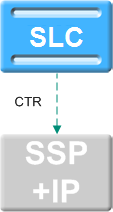
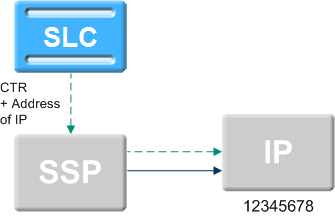
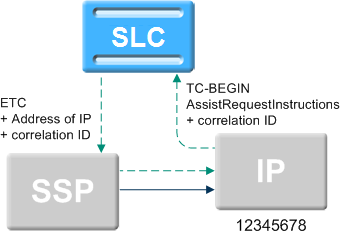
acsChassis SCF Configuration (SLC)
The scf parameter defines an SCF (Service Control Function) name and SCCP Address that can be used by the TCAP Handover feature node as a destination for the handed over TCAP primitive.
For more information about the TCAP Handover feature node, see CPE User's Guide.
Parameters
Usage:
scf (scfName,NOA=0-4,Address=SCF_addr,TT=translation_type,NPI=number_plan_ind,PC=point_code,SSN=subsystem_number,RI=routing_ind,NI=national_ind,appContext=context)To specify a location, point code or global title addressing may be used.
Valid combinations are:
- PC+SSN
- Address+NOA
- Address+TT
- Address+TT+NPI
- Address+NOA+TT+NPI
You can also cause an originating address to be set in the outgoing ICA request by slee_acs instead of your TCAP IF using:
scf (LocationAddress,NOA=0-4,Address=SCF_addr)Note:
Consult standard Q713 for full parameter definitions.scfName
| Syntax: | |
| Description: | The SCF name to deliver the TCAP primitive to. |
| Type: | String |
| Optionality: | Required if TCAP Handover is used. |
| Allowed: | Must match the name from the TCAP Handover feature node configuration in the control plan. |
| Default: | none |
| Notes: | If you set LocationAddress in this position in the scf, slee_acs will set an originating address in the outgoing ICA request (otherwise it is set by TCAP IF). |
| Example: | For an example of how to use this configuration in context, see Example SCF Configuration . |
Address
| Syntax: | SCF_addr |
| Description: | The address of IP if an external IP is used. |
| Type: | |
| Optionality: | |
| Allowed: | Address of IP or nothing if internal IP |
| Default: | none |
| Notes: | |
| Example: | For an example of how to use this configuration in context, see Example SCF Configuration . |
NOA
| Syntax: | noa |
| Description: | The nature of address indicator. |
| Type: | |
| Optionality: | Optional (default used if not set) |
| Allowed: |
|
| Default: | 0 |
| Notes: | |
| Example: | For an example of how to use this configuration in context, seeExample SCF Configuration . |
TT
| Syntax: | translation_type |
| Description: | The translation type. |
| Type: | |
| Optionality: | |
| Allowed: | |
| Default: | none |
| Notes: | |
| Example: | For an example of how to use this configuration in context, see Example SCF Configuration . |
NPI
| Syntax: | number_plan_ind |
| Description: | The number plan indicator. |
| Type: | |
| Optionality: | |
| Allowed: | |
| Default: | none |
| Notes: | |
| Example: | For an example of how to use this configuration in context, see Example SCF Configuration . |
PC
| Syntax: | point_code |
| Description: | The point code. |
| Type: | |
| Optionality: | |
| Allowed: | |
| Default: | none |
| Notes: | |
| Example: | For an example of how to use this configuration in context, see Example SCF Configuration . |
SSN
| Syntax: | subsystem_number |
| Description: | The subsystem number. |
| Type: | |
| Optionality: | |
| Allowed: | |
| Default: | none |
| Notes: | |
| Example: | For an example of how to use this configuration in context, see Example SCF Configuration . |
RI
| Syntax: | routing_ind |
| Description: | The routing indicator. |
| Type: | |
| Optionality: | |
| Allowed: | |
| Default: | none |
| Notes: | |
| Example: | For an example of how to use this configuration in context, see Example SCF Configuration . |
NI
| Syntax: | national_ind |
| Description: | The national indicator. |
| Type: | |
| Optionality: | |
| Allowed: | |
| Default: | none |
| Notes: | |
| Example: | For an example of how to use this configuration in context, see Example SCF Configuration . |
appContext
| Syntax: | appContext=context |
| Description: | The application context for this SCF. |
| Type: | String |
| Optionality: | Optional |
| Allowed: |
Any valid context:
|
| Default: | None |
| Notes: | Required if the TCAP Handover node is expected to pass on the application context. |
| Example: | appContext=CAPv2_IDP |
Example SCF Configuration
The following are examples of valid SCF definitions:
scf (SCF_Name1,PC=0xADB,SSN=11)
scf (SCF_Name2,NOA=4,Address=01224)
scf (LocationAddress,NOA=4,Address=01234)
scf (LocalAddress,PC=0xADB,SSN=11,address=22224444,NOA=4,RI=0)
About Defining scfs in acsGui.bat/acsGui.sh and smsGui.bat/smsGui.sh
The values used for SCP names in the scf section of the acs.conf configuration file must match the scfs application property definition in both the acsGui.bat/acsGui.shand thesmsGui.bat/smsGui.shfiles.
Example: If acs.conf contains the following two lines:
scf (SCP_Name1,PC=0xADB,SSN=11)
scf (SCP_Name2,NOA=4,Address=01224)
The application property section of the acsGui.bat/acsGui.shand smsGui.bat/smsGui.sh files must contain a corresponding entry for the scfs application property:
-Dscfs="SCP_Name1,SCP_Name2"For more information about configuring application properties in acsGui.bat/acsGui.shand smsGui.bat/smsGui.sh, see Setting up the Screens.
acsChassis SSF Configuration (SLC)
In acs.conf, the ssf line defines a service switching function (SSF)
that can be used by the Call Initiation feature node as a destination for the initiate
call attempt.
Parameters
An ssf parameter line in acs.conf must contain at least:
- The
ssf_nameparameter - The
interface=handleparameter - An address specified by one of the following:
- GT
- PC and SSN
acsChassis uses the address specification to construct address and address indicator numbers that comply with the ITU-T SS7 standard.
GT can be specified in four different ways, each defined in terms of ITU-T SS7's global titles.
- GT1.
[Address=GlobalTitleAddress, NOA=noa] - GT2.
[Address=GlobalTitleAddress, TT=TranslationType] - GT3.
[Address=GlobalTitleAddress, TT=TranslationType, NPI=NumberingPlanIndicator] - GT4.
[Address=GlobalTitleAddress, TT=TranslationType, NPI=NumberingPlanIndicator, NOA=noa]
The address indicator number is made up of the PC=<pc>,
SSN=<ssn>, RI=<RI> parameters.
Usage: The full syntax of an ssf line in acs.conf is:
ssf (ssf_name[, Address=GlobalTitleAddress[, NOA=noa][, TT=TranslationType[, NPI=NumberingPlanIndicator[, NOA=noa]]]][, PC=pc, SSN=ssn][, RI=RI], interface=handle[, appContext=objectIdentifier])Definitions for individual parameters follow.
For more information about the address and address indicator parameters, refer to ITU-T Recommendation Q.713 Signalling Connection Control Part formats and codes.
ssf_name
| Syntax: | ssf_name |
| Description: | The name of the switch that appears in the configuration screen of the Call Initiation feature node. |
| Type: | String |
| Optionality: | Required |
| Allowed: | |
| Default: | |
| Notes: | For more information about the Call Initiation feature node, see Feature Nodes Reference Guide |
| Example: | Switch_Name1 |
Address
| Syntax: | Address=GlobalTitleAddress |
| Description: | The global title address |
| Type: | Integer |
| Optionality: | Optional (required if PC and SSN are not used) |
| Allowed: | |
| Default: | |
| Notes: | |
| Example: | Address=40053 |
NOA
| Syntax: | NOA = NatureOfAddress |
| Description: | The nature of address indicator. |
| Type: | Integer |
| Optionality: |
NOA
|
| Allowed: | The following lists out the Nature of Address for number
of address signals
|
| Example: | NOA=1 |
TT
| Syntax: | TT = TranslationType |
| Description: | Directs messages to the appropriate translator. The value depends on the GT chosen under Parameters. |
| Type: | Integer |
| Optionality: | Optional |
| Allowed: |
GT1. not used. GT2. 0 to 255 GT3. The ITU have not defined a translation type for this global title. GT4. 1 to 254. For GT4, values for
TranslationType are defined below:
|
| Notes: |
GT2:
|
NPI
| Syntax: | NPI = NPI |
| Description: | Defines the numbering plan. |
| Type: | Integer |
| Optionality: | Optional |
| Allowed: | 1 to 14. |
| Notes: |
The following describes the meanings of the different
NPIs.
|
PC
| Syntax: | PC = pc |
| Description: | Defines the signaling point code. |
| Type: | Integer; hexadecimal, decimal or octal |
| Optionality: | Optional (required if SSN is set) |
| Allowed: |
|
| Notes: |
|
SSN
| Syntax: | SSN = SSN |
| Description: | Identifies an SCCP user function. |
| Type: | Integer |
| Optionality: | Optional (required if PC is set) |
| Allowed: | 0 – 255 |
| Default: | |
| Notes: |
The following describes the SCCP user function of each
SSN:
|
| Example: | SSN = 12 |
RI
| Syntax: | RI = RI |
| Description: | The routing indicator. It identifies the address element to use for routing. |
| Type: | Integer |
| Optionality: | Optional |
| Allowed: |
|
| Default: | |
| Notes: | |
| Example: | RI = 1 |
interface
| Syntax: | interface = handle |
| Description: | The handle for the SLEE interface that sends ICA messages to the SSF. |
| Type: | String |
| Optionality: | Required |
| Allowed: | |
| Default: | |
| Notes: | Must match the handle in the SLEE.cfg file. For more information, see SLEE Technical Guide. |
| Example: | interface = sua_if |
appContext
| Syntax: | appContext=string |
| Description: | The transaction capability (TC) object. |
| Type: | String |
| Optionality: | Optional |
| Allowed: |
|
| Default: | |
| Notes: |
When the ICA node uses an ssf with appContext set, appContext enables you to specify the application context to pass back up to ACS in the generated IDP. Set appContext to CAPv4_IDP to enable the ssf to use the correct message sequence in CAP4 InitiateCallAttempt operations. When you set appContext to CAPv4_IDP in the ssf line, you must also configure and scf line for an scf named LocalAddress that includes a global title. The scf will be used in the smScfAddress mandatory parameter of the CAP4 InitiateCallAttempt operation. |
| Examples: |
|
useLeg3ForICA
| Syntax: | useLeg3ForICA |
| Description: | Sets the leg ID to 3 for all subsequent operations for that leg. Specify the useLeg3ForICA parameter in the ssf line if the leg ID for InitiateCallAttempt message sequences for the SSF must be 3 or higher. |
| Type: | String |
| Optionality: | Optional |
| Allowed: | |
| Default: | |
| Notes: | |
| Example: | useLeg3ForICA |
Example SSF Configuration
The following are examples of valid ssf definitions:
ssf (SSF_Name1,PC=0xADC,SSN=11,interface=hssScIf)
ssf (SSF_Name2,NOA=1,Address=01234,interface=hssScIf)
ssf (Company,NOA=1,Address=01234,interface=VSSP,
appContext=CAPv2_IDP)
ssf(ssf2,NOA=4,address=1234,interface=sua_if_sms,appContext=CAPv4_IDP,useLeg3ForIca)
About Defining ssfs in acsGui.bat/acsGui.sh and smsGui.bat/smsGui.sh
The value used for ssf_name (the switch name) in the ssf section
of the acs.conf configuration file must match the ssfs application
property entry in the acsGUI.bat/smsGui.sh and smsGui.bat/smsGui.sh files.
Example: If the acs.conf file contains the following two lines:
ssf (SwitchName1,PC=0xADC,SSN=11,interface=hssScIf)
ssf (SwitchName2,NOA=1,Address=01234,interface=hssScIf)
The application property section of the acsGUI.bat/smsGui.sh and smsGui.bat/smsGui.sh files must contain a corresponding entry for the ssfs application property:
-Dssfs="SwitchName1,SwitchName2"For more information about defining application properties in the acsGUI.bat/smsGui.sh and smsGui.bat/smsGui.sh files, see Setting up the Screens.
acsChassis EDR Configuration (SLC)
The parameters listed below in this topic affect the way EDRs are logged.
Note:
For EDRs to be logged at all, the acsChassis section of the acs.conf
file must contain the line CdrFile 1.
TCP Network Loading
EDR files are collated on each SLC and uploaded at regular intervals to the SMS.
Files are transferred using the proprietary program cmnPushFiles. Refer to the main component diagram.
EDR files contain a base content that has a size of approximately 350 bytes per call attempt or call disconnect. The total data size to be transferred can be computed from the call rate combined with assumptions about the complexity of the control plan.
A control plan that attempts to terminate and then terminates to a second number will generate two EDRs.
The total data will be typically distributed over a number of files.
A new EDR file is created when the old file reaches a specified age or size
as defined by the CdrFileMaxAge and CdrFileMaxSize
parameters.
Note:
slee_acs compares the current EDR file against the
CdrFileMaxAge and CdrFileMaxSize parameters at
the end of the call. Thus, when a single call is run, the EDR file is closed only
when more calls are run or slee_acs is gracefully restarted.
The CdrExtraFields and SendCIR parameters cause
additional content to be written to each EDR line. This raises the average data flow
above the base 350 bytes per EDR line. The size of the additional content depends on the
nature of the control plan. Experimentation with individual control plans is required to
determine the size of extended EDRs.
Parameters
The following parameters are optional and may be added when required. Only one entry per parameter is allowed.
callReferenceIDAsHex
| Syntax: | callReferenceIDAsHex 0|1 |
| Description: | Indicates the Call Reference ID (an Octet string) in an IDP is a BCD number ASCII string or not. |
| Type: | Boolean |
| Optionality: | Optional (default used if not set). |
| Allowed: | 0 (false), 1 (true) |
| Default: | 0 |
| Notes: | If the Call Reference ID (an Octet string) in an IDP is a BCD number other than an ASCII string, for instance 0x28 0x81 0x1F 0xE3 0x29, then we need to set this option to true in order to be able to read the hex values "28811FE329" in EDR other than see unreadable characters. |
| Example: | callReferenceIDAsHex 1 |
cellIDAndLACAsHex
| Syntax: | cellIDAndLACAsHex 0|1 |
| Description: | Indicates whether LAC and CellID should be converted to hexadecimal digit strings. |
| Type: | Boolean |
| Optionality: | Optional (default used if not set). |
| Allowed: | 0 (false), 1 (true) |
| Default: | 1 |
| Notes: | |
| Example: | cellIDAndLACAsHex 0 |
CdrCacheMaxSize
| Syntax: | CdrCacheMaxSize int |
| Description: | The maximum size in kilobytes of the internal CDR cache. When the limit is reached, the CDR cache is written to file and then cleared. |
| Type: | Integer |
| Optionality: | Optional (default used if not set) |
| Allowed: | A value in the range 4 to 64 |
| Default: | 32 |
| Notes: | |
| Example: | CdrCacheMaxSize 32 |
CdrClosedDirectory
| Syntax: | CdrClosedDirectory "path" |
| Description: | The path to move the EDR file to when it is flushed due
to one of CdrFileMaxAge or
CdrFileMaxSize being exceeded.
|
| Type: | String |
| Optionality: | Optional (default used if not set). |
| Allowed: | |
| Default: | /IN/service_packages/SMS/cdr/closed |
| Warning: | This parameter only changes the output of the EDR file. If this parameter is changed all other relevant parts of the platform must also be updated. |
| Example: | CdrClosedDirectory "/var/EDRs/closed" |
CdrCompressCall
| Syntax: | CdrCompressCall 0|1 |
| Description: | Whether or not to log multiple connect attempts as one EDR. |
| Type: | Boolean |
| Optionality: | Optional (default used if not set). |
| Allowed: |
0 a separate EDR will be created for each connection attempt, abort, or disconnect individually. 1 calls with multiple connect attempts are logged as one EDR. A single EDR will be generated at the end of every call, at the point where it is torn down, regardless of how the call finishes. |
| Default: | 0 |
| Notes: | If CdrCompressCall is 0, the
CdrOnAbort and CdrOnDisconnect
parameters determine if abort and/or disconnect events generate
EDRs.
|
| Example: | CdrCompressCall 0 |
CdrCurrentDirectory
| Syntax: | CdrCurrentDirectory "path" |
| Description: | The path to write the EDR file to. |
| Type: | String |
| Optionality: | Optional (default used if not set). |
| Allowed: | |
| Default: | /IN/service_packages/SMS/cdr/current |
| Warning: | This parameter only changes the output of the EDR file. If this parameter is changed all other relevant parts of the platform must also be updated. |
| Example: | CdrCurrentDirectory "/var/EDRs/current" |
CdrFile
| Syntax: | CdrFile 0|1 |
| Description: | Whether or not to log EDRs to a file. |
| Type: | Boolean |
| Optionality: | Optional (default used if not set). |
| Allowed: | 0 (no), 1 (yes) |
| Default: | 0 |
| Notes: | |
| Example: | CdrFile 0 |
CdrExtraFields
| Syntax: | CdrExtraFields 0|1|2 |
| Description: | EngineNodes that are traversed during the processing of a control plan will be logged and placed in the EDR (TFN tag) |
| Type: | Integer |
| Optionality: | Optional (default used if not set). |
| Allowed: |
|
| Default: | 1 |
| Notes: |
You can customize the maximum length in characters of the TFN data by
using the There are no separators between the <state> fields which are all single characters as defined in Table 5-9 below. |
| Example: | CdrExtraFields
1 |
Table 5-9 Node States
| State Number | Node State | State Number | Node State |
|---|---|---|---|
| 0 | 0 | 26 | J |
| 1 | 1 | 27 | K |
| 2 | 2 | 28 | L |
| 3 | 3 | 29 | M |
| 4 | 4 | 30 | N |
| 5 | 5 | 31 | O |
| 6 | 6 | 32 | P |
| 7 | 7 | 33 | Q |
| 8 | 8 | 34 | R |
| 9 | 9 | 35 | S |
| 10 | : | 36 | T |
| 11 | ; | 37 | U |
| 12 | < | 38 | V |
| 13 | = | 39 | W |
| 14 | > | 40 | X |
| 15 | ? | 41 | Y |
| 16 | @ | 42 | Z |
| 17 | A | 43 | [ |
| 18 | B | 44 | \ |
| 19 | C | 45 | ] |
| 20 | D | 46 | ^ |
| 21 | E | 47 | _ |
| 22 | F | 48 | ' |
| 23 | G | 49 | a |
| 24 | H | 50 | b |
| 25 | I | NA | NA |
CdrFileAppendCloseTime
| Syntax: | CdrFileAppendCloseTime 0|1 |
| Description: | Whether or not to append the time that the file was closed to the EDR file name. |
| Type: | Boolean |
| Optionality: | Optional (default used if not set). |
| Allowed: | 0 (no), 1 (yes) |
| Default: | 0 |
| Example: | CdrFileAppendCloseTime 0 |
CdrFileAppendPid
| Syntax: | CdrFileAppendPid 0|1 |
| Description: | Whether or not to append the PID of the logging process to the EDR file name. |
| Type: | Boolean |
| Optionality: | Optional (default used if not set). |
| Allowed: | 0 (no), 1 (yes) |
| Default: | 1 |
| Example: | CdrFileAppendPid 1 |
CdrFileMaxAge
| Syntax: | CdrFileMaxAge seconds |
| Description: | Set the maximum age of the EDR file. After this period expires the file is purged. |
| Type: | Integer |
| Optionality: | Optional (default used if not set). |
| Allowed: | Any integer |
| Default: | 600 |
| Notes: | Value is in seconds |
| Example: | CdrFileMaxAge 600 |
CdrFileMaxSize
| Syntax: | CdrFileMaxSize KB |
| Description: | Set the maximum size of the EDR file. When this file size is exceeded, the file is purged. |
| Type: | Integer |
| Optionality: | Optional (default used if not set). |
| Default: | 8 |
| Example: | CdrFileMaxSize 8 |
CdrFileUseGMT
| Syntax: | CdrFileUseGMT 0|1 |
| Description: | Whether or not to add a start timestamp in GMT to the EDR filename. |
| Type: | Boolean |
| Optionality: | Optional (default used if not set). |
| Allowed: |
0 – Do not add a GMT timestamp to the EDR filename. 1 – Add a GMT timestamp to the EDR filename. |
| Default: | 0 |
| Notes: |
If set to 1, the EDR filename uses this format:
If set to 0, the EDR filename uses this format:
Where:
The format used for start time is: yyyymmddhh24missff1, where ff1 is the decisecond portion of the timestamp. |
| Example: | CdrFileUseGMT 1 |
CdrFileUseLocalTime
| Syntax: | CdrFileUseLocalTime 0|1 |
| Description: | What timezone to use for the start and end timestamps in the EDR filename. |
| Type: | Boolean |
| Optionality: | Optional (default used if not set). |
| Allowed: |
0 – Use GMT. 1 – Use local time. |
| Default: | 0 |
| Notes: | This parameter does not affect the timestamp added if
CdrFileUseGMT is set to 1 (adds GMT timestamp to
EDR filename).
|
| Example: | CdrFileUseLocalTime 1 |
CdrRemoveFields
| Syntax: | CdrRemoveFields 0|hex_value |
| Description: | Mask that specifies the fields to remove from an EDR. To set the mask, sum the values used to identify each field that you want to remove, and convert to hexadecimal. |
| Type: | Hexadecimal Integer |
| Optionality: | Optional (default used if not set). |
| Allowed: | Hexadecimal number that is the sum of the values for the fields you want to remove. For a list of valid values, see EDR field values table below. |
| Default: | 0 - Do not remove any fields. |
| Notes: | For more information about the EDR fields, see Event Detail Record Reference Guide. |
| Example: |
Turns off release cause and slee call ID (2^24 + 2^37 = hex 2001000000). |
The following table lists the EDR field values you can use and their corresponding field codes and field names. The EDR field values have the following format. 2^x, which means 2 to the power of x.
Table 5-10 EDR Field Values
| EDR Field Value | EDR Field Code | Field Name |
|---|---|---|
| 2^0 | OA | Originating Address (IP/PC) |
| 2^1 | OTI | Originating Transaction ID |
| 2^2 | CUST | Customer ID |
| 2^3 | SN | Service (Original Called) Number |
| 2^4 | TN | Termination Number |
| 2^5 | CGN | Calling Network Number |
| 2^6 | CLI | Calling Line Identifier |
| 2^7 | SK | Service Key |
| 2^8 | TCS | Time Call Start |
| 2^9 | TCE | Time Call End (ETSI only) |
| 2^10 | LPN | Last PIN Number Entered |
| 2^11 | LAC | Last Account Code Entered |
| 2^12 | CS | Connect Status |
| 2^13 | CPC | Calling Party Category |
| 2^14 | CC | Carrier Code |
| 2^15 | CPNI | Calling Private Network ID |
| 2^16 | PCNA | Calling Private Network Address |
| 2^17 | PTNA | Called Private Network Address |
| 2^18 | CGNA | Calling Global Network Address (for example, GVNS number) |
| 2^19 | TFN | Track Feature Nodes |
| 2^20 | CPN | Call Plan Name |
| 2^21 | CAET | Call Attempt Elapsed Time (CallInfoRequest) |
| 2^22 | CCET | Call Connect Elapsed Time (CallInfoRequest) |
| 2^23 | CA | Called Address (CallInfoRequest) |
| 2^24 | RELC | Release Cause (CallInfoRequest) |
| 2^25 | OCPI | Original Called Party ID |
| 2^26 | CPNN | Called Party Nature of Number (Address) |
| 2^27 | NOAT | Number of Attempt Terminations |
| 2^28 | LGID | Language ID |
| 2^29 | CBAT | Connect by Attempt Termination |
| 2^30 | FATS | First Announcement Timestamp |
| 2^31 | HTS | Hunting Timestamp |
| 2^32 | CCTS | Call Connect Timestamp |
| 2^33 | AIDL | Announcement ID List |
| 2^34 | TPNI | Terminating Private Network ID |
| 2^35 | CGNN | CallingPartyID Nature of Number |
| 2^36 | CPPI | CallingPartyID Presentation Restriction Indicator |
| 2^37 | CID | Slee Call ID |
| 2^38 | TGNA | Terminating Global Network Address (for example, GVNS number) |
| 2^39 | SL_CONTENT | All service library supplied fields (may be zero, one, or more fields) |
| 2^40 | EXT(0-9) | Any extension digits fields |
CdrLogPIN
| Syntax: | CdrLogPIN 0|1 |
| Description: | Whether or not to log the PIN. |
| Type: | Boolean |
| Optionality: | Optional (default used if not set). |
| Allowed: |
1 the LPN field which records the PIN is written to the EDR log files as part of EDR creation. 0 this action is suppressed. The EDRs will be created normally but the LPN field will be missing. |
| Default: | 1 |
| Notes: | For more information about PIN logging configuration, see PIN Logging Parameters. |
| Example: | CdrLogPIN 1 |
CdrOnAbort
| Syntax: | CdrOnAbort 0|1 |
| Description: |
Whether or not to create EDRs when one of the following occurs:
|
| Type: | Boolean |
| Optionality: | Optional (default used if not set). |
| Allowed: |
0 Abort logging is disabled 1 Aborted calls are logged |
| Default: | 1 |
| Example: | CdrOnAbort 1 |
CdrOnCallCompletion
| Syntax: | CdrOnCallCompletion 0|1 |
| Description: | Whether or not to log EDR on call completion when
CdrCompressCall is set as 0.
|
| Type: | Boolean |
| Optionality: | Optional (default used if not set) |
| Allowed: |
0 - EDR will not be written on call completion. 1 - EDR will be written on call completion if
|
| Default: | 0 |
| Notes: | |
| Example: | CdrOnCallCompletion 0 |
CdrOnDisconnect
| Syntax: | CdrOnDisconnect 0|1 |
| Description: | Whether or not to create EDRs when a call is deliberately disconnected (for example, by a disconnect call node). |
| Type: | Boolean |
| Optionality: | Optional (default used if not set). |
| Allowed: | 0 (no), 1 (yes) |
| Default: | 1 |
| Example: | CdrOnDisconnect 1 |
CdrOnForcedDisc
| Syntax: | CdrOnForcedDisc 0|1 |
| Description: | When set to true, forces ACS to write an EDR in the event of a forced disconnect. |
| Type: | Boolean |
| Optionality: | Optional (default used if not set). |
| Allowed: |
|
| Default: | 0 |
| Notes: | |
| Example: | CdrOnForcedDisc 1 |
CdrOnHandover
| Syntax: | CdrOnHandover 0|1 |
| Description: | When set to true, forces ACS to write an EDR on service
handover, providing the CdrCompressCall parameter is
set to zero (0).
|
| Type: | Boolean |
| Optionality: | Optional (default used if not set). |
| Allowed: |
|
| Default: | 0 |
| Notes: | |
| Example: | CdrOnHandover 0 |
CdrResetOnWriteRELC
| Syntax: | CdrResetOnWriteRELC 0|1 |
| Description: | When set to true, forces ACS to reset the call release
cause to zero after it has been written to an EDR, providing the
CdrCompressCall parameter is set to zero
(0).
|
| Type: | Boolean |
| Optionality: | Optional (default used if not set). |
| Allowed: |
|
| Default: | 0 |
| Notes: | |
| Example: | CdrResetOnWriteRELC 1
|
CdrUsecDigits
| Syntax: | CdrUsecDigits n |
| Description: | The number of digits to use as a fractional second extension to the start time and closing time, to ensure a unique CDR filename. The fractional part has a resolution of 1/10^n seconds, where n is the number of digits (in the range 1 to 6) that are added to the filename. |
| Type: | Integer |
| Optionality: | Optional (default used if not set) |
| Allowed: | 1, 2, 3, 4, 5, or 6 |
| Default: | 1 |
| Notes: | For example, if the timestamp is 23/01/2014 22:34:48.567 and CdrUsecDigits is set to 3, then acsChassis creates a file named: ACS_20140123223448567.cdr. If CdrUsecDigits is set to 1, then acsChassis omits the last two digits from the timestamp to create a file named: ACS_201401232234485.cdr. |
| Example: | CdrUsecDigits 1 |
elapsedTimesFromApplyChargingReport
| Syntax: | elapsedTimesFromApplyChargingReport 0|1 |
| Description: | Whether or not to calculate CAET and CCET using the ApplyChargingReport. |
| Type: | Boolean |
| Optionality: | Optional (default used if not set). |
| Allowed: | 0 (no), 1 (yes) |
| Default: | 0 |
| Notes: | This is an option to use when a call has been released, in which there is no CallInformationReport. |
| Example: | elapsedTimesFromApplyChargingReport 1 |
zeroElapsedTimesInCdr
| Syntax: | zeroElapsedTimesInCdr 0|1 |
| Description: | Whether or not to include TCS, CCET and CAET in the EDR, even in the case where call duration is zero. |
| Type: | Boolean |
| Optionality: | Optional (default used if not set). |
| Allowed: | 0 (no), 1 (yes) |
| Default: | 0 |
| Notes: | |
| Example: | zeroElapsedTimesInCdr 1 |
acsChassis Service Library Configuration (SLC)
The entries in the acsServiceLibrary topic determine configuration
parameters for the acsServiceLibrary.
ProfileOrder
| Syntax: | ProfileOrder (key, pro1, pro2, pro3) |
| Description: | Defines the order of the profiles for loading and searching for traffic with a specific service key. |
| Type: | Array |
| Optionality: | Optional (default used if not set). |
| Allowed: |
Each
|
| Default: | ProfileOrder (110,CUSTOMER,CALL_PLAN,SERVICE_NUMBER) |
| Notes: | All three profiles must specified for each parameter. |
| Examples: |
|
acsChassis Service Normalisation Parameters (SLC)
Each service for which a ServiceEntry exists in the acs.conf can have a specific config section where you define configuration parameters specific for that service. The name for the service section must be the same name specified in the corresponding acsChassis ServiceEntry Configuration (SLC), that is, ACS_Outgoing, CCS, VPN_Originating etc.
Service Specific Normalization Parameters
The service specific normalization parameters are used to define conversion rules specific to each available service. These parameters are equivalent to those with the same name described in the acsChassis Normalization Parameters section. For a description of each, refer to Normalization Parameters.
When a service section is found in the acs.conf, the global normalization rules are ignored for that particular service and the specific rules (if any) are used instead. In this sense, a service will only use the global configuration when no specific section is defined for it in the acs.conf. Also, in no case global and specific normalization rules will be used simultaneously within the same service.
acsChassis AWOL Configuration
The ACS service supports many different call scenarios, including scenarios where the SLC is involved in the call right up to when the A or B party disconnects at the end of a conversation.
The number of entities involved in the call and managing the connection between the SSP and SLC software can lead to many complex interactions. Occasionally these interactions may not follow the INAP CS1 call model due to situations beyond the direct control of the ACS service.
In particular, ACS can be used for billable call control by using the ApplyCharging and ApplyChargingReport INAP messages. When ACS sends an ApplyCharging request to a SSP, it will expect a response within a certain time frame due to the request defining a limit on the time the call can proceed for.
Certain circumstances can occur in production networks that can cause the ApplyChargingReport to be never returned. This would in general cause the call to be left 'hanging' in the ACS service, using system and service resources that would never, usually, be freed.
To alleviate this situation, AWOL checking has been developed in the ACS service. The basic premise is that the ACS service should abort any call for which an expected ApplyChargingReport is late.
Calls that are considered as AWOL, are aborted. This will clean up all call resources within the ACS service and the SLEE.
The ACS Service will continue to process the control plan for the call according to the service limitations.
Defining acsChassis AWOL configuration
The acsChassis AWOL configuration section defines six AWOL
parameters, two of which are global and should only be defined in the
acsChassis section of acs.conf:
checkAWOLcheckAWOLMarginAC
The other parameters are defined globally in the acsChassis section; but they can also be defined in the service configuration, per service, which will override the global values. These parameters are:
awolTimeoutawolReportOnlyawolReportPeriodawolOverrideACRTimeout
For more information, see Overriding AWOL Configuration Per Service.
Parameters
The following configuration parameters are provided to control AWOL checking:
checkAWOL
| Syntax: | checkAWOL 0|1 |
| Description: | Whether or not the ACS service should check for calls with later ApplyChargingReport messages. |
| Type: | Boolean |
| Optionality: | Optional (uses default if not set) |
| Allowed: |
0 – No AWOL checking is done and if the ACR is never received, the call will never be torn down. 1 – AWOL checking is done as defined by the other AWOL parameters. |
| Default: | 0 |
| Example: | checkAWOL 1 |
checkAWOLMarginAC
| Syntax: | checkAWOLMarginAC int |
| Description: | Tolerance, in seconds, added to the apply charging timeout. |
| Type: | Integer |
| Optionality: | Optional |
| Allowed: | Positive integer |
| Default: | 30 |
| Notes: |
Apply Charging operations use this parameter and not the awolTimeout parameter. If an ApplyCharging report was sent for a call with a talk time of 60
seconds, using the |
| Example: | checkAWOLMarginAC 30 |
awolTimeout
| Syntax: | awolTimeout duration |
| Description: | The time a call must be in progress before it becomes eligible for termination. |
| Type: | Integer |
| Units: | Seconds |
| Optionality: | Optional |
| Allowed: | duration ³ 0 |
| Default: | If the awolTimeout parameter is omitted, duration = 0 is assumed. |
| Notes: |
|
| Example: | awolTimeout 1800 |
awolReportOnly
| Syntax: | awolReportOnly 0|1 |
| Description: | Specifies the type of AWOL message printed to the system log. |
| Type: | Boolean |
| Optionality: | Optional |
| Allowed: |
0 – For every timed out message, report:
1 – For every timed out message, print only a summary report. |
| Default: | 1 |
| Notes: |
|
| Example: |
|
awolReportPeriod
| Syntax: | awolReportPeriod seconds |
| Description: | How often, in seconds, to provide AWOL reporting. |
| Type: | Integer |
| Optionality: | Optional |
| Allowed: |
|
| Default: | 0 |
| Notes: | When specified in the service instance section, it overrides the global value. |
| Example: | awolReportPeriod 900 |
awolOverrideACRTimeout
| Syntax: | awolOverrideACRTimeout value |
| Description: | Specifies the period of time, in seconds, between Apply Charging Reports (ACRs). If the ACR is not received during this time, the call is cleaned up. It is anticipated that this value will be used in data session scenarios where the return time of the ACR cannot be predicted based on the Apply Charging request. |
| Type: | Integer |
| Optionality: | Optional. Configurable on a per-service basis only. |
| Allowed: |
|
| Default: | 0 |
| Notes: | If set, the value in checkAWOLMarginAC is ignored. |
| Example: | awolOverrideACRTimeout 1800 |
Get Hunting Number Node Configuration
The following configuration parameter is provided to control the Get Hunting Number node.
setCallData
| Description: | If non zero, use the VPN Set Call Data chassis action to set the RedirectingPartyID and OriginalCalledPartyID. |
| Type: | Boolean |
| Allowed: | 0, 1 |
| Default: | 0 |
| Notes: | Set to 1 if you have VPN installed. |
Number Matching Node Configuration
The following configuration parameters are provided to control the Number Matching node.
RegMapFlushPeriod
| Syntax: | RegMapFlushPeriod
seconds |
| Description: |
The number of seconds between attempts to flush the
compiled regular expression map. Entries are flushed if they are
older than the time specified by the A value of 0 or less disables the flushing mechanism. |
| Type: | Integer |
| Optionality: | Optional |
| Default: | 600 |
| Notes: | To disable the flushing mechanism for the regular expression map, set the value to 0 (zero). |
| Example: | RegMapFlushPeriod 600 |
RegMapMaxAge
| Syntax: | RegMapMaxAge seconds |
| Description: | The maximum number of seconds a compiled regex may remain in the map unused. |
| Type: | Integer |
| Optionality: | Optional (default used if not set). |
| Allowed: | |
| Default: | 43200 (12 hours) |
| Notes: | |
| Example: | RegMapMaxAge 43200 |
Play Variable Part Announcement Node Configuration
The following configuration parameters are provided to control the Play Variable Part Announcement node:
NumberRulesSection
| Syntax: | NumberRulesSection section_name: |
| Description: | Defines where to find custom denormalization rules when the Denormalize check box is selected in the Play Variable Part Announcement node. |
| Type: | String |
| Optionality: | Optional |
| Allowed: | Any section name defined in the
acsPlayVariablePartAnnouncement section of
acs.conf
|
| Default: | None |
| Notes: | The colon at the end is essential. |
| Example: | NumberRulesSection examplePVP: |
DenormalisationRule
| Syntax: | DenormalisationRule (parameters): |
| Description: | Defines the denormalization rule to check for. |
| Type: | Parameter list |
| Optionality: | Required |
| Allowed: | |
| Default: | None |
| Notes: | There may be as many DenormalisationRule lines configured as needed. The colon at the end is essential. |
| Example: | DenormalisationRule (0064,2,4,0,12): |
Profile Date Compare Node Configuration
The following configuration parameters are provided to control the Profile Date Compare node:
useTzDefault
| Syntax: | useTzDefault 0|1 |
| Description: | Specifies the time zone that is applied to the stored profile date. The Profile Date Compare node compares the stored profile date in the specified time zone to the current system time. |
| Type: | Boolean |
| Optionality: | Optional (default used if not set) |
| Allowed: |
|
| Default: | 0 |
| Notes: | |
| Example: | useTzDefault 1 |
acs.conf Example
Here is an example acs.conf file. Note that not all available parameters appear in the example.
# The following programs or groups of programs get their configuration
# from this configuration file.
#
# acsStatisticsDBInserter
# acsStatsMaster
# acsStatsLocal
# acsCompilerDaemon
# acsProfileCompiler
# acsChassis
#
# This file is parsed according to the following rules:
# - Indenting beyond the first white space is ignored by the parser, it is done
# only for clarity for human readers.
#
# - Lines without at least a single leading white space or comment character are
# section names.
#
# - The file is parsed until a line containing only the indicated section
# name is matched.
#
# - Following lines are considered part of the section, until either the
# end of file, or a line terminated with a ':' is reached.
#
# - Parameter lines are in the form '<key> <value>'
#
# - All key strings are case-sensitive. The specific keys recognised by
# an application are specific to that application.
#
# - To add service specific Chassis configuration. specify the service name, such as 'ACS_Outgoing'
# and then set the configuration parameters as required. See example at the end of this file.
#
acsStatisticsDBInserter
# oracleusername <sms_user>
# oraclepassword <sms_passwd>
# oracledatabase @SMF
Retries 3
Period 30
MasterServerLocation STATSMASTERNODE
MasterServerPort 1490:
acsStatsMaster
port 1490
shmKey 17170588
semKey 17170589
masterStatsServer STATSMASTERNODE:
acsStatsLocal
port 1490
masterStatsServer STATSMASTERNODE:
acsCompilerDaemon
# oracleusername SMF
# oraclepassword SMF
# oracledatabase @SMF
alertTimeout 3
maxBranches 99
maxNodes 2000
maxCompiledKb 1024
compressAtKb 128
compressLevel 1
AuditChallenge 1:
acsProfileCompiler
# oracleusername SMF
# oraclepassword SMF
# oracledatabase @SMF
acsChassis
# oracleusername SMF
# oraclepassword SMF
#
ServiceEntry (ACS,libacsService.so)
ServiceEntry (ACS_Outgoing,libacsService.so)
setCcetOnDisconnectCall 1
# Macro Node library - base ACS macro nodes.
#
MacroNodePluginFile libacsMacroNodes.so
#
# Pluggable Action - base ACS actions.
#
ChassisPlugin libacsChassisActions.so
#tfnListSize 2048
#
# Special Resource Function mappings for the SLEE
#
srf (NAP1,UseETC=N,Address=,NOA=3)
srf
                            (nap1,UseETC=N,Address=,NOA=3)
# Example of the ssf/scf definitions:
# ssf (SSF_Name1,PC=0xADC,SSN=11,interface=hssScIf)
# ssf (SSF_Name2,NOA=1,Address=01234,interface=hssScIf)
# scf (SCP_Name1,PC=0xADB,SSN=11)
# Example entry for the ICA originating address
# Setting this will cause an originating address to be set
# in the out going ICA request by slee_acs instead of your tcap IF
# scf (LocalAddress,NOA=4,Address=01224)
#
# Extension Numbers
#
# *** Unique to each site ***
#
# Examples:
# extensionNumber 0 26 inapaddressstring digits
# extensionNumber 1 28 inapaddressstring extension,nature,plan,digits
# extensionNumber 2 1 InapNumber digits
#
# Here are the rest of the Chassis parameters.
#
port 1490
shmKey 17170588
semKey 17170589
NoServiceAction disconnect
NoServiceError WARNING
NoCallPlanAction continue
NoCallPlanError
InternalErrorAction continue
ChainCountLimit 8
DialledStarEncoding B
DialledHashEncoding C
EntryChar C
EmergencyNumber 111
# If the Call Reference ID (an Octet string) in an IDP is a BCD number other than an Ascii string,
# for instance 0x28 0x81 0x1F 0xE3 0x29, then we need to set this option to true
# in order to be able to read the hex values "28811FE329" in EDR other than see unreadable characters.
# Defaults to false
callReferenceIDAsHex 1
# For use with the CIN
CallInitiationTimeoutToleranceSeconds 10
#
# CallInitiationUseContextInd
#
# CDR file configuration, disabled by default.
#
# Valid values for CallInitiationUseContextInd are:
#
# 0. All indicator values, including NoA, set to the
# original values:
#
# (NoA = 4, ScrnInd = 3, PresInd = 0, NumIncomplete = 0)
# (Default = 0)
#
# 1. All indicator values, except NoA, set to original
# values. The NoA value would come from the context and
# could be altered via denormalisation rules.
#
# 2. NoA set to original value. Other indicator values come
# from context and could be altered via Set Indicator
# nodes in the call plan.
#
# 3. All indicator values would come from the context.
# The NoA value could be altered via denormalisation rules
# and the other indicator values could be altered via Set
# Indicator nodes in the call plan. In all cases the
# NumberPlan will be set to 1, as in the original version.
#
# CallInitiationUseContextInd 0
#
# CDR file configuration, disabled by default.
#
CdrFile 0
CdrFileMaxAge 600
CdrFileMaxSize 8
CdrExtraFields 1
CdrOnDisconnect 1
CdrOnAbort 1
CdrOnCallCompletion 0
CdrCompressCall 0
CdrLogPIN 1
CdrCacheMaxSize 32
CdrUsecDigits 1
# Append PID of logging process to filename (enabled by default)
CdrFileAppendPid 1
# Append time that file was closed to filename (disabled by default)
CdrFileAppendCloseTime 0
CdrFileUseLocalTime 0
CdrFileUseGMT
PINLogEnable 1
PINLogMaxAge 3600
PINLogMaxSize 1024
PINLogSuccess 0
PINLogFail 1
OverrideDefaultIPDigitTimeout 0
FirstDigitTimeout 4
InterDigitTimeout 4
MaxPromptDigits 21
# Maximum number of bytes allowed in the text field of a
# PlayAnnouncement or PromptAndCollectUserInformation operation.
maxAnnouncementTextBytes 80
#
# Call Dump configuration, disabled by default.
#
CallDumpEnabled 0
CallDumpSeconds 120
CallDumpDir /tmp
CallDumpSeverity ERROR
CallDumpMessage
edpArmAnswer 1
edpArmNoAnswer 1
edpArmBusy 1
edpArmRouteSelectFailure 1
edpArmAbandoned 1
edpUseNoAnswerTimer 1
NokiaCIR 0
CarrierCodeDisposal 0
UseReplication 0
AuditChallenge 0
ArmTerminateTriggers 0
UseContinueOperation 0
enableTermAttemptAuthorizedConnect 1
masterStatsServer STATSMASTERNODE
SendCIR 0
AskCirAttemptElapsedTime 1
AskCirStopTime 1
AskCirConnectElapsedTime 1
AskCirCallAddress 1
usePendingTnForCaInCdr 0
AskCirReleaseCause 1
recordSmpStatistics 1
disarmEDPs 0
tzDefault Europe/Prague
# set the engine's terminationNumber, which
# is printed as TN in the CDR, to:
# 0 - the digits sent over the network in the connect
# 1 - the normalised number sent to the service loader
normaliseTerminationNumber 0
# Normalise the SN (Service Number) in the CDR and set CPNN
# (Called Party Nature of Number) to match:
# 0. SN = the digits received over the network in the IDP
# CPNN = the Nature of Address received over the network in the IDP
# 1. SN = the normalised number received from the service loader
# CPNN = 0, a normalised number does not have a Nature of Address
normaliseServiceNumber 0
# Normalisation rules
# These translate numbers from the network, which have NOA and digits, into a standard form for use within ACS.
# They can either be in the acsChassis section or in a service entry specific section, which has
# the same name as the service name in the ServiceEntry line.
#
# NormalisationRule (<inNOA>,<inPrefix>,<stripDigits>,<outPrefix>[,<minLength>[,<maxLength>]]
#
# inNOA . This rule will only match numbers with this NOA
# inPrefix . This rule will only match numbers with this prefix
# stripDigits . Strip this many digits from the front of the number
# outPrefix . Then, add this many digits to the front of the number
# minLength,maxLength . The rule will only match numbers of this length
# NormalisationRule (3,-,0,-,10,13,m)
# This says normalise nationally significant (NOA 3) numbers where the MSC address
# (m) has a prefix in the countryCodes list (longest match), the matched number is
# between 10 and 13 characters long and the result is the matched number prefixed
# with the country code prefix from the MSC address.
# Denormalisation rules
# These translate numbers stored inside ACS as just digits to digits and NOA to be sent out to the network.
# They can either be in the acsChassis section or in a service entry specific section, which has
# the same name as the service name in the ServiceEntry line.
#
# DenormalisationRule (<inPrefix>,<outNOA>,<noOfDigitsToRemove>,<outPrefix>[,<minLength>[,<maxLength>]])
#
# inPrefix . This rule will only match numbers with this prefix
# outNOA . Use this NOA in the number sent out
# noOfDigitsToRemove . Strip this many digits from the front of the number
# outPrefix . Then, add this many digits to the front of the number
# minLength,maxLength . The rule will only match numbers of this length
#
# There is a second form of DenormalizationRule which takes an NOA
#
# DenormalisationRule (noa,<NOA>,<inPrefix>,<outNOA>,<noOfDigitsToRemove>,DigitsToAdd)
#
# Where the first noa is the literal, lowercase text "noa".
#
# Example:
# DenormalisationRule (noa,3,E,4,0,999)
#
# This rule will convert the NoA to 4 and add "999" to any ICA outgoing number
# with an NoA of 3.
# The interval in seconds to be used for checking dialog timers.
# Note that this effectively depricates the RIMS Chassis Action approach to doing this.
# Setting to 0 will disable this explicit setting (in which case 10 will be used).
# Defaults to 0 if not specified for backwards compatibility.
# dialogTickInterval 10
#
# alwaysIncludePartyToCharge
#
# If set, we set partyToCharge parameter in ACs
# to the leg1 party.
#
# Defaults to 0 - partyToCharge is not set.
#
# alwaysIncludePartyToCharge 1
#
# alternativeCallPlanNamePostfix
#
# This string is appended to the end of the Control Plan name
# and this new control plan is the replacement control plan when
# alternative control plan replacement is activated from the
# ACS Screens. Services -> ACS Service -> Customer
# -> Control Plan Change Tab
#
# Defaults to _alt
#
# Example:
# alternativeCallPlanNamePostfix _emergency
#
alternativeCallPlanNamePostfix _alt
#
# minimumSizeOfConnectSleeEvent configures the minimum size of a SLEE event used
# to return the Connect message. This defaults to 1024.
# A service specific configuration may be added if required to reduce the amount of
# memory required for 'normal' services.
#
minimumSizeOfConnectSleeEvent 1024
#
# Checking for AWOL calls, disabled by default.
#
# Note that Apply Charging operations do not use awolTimeout (see below).
#
# checkAWOL 0 - disable
# 1 - enable
#
# awolTimeout - the timeout period (in seconds) for events that are not the
# last events. May be specified for service instance section.
#
# awolReportOnly 0 - always raise warning alarm when cleaning up each AWOL call
# 1 - only raise warning alarm which summarizes changes
# May be specified for service instance section.
#
# awolReportPeriod - how often (in seconds) to provide summary report.
# May be specified for service instance section.
#
# checkAWOLMarginAC - configurable tolerance added to Apply Charging timeout.
# Replaces old checkAWOLMargin setting (now deprecated).
#
# awolOverrideACRTimeout - Configurable on a per-service basis only.
# Specifies the period of time (seconds) within which we
# expect to have received an Apply Charging Report. If
# the ACR is not received during this time then the call
# is cleaned up. It is anticipated that this value will
# be used in data session scenarios where the return
# time of the ACR cannot be predicted based on the
# Apply Charging request.
# Note. if set, then the value in checkAWOLMarginAC is ignored.
# Note. value of zero means do not override timeout from ACR.
#
checkAWOL 0
awolTimeout 1800
awolReportOnly 0
awolReportPeriod 900
awolOverrideACRTimeout 0
checkAWOLMarginAC 30:
# end of acsChassis configuration
# =============================================================================
# Apply the timezone specified by parameter tzDefault
# to the stored profile date. If tzDefault is not set, the
# default system timezone will be used.
ProfileDateCompare
useTzDefault 1
# =============================================================================
# configuration for Get Hunting Number node
acsGetHuntingNumber
# setCallData {0|1}
# if non zero use the VPN Set Call Data chassis action
# to set the RedirectingPartyID and OriginalCalledPartyID
# set to 1 if you have VPN installed.
# defaults to 0
setCallData 0:
# =========================================================================
# configuration for Play Variable Part Announcement node
#
# This is necessary if the Denormalise check box is used in the
# Play Variable Part node. By default, the Play Variable Part Announcement
# node looks in a section called NumberRulesInteraction.
# An alternative section name can be given in the
# acsPlayVariablePartAnnouncement section
# Uncomment this to use the examplePVP section for denormalisation rules
# for the Play Variable Part Announcement node.
#
#acsPlayVariablePartAnnouncement
# NumberRulesSection examplePVP:
#
#examplePVP
# # Denormalisation Rules (Prefix, NOAToAdd, NumberOfDigitsToRemove, DigitsToAdd, MinLength)
# DenormalisationRule (0064,2,4,0,12):
# Uncomment this to use the default section name for denormalisation rules
# for the Play Variable Part Announcement node.
#
#NumberRulesInteraction
# # Denormalisation Rules (Prefix, NOAToAdd, NumberOfDigitsToRemove, DigitsToAdd, MinLength)
# DenormalisationRule (0064,2,4,0,12):
# service specific configuration for ACS_Outgoing (overrides standard acsChassis configuration)
ACS_Outgoing
minimumSizeOfConnectSleeEvent 2048:
# end of file