1 System Overview
This chapter provides a high-level overview of the application. It explains the basic functionality of the system and lists the main components.
It is not intended to advise on any specific Oracle Communications Convergent Charging Controller network or service implications of the product.
Introduction to Charging Control Services
The Charging Control Services (CCS) is a prepaid and post-paid service, which allows customers greater flexibility and control over their billing methods and telephony services in general. It provides options for customers with low credit ratings, at the same time as furnishing all customers with a high-quality and adaptable range of services. This allows the service provider to customize call-processing functionality according to factors such as:
- Geography
- Demographics
- Resources
- User preference
CCS is installed and run as a network service by a Telecommunications Provider (telco). This service allows the telco to create:
- Subscriber accounts and wallets
- Product types to be associated with the subscriber wallet
Each product type may be linked to a rate table, each of which may have many tariff options. CCS uses a three-tier tariff scheme.
- Basic tariffs use the flexible geography sets to determine calling areas.
- Weekly tariffs are available to override the basic tariffs where applicable.
- Holiday tariffs may be set to override both basic and weekly tariffs.
Subscriber Access
CCS supports several possible access points for subscriber, including:
- Fixed line
- Mobile line
- IP connection
- Carrier pre-select charging
- Home Zone / Office Zone
Business Process Logic
CCS provides the facility to define Business Process Logic (BPL) tasks. Each BPL task defines a set of actions that, when run, perform a specific business process for a subscriber, for which the subscriber may optionally be charged.
BPL tasks are defined by the service provider. Each BPL task has an associated control plan that can be started through one of the following:
- CCS screens
- Provisioning Interface (PI)
For more information about BPL task definition, see the Task Management chapter in Charging Control Services User's Guide.
Periodic Charges
Periodic charges enable the telco to set regular subscriber charges. For example, you can define periodic charges for providing a phone service, or for rental of services and equipment. Periodic charges can also be configured for sending notifications and for performing voucher type recharges.
Periodic charges are associated with product types, and must be subscribed to by subscribers.
Note:
- Each time a periodic charge occurs, it is logged in an EDR.
- This functionality is available only if you purchase the Periodic Charges license. For more information about the screens configuration, see Charging Control Services User's Guide.
How CCS Fits into the Network
There are four major functional layers in the Oracle Communications Convergent Charging Controller:
- Service Management
- Service Applications
- Context Management
- IN Control
Service Management
Centralized management and an extensive set of service reporting and alarm management functionality is provided to ease the administration of the entire platform.
Service Applications
This layer provides a graphical control plan management and provisioning interface for users. A rich set of service features and powerful call routing functionality is available.
Context Management
This layer manages each (message) call event coming into and going from the service application layer. Every message represents an event happening during a call; the message must be received from the underlying network and passed to the service application, and vice versa.
This layer is designed to maintain integrity, simplify management, and ensure high performance when managing multiple messages from multiple underlying networks to multiple applications.
IN Control
This layer enables the service application layer to be available on networks with multiple different communications protocols (for example, INAP, ISUP, H.323). Convergent Charging Controller provides generic interfaces for H.323, ISUP and INAP.
Depending on the underlying network protocol, these interfaces translate call events and messages from the network into INAP messages that can then be sent through the context management layer to the service application layer. The reverse happens for messages coming the other way.
Diagram
Here is an example showing how CCS fits into the application layer.
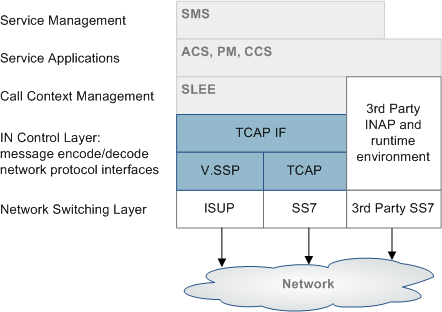
CCS Components Overview
Platform Components
This table describes the main components in CCS.
Note:
CCS is installed on all three machines.
| Component | Role |
|---|---|
| SMS | The central management system of the platform. It hosts the authoritative configuration and subscriber database (SMF), and provides access to the external world using provisioning interfaces and using a graphical user interface (SMS screens). It is responsible for keeping all platforms in sync, and acts as a central collection point for alarms and statistics of the entire platform. |
| SLC | Performs all actual call switching. It interfaces with the telephony network and runs the service logic for each service. It also interfaces with the Voucher and Wallet Servers to ensure that calls are charged in real-time. |
| VWS |
The Voucher and Wallet Server hosts the subscriber balances and acts as the rating engine. It processes incoming rating and charging requests and maintains wallet data. For more information about Voucher and Wallet Servers, see Voucher and Wallet Server and CCS. |
System diagram
Here is an example of how CCS fits into a standard install of Convergent Charging Controller software.
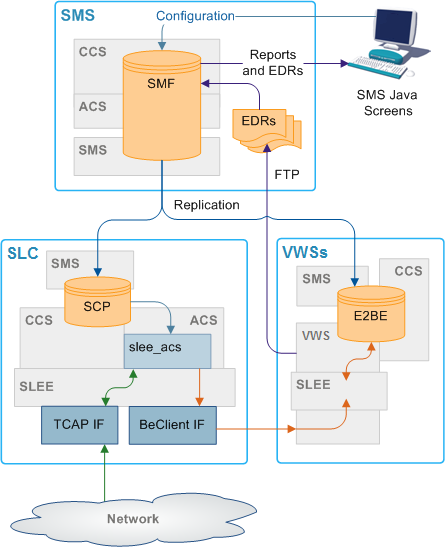
Supporting Applications
Some of the components of CCS are supplied by the other applications.
| Application | Role | Further information |
|---|---|---|
| SMS |
Provides the base system management functionality including the SMS Java administration screens and centralized data storage and replication, including:
|
Service Management System User's Guide Service Management System Technical Guide |
| ACS |
Provides call and SMS processing and control, customer/service provider management and control plan creation. ACS functionality is extended by CCS plug-ins (macro nodes, configuration and libraries). |
Advanced Control Services User's Guide Advanced Control Services Technical Guide |
| VWS |
Provides billing facilities. May be replaced by a third-party billing engine. VWS database is the VWS database, it also holds CCS data. |
Voucher and Wallet Server Technical Guide |
Subsystems used by CCS
The main subsystems used by CCS are:
- Replication (provided by SMS)
- ACS and CPE (for call processing)
- EDR generation and file transfer
- SMS Java administration screens and optional PI commands
- VWS (for charging, and subscriber account and wallet management)
Note:
Each subsystem (except the SMS administration screens) must be configured to support CCS. The SMS administration screens are automatically configured when CCS is installed.
CCS and ACS
Some aspects of the Advanced Control Services (ACS) service are available to the CCS operator, providing call-processing functionality to the CCS base service.
The core ACS functionality may be used by operators or service providers in conjunction with the CCS service. This provides additional value and adds processing capability. For example, personal or global barring lists, special PIN accessed functionality, or speed dial codes.
ACS requires some configuration to enable CCS to operate correctly.
For more information about:
- Configuring ACS for CCS, see Configuration Overview
- ACS, see Advanced Control Services Technical Guide
CCS Control Plans
Calls using the CCS service are routed to a terminating point using a control plan. A control plan is a service-logic flowchart that consists of a collection of feature nodes that are used to define the call flow. Each feature node defines a particular decision point or action that determines where next to route a call.
Note:
Credit transfers require a special control plan called CREDIT_TRANSFER. This control plan is installed by default, and is required to process credit transfer commit requests. For more information about credit transfers, see the Transfer Management chapter in Charging Control Services User's Guide.
For more information about CCS feature nodes, see Feature Nodes Reference Guide.
You can also create global CCS control plans. Global control plans enable the operator to screen calls before the customer's control plans are applied. Global control plans are owned only by the operator and are automatically assigned to the default operator customer.
Global control plans are associated with a specific service. If you create a global control plan and associate it with the CCS service, the control plans' service logic is applied to calls for all customers who use the CCS service.
For more information about managing control plans, see Control Plan Editor User's Guide.
CCS and VWS
The CCS base service uses a fault-tolerant Voucher and Wallet Server, known as VWS. Keeping the Voucher and Wallet Server logically separate from the call-processing engine allows it to be used by multiple clients.
CCS provides call control and business rules. It handles:
- Subscribers
- Tariffing
- Vouchers
- Money
- Provisioning
- Credit cards
- Relationship between subscriber accounts and wallets
CCS uses the VWS for running financial functions for CCS and managing wallets and balances. Familiarity with the VWS design and structure is assumed. For more information about the VWS, see Voucher and Wallet Server Technical Guide.
Note:
A third party domain may be used instead of the VWS to service billing requirements.
CCS Components
CCS has these types of components:
- Data (subscribers, charges, vouchers, promotions)
- CCS Java administration screens (enables users to manage data)
- CCS plug-ins to Voucher and Wallet Server (run tariffing and business rules)
- CCS plug-ins to ACS for call control (includes CCS feature nodes for charging control plans)
- Command-line tools and utilities
Component diagram
Here is an example showing the main components of CCS.
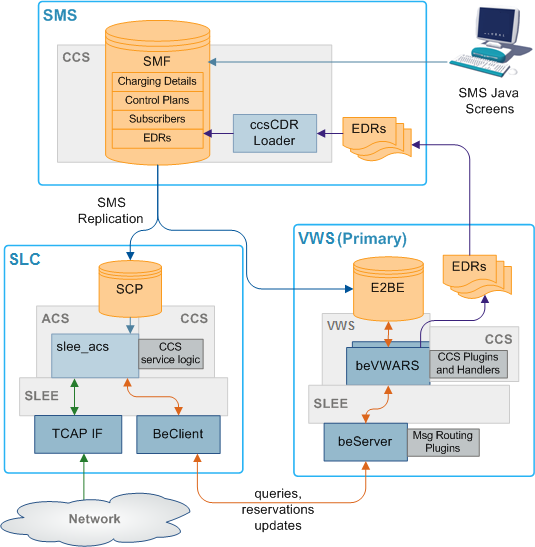
Component description
This table describes the main components in CCS.
| Component | Role | Further information |
|---|---|---|
| SMS Java Administration screens | These administration screens provide a GUI for configuring CCS. | Convergent Charging Controller Charging Control Services User's Guide |
| SMF database | The main database on the SMS. This database holds data for CCS and the other applications installed alongside it. | Convergent Charging Controller Service Management System Technical Guide |
| SCP database | The databases on the SLCs. They hold a subset of the data in the SMF database. | NA |
| E2BE database | The databases on the Voucher and Wallet Servers. They hold a subset of the data on the SMF. They primarily hold VWS and CCS data. | Convergent Charging Controller Voucher and Wallet Server Technical Guide |
| ccsCDRLoader | Inserts EDRs into the SMF so the SMS screens can be used to view call and system activity. | ccsCDRLoader |
| slee_acs | The slee_acs process handles call processing on the SLC. Compiled control plans provide the call process configuration. | Convergent Charging Controller Advanced Control Services Technical Guide |
| CCS Service Logic | slee_acs is extended by CCS-specific functionality which enables charging control plans. | Convergent Charging Controller Control Plan Editor User's Guide |
| SLEE | The Service Logic Execution Environment routes calls to the slee_acs and to other machines through the SLEE interfaces (TCAP IF and BeClient IF). | Convergent Charging Controller Service Logic Execution Environment Technical Guide |
| TCAP IF | The TCAP IF is the interface between the SLEE and the TCAP stack. | Convergent Charging Controller XML TCAP Interface Technical Guide |
| BeClient IF | The BeClient interface processes requests from the call processor to the Voucher and Wallet Servers. | Voucher and Wallet Server Technical Guide |
| beServer | The beServer handles all incoming requests to the Voucher and Wallet Servers. | Convergent Charging Controller Voucher and Wallet Server Technical Guide |
| beVWARS | The beVWARS handles all actions involving vouchers, wallets and accounts. beVWARS is extended using CCS plug-ins. | Convergent Charging Controller Voucher and Wallet Server Technical Guide |
CCS Service Logic
The CCS service logic is provided to extend the ACS slee_acs process to provide charging and billing functions. This table describes the plug-in libraries which provide the CCS service logic.
| Plug-in Library | Purpose |
|---|---|
| ccsSvcLibrary | The CCS service library handles the initial call setup for calls which will use CCS functionality. It determines which control plan to use, and populates any necessary profile data. |
| ccsMacroNodes | The CCS macro nodes library provides the CCS macro nodes which are used in control plans which use CCS. |
| ccsActions | The CCS chassis action library provides functions which are used when ccsSvcLibrary requires an action outside slee_acs. This library is primarily used for billing actions which are completed by the VWS. |
Note:
If a third-party VWS is used, a different chassis action library will be provided. For more information about these chassis action libraries, see the technical guide for the application which provides connectivity to the third-party Voucher and Wallet Server.Replication
Replication is the main method used to transfer relevant data from the main SMF database on the SMS to the databases which are used for specific functions. Each replication point (node) must be configured in SMS before it can be used in CCS.
For more information about replication, see Service Management System Technical Guide.
CCS Replication
CCS replication
For CCS, replication forwards data from the SMF to the SCP and E2BE databases.
The data replicated to the SCP are:
- Subscriber data
- ACS compiled control plans
The data replicated to the E2BE are:
- Tariffs and tariff rate tables
- CCS Mfile data
- Subscriber and wallet data
Note:
Some of the CCS plug-ins for VWS require additional data from the SMF database on the SMS. These tables and their replication configuration are installed with the ccsSms package.CCS-VWS Protocol overview
The new CCS-VWS protocol is built upon an extensible self-describing message format called Escher. The new protocol is easily extensible, versioned, and allows additions without breaking backward compatibility. The CCS-VWS protocol definition is defined for internal use only.
Voucher and Wallet Server and CCS
CCS provides the facility to control which service is provided by which network element using domains.
A domain defines what functionality CCS uses a set of one or more domain nodes for. Domain nodes are network elements which provide one or more of the following functions:
- Rating
- Billing
- Wallet management
- Voucher management
An example of a domain would be a pair of Convergent Charging Controller Voucher and Wallet Servers.
Domains enable CCS to separate traffic for a dedicated service such as voucher redemption.
For more information about configuring domains, see Charging Control Services User's Guide.
Distributed Wallet Management
You can distribute wallet management across two domains. The wallet management functionality is split between the following two elements:
- Charging management
- Tracking management
A domain can be configured to support one or both of these elements. This allows chargeable balances to be held on the charging domain, and fraud and expense balances to be held separately on a tracking domain.
Note:
Tracking domains can only be configured for a VWS domain type. Charging domains can be configured for any domain type.
Domain Types
Domain types enable CCS to handle groups of domain nodes that share a common technology. This can reflect the communication protocol, and/or make and model of the node.
Examples: The following are domain types:
- VWS
- DIAMETER
- Intec
For more information about configuring these domain types, see Domain.
Default Domain Type
The default domain type for a call is set by the service loader library which loads the control plan for the call. For example: ccsSvcLibrary sets the default domain to 1.
Overriding default domain types
The default domain type for ccsSvcLibrary can be overridden using one of the following:
- The eserv.config parameters are one of the following:
- SubscriberDomainType
- VoucherDomainType
- The Domain drop down list on the Wallet option on the Edit Subscriber screen.
Note:
- These overrides only work for the ccsSvcLibrary. If the call is being processed using a different service loader library, see the application's technical guide for details of how the domain type is set.
- If the call is being processed by ccsSvcLibrary using a service loader plug-in, see the plug-in application's technical guide for details of any default domain type setting and overriding.
Changing Domains During Call Processing
The Set Active Domain feature node enables the domain type to be changed at any point within a control plan.
For example, if TUS is installed with the default Voucher Domain type as '2' (for TUS), then the domain can be changed mid call to VWS and vice versa using the Set Active Domain feature node.
For more information about the Set Active Domain feature node, see Feature Nodes Reference Guide.
CCS and VWS
The CCS base service uses a fault-tolerant Voucher and Wallet Server, known as VWS. Keeping the Voucher and Wallet Server logically separate from the call-processing engine allows it to be used by multiple clients.
CCS provides call control and business rules. It handles:
- Subscribers
- Tariffing
- Vouchers
- Money
- Provisioning
- Credit cards
- Relationship between subscriber accounts and wallets
CCS uses the VWS for executing financial functions for CCS and managing wallets and balances. Familiarity with the VWS design and structure is assumed. For more information about the VWS, see Voucher and Wallet Server Technical Guide.
Note:
A third party domain may be used instead of the VWS to service billing requirements.
Subscribers and Wallet Management
CCS provides a number of services with VWS. They include:
- Balance check
- Subscriber management and wallet charging
- Business process logic
- Merge wallets facility
- Wallet grace periods
- Voucher and credit card recharges
- Automatic deletion of redeemed vouchers
- Wallet and balance expiry and subscriber notification
- Product type updates and notifications
- EDR generation
Diagram
Here is an example of how the VWS handles requests from CCS on an SLC to a VWS.
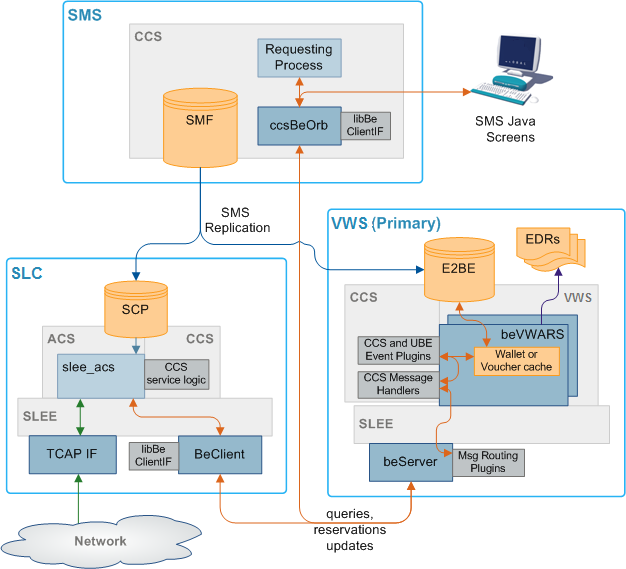
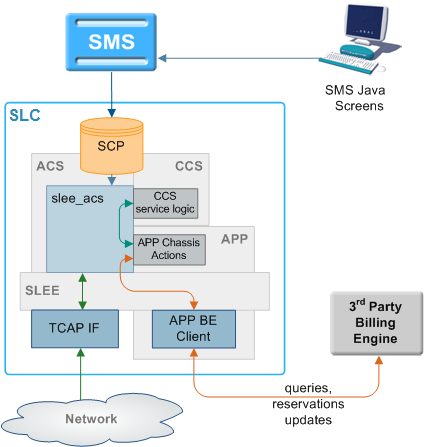
Diagram - Third party Voucher and Wallet Servers (VWS)
This diagram shows the CCS components involved in interaction with third party Voucher and Wallet Servers.
Note:
For each type of third party VWS, a different extension will be installed to work with CCS.
Starting and Stopping the VWS
The VWS runs on top of the SLEE, so the normal SLEE start/stop commands should be used on the VWS machine using the ebe_oper user, to start and stop it.
The VWS will go through several phases before making itself available for calls, the duration of these phases depends on the speed of the network link to the other Voucher and Wallet Server in the pair and the length of time the Voucher and Wallet Server has been down. The VWS will not enable itself until it is closely synchronized with the other Voucher and Wallet Server (which will be acting as primary) so as to minimize the problems caused by timing delays in the synchronization process when a swap from secondary to primary occurs. If the partner Voucher and Wallet Server cannot be contacted then the recovering Voucher and Wallet Server will enable after a configurable number of connection attempts.
For more detail about the VWS design, implementation and operation see Voucher and Wallet Server Technical Guide.
CCS on a Clustered Platform
CCS can be integrated with SMS 3.0 which introduces support for a clustered SMS configuration. Using a clustered configuration means that critical management processes can be run on multiple machines minimizing the amount of downtime of the overall system.
CCS/VWS management processes are split into three categories of availability:
- Single node services with automated failover
- Multi-node services
- Single node services with manual restart
Single Node Services with Automated Failover
The EDR management process is only run on a single node, even when the SMS is in a clustered configuration. The process fails over to an alternate node within 20 seconds.
Multi-node Services
The following CCS/VWS processes operate concurrently on all nodes in a cluster:
| Process | Description |
|---|---|
| CLI-DN Daemon | This allows calling and called numbers to be cross-referenced in order to begin determining the rate for a call. |
| ccsBeOrb | This is the CCS CORBA gateway to the Voucher and Wallet Server. |
| ccsCDRLoader | Loads EDR files into the SMF database. |
| ccsRewardsBatch | Processes rewards requests from the VWS. |
Configuring Services
CCS can support more than one service at the same time. Consequently, each service must be defined so CCS can determine which service to apply to each call.
Configuration Overview
Configuring services involves:
- SLEE and slee_acs routing
- Defining capabilities
- Defining tariffs
- Defining product types
- Creating appropriate control plans
SLEE and slee_acs Routing
Calls are routed to slee_acs over the SLEE. Each call has:
- A service key
- An originating number (CLI or MSISDN)
- A terminating number (DN or MSISDN).
The service triggers to different service loaders within slee_acs depending on:
- Service key
- Terminating number
The relationship is defined in acs.conf.
Capabilities
Capabilities enable calls sent to the same service key to be handled differently depending on the bearer capability in their IDP. For example, Voice and Video for same service key can have different control plans and tariff plans.
CCS screens configure IDP to capability routing. You can set up a global capability which applies to all product types or a capability can have a specific control plan (and tariff plan if specified).
Services are defined in acs.conf using the ServiceEntry configuration. The first argument in the ServiceEntry matches to Service field in a capability. Default control plan is invoked if a subscriber cannot be loaded.
ServiceEntry (CCS,ccsSvcLibrary.so)
For more information about ServiceEntry configuration, see Advanced Control Services Technical Guide.
Note:
Default control plan is used if no subscriber can be loaded (and therefore CCS cannot locate a control plan by product type).Bearer Capabilities
Bearer capability specifies a requested service: packet or circuit mode, data rate, type of information content. The bearer capability is made up of a number of different bits, but the number you enter in the capability screen is actually the InitialDP itc field (information transfer capability).
This table shows some capabilities and their general uses.
| Capability | Description |
|---|---|
| 0 | Speech |
| 8 | Unrestricted Digital Information |
| 9 | Restricted Digital Information |
| 16 | 3.1 Khz Audio |
| 17 | Unrestricted Digital Information with Tones/Announcements |
| 24 | Video |
Note:
These capabilities are shown in decimal.
Subscriber Accounts and Wallet Management
Actions regarding subscriber accounts and wallets can be completed by either CCS processes or Voucher and Wallet Server processes. The CCS processes complete actions in the following areas:
- Sending wallet and voucher requests to the Voucher and Wallet Server
- Updating subscriber account and wallet expiry and activation details in the SMF
- Updating subscriber's account and product type details
- Generating short messages which are sent to subscribers reminding them that their wallet or balance will shortly run out, or informing them of any balance or product type changes
For more overview information about subscriber accounts and wallets, see Charging Control Services User's Guide.
CCS Plug-ins for the VWS
If the platform uses a Voucher and Wallet Server, the VWS processes handle the VWS-end of wallet or voucher related actions. CCS functionality is provided by adding plug-in libraries to the VWS processes on the VWS. The message and wallet handler plug-ins on the VWS are installed by the ccsBe package. These are explained in detail in Background Processes on the VWS.
For more information about the VWS processes involved in subscriber account and wallet management, see Voucher and Wallet Server Technical Guide.
Diagram
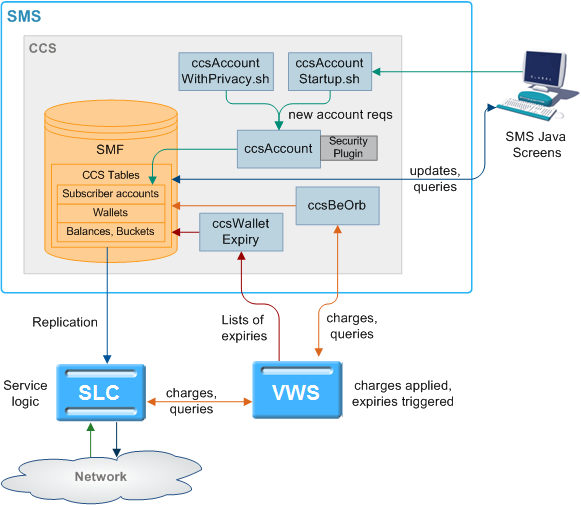
This diagram shows some elements relating to subscriber account, wallet and bucket creation and expiry/removal.
Figure 1-1 Elements relating to subscriber account, wallet and bucket creation and expiry/removal
For more information about:
- Charging, see Rating and Charging
- Expiry, see Voucher and Wallet Server Technical Guide
Subscriber accounts and wallet processes
This table describes the main processes involved in subscriber and wallet management.
| Process | Role | Further information |
|---|---|---|
| ccsAccount | Generates batches of subscriber accounts. | About ccsAccount |
| ccsAccountStartup.sh | Startup script for ccsAccount. | About ccsAccountStartup.sh |
| ccsAccountWithPrivacy.sh | Startup script for ccsAccount with encryption. | About ccsAccountWithPrivacy.sh |
| Security modules | Used by ccsAccount when started by ccsAccountWithPrivacy.sh. | Security |
| ccsBeOrb | Handles communication between SMS screens and VWSs. | ccsBeOrb |
| libBeClientIF | This library provides common functions for the connection with the VWS VWSs. | Voucher and Wallet Server Technical Guide |
|
ccsExpiryMessage Generator |
ccsExpiryMessageGenerator generates a list of wallets or balances which will expire shortly and writes it to a file on the VWS VWS. | ccsExpiryMessageGenerator |
| cmnPushFiles | cmnPushFiles forwards the expiry list file to the SMS. | cmnPushFiles |
| cmnReceiveFiles | cmnReceiveFiles accepts the expiry list file from cmnPushFiles and writes it to the directory indicated by cmnPushFiles. | Service Management System Technical Guide |
|
ccsExpiryMessage Loader |
ccsExpiryMessageLoader sends short messages to subscribers to warn them that their wallet or balance will expire shortly. | ccsExpiryMessageLoader |
| ccsWalletExpiry | ccsWalletExpiry processes CCS updates to the subscriber and wallet expiry tables on the SMF. | ccsWalletExpiry |
Wallets and VWS VWSs
If CCS is using Voucher and Wallet Servers (VWSs), each wallet is created on a specific VWS. To perform an action on a wallet or its balances and buckets, the requesting process must know which VWS to send the message to. This information is stored in a reference table which is stored on the SMS and replicated to the SLC.
Generating Accounts
This table describes the process ccsAccount follows to create CCS subscribers and wallets by batch.
| Stage | Description |
|---|---|
| 1 |
On the SMS, ccsAccount logs into the SMF database using Oracle user ID ccs_admin and creates rows in the following tables:
The rows are entered by calling the methods of packages on the SMS. |
| 2 |
ccsAccount then requests that the Voucher and Wallet Server make the Wallets for the Subscribers by making rows in:
|
| 3 | The CCS_* rows are replicated out to the VWSs and SLCs by replication. |
Note:
- ccsAccount may also create accounts using the privacy setting. For more information about this process, see Generating Account Numbers.
- ccsAccount must be able to contact the Voucher and Wallet Servers at all times. If the connection drops to one of the pair it will switch over to the secondary. If the secondary also goes down, ccsAccount will try to re-send its request a configurable number of times before giving up.
- All the wallets are created on one VWS only. If the VWS pair ID is not specified, it will pick the VWS with the lowest ratio of 'Maximum Accounts' (java screens, Subscriber Management->Domain) to the actual number of wallets on a VWS.
Wallet Migration Diagram
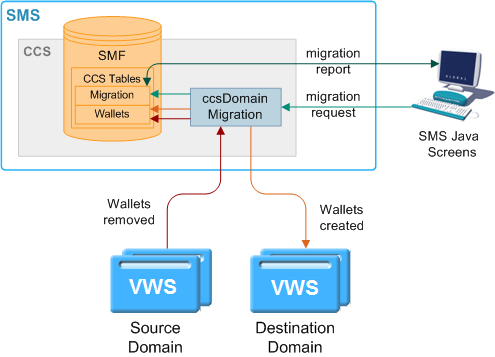
This diagram shows the elements involved in migrating wallets from one Voucher and Wallet Server to another.
Figure 1-2 Elements involved in migrating wallets from one Voucher and Wallet Server to another
Wallet Migration Process Descriptions
This table describes the main processes involved in migrating wallets from one Voucher and Wallet Server pair to another.
| Process | Role | Further information |
|---|---|---|
| ccsDomainMigration |
ccsDomainMigration manages the migration of wallets from one VWS to another. It connects to beServer on the Voucher and Wallet Servers. |
About ccsDomainMigration |
| libBeClientIF | This library provides common functions for the connection with the VWSs. | Voucher and Wallet Server Technical Guide |
Wallet Migration Process
This table describes how wallets are migrated from one Voucher and Wallet Server pair to another using wallet migration.
| Stage | Description |
|---|---|
| 1 |
The user configures a migration using the UBE Account Balancing tab on the Subscriber Management screen and clicks Confirm on the Confirmation Dialog prompt. For more information about the UBE Account Balancing tab, see Charging Control Services User's Guide. |
| 2 | The screens trigger the ccsDomainMigration daemon using its startup script: ccsDomainMigrationStartup.sh |
| 3 | ccsDomainMigration reads configuration from eserv.config. |
| 4 |
ccsDomainMigration checks for a lockfile (the lockfile is specified by the lockFile parameter in Parameters or the default is used). If the lockfile is present, ccsDomainMigration will log an error and exit. Otherwise, ccsDomainMigration will create a lockfile. |
| 5 | ccsDomainMigration will use libBeClientIF to connect to the source and destination VWS Voucher and Wallet Server pairs. |
| 6 |
ccsDomainMigration starts processing the wallets specified in the migration record stored in the SMF database. The migration's state is updated to R in the SMF database and can be viewed from the screens after the data is refreshed (for example by using the Refresh button). |
| 7 |
For each wallet, ccsDomainMigration:
|
| 8 |
ccsDomainMigration constructs the migration report and updates the SMF database with the migration status. For more information about the migration report, see Charging Control Services User's Guide. |
| 9 | ccsDomainMigration removes the lockfile. |
Inactive Wallet and Bucket Expiry
The following steps describe how wallets and buckets are expired due to inactivity.
Note:
This is not the same as being expired due to their expiry date being passed.-
beVWARS loads a wallet. The wallet loaded event triggers ccsVWARSExpiry.
For more information about how beVWARS triggers beVWARS plug-ins, see Voucher and Wallet Server Technical Guide.
-
ccsVWARSExpiry checks the wallet state. Go to the appropriate step for the wallet state.
-
If the wallet is currently in the Pre-use state, ccsVWARSExpiry checks the wallet's subscriber batch status.
If the batch status is expired, ccsVWARSExpiry sets the wallet status to Terminated.
-
If the wallet is currently in the Active state, ccsVWARSExpiry checks the current date against the wallet's Date Last Used + the Active to Dormant period for the applicable product type.
If the current date is later than the wallet's Date Last Used + Active to Dormant period, the wallet is stale. ccsVWARSExpiry:
- Writes an EDR detailing the wallet expiry
- Sets the wallet state to Dormant
For more information about Date Last Used and Active to Dormant, see Charging Control Services User's Guide.
-
If the wallet is currently in the Dormant state, ccsVWARSExpiry checks whether the wallet was activated or used. If it was, ccsVWARSExpiry checks the Date Last Used + Active to Dormant period + Dormant to Terminated Period for the applicable product type.
If the current date is later than the wallet's Date Last Used + Active to Dormant + Dormant to Terminated, the wallet is stale. ccsVWARSExpiry:
- Writes an EDR detailing the wallet termination
- Sets the wallet state to Terminated
Expiry Event Handling
If ccsVWARSExpiry is triggered by a wallet expiry event (usually sent by beVWARSExpiry), ccsVWARSExpiry:
- Checks the wallet's expiry date and, if there is none, sets expiry date to now
- Writes an EDR detailing the wallet expiry
- Writes the wallet ID to expired list
The name and location of the expired list is specified by: expiredPrefix, expiredSuffix, and expiredDirectory in the section Parameters.
If ccsVWARSExpiry is triggered by a bucket expiry event (usually sent by
beVWARSExpiry) and produceCDRForWalletExpiredBucket (see section ccsVWARSExpiry) is set to true, ccsVWARSExpiry logs an EDR for the bucket. It does nothing if
produceCDRForWalletExpiredBucket is false.
If ccsVWARSPeriodicCharge is triggered by a bucket expiry event, it processes expiring periodic charge buckets. It keeps the periodic charge bucket and sets the expiry date to a point in the future. For more information about how expiry dates are calculated, see Charging Control Services User's Guide.
Wallet Removal
The following steps describe how wallets are removed.
-
beVWARS loads a wallet. The wallet loaded event triggers ccsVWARSExpiry.
For more information about how beVWARS triggers beVWARS plug-ins, see Voucher and Wallet Server Technical Guide.
- If the wallet is currently in the Terminated state, ccsVWARSExpiry checks whether the wallet is passed its wallet expiry date + the Terminated to Removed period for the applicable product type.
-
If the current date is later than the wallet's expiry date + Terminated to Removed, ccsVWARSExpiry checks logNotRemoveWallet.
If logNotRemoveWallet is set to false, ccsVWARSExpiry:
- Logs an EDR detailing the wallet removal
- Removes all the buckets associated with the wallet
- Logs an EDR for each removed bucket
- Removes the wallet from the E2BE
- The wallet removed event triggers ccsVWARSExpiry again and it logs the wallet removal to the remove list.
If logNotRemoveWallet is set to true, ccsVWARSExpiry logs the wallet ID to the remove list.
The name and location of the removed list is specified by: removedPrefix, removedSuffix, and removedDirectory in the section Parameters.
Exception: If removeAtMidnightTZ (see section ccsVWARSExpiry) is set, ccsVWARSExpiry will take these actions the next time the wallet is loaded after the midnight in the specified timezone which follows the expiry date.
- If logNotRemoveWallet was set to true, cmnPushFiles picks up the remove list from its configured input directory and pushes it to the SMS.
- cmnReceiveFiles receives the files from cmnPushFiles. For more information about cmnReceiveFiles, see SMS Technical Guide.
-
ccsWalletExpiry reads files which match the name and location details specified by these Parameters:
- removedPrefix
- removedDirectory.
- ccsWalletExpiry deletes the wallets from the remove list from the SMF database.
- ccsWalletExpiry sends a wallet delete request to ccsBeOrb for the wallet which was deleted in step 7.
- ccsBeOrb passes the request to beVWARS via beServer.
-
beVWARS attempts to delete the wallet.
Note: If logNotRemoveWallet was set to false, the wallet will already have been deleted and an error will be returned to ccsWalletExpiry via beServer and ccsBeOrb.
Note:
Wallets can also be deleted through the SMS screens. For more information, see Charging Control Services User's Guide.Grace Periods
Wallets can be configured to have a grace state. A grace state provides limited functionality to a wallet which would otherwise be in the terminated state.
A wallet can be in more than one grace period. In this case the functionality is limited to functions allowed by all the applicable grace periods. If a wallet is in more than one grace period, the allowed named events are limited to those events enabled by all the applicable grace periods. Grace periods can only allow named events if the wallet is in Active, Dormant or Terminated states.
Security
Authenticating modules
To provide security over account and voucher generation, CCS contains authentication modules.
These modules contain information uniquely related to the account or voucher number, which is not stored (directly) in the database, but which must be supplied in order to make use of the account or voucher.
Each module has a pair of functions.
- The first function (the hash generation function) is called at subscriber account- or voucher-generation time.
- The second (the hash validation function) is called every time a subscriber account- or voucher number is presented to the system during call processing.
Note:
Once a batch is created, the authentication module associated with that batch may not be changed.Modules and Security Plug-ins
This table describes when security plug-in libraries are used and which authentication module binary they are used by.
| Authentication Binary | Use |
|---|---|
| About ccsAccount | Used to generate subscriber account PINs (which are used to secure self-management systems). |
| ccsVoucherStartup.sh | Used to generate voucher PINs (that is, a string of digits to be printed on the calling card (or similar). |
| beVWARS ccsVWARSVoucherHandler plug-in | Used to check PIN numbers for validity (for example, to validate a string of digits entered by the user indicating a subscriber account to use or a voucher to redeem). |
For more information about the ccsVoucherStartup.sh and ccsVWARSVoucherHandler binaries, see Voucher Manager Technical Guide.
Security libraries
Security libraries are used to provide flexibility in how the PINs are generated by ccsAccount (see About ccsAccount) and ccsVoucher_CCS3. This table describes the function of each security library.
| Library | Description |
|---|---|
| ccsLegacyPIN |
Provides the DES authentication rule (DES crypt()ed n-digit PINs) for subscriber account and voucher security. The plug-in library is not applicable to new voucher batches. Note: The output file is sent directly to the third-party tool gpg, so the resulting printer file is encrypted. The printer file is never created on the SMS in an unencrypted format. |
| ccsCB10HRNSHA | Provides the CB10 HRN SHA256 and CB10 HRN SHA512 authentication rules for voucher security. |
| ccsCB10HRNAES | Provides the CB10 HRN AES256 authentication rules for voucher security. |
Tip:
Subscriber account PINs and vouchers are validated using the same security library as they were generated with.For information about how the authentication rule is selected during:
- Subscriber account generation, see Charging Control Services User's Guide
- Voucher generation, see Voucher Manager User's Guide
GPG Keys
GPG Public keys are used to increase security when creating subscriber account and voucher batch export files for printing.
To use GPG public keys, you must use the Voucher Management screen to:
- Import new GPG public keys
- Verify the imported keys.
Note:
You cannot use a key until you verify it.When a GPG Public Key is imported, it is added to the SMF database by smf_oper. When verified, they are marked as verified. These keys are then available when creating a voucher or account batch. You cannot remove public keys from the database or from the GPG key-ring store on the SMS.
When a voucher batch is created a required key or UID will be supplied. The UID is used to determine which GnuPG key to use within the keyring to encrypt the export file. The key UID is a hexadecimal number up to 10 digits in length.
For more information about the Voucher Management screen, see Voucher Manager User's Guide.
Verification of a User-supplied Subscriber Number
The CCS Compatibility Authentication Module is used for subscribers using a PIN. In this
case, the CCS Compatibility option is selected from the Encryption Key
field of the New Subscriber Batch screen or the –m option to the batch
generation utilities.
The example below illustrates authentication of a subscriber number using subscriber-number-plus-PIN authentication - that is, using the CCS Compatibility authentication module.
Example Subscriber Account Verification
This table shows how a subscriber's account and PIN are verified.
| Stage | Description |
|---|---|
| 1 | User dials into the gateway. |
| 2 | User dials his/her subscriber number and PIN, followed by #. |
| 3 | User is presented with a dial tone. |
| 4 | User dials destination number. |
| 5 |
The gatekeeper forwards the subscriber-number/pin and the dialed number to CCS. Result: The CCS service logic is invoked. |
| 6 | The subscriber-ID, is looked up in CCS_ACCT_REFERENCE, and the ID of the subscriber-batch is determined. If there is no subscriber-batch for the subscriber, a zero-length hash-digit-string is assumed. Otherwise, the authentication module corresponding to the subscriber-batch is looked up. |
| 7 | The subscriber-ID and PIN are sent to the hash validation function, with the private secret retrieved from the CCS_ACCT_REFERENCE row which corresponds to the subscriber's account. |
| 8 |
If all three pieces of data match, the hash function returns true. In the case of the CCS1 Compatibility security module, it encrypts the secret and compares it to the private secret (which is the PIN encrypted the last time the PIN was set for that subscriber) and returns true if the two encrypted strings match. |
Example: The dialed subscriber number and PIN {1033331234 (dialed digit string)} is split into a subscriber-ID (as stored in the database) and a remainder, by using the per service-provider account-number-length parameter.
Note:
The TOTAL length of subscriber-ID PLUS ‘secret’ or ‘PIN’ may not exceed 20 digits (for example: 103333 + 1234 (key)+(secret)).The subscriber-ID, 103333, is looked up in CCS_ACCT_REFERENCE, and the ID of the subscriber-batch is determined. If there is no subscriber-batch for the subscriber, a zero-length hash-digit-string is assumed. Otherwise, the authentication module corresponding to the subscriber-batch is looked up.
At this point, the strings 103333 and 1234 are sent to the hash validation function, along with the private secret retrieved from the appropriate CCS_ACCT_REFERENCE row.
About Secure SSL Connection to the Database
Enabling Secure SSL Connection to the Database
Convergent Charging Controller supports secure network logins through Secure Socket Layer (SSL) connections from theConvergent Charging Controller UI to the database. SSL is the default method for connecting to the database when you install Convergent Charging Controller. You can also enable SSL after installing Convergent Charging Controller.
For information about enabling SSL connections to the database, see SMS Technical Guide.
Enabling SSL for the CCP
The Customer Care Portal (CCP) provides a customizable user interface (UI) to CCS that allows customer service representatives (CSRs) to perform the tasks required to manage their subscribers.
You can access the CCP through the Services menu in the SMS UI, or you can access it directly from:
- Your Web browser by using the appropriate URL
- A Java WebStart URL
- The desktop or Start menu by using the CCP shortcut
If you access the CCP through the SMS UI and SSL is already enabled, no further action is required to enable SSL for the CCP. For information about enabling SSL on the SMS, see SMS Technical Guide.
If you access the CCP directly, enable SSL connections to the database by:
- Creating the Oracle wallet that identifies the database server on the SMS node. Its location must be specified in the listener.ora and sqlnet.ora files.
- Modifying the listener.ora file to additionally listen on port 2484. Use the TCPS protocol for secure SSL connections to the database.
Note:
The standard Oracle listener TCP port is 1521. However, SSL connections use the standard port for the TCPS protocol, port 2484, instead. If there is a firewall between screen clients and the SMS, you must open port 2484 in the firewall.For more information about enabling SSL by configuring the Oracle wallet and updating the listener.ora and sqlnet.ora files, see SMS Technical Guide.
The following additional configuration must be set in the ccpGui.bat/ccpGui.sh file:
- The
jnlp.sms.secureConnectionDatabaseHostJava application property (on non-clustered systems) or thejnlp.sms.secureConnectionClusterDatabaseHostJava application property (on clustered systems) must specify the database connection in the CONNECT_DATA part. In addition, the PROTOCOL part must be set to TCPS and the PORT part must be set to 2484. - If present, set the
jnlp.EncryptedSSLConnectionJava application property to true. The Convergent Charging Controller UI connects to the database by using encrypted SSL connections by default.
Note:
If you are using non-SSL connections to the database, you must setjnlp.EncryptedSSLConnection to false. When
jnlp.EncrtyptedSSLConnection is set to false, the
jnlp.sms.secureConnectionDatabaseHost and
jnlp.sms.secureConnectionClusterDatabaseHost properties are
ignored.
See CCP Application Properties for SSL and Non-SSL Database Connections for more information.
Calling Card Services
The calling card service allows operators to offer a card-based service where a subscriber's calls are charged, not to the CLI or the telephone number of the caller, but to the wallet linked to the subscriber's calling card. The card user dials a predefined service number and security code provided by the telco. This connects them to an IVR system which prompts the caller to enter the destination number to which they wish to transfer the call.
The cost of this call is deducted from the wallet associated with the calling card.
Service Features
The calling card service allows the telco operator to:
- Generate large numbers of CCS card/subscriber account numbers randomly in a batch (within the specified range).
- Assign serial numbers to the accounts for customer care purposes.
- Encrypt the output files sent to the print shop and used for producing the printed cards.
Generating Account Numbers
The ccsAccount command line tool can be used to generate:
- Batches of subscriber/card accounts
- Subscriber/card account PINs (which are used to secure self-management systems)
When the ccsAccount tool is run by ccsAccountWithPrivacy.sh:
- It runs ccsAccount with the
-P(privacy) parameter - Account numbers are allocated randomly within the batch, with gaps between the sequences to ensure fraud control (true while the batch is not approaching full)
- A sequential serial number is allocated which is stored in the CLI field, while the card number is stored in the Account Number field
Setting Initial Card Balance
After the subscriber/card account is generated by ccsAccount, the amount specified in the Initial Value field on the New Product Type or the Edit Product Type screen will be credited to the account.
For more information about the Product Type screens, see Charging Control Services User's Guide.
Encrypting Print Shop File
The ccsAccount tool, when run with the -P parameter, causes the exported print shop file to be encrypted. The shell script, ccsAccountWithPrivacy.sh, is used to extract the GPG key specified on the command line and directs the encrypted output to the print shop filename.
ccsAccountWithPrivacy.sh key file ccsAccount_parametersThe output is passed onto the ccsAccount binary which then runs with additional parameters:
ccsAccount -P -m encryption_module ccsAccount_parameters
Example
Here is an example ccsAccount command and the resulting account batch output file:
ccsAccount -P -t "World" -m "DES" -s 8815000000 -e 8820990000 -n 10 - b debit -C 7 -c USD -d 2>&1Output:
# Account Batch Output File
# Generated Wed Dec 31 01:24:29 2008
#
AccountBatchID=59
ServiceProviderID=1
AccountTypeID=7
maxConcurrent=1
BatchSize=10
RangeStart=8815000000
RangeEnd=8819990000
AuthenticationModuleID=4
BillingEngineID=2
CurrencyID=2
LimitType=DEBT
BalanceType=1
=
Dec 31 01:24:29.861203 ccsAccount(15179) NOTICE: Beginning account generation.
16309877,3415992,7,G8.H3zCjoKzbY,8800127
19052821,0363266,7,G8fRbQy015unk,8800128
18627603,5447142,7,G82efn9Gh2gSY,8800129
16635167,9003194,7,G8nkF67MOzS9g,8800130
19498256,8441931,7,G8tfZtbQvbOIg,8800131
18758105,8744644,7,G8CSYLULMZtww,8800132
17349265,3517347,7,G8GH/BMl4HHzs,8800133
16223817,0064708,7,G8MbgIe4gPO.U,8800134
16089674,7771756,7,G8lXd7ySSzsVw,8800135
16405822,1207166,7,G8JugOSguxjqg,8800136
Dec 31 01:24:35.514685 ccsAccount(15179) NOTICE: Progress 10/10 (100.0%) Complete
Dec 31 01:24:35.515578 ccsAccount(15179) NOTICE: Account generation complete.
Rating and Charging
- Call charging (from the SLC)
- Named events (from either the SLC or the SMS)
A wallet can also be debited using one of the following:
- A credit transfer (when they pass funds to another wallet)
- A periodic charge (which applies a named event charge on a regular basis)
All charges are calculated and applied by CCS plug-ins on the Voucher and Wallet Servers.
For information about:
- The processing done on the VWS servers, see Voucher and Wallet Server Technical Guide.
- How to configure the charges, see Charging Control Services User's Guide.
Charging for Calls
This table describes how CCS handles call rating and charging for a VWS.
| Stage | Description |
|---|---|
| 1 |
Call arrives from network over the SLEE to slee_acs with a service key that triggers the CCS Service Library (ccsSvcLibrary). The service to use is determined using the service key, the configuration in the SLEE.cfg, and capabilities configuration. For more information about slee_acs, see Advanced Control Services Technical Guide. |
| 2 |
The CCS service library determines the control plan to initiate using the:
The control plan which applies to the subscriber is initiated. For more information about configuring capabilities and product types, see Charging Control Services User's Guide. |
| 3 |
Service logic checks for a valid subscriber account to charge by querying beVWARS through BeClient and beServer. Tips:
|
| 4 | CCS service library processes the call according to control plan. When the Universal Attempt Billing node is reached, CCS service library sends an Initial Reservation Request (IR_Req) to beVWARS through BeClient and beServer. |
| 5 |
beVWARS checks for IR message handlers. CCS provides ccsVWARSReservationHandler for IR messages, so beVWARS passes the message to that handler. ccsVWARSReservationHandler uses rating tables to calculate the minimum charge to be reserved from a particular balance type to pay for the call. The amount which can be reserved is determined per request, based on:
The balances that funds are reserved and charged against are specified in the service's rate table. The rate table can specify more than one balance type by using a balance cascade. Note: Reservations may fail due to too many subscribers attempting to access a wallet at the same time. |
| 6 |
beVWARS checks the wallet. This triggers any beVWARS event plug-ins and they perform any configured actions on the wallet (for details about VWS plug-ins which fire, see Voucher and Wallet Server Technical Guide). The only CCS event plug-in which is likely to trigger is ccsWLCPlugin, which will handle wallets which:
If the wallet is still valid, ccsVWARSReservationHandler reserves the charge amount and sends a reservation acknowledgment (IR_Ack) back to the service logic. Stages 4-6 repeat until the final charge is established by CCS service library. After the first reservation is successfully processed, CCS will use subsequent reservation request (SR_Req) messages to reserve additional blocks of time. |
| 7 | CCS service library finalizes charge (using the Universal Attempt Terminate with Billing node), and sends a commit reservation (CR_Req) request to beVWARS through BeClient and beServer. |
| 8 |
beVWARS checks for CR message handlers. CCS provides ccsVWARSReservationHandler for CR messages, so beVWARS passes the message to that handler. ccsVWARSReservationHandler uses rating tables to calculate the final charge and charges the wallet. Note: beVWARS event plug-ins are triggered when the final charge is applied. CCS does not provide any plug-ins which are specifically designed to fire at this point (though ccsWLCPlugin may fire again). |
| 9 | beVWARS sends the acknowledgment back to the service logic through beServer and BeClient. |
| 10 |
The CCS service logic passes the response back to the control plan. If the reservation was successful, the control plan would:
|
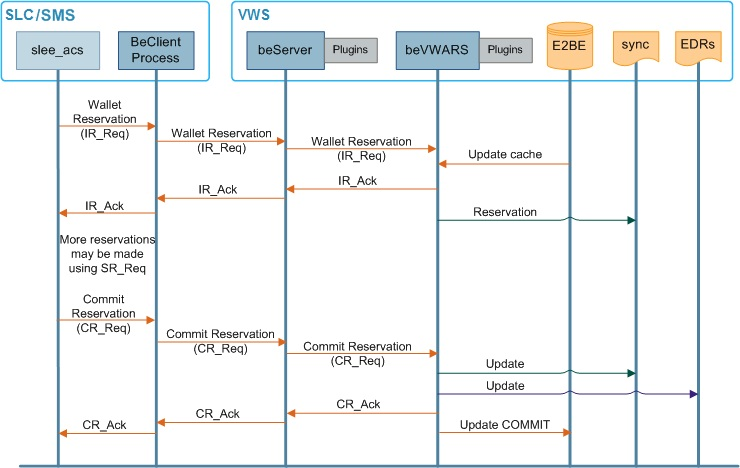
Call Charging Message Flow
This diagram shows the message flows involved in charging for a standard voice call.
Figure 1-3 Message flows in charging for a standard voice call
Charging for Named Events
Named events are predefined events on the system that incur a charge.
This table describes how CCS handles charging for named events for a VWS server.
| Stage | Description |
|---|---|
| 1 |
Named event occurs. Examples:
For more information about the Named Event feature node, see Feature Nodes Reference Guide. |
| 2 | The triggering process (ccsPeriodicCharge on the SMS or slee_acs using the ccsMacroNodes plug-in on the SLC) sends a Named Event (NE) request to the local BeClient process. |
| 3 | BeClient process receives the request and sends a NE_Req request to beServer on a Voucher and Wallet Server. |
| 4 |
beServer on the Voucher and Wallet Server receives the request, calculates the charge, and forwards the request to beVWARS. Note: If there are any beServer message handlers configured for NE messages, beServer will pass the request to them before it passes the messages to beVWARS. CCS does not provide beServer message handlers for NE messages described in this process. |
| 5 |
beVWARS checks for NE message handlers. CCS provides ccsVWARSNamedEventHandler (on page 2) for NE messages, so beVWARS passes the message to that handler. ccsVWARSNamedEventHandler uses Named Event definitions to calculate the named event charge and charges the wallet. Note: beVWARS event plug-ins are triggered when the charge is applied. CCS does not provide any plug-ins that are specifically designed to fire at this point (though ccsWLCPlugin may fire). |
| 6 | beVWARS sends an acknowledgment back to the service logic through beServer and BeClient. |
| 7 | CCS service logic continues processing the control plan until an Exit node is reached, when the call is released using standard slee_acs release. |
Note:
Named events can also use a reservation process similar to that used in the charging for calls process. In this case three messages are used:- INER
- SNER
- CNER
For information about how the VWS processes apply the named event charge, see Voucher and Wallet Server Technical Guide.
Wallets with Multiple Concurrent Access
Where a wallet has its maximum concurrent accesses field configured to more than 1,
charges have special requirements when they are reserved. They can also be applied
differently, depending on the application of the alwaysUsePreferred
parameter.
Terminated State and Wallet Life Cycle Periods
Normally, named events and charges cannot be charged against wallets which are pre-use, frozen, suspended, terminated.
However, if a wallet is in a WLC period that allows specific named events, as well as session charges, general charges and general recharges, while being in a terminated state, these will be allowed.
Periodic Charges
Periodic charges enable a telco to apply regular charges or recharges to a subscriber's wallet. They can also send notifications on specific events. Periodic charges are configured and populated on the SMS and are run on VWS Voucher and Wallet Servers.
For more information about the configuration available for periodic charges, see CCS User's Guide.
Periodic Charge Processes
This table describes the main processes involved in running periodic charges.
| Process | Role | Further information |
|---|---|---|
| beVWARS | Main VWS process. Supports the ccsVWARSPeriodicCharging plug-in and handles interaction with the E2BE database. | beVWARS |
| ccsVWARSPeriodicCharge | This beVWARS plug-in handles periodic charge-specific tasks associated with periodic charge bucket changes. | ccsVWARSPeriodicCharge |
| ccsSLEEChangeDaemon | ccsSLEEChangeDaemon updates assignment of periodic charges to wallets. | ccsSLEEChangeDaemon |
| ccsVWARSWalletHandler | This beVWARS message handler performs the VWS side processing of all messages relating directly to wallets. | ccsVWARSWalletHandler |
| ccsPeriodicCharge | ccsPeriodicCharge applies periodic charges defined for wallets. Only processes periodic charges configured in versions earlier than CCS 3.1.4. | ccsPeriodicCharge |
Periodic Charge Processing
The following steps describe how periodic charges are applied.
-
A wallet is queried. This can be from a normal operation, or because beGroveller passes the wallet ID to beVWARS for groveling. For each bucket that is past its expiry date, an expiry event is generated.
For more information about how wallets are groveled, see Voucher and Wallet Server Technical Guide.
- Expiry event triggers ccsVWARSPeriodicCharge.
-
ccsVWARSPeriodicCharge processes the periodic charge.
A periodic charge can apply a charge and/or a credit. According to the periodic charge's configuration, ccsVWARSPeriodicCharge runs:
- A named event request (NE_Req), then/or
- A wallet general recharge request (WGR_Req for a credit, or VTR_Req for a credit plan (that is, voucher type)).
Note: Recharges are only applied if the charge was successful. If the debit is unsuccessful, the periodic charge is moved directly to grace or (if the periodic charge has a Loss of Service period of zero) to terminated.
EDRs are generated for each operation, unless ccsVWARSPeriodicCharge is processing backlogged charges, in which case an EDR will only be generated if a charge fails and the periodic charge moves to Grace.
-
If the periodic charge should change state (for example, due to a failed charge), ccsVWARSPeriodicCharge:
- Applies the state change
- Logs an EDR of type 52
For more information about the state transitions and what happens when a periodic charge is applied to a wallet with a disallowed state, see Charging Control Services User's Guide.
Periodic Charge Triggering
The time periodic charges are processed by ccsVWARSPeriodicCharge is based on the following logic:
- The periodic charge must have passed its expiry date (this is set based on the
details configured in the When option for the periodic charge and where in the
periodic charge life cycle the charge is)
-
Note:
You can adjust when periodic charge processing triggers for a specific time zone by setting therenewPCAtMidnightTZparameter in the ccsVWARSExpiry section of the eserv.config file.
-
- The wallet must have been queried (either from normal activity, or because beVWARS's groveller processed the wallet from work sent from beGroveller)
- For fixed date charges, the value set in chargeTimeGMTHours (See ccsVWARSPeriodicCharge)
- The processing of the wallet can be delayed by retryTimeoutMinutes (See ccsVWARSPeriodicCharge)
For more information about:
- 'When' configuration for a periodic charge and the periodic charge life cycle, see Charging Control Services User's Guide.
- When the beGroveller will send a wallet to be groveled by beVWARS, see Voucher and Wallet Server Technical Guide.
Periodic Charge Association Maintenance Diagram
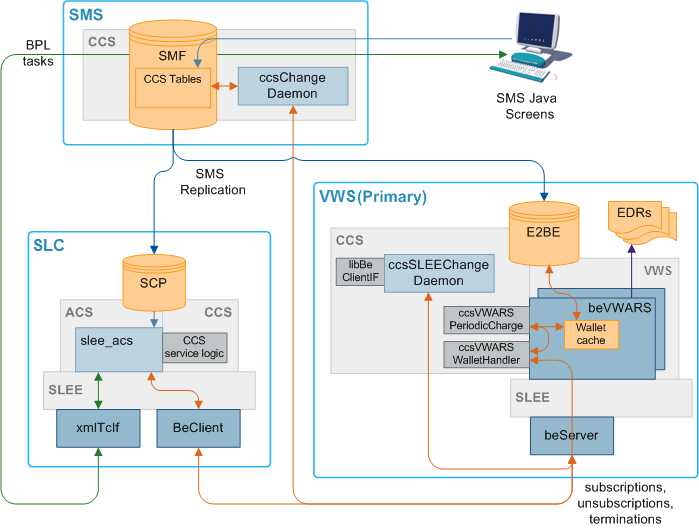
This diagram shows how periodic charge to wallet associations are maintained.
Figure 1-4 Periodic Charge to Wallet Associations
Processing Periodic Charge Subscription Changes
The following steps describe how changes to periodic charge states are processed.
-
Periodic charge subscriptions are triggered when:
- A customer service representative or subscriber triggers a periodic charge subscribe, unsubscribe or terminate BPL task using the Periodic Charge Subscription feature node.
- A customer service representative or subscriber triggers a periodic charge transfer using the Periodic Charge Transfer feature node in a control plan.
- A periodic charge configuration change is made through the SMS screens (ccsSLEEChangeDaemon or ccsVWARSActivation sends WU_Req with state change (see Period Charge Assignment for more information) to beVWARS).
- ccsVWARSPeriodicCharge calculates and applies a final charge.
-
If the trigger is a periodic charge subscription, unsubscription or termination of a subscription to a service, a wallet update request (WU_Req) is sent from the BPL control plan's Periodic Charge Subscription feature node with the:
- Subscriber's ID
- Change value (that is, Subscribe (103), Unsubscribe (102), or Terminate (101))
- Periodic charge ID
For more information about BPL tasks, see the Task Management chapter in Charging Control Services User's Guide. For more information about the Periodic Charge Subscription feature node, see Feature Nodes Reference Guide.
If the trigger is a periodic charge transfer, a wallet information query (WI_Req) is completed against the subscriber's wallet. The query returns information about the subscriber's current subscription balances. If the subscriber has a subscription which is not in an Unsubscribed or Terminated state, the Periodic Charge Transfer feature node sends a wallet update request (WU_Req):
- Changing the existing subscription balance to terminated
- Creating a new subscription balance and buckets for the target periodic charge (copying the expiry date to the new balance).
-
The WU_Req is received by beVWARS on the VWS server and ccsVWARSWalletHandler is triggered.
When ccsVWARSWalletHandler receives a periodic charge subscription request (WU_Req 103), it checks for the presence of a periodic charge balance type for this periodic charge in the wallet (that is, whether the periodic charge is assigned to the subscriber's product type). If the wallet does not have the relevant periodic charge balance type, ccsVWARSWalletHandler creates the balance type which correlates to the periodic charge ID sent in the WU_Req and creates a bucket for the new subscription with an initial value of 103.
If the request is unsubscribe or terminate (WU_Req 102 or 101), and the required balance type does not exist, ccsVWARSWalletHandler returns a Not Subscribed error.
The WU_Reqs from the periodic charge transfer are treated as normal balance updates.
Note: The EXPIRY value is not changed. If the expiry has been changed by a WU request (in error), then it will be reset back to the original EXPIRY value before applying the state machine logic.
-
ccsVWARSWalletHandler triggers bucket and/or a balance value changed events as necessary to reflect changes.
Exception: If the bucket or balance value is due to a periodic charge transfer, ccsVWARSWalletHandler does not trigger a bucket and/or balance changed event (and step 5 and 6 are skipped).
Note: If no action is described in step 3, the balance type change event is the only action ccsVWARSWalletHandler will take.
-
Any bucket or balance changed event triggers the ccsVWARSPeriodicCharge plug-in.
Note:
ccsVWARSPeriodicCharge is triggered on all bucket or balance changed events, but only processes periodic charge balances. -
ccsVWARSPeriodicCharge checks for periodic charge balances and buckets.
For periodic charge balances and buckets, ccsVWARSPeriodicCharge:
- Changes the state value to reflect the new state (that is, subscribed, unsubscribed or terminated)
- Recalculates and updates the bucket's expiry date
- Triggers any configured notifications
For more information about configuring periodic charge expiries and notifications, see Charging Control Services User's Guide.
Period Charge Assignment
- The periodic charge is configured on the SMS screens and is saved to the SMF database.
-
When a periodic charge is changed so it is assigned to a product type and 'Apply to Existing' is selected, the change to the CCS_AT_PERIODIC_CHARGE table triggers adding a new record to CCS_PC_QUEUE. This change is also replicated to the E2BE database on the VWS using SMS replication.
Note: If the periodic charge has 'Apply to Activating Subscribers' selected, an entry is also added to CCS_PROMOTION, and the relationship is handled by ccsVWARSActivation. For more information, about this process, see Periodic Charges and Wallet Activation.
-
ccsChangeDaemon on SMS and ccsSLEEChangeDaemon on VWS polls the CCS_PC_QUEUE table and picks up the new record.
Note: Polling frequency is controlled by pollPeriod. The frequency records are processed at is controlled by throttle in eserv.config Parameters.
-
If the CCS_PC_QUEUE record has a change type of A (that is, a periodic charge has been associated with or removed from a product type), ccsSLEEChangeDaemon on the VWS sends a wallet inquiry request (WI_Req) to check subscriber's subscription status.
Note: This query will be processed as a normal WI_Req on the VWS VWS. That is, it will trigger the WI message handler, and any event plug-ins which are triggered by wallet query events. For more information about event plug-ins, see Background Processes on the VWS.
- If the change action = I, and the wallet inquiry reports the balance type and bucket do not exist or they do exist but are set to Terminated, sends beVWARS a wallet update request (WU_Req) which sets the periodic charge's state to subscribed.
- If the change action = D, and the wallet inquiry reports the balance type and bucket for this subscriber exist and are not set to Terminated, sends beVWARS a wallet update request (WU_Req) which sets the periodic charge's state to terminated.
-
If the CCS_PC_QUEUE record has a change type of W (that is, a single wallet has been associated with a periodic charge), ccsChangeDaemon on the SMS loops through each periodic charge. For each periodic charge which is associated with the wallet's product type and has "marked as apply to existing subscribers":
- If the change action = I (association), ccsChangeDaemon sends beVWARS a wallet update request (WU_Req) which sets the periodic charge's state to Subscribed.
- If the change action = D (removal), ccsChangeDaemon sends beVWARS a wallet update request (WU_Req) which sets the periodic charge's state to Terminated.
-
If the CCS_PC_QUEUE record has a change type P (that is, a wallet has swapped product types), ccsChangeDaemon on the SMS loops through the wallet's periodic charges checking for periodic charges that are no longer relevant and for new periodic charges from the new product type being swapped to.
- For the periodic charges associated with the old product type and not associated with the new product type, ccsChangeDaemon sends beVWARS a wallet update request (WU_Req) which sets the periodic charge's state to Terminated.
- For the periodic charges associated with both the old and the new product types the ccsChangeDaemon does nothing, regardless of the state of the subscription to that periodic charge.
- For the periodic charges which are associated with the new product and "marked as apply to existing subscribers" and for which the subscriber has no subscription, ccsChangeDaemon sends beVWARS a wallet update request (WU_Req) which sets the periodic charge's state to subscription.
- When ccsSLEEChangeDaemon receives confirmation of the update, it removes the CCS_PC_QUEUE record.
Periodic Charges and Wallet Activation
In addition to the operations normally performed when a subscriber's subscription to a periodic charge changes, operations may be performed when a subscriber:
- Activates a wallet or resubscribes when their periodic charge is in a terminated state
- One or more of the periodic charges associated with the wallet's product type have 'Apply to Activating Subscribers' ticked
If the change is a wallet state change from PreUse to Active, ccsVWARSActivation applies any activation credits (CCS_PROMOTION entries) as per standard behavior. For any periodic charge which has 'Apply to Activating Subscribers' ticked, an activation credit is defined which includes the periodic charge's balance type and a bonus which has a value of 103 (subscribe). When the credit is applied and ccsVWARSActivation attempts to created the relevant subscription bucket, ccsVWARSPeriodicCharge is triggered and creates the appropriate periodic charge balance in the wallet.
Note:
When a periodic charge is subscribed-to an immediate charge (Named Event) is not taken (unless one is specified in the control plan run by the BPL task which changes the subscriber's periodic charge state. This enables any issues with sequencing of activation credits to be avoided.If a wallet state is changed from Terminated to Active, ccsVWARSPeriodicCharge searches for periodic charges in Terminated state. Any periodic charges that are configured to ‘Apply to Activating Subscribers’ are changed to Subscribed. Any other periodic charges are left in the Terminated state.
For more information about 'Apply to Activating Subscribers' field, see Charging Control Services User's Guide.
Sending Periodic Charge Notifications
The following steps describe how notifications generated by periodic charges are sent.
-
When ccsVWARSPeriodicCharge runs a transition which sends a notification, it writes a notification request to the notification batch file.
Exception: No notifications will be sent if either:
- ccsVWARSPeriodicCharge is processing backlogged PreCharge transitions
- The state of the affected wallet is not allowed
The time the notification is written is controlled by notificationMidnightTZ (See ccsVWARSPeriodicCharge).
For more information about which transitions send notifications and how to configure them, see Charging Control Services User's Guide.
-
From there, the standard real-time notifications subsystem processes the notifications as usual.
For more information about how real-time notifications are processed, see step 3 in the Real-time wallet notifications process.
Recharges
Recharge Methods
CCS supports either off-the-shelf or customized recharge mechanisms depending on which interfaces are available. This table describes the available recharge mechanisms.
| Recharge Method | Description |
|---|---|
| Voucher / Scratch Card recharge |
A voucher creation, management and replenishment system is provided with the VWS which a subscriber can use to recharge their wallets. Vouchers can be redeemed using any of the following interfaces:
|
| SMS GUI |
Telco operators can recharge subscriber accounts using the SMS administration screens:
|
| Credit Card Recharge |
Prepaid Charging stores credit card information so a subscriber can be recharged against a credit card number previously provided by the subscriber (when authorized by PIN entry). Credit cards can also be charged periodically (for example, one account charge per month). |
| Web | The PI can support command processing from a range of sources (for example: websites). |
| Electronic refill |
Systems have been deployed that use ISO 8583-based interfaces to recharge subscriber accounts directly from:
|
Tip:
Wallets can also have credit added as part of a promotion or bonus.Promotions
Promotions can be used to increase subscriber activity by rewarding subscribers with more attractive packages for specific behavior. Promotional bonuses can be implemented using one of the following:
- In-built rewards and bonus schemes
- Free form configuration such as control plans and/or profile fields
In-built Reward and Bonus Types
This table describes the types of in-built rewards and bonuses provided to CCS.
| Type | Description |
|---|---|
| Tracker threshold promotions |
Awarded to subscribers whose total usage exceeds a set threshold. Promotional reward can change the subscriber's product type (and applicable tariff), and/or award one or more bonus credits. Promotion notifications can be sent to subscribers specifying how much more they need to spend to upgrade. |
| Wallet activation promotions |
Triggered when a subscriber activates their account. Defines a time period from subscriber creation to activation. If a subscriber activates their account in this period, they are given free SMS messages. |
| Balance recharge promotions | Awards a promotional cash bonus to subscribers if they recharge their account and the recharge is above a specified threshold. |
Promotions Process
Balance changes due to promotions are handled by the ccsPMXPlugin on the VWS. For details, see ccsPMXPlugin.
Notifications
Notifications are any short message sent by CCS to a subscriber's handset.
CCS sets up notifications which are delivered by other applications. Different delivery applications are used depending on the type of network and destination.
ACS Notification Templates
You define the content to include in notifications by configuring ACS notification templates. For more information, see ACS User's Guide.
Examples of CCS activities that can use ACS notification templates are:
- Feature nodes in control plans
- Business process logic (BPL) tasks
- Credit transfers
- Periodic charges
- Profile updates
- Real-time notifications
- Promotions
Notification Languages
Notifications can use any language configured on the system. They are sent in the subscriber's preferred language (if set) or in the system's default language.
For more information about configuring:
- Languages, see ACS User's Guide
- Notification translations, see CCS User's Guide
Events Triggering Notifications
This table lists the events triggering notifications sent by CCS.
| Notification | Triggering Events | Delivery by |
|---|---|---|
| Control plan notifications |
Requested by a feature node in a control plan; for example, to send:
Note: This includes control plans used by BPL tasks. |
Notifications DAP template |
| Real-time wallet notifications |
A specific change in wallet and balance details on the VWS, including:
Promotions, including:
|
Notifications DAP template |
| Periodic charge notifications | Successful or unsuccessful periodic charges | Notifications |
| CCS System notifications |
A specific event in CCS including:
|
Notifications DAP template |
| Credit Transfer notifications | Credit transfer success or failure | Notifications |
| Profile notifications | A defined event in a subscriber's profile |
Notifications DAP template |
For more information about:
- ACS notifications, see ACS User's Guide
- DAP templates, see DAP User's Guide
- Profile notifications, see Charging Control Services User's Guide
About Notification Delivery
Notifications can be delivered by:
- slee_acs process (called by feature nodes in control plans)
- SMSC IF (smsInterface)
- Messaging Manager (xmsTrigger)
- The ccsProfileDaemon or xmlIF processes (through DAP XML templates)
For more information about:
- smsInterface, see SMSC Technical Guide
- xmsTrigger, see MM Technical Guide
- DAP XML templates, see Data Access Pack User's & Technical Guide
Notification Flows
Figure 1-5 Notification flows across the Convergent Charging Controller platform
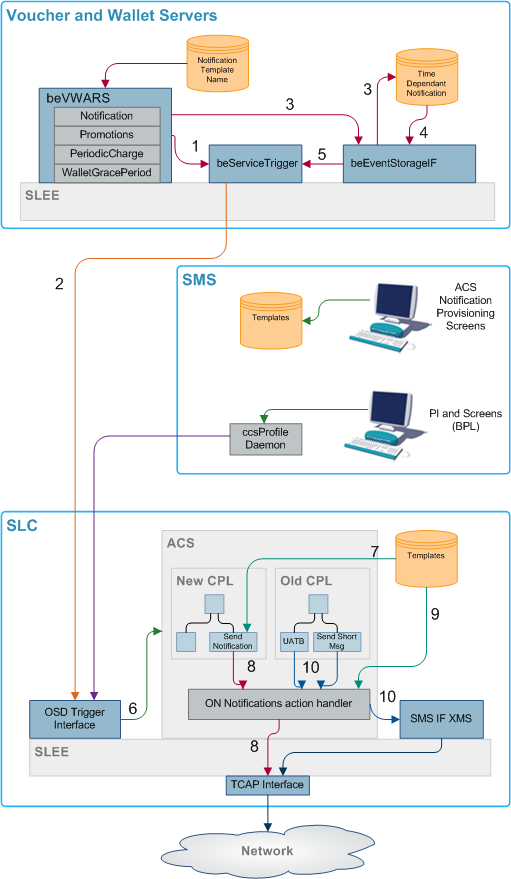
This diagram shows the various notification flows across the Convergent Charging Controller platform.
The beVWARS plug-ins send SMS information to the beServiceTrigger.
Notification XML messages from the beServiceTrigger to the OSD interface on the SLC.
If a notification cannot be delivered immediately, either because it has an associated time period when it can be delivered, or because the delivery attempt failed, then persistent storage of the notification is provided in a database table.
The beEventStorageIF process looks for, and retrieves, the notification entries in the database that can be sent now, either because their allowable delivery time has been met, or because the notification is a message retry.
The beEventStorageIF deletes the active notification entries from the database and sends delivery request messages to the beServiceTrigger for each one.
The OSD interface triggers ACS, which then loads the control plan containing the notification feature node that will perform delivery of the notification.
The notification template to use is determined by the notification feature node, based on:
- Language ID
- Template ID
- Customer ID
The notification feature node delivers a USSD notification through the TCAP interface.
If the message class is "USSD push", then an internal message is sent through the USSD push action handler to the TCAP interface after the notification feature node has performed all the parameter substitutions.
Chassis action to construct message from template.
Other send message feature nodes use new chassis actions to deliver notifications using Messaging Manager.
EDRs
This topic explains how EDRs are used in CCS. Most of the information relates to processing of the EDRs after they are written. For more information about how EDRs are generated, see VWS Technical Guide and Event Detail Record Reference Guide.
Viewing Active Rules for a Subscriber
Follow these steps to view the active rules for a subscriber:
- Open the Subscriber Management screen for the Prepaid Charging service.
- On the Subscriber tab, select the subscriber record and click Edit.
-
In the left pane of the Edit Subscriber screen, select the Balance Topup Rules option.
Result: The Balance Topup Rules screen appears. The rules that apply to this subscriber are displayed on the screen. You see the name of the rule and the date for the last time it will be run.
Note:
This information is read only.
Dataflow
This table shows the process by which EDRs are written and collected to the SMF database.
| Stage | Description |
|---|---|
| 1 | The SLC is the originator of all events that cause Voucher and Wallet Servers to perform tasks during call processing, as the SLC controls how the service responds to network events. The SLC signals events to the VWS Voucher and Wallet Server using the CCS Billing Engine Protocol. The service sends messages to the Voucher and Wallet Servers through the ccsBeClient interface. |
| 2 | EDRs are written out to disk as ASCII files on the VWS. |
| 3 | The files are transfered to the SMS. |
| 4 | The files are indexed and made available to the Java User Screens and external EDR post-processing tools. |
| 5 | CCS screens created EDRs are written by the ccsCDRGenerator process to the same directory the VWS flat files are transfered into. The ccsCDRLoader then loads both the same way. |
CCS EDR Processing
The following process shows how EDRs are processed on the SMS by CCS components:
- If configured to, ccsCDRTrimFiles processes the EDRs from the VWS.
- ccsCDRLoader inserts the details from the EDR files into the CCS_BE_CDR table in the SMF database.
- If configured to, ccsCDRTrimDB processes the EDRs.
- EDRs can be viewed on the EDR Details screen in CCS.
Diagram
Figure 1-6 EDR creation and transfer to the SMS and processing.
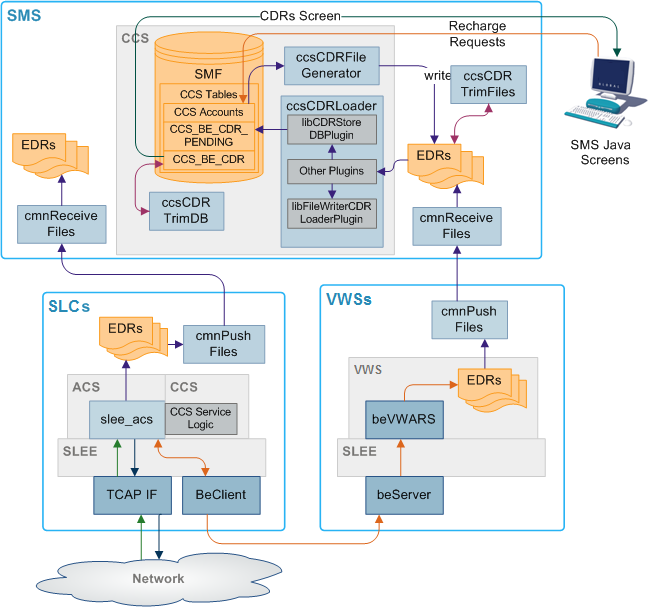
Process Descriptions
This table describes the processes involved in Voucher and Wallet Server EDR creation, transfer and processing in CCS.
Note:
EDRs are also created on the SLC to record the details of the call processing through the control plan and slee_acs.| Process | Role | Further Information |
|---|---|---|
| beVWARS | beVWARS writes EDRs on the VWS based on VWS account, wallet and balance transactions. | VWS Technical Guide |
| cmnPushFiles | cmnPushFiles reads EDRs on the VWS and sends them to a configured directory on the SMS. Once the files have been sent, the read files on the VWS are archived by cmnPushFiles. | cmnPushFiles |
| cmnReceiveFiles | cmnReceiveFiles accepts EDRs sent from cmnPushFiles and writes them to the directory on the SMS specified by cmnReceiveFiles. | SMS Technical Guide |
| ccsCDRLoader | ccsCDRLoader scans the input directory written to by cmnReceiveFiles and loads any EDRs into the CCS_BE_CDRS table in the SMF database. | ccsCDRLoader |
| ccsCDRFileGenerator | ccsCDRFileGenerator creates EDRs recording relevant actions taken in the CCS UI screens. Relevant actions include changes to the balances or wallets. | ccsCDRFileGenerator |
| ccsCDRTrimDB | ccsCDRTrimDB periodically scans the CCS_BE_CDR table in the SMF and removes records past a specified age. | ccsCDRTrimDB |
| ccsCDRTrimFiles | ccsCDRTrimFiles periodically scans the EDR archive directory on the SMS and removes files over a specified age. | ccsCDRTrimFiles |
| CCS UI screens |
The CCS screens enable:
|
Charging Control Services User's Guide |