Announcement Quadrant
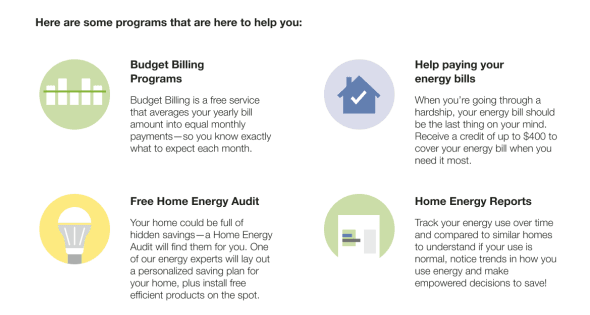
The Quadrant module in the Announcement Report includes four customized sections that echo the theme of the Announcement module, and provides the customer with context and rationale for the personalized insights included in the report.
Appears in: Welcome and Announcement Report
Design
This image is an example of a Quadrant module customized for the Announcement Report.
Configuration Options
For each element listed in the table, indicate the desired configuration in the Input Value column. If you do not provide an input for optional configurations, the default will be used.
| Configuration Option | Input Value |
|---|---|
|
Feature Heading The feature heading must support the announcement theme. Default: Not applicable. |
Required Contact your Delivery Team about creating custom content for the Quadrant module. |
|
Quadrant Headings and Text The quadrant headings and text must support the announcement theme. Default: Not applicable. |
Required Contact your Delivery Team about creating custom content for the Quadrant module. |
| Images
The module images must support the announcement theme and quadrant text. Default: Not applicable. |
Required Contact your Delivery Team about selecting alternate images. |
|
Module Placement Default: The Quadrant module appears on the front of the report by default. It can be swapped with the Efficiency Zone or Neighbor Comparison to appear on the back of the report. |
Optional Choose one of the following:
|
|
Blank Slot Utilities have the option of replacing the Quadrant module with a custom module created by the Client Design team. The custom module must fit the primary feature specifications. See the Client Design Menu of Services for more information. |
Optional Contact your Delivery Team about replacing the module. |