2.1 Collateral 360
This topic describes about the Collateral 360 interface in OBCFPM.
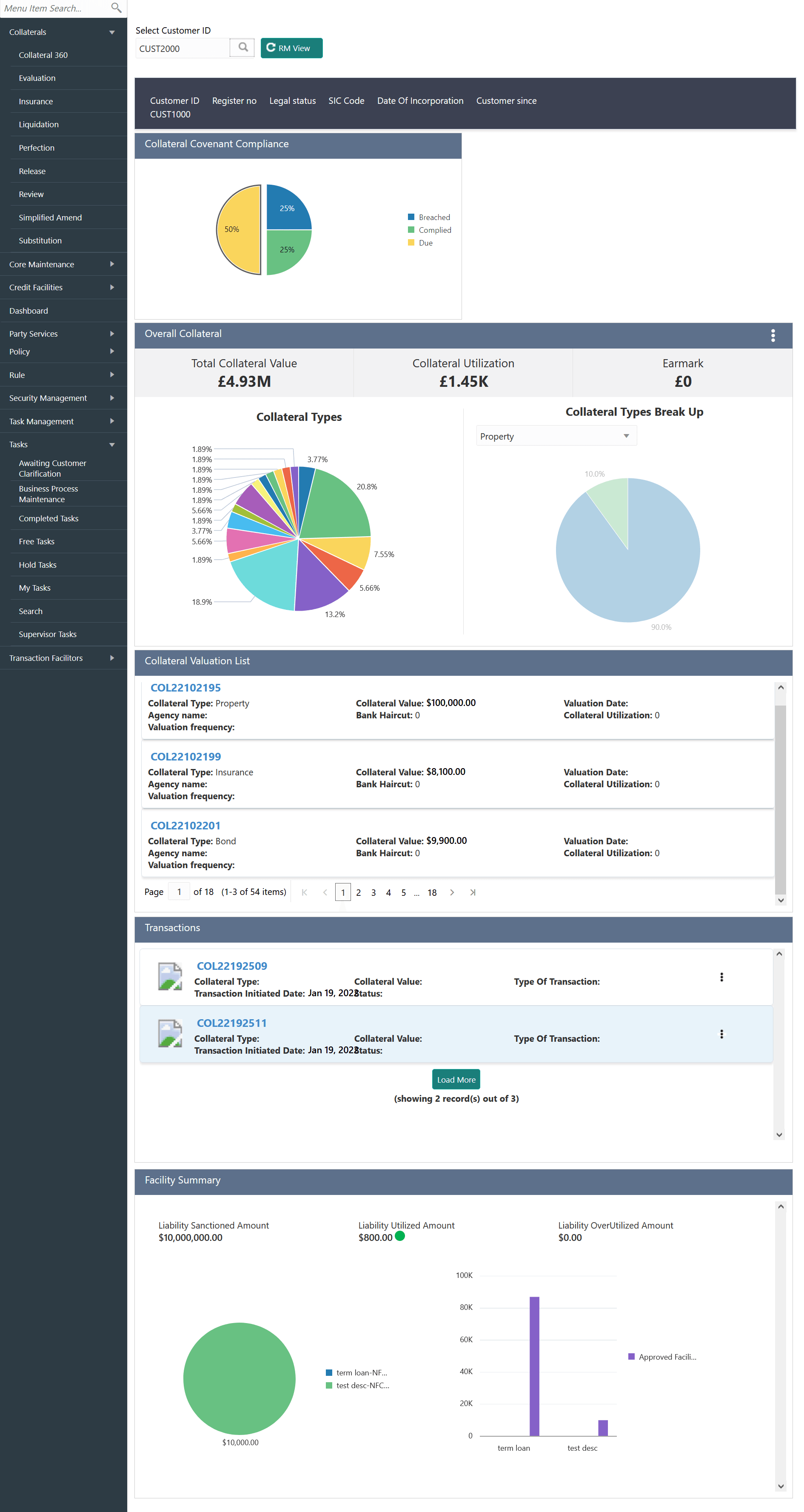
Collateral 360 is a smart dashboard which displays different dimensions of the customer collaterals in graphical and table formats. Dimensions of collaterals include covenant compliance status, valuation details, collateral related transactions, and linked facilities. With the information available in Collateral 360, you can easily track the performace of collateral and take necessary actions to mitigate security risks.
- To launch the Collateral 360 screen, navigate to Collaterals >
Collateral 360 from the left menu.
Figure 2-1 Collateral 360
- Collateral Covenant Compliance
This topic provides systematic instructions about the Collateral Covenant Compliance widget in Collateral 360 screen. - Overall Collateral
This topic provides systematic instructions about the Overall Collateral widget in Collateral 360 screen. - Collateral Valuation List
This topic provides systematic Instructions about the Collateral Valuation List widget in Collateral 360 screen. - Transactions
This topic provides systematic instructions about the Transactions widget in Collateral 360 screen. - Facility Summary
This topic provides systematic instructions about the Facility Summary widget in Collateral 360 screen.