8.4.2 Edit Reconciliation Rule
This topic provides systematic instructions to edit a reconciliation / allocation rule.
- From the Dashboard, click the Toggle
Menu, then click Receivables/Payables,
Reconciliation, and View/Edit
Reconciliation/Allocation Rule.The View Reconciliation/ Allocation Rules screen appears.
Figure 8-37 View Reconciliation/ Allocation Rules
- Click the Rule Id link of the rule to be viewed/edited. The View
Reconciliation Rule (details) screen appears. Or, click
Cancel to cancel the transaction.
Figure 8-38 View Reconciliation Rule (details)
- Click the Edit link to edit the reconciliation rule. The Edit
Reconciliation Rule screen appears. Or, click
Back to go to the previous screen.
Figure 8-39 Edit Reconciliation Rule – Generic Rule
Figure 8-40 Edit Reconciliation Rule – Exact Rule
Table 8-17 Edit Reconciliation Rule - Field Description
Field Name Description Party Name Displays the name of the logged-in corporate party. Rule Details (train stop) This section displays Rule details related fields. Rule Id Displays the unique ID assigned that is automatically assigned to the rule during creation. This field is not editable. Reconciliation Type Displays whether the reconciliation is for invoices and payments, or expected cash-flows and payments. This field is not editable. Rule Type Displays whether the rule is a generic or an exact one. This field is not editable. Rule Name Indicates the name of the rule. This field is editable. Reconciliation Method Indicates how the rule is applied to the invoice/cash-flow records for reconciliation. This field is displayed only for Generic rule type. It is editable. The options are: - FIFO – Oldest invoice/cash-flow to be reconciled first
- LIFO – Latest invoice/cash-flow to be reconciled first
- HAFO – Invoice/Cash-flow with highest amount to be reconciled first
- LAFO – Invoice/Cash-flow with lowest amount to be reconciled first
Attribute Indicates the attribute used for applying the reconciliation method. This field is displayed only for Generic rule type. It is editable. For Invoice and Payments reconciliation:
- For FIFO and LIFO, the options are: Invoice Date; Invoice Due Date.
- For HAFO and LAFO, the options are: Invoice Amount; Outstanding Invoice Amount.
For Cash Flow and Payments reconciliation:
- For FIFO and LIFO, the options are: Expected Date; Revised Expected Date.
- For HAFO and LAFO, the option is: Amount.
Rule Interpretation Displays the rule that is set, based on the options you select in the Reconciliation Method and Attribute fields. This field is displayed only for Generic rule type. Reconciliation Rule This section appears only for Exact rule type. It displays the conditions that have been set during creation. The entire section is editable. Add Condition Indicates an option to add a condition for Exact reconciliation. Add Group Indicates an option to add a group of conditions that are clubbed together by logical operators ‘AND’ or ‘OR’. AND / OR Indicates the logical operator to be used for clubbing the conditions for creating the Exact reconciliation rule. Single-Sided Condition You can create single-sided conditions by selecting a specific entity (Invoice/ Cash-Flow or Payment) and then comparing an attribute of this entity with a specific value.
The following fields appear for a single sided condition.
Select Entity Select the required entity for building the condition. Select Attribute Select the attribute of the entity to be compared. Select Pattern Select the relational operator or pattern to be used for comparison. Value Specify the value that the attribute is to be compared with. The options available are:- =
- <
- >
- !=
- Starts with
- Ends with
Match Case Select the toggle to match the value with case sensitive. Double-Sided Condition You can create double-sided conditions by comparing an attribute of one entity with a relevant attribute of the other entity. For example, for the Invoice and Payment double-sided condition, the Net Invoice Amount can be compared with the Payment Amount. The following fields appear for a double-sided condition. Entities Select the entities combination for creating the double-sided condition. Select Pattern Select the pattern to be used for the attribute (of the first entity) to be compared. The options available are: - Exact Attribute
- Text Between Two Positions – On selecting this option, two fields appear where you can enter the position (numerical values). The attribute text between these positions is used for comparison.
- Likewise Match - On selecting this option, the relational operator defaults to Contains In and Left Hand Side pattern will be defaulted to Likewise Match.
Select Attribute Select the attribute of the first entity to be compared. Relational Operator Select the relational operator to be used for comparison. Select Pattern Select the pattern to be used for the attribute (of the second entity) to be compared. The options available are: - Exact Attribute
- Text Between Two Positions – On selecting this option, two fields appear where you can enter the position (numerical values). The attribute text between these positions is used for comparison.
- Likewise Match - On selecting this option, the relational operator defaults to Contains In and Left Hand Side pattern will be defaulted to Likewise Match
Select Attribute Select the attribute of the second entity to be compared. Match Case Select the toggle to match the value with case sensitive. Save all and Preview Click this link to save and preview all added conditions.
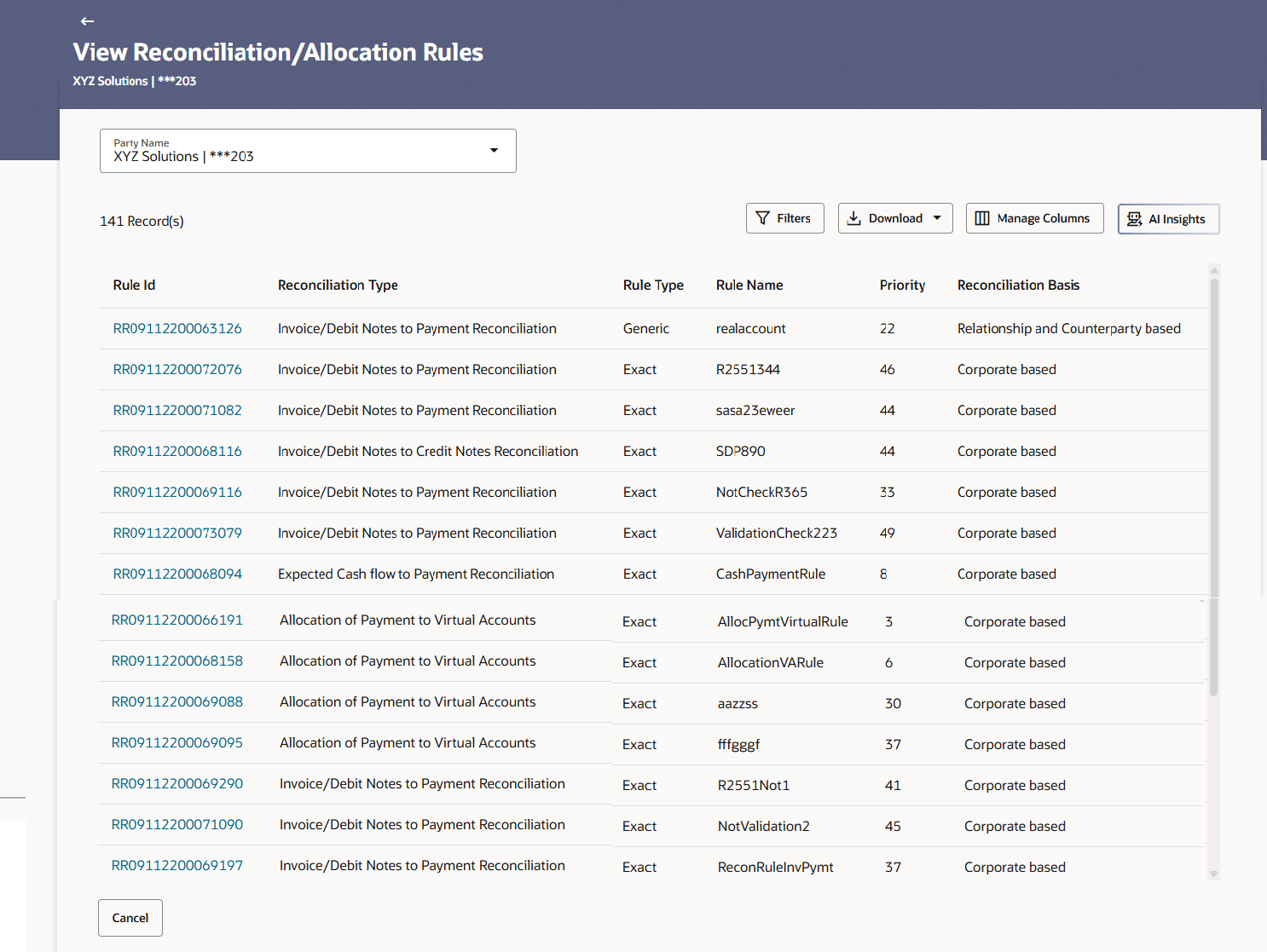
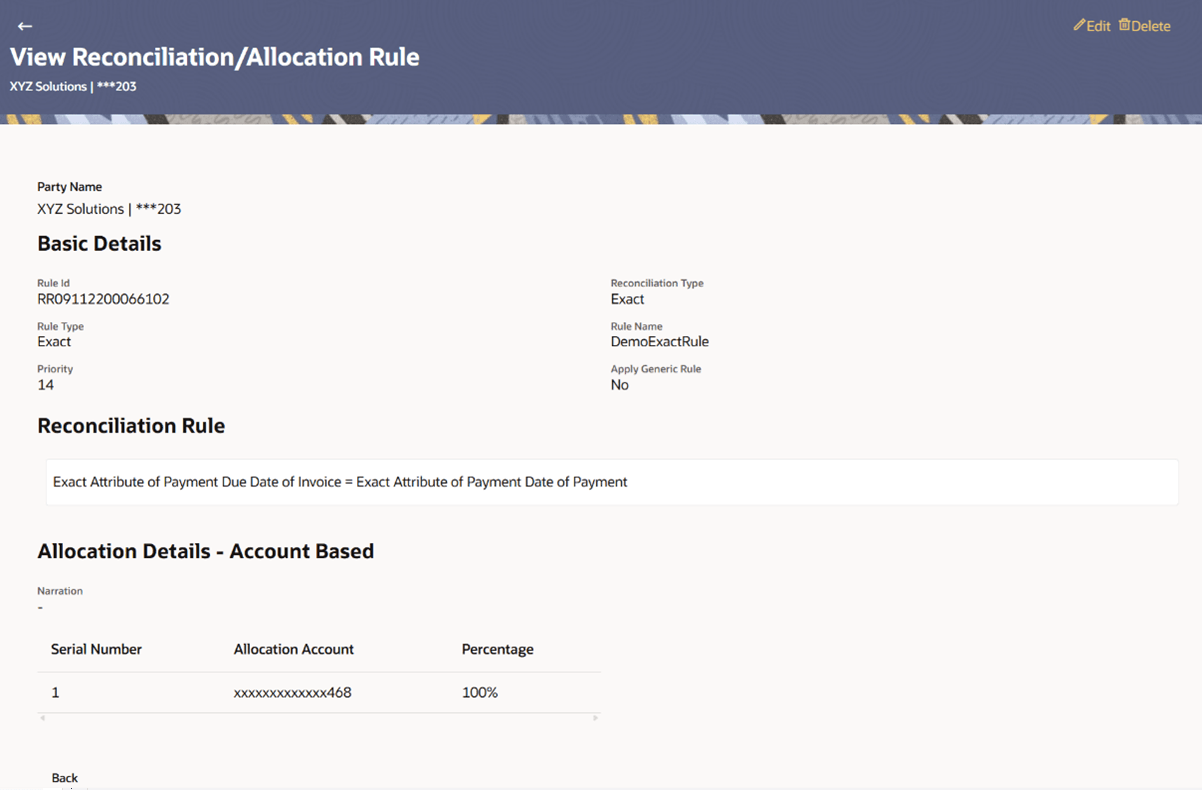
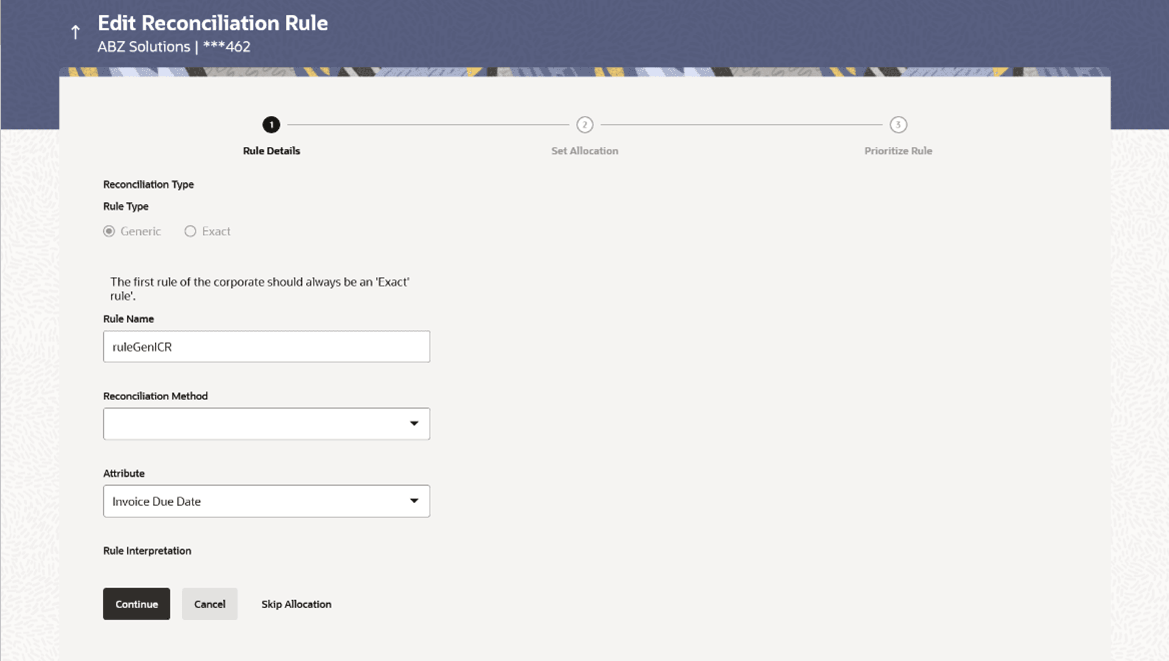
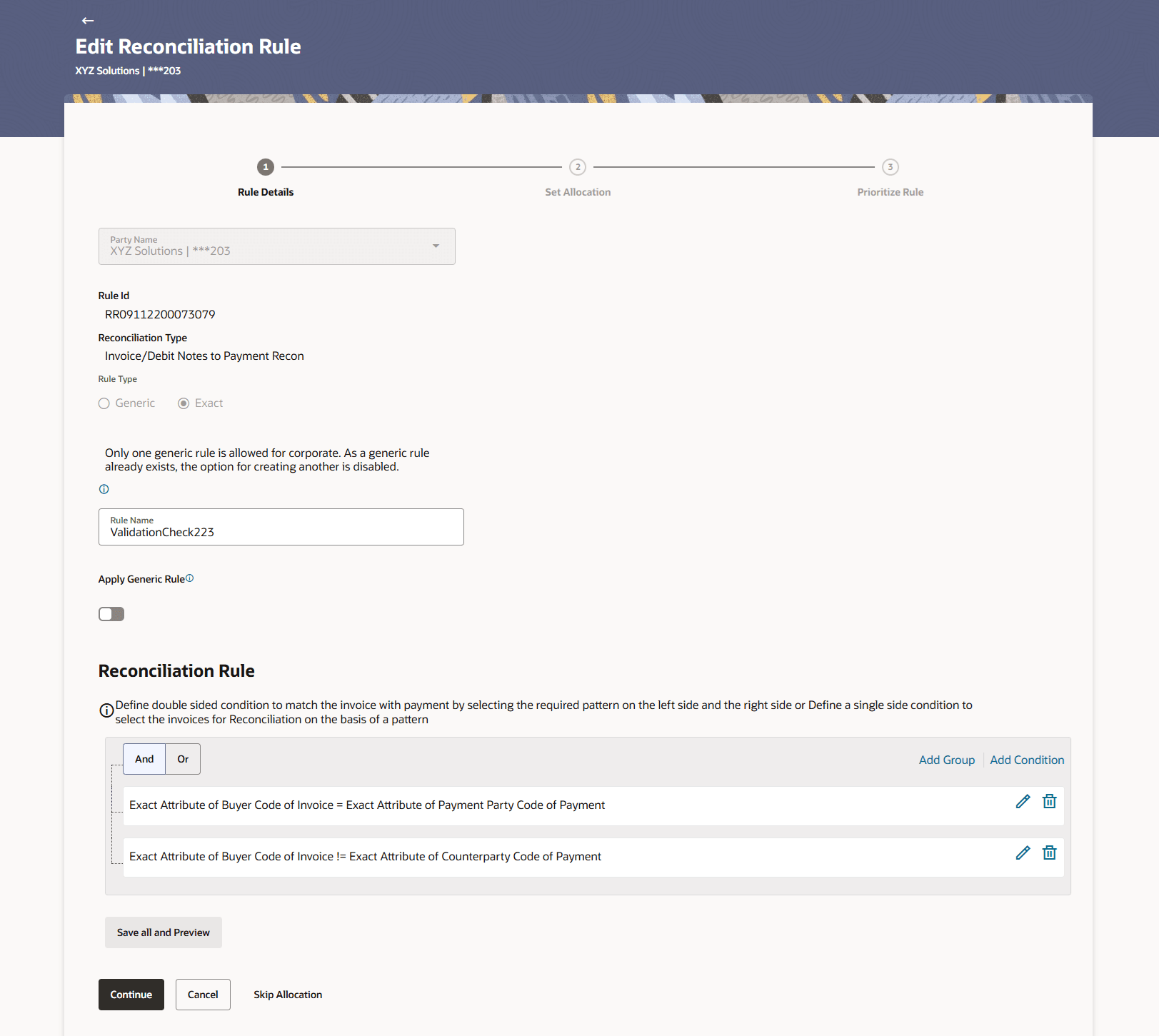
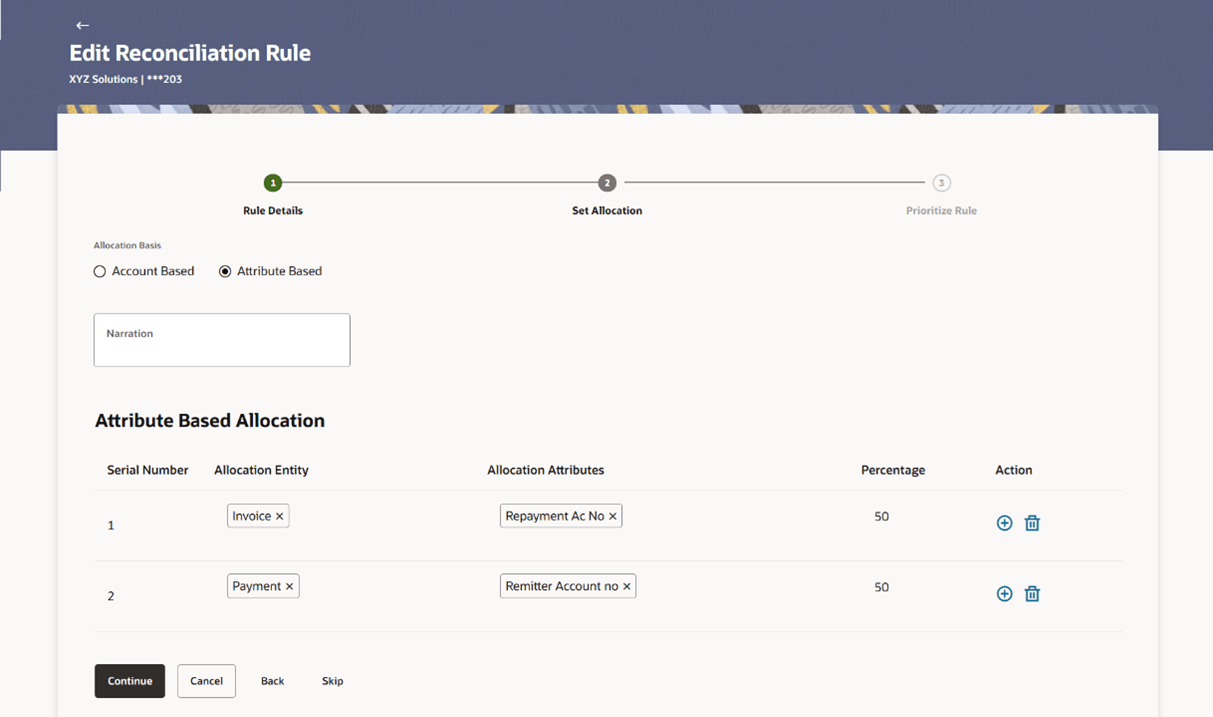
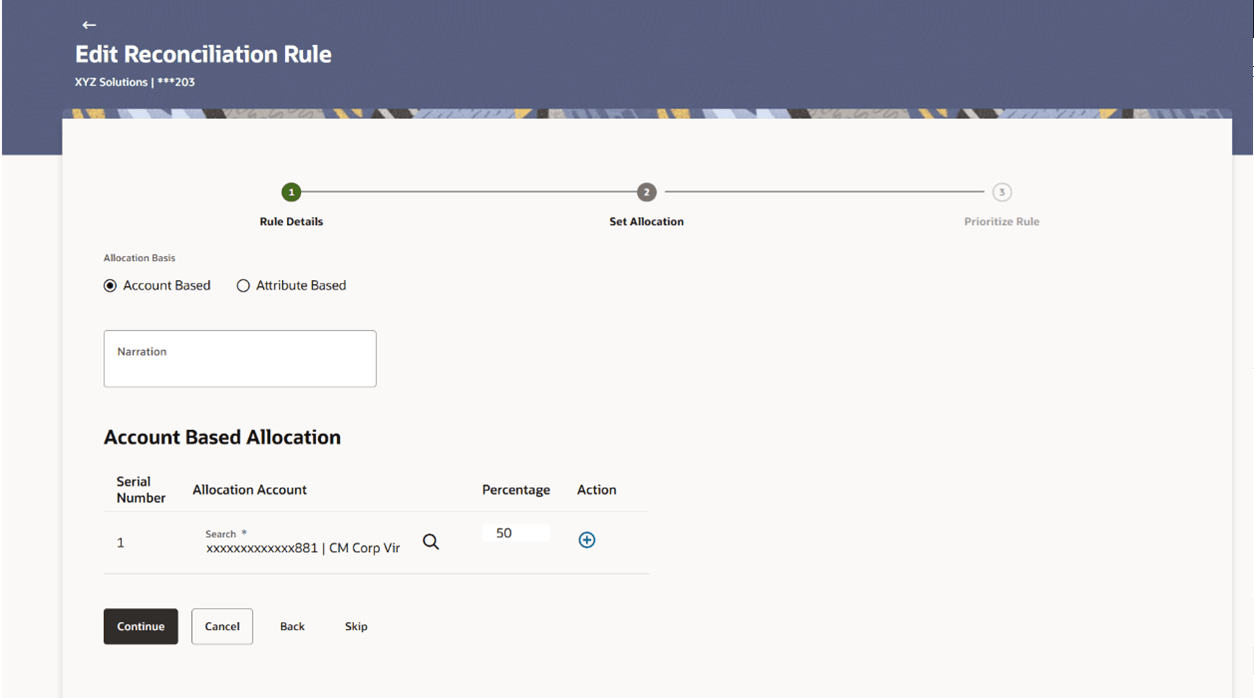
Figure 8-41 Edit Reconciliation Rule – Set Allocation step – Attribute
Based Figure 8-42 Edit Reconciliation Rule – Set Allocation step – Account
Based Table 8-18 Edit Reconciliation Rule - Set Allocation - Field Description
Field Name
Description
Party Name
Displays the name of the logged-in corporate
party.
Set Allocation
In this step, you can set the percentages to be
allocated to specific virtual accounts. You must ensure that the
sum of the allocated percentages should be 100.
Allocation Basis
Select whether the allocation should be virtual
accounts-based or attributes-based.
Narration
Specify the narration text.
Account Based Allocation
This section appears if you have selected the
Account Based option in the Allocation Basis
field.
Serial Number
Displays the serial number of the allocation
account.
Allocation Account
Select a virtual account to assign an allocation
percentage.
Percentage
Specify the percentage of payment to be allocated
to the virtual account.
Action
Click
 to add further virtual accounts. Or click
  to delete an added account.
Attribute Based Allocation
This section appears if you select the
Attribute Based option in the Allocation Basis
field. This option can be used to allocate specific percentages
of the payment towards specific attributes. The amount
corresponding to the payment percentage set, is allocated to the
virtual accounts mapped to these attributes.
Serial Number
Displays the serial number of the
attribute.
Allocation Entity
Select the entity whose attribute should be
considered for setting an allocation percentage.
Allocation Attributes
Select the attribute for which the allocation
percentage should be set.
Percentage
Enter the percentage of payment to be allocated
to the attribute.
Action
Click
to add further attributes. Or click to delete an added attribute.
- Click Continue to go to the Prioritize Rule step.
Or, do one of the following:
- Click Cancel to cancel the transaction.
- Click Back to go to the previous screen.
- Click Skip to skip modifying the allocation and to move to the Prioritize Rule train stop.
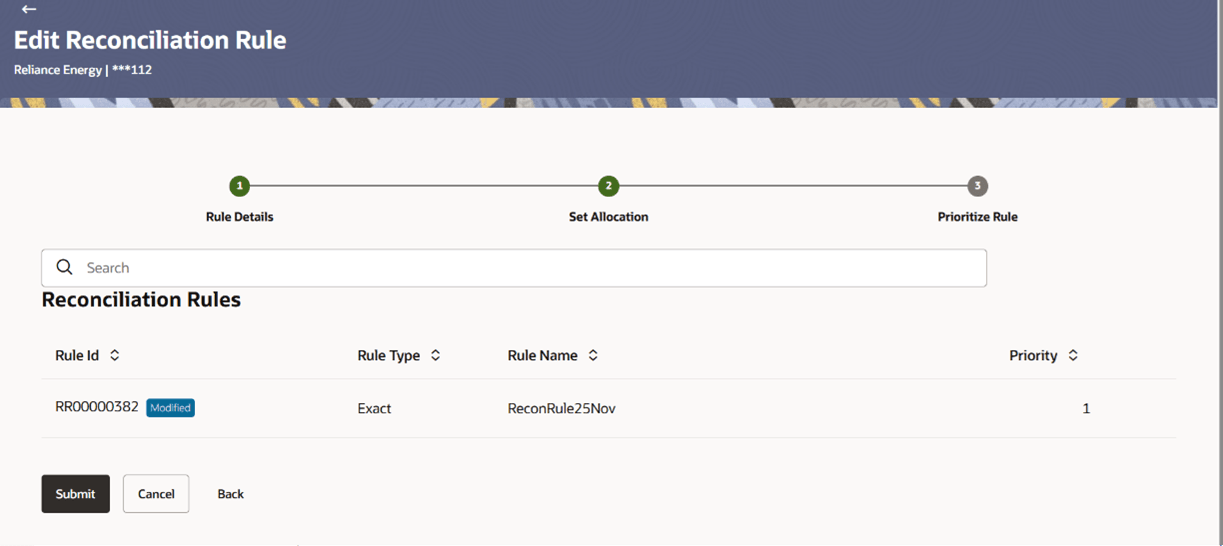
Figure 8-43 Edit Reconciliation Rule – Prioritize Rule step
Table 8-19 Edit Reconciliation Rule – Prioritize Rule Field Description
Field Name Description Party Name Displays the name and ID of the logged-in corporate party. Prioritize Rule This section displays Prioritize Rule details related fields. A list of existing rules for the same set of conditions is displayed. You can set the priority on the rule being created. You can also modify the priority on an existing rule.
Reconciliation Rules This section displays the reconciliation rules. Search Indicates an option to search for a specific reconciliation rule. Rule Id Displays the unique rule ID that has been assigned to the rule. Except for the rule being edited, all other IDs are hyperlinks, which when clicked display the rule details in an overlay window. For more information, refer the Recon Rule overlay window section below. The keyword “Current” is displayed beside the rule being edited.
The keyword “Modified” is displayed beside any rule whose priority has been changed.
Rule Type Displays whether the rule is a generic or an exact one. Rule Name Displays the name assigned to the rule. Priority Indicates the priority assigned to the rule. Note:
For the rule being edited, you can modify the priority. For other existing rules, click to edit and modify the priority, if
required.
to edit and modify the priority, if
required.
- Click Submit to submit the transaction. The Review
screen appears. Or, do one of the following:
- Click Cancel to cancel the transaction.
- Click Back to go to the previous screen.
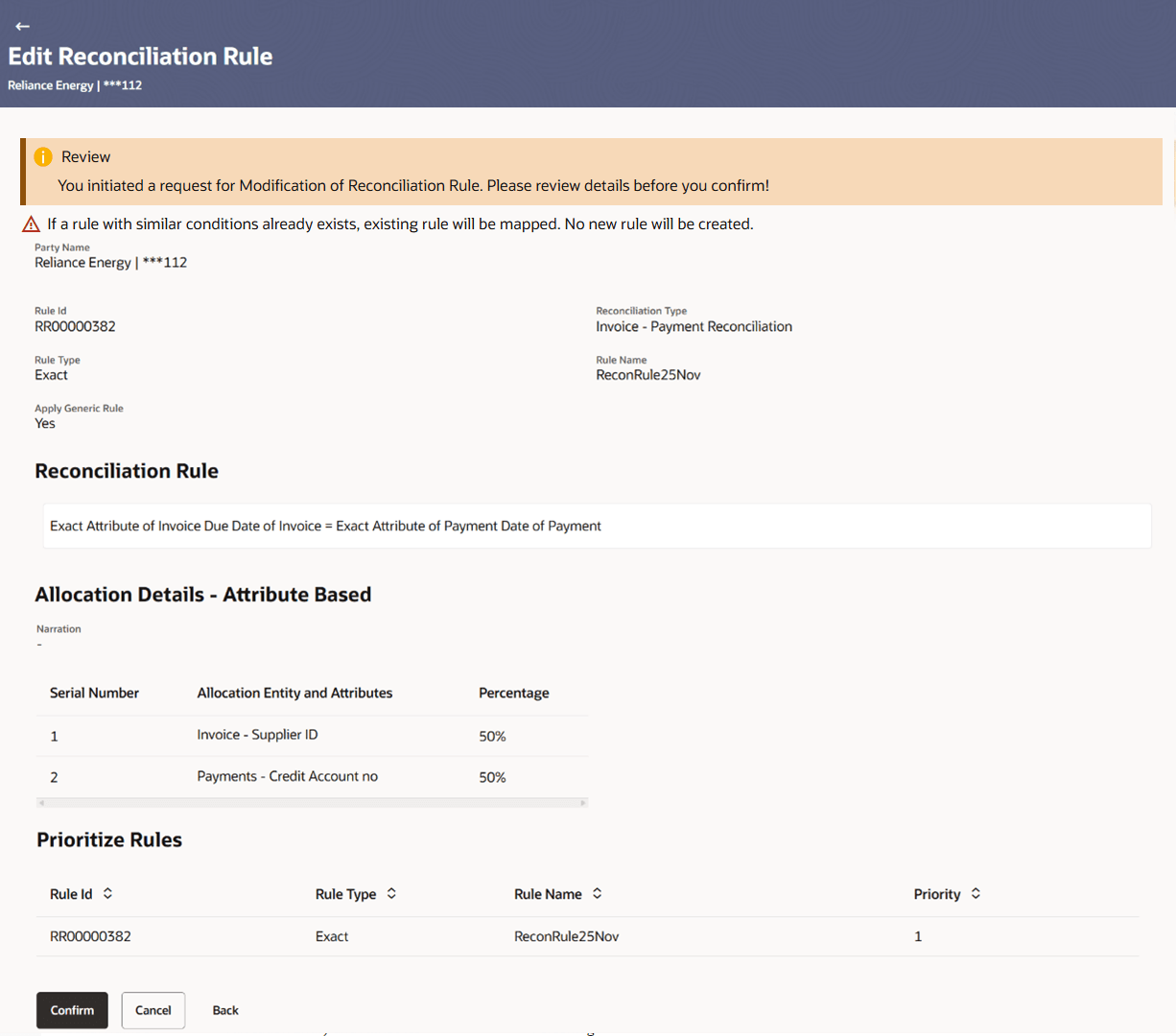
Figure 8-44 Edit Reconciliation Rule – Review Screen
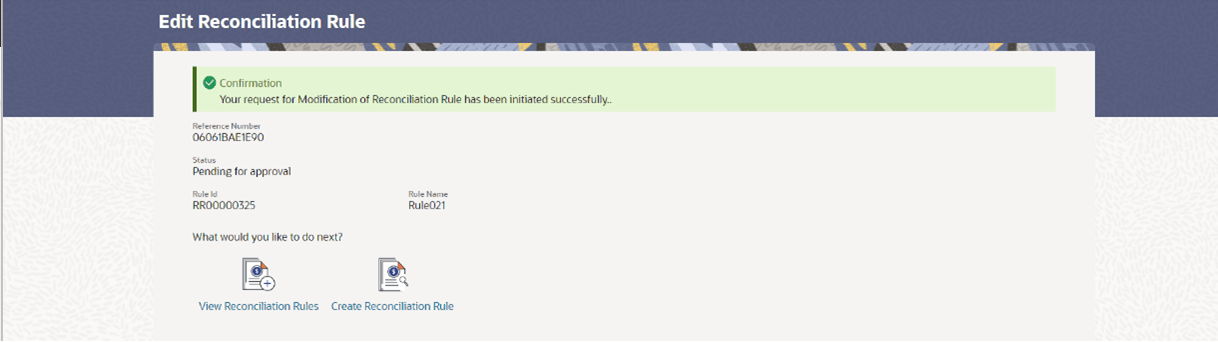
- In the Review screen, verify the details and click
Confirm. A confirmation message appears with the
reference number and status of the transaction. Or, do one of the
following:
- Click Cancel to cancel the transaction.
- Click Back to go to the previous screen.
Figure 8-45 Edit Reconciliation Rule – Confirmation Screen
- Recon Rule overlay window
This topic provides systematic instructions to view the recon rule details. This window appears when you click the Rule Id link in the Prioritize Rule step when creating a reconciliation rule.
Parent topic: View/Edit Reconciliation/Allocation Rule