8.2.3 Recon Rule overlay window
This topic provides systematic instructions to view the recon rule details. This window appears when you click the Rule Id link in the Prioritize Rule step when creating a reconciliation rule.
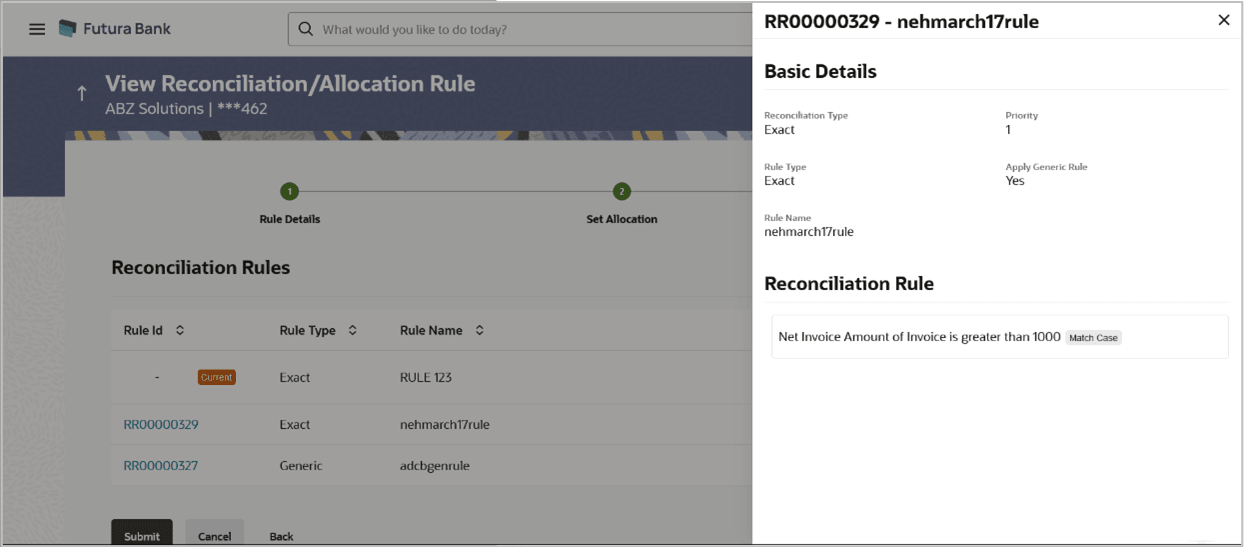
Table 8-8 Recon Rule overlay window - Field Description
| Field Name | Description |
|---|---|
| Rule ID and Rule Name | Displays the rule ID and name at the top of the overlay window. |
| Basic Details | This section displays the Basic Details. |
| Reconciliation Type | Displays whether the reconciliation is for invoices/debit notes and payments/credit notes, or expected cashflows and payments. |
| Priority | Displays the priority assigned to the rule. |
| Rule Type | Displays whether the rule is Exact or Generic. |
| Apply Generic Rule | Displays Yes if generic rule application is enabled, and No, otherwise. |
| Rule Name | Displays the name of the rule. |
| Reconciliation Rule | This section displays the entire rule that has been configured. |
| Allocation Details – Account Based | This section is displayed if account-based allocation has been selected for the rule. |
| Serial Number | Displays the serial number of the allocation. |
| Allocation Account | Displays the masked account number of the allocation. |
| Percentage | Displays the percentage allotted to the allocation account. |
| Allocation Details – Attribute Based | This section is displayed if attribute-based allocation has been selected for the rule. |
| Serial Number | Displays the serial number of the allocation. |
| Allocation Entity and Attributes | Displays the entity and the selected attribute of the allocation. |
| Percentage | Displays the percentage allotted for the allocation. |
Parent topic: Create Reconciliation Rule
Parent topic: Edit Reconciliation Rule