3.2.5.2 Commission
This topic provides the systematic instructions to capture the commission details.
Navigate to Bills and Collections Product Definition screen.
- On Bills and Collections Product Definition screen,
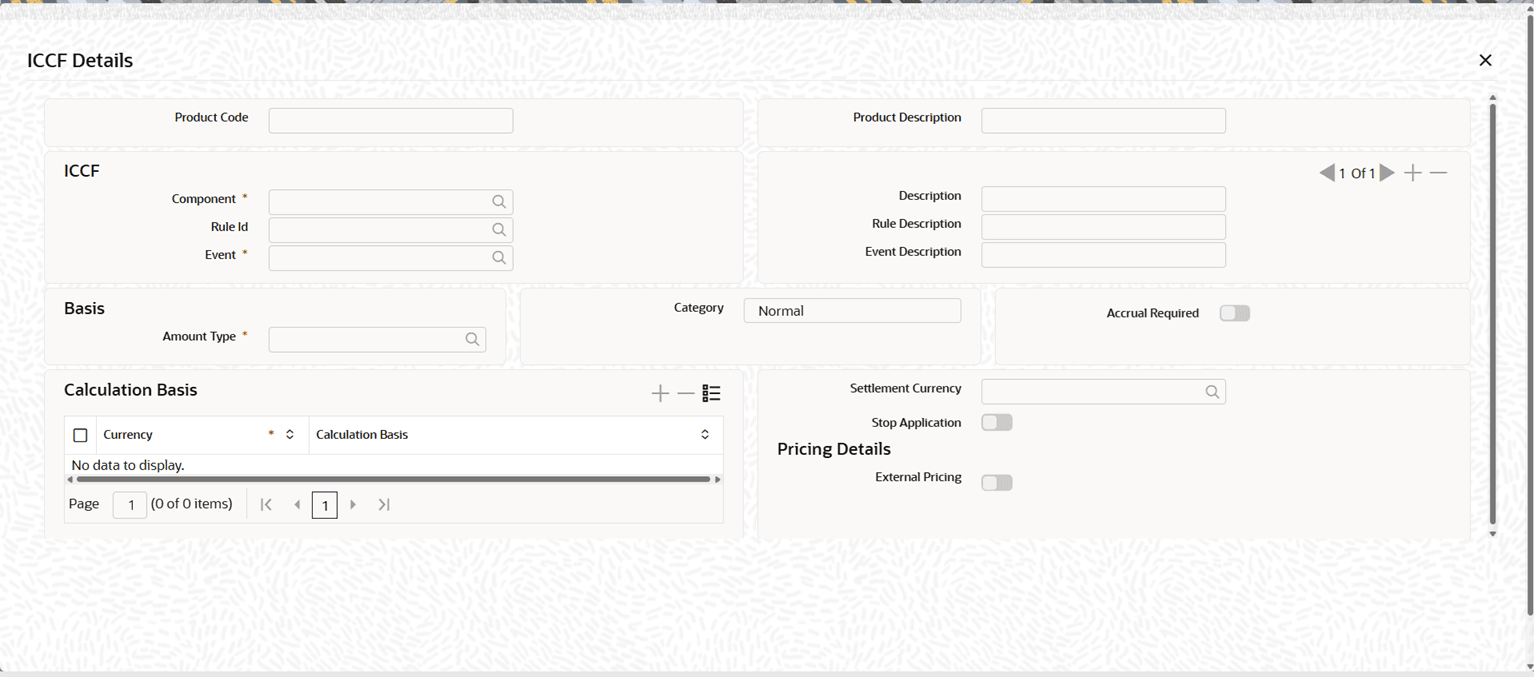
click Commission.ICCF Details screen is displayed.
Note:
Bills commission is applicable for Import Bill Under LC and Collection for Acceptance and Co-Acceptance. Commission for Export Transactions are not applicable. - On the ICCF Details screen, specify the details as per
the requirement.For information on fields, refer to: Table 3-17
Table 3-17 Commission Tab - Field Description
Field Description Product Code System displays the Bill Product Code. A Product Code is a unique four-character identifier created by the user to categorize and handle banking products (like loans, deposits, accounts) in different modules. It acts as a key to set default attributes, including interest rates and fees, and needs to be unique in all modules.
This field is display only.
Product Description System displays the description of the Bill product. This field is display only.
ICCF Specify the ICCF details: Component Select the commission Component from the list of values.
The list includes commission components maintained for the BC module commission classes.
Description System displays the description of the selected commission component.
This field is display only.
Rule Id System displays the commission rule ID attached to the selected commission component.
This field is display only.
Rule Description System displays the description of the commission rule ID.
This field is display only.
Event Select the Event for which the commission is collected.
Available events for Bills are:
- INIT
- BCAC
- BCAP
Commission is collected, when the selected event is triggered.
Note: Commission in INIT allowed only for Bills under Import LC.
Event Description System displays the description of the selected commission component. This field is display only.
Basis Specify the following Basis details: Amount Type Specify the basis amount on which the commission is calculated.
For Bills commission, the basis amount is BILL_AMOUNT.
Only basis amounts applicable for Bills commission are available in the list.
If the commission is defined with a fixed rate, the system calculates the commission on the selected basis amount.
If Flat is selected, enter the commission amount manually at the transaction level.
Category Category for Bill commission defaulted to Normal. Accrual Required Select Yes or No to indicate whether commission accrual is required.
If set to Yes, the system triggers the ACCR event for the commission component and posts accounting entries as defined in the product.
Settlement Currency Specify the currency in which the commission is collected.
If a settlement currency is specified and the customer has an account in that currency, the system collects commission from that account.
If the customer does not have an account in the specified currency, the system uses the default settlement account defined for the customer.
This field is optional.
Stop Application Select Yes or No.
If set to Yes, the system stops applying commission for New Contracts created under the product.
Calculation Basis Specify the following Calculation Basis details: Currency Specify the Currency for which the calculation basis is applicable. The system applies the selected calculation basis for commission calculation in the specified currency.
Calculation Basis Specify the day-count basis used for commission calculation for the given currency.
Available values are as follows:
- 30(Euro)/360
- 30(US)/360
- Actual/360
- 30(Euro)/365
- 30(US)/365
- Actual/365
- 30(Euro)/Actual
- 30(US)/Actual
- Actual/Actual
If a value is defined at the product level, the system uses the specified calculation basis.
If not specified, the system uses the interest calculation basis defined for the currency.
External Pricing System displays the External Pricing value defined in the commission rule. This field is display only.
Parent topic: Preferences