3.3.5 Specify Upload Source Preferences
This topic provides the systematic instructions to specify upload source preferences.
- On the Homepage, type CODUPLDM in the text box, and click the next arrow.The Upload Source Preferences Maintenance screen is displayed.
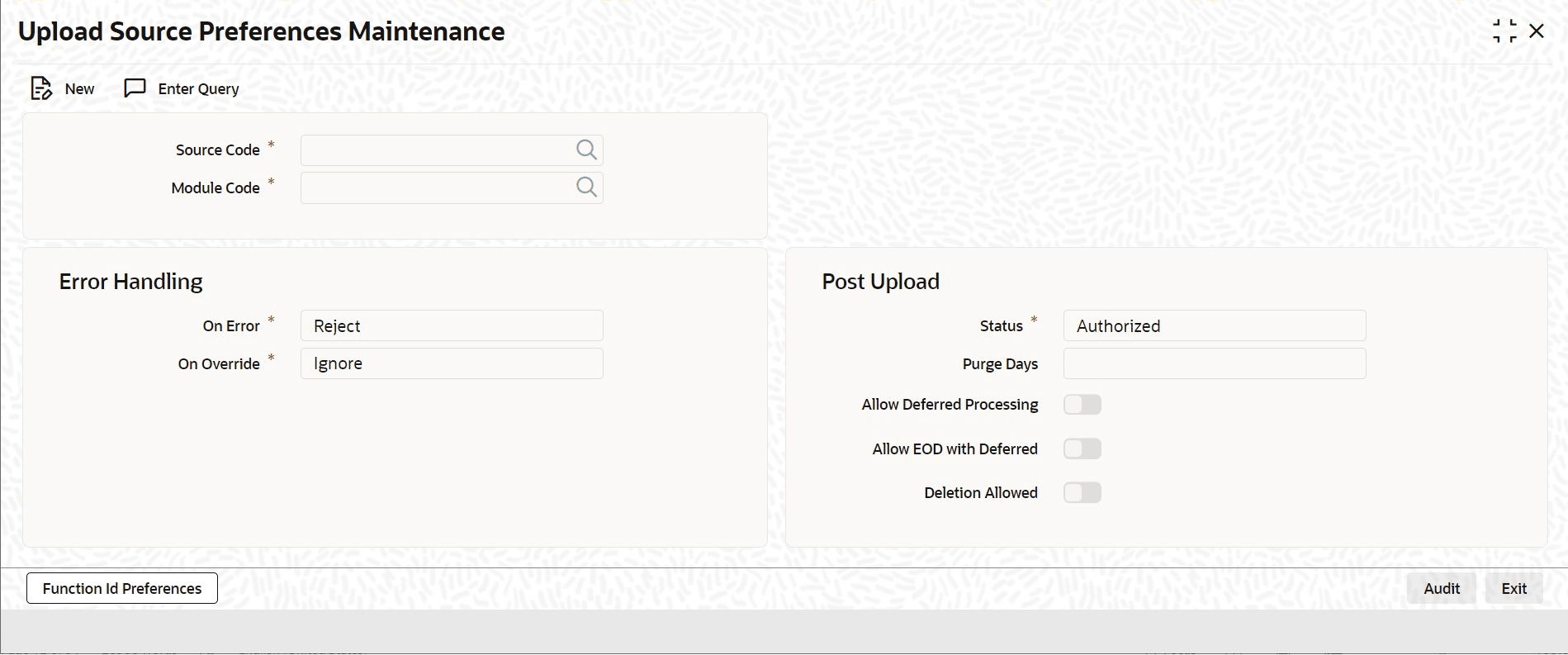
- On Upload Source Preferences Maintenance screen, specify the fields.For information on fields, refer to Table 3-10:
Table 3-10 Upload Source Preferences Maintenance - Field Description
Field Description Source Code Select the Source Code from the option list. Based on the selectedSource Code, the system uploads data from that source into Oracle Banking Trade Finance.
Module Code Select to upload data from a source directly onto a module in Oracle Banking Trade Finance. This field indicates the module for data upload from the specified source. On Override Oracle Banking Trade Finance generates override messages in case, it encounters any discrepancies during data upload. Select any of the following: - Ignore – Select this option to ignore such error messages and continue with the upload process.
- Override – Select this option to put the record on hold for user intervention later.
- Reject – Select this option to reject the record.
On Exception In case a serious error occurs during data upload, Oracle Banking Trade Finance generates an error message. Select to put the record with the error on hold. In thses cases, select Move To Queue from the list of options available. To reject the record, select Reject.
Post Upload Status To automatically authorize the data that is uploaded into Oracle Banking Trade Finance, select the Authorize’ option. To put on hold the record , select this option in this field.
To unauthorize the record, select the Unauthorized option in this field. The record is not authorized automatically on upload. Manually authorize the data.
Purge Days (Calendar) Specify the days maintained for purging of the data uploaded. Allow Deferred Processing Check this option to defer processing of amendment and cancellation uploads. Allow EOD with Deferred Check this option to proceed even if the records exist in the deferred processing log. If it is unchecked, then the EOD process halts until the deferred process log is cleared.
Allow Delete Check this option to delete the process log.
Parent topic: Access Rights to an External System
