16.5 Invoices Tab
This topic provides details of invoices associated with a record, including invoice amounts, due dates, status, and related billing information within the system.
In the invoice tab of vendors screen, user can define invoices and process them along with internally generated and externally received invoices. Invoice processing involves validating the invoice information either manually or through an automated process.
Manual validation involves verifying the invoice information, accepting or rejecting the details, updating the invoice status and indicating if the invoiced amount is Collectible.
Auto validation is supported for invoices which are in OPEN status and generated internally (i.e. channel = Internal). During auto validation, the invoice details are verified against specific business rules defined in the system and corresponding status update and collectible indicator is updated accordingly.
However, other invoices received from externally interfaced channel would get auto validated with specific business rules when they are received and corresponding status is appended to the invoice while listing in the Invoice Information section.
Post the validation, invoices may still have difference in estimated and invoiced amount. Such invoices are marked with status FOR APPROVAL and requires to be manually approved.
- On the Origination, click
Origination. Under Origination, click
Vendors. Under Vendors, click
Invoices.
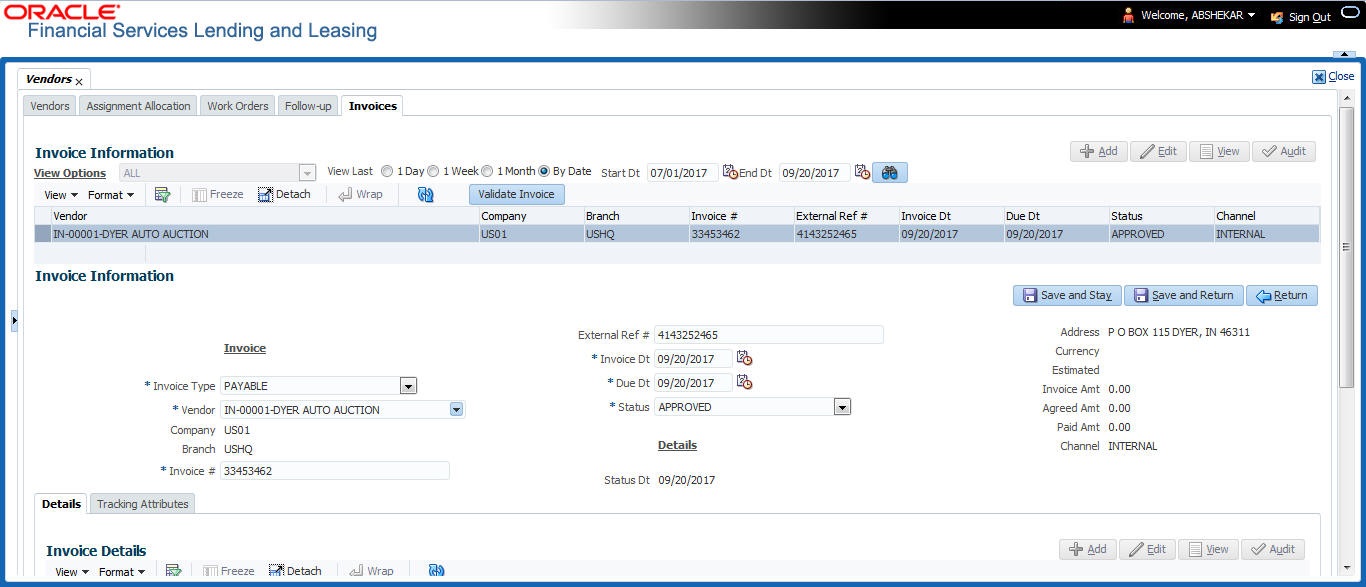
The Invoices screen displays.
- Sort the list of invoice based on status using the View Options drop down list. User can further sort the list of invoice based on elapsed days by selecting the View Last option as 1 Day / 1 Week / 1 Month / By Date. When By Date is selected user can specify a date range (within 3 months) in Start Dt and End Dt fields using the adjoining calendar and clicking Search.
- Perform any of the Basic Operations mentioned in Preface.
A brief description of the fields is given below:
Table 16-13 Invoice Information
Field Description Vendor Select the vendor name for whom the invoice is to be created. Company Displays the vendor portfolio company. Branch Displays the vendor portfolio branch. Invoice # Specify the invoice number.
The invoice number should be unique for every vendor. In case the Invoice # already exists for Vendor, system displays a warning message.
External Ref # Specify the reference number which can be used for invoice tracking.
For invoice received from external system, this field is auto populated with the reference number generated in external interfaced system.
Invoice Dt Specify the invoice date. User can even select the date from the adjoining Calendar icon. Due Date Select the due date. User can even select the date from the adjoining Calendar icon. Status Select the invoice status from the drop-down list. Details Displays the details section. Status Dt Displays the last invoice status change date. Address Displays the vendor address. Currency Select the currency from the drop-down list. Estimated Displays the total estimated amount of all the invoices defined in Invoice Details sub tab. Invoice Amt Displays the total invoice amount. Agreed Amt Displays the total agreed amount. Paid Amt Displays the total paid amount. Channel Displays the Channel as Internal for manually defined or internally generated invoice and Generic Recovery Interface (GRI) for externally generated invoice. - Perform any of the Basic Actions mentioned in Preface.
This section consists of the following topics:
- Auto Validate Invoice
This feature automatically verifies invoice details against predefined rules and criteria to ensure accuracy and compliance before further processing within the system. - Invoice Details Sub Tab
This topic provides detailed information related to an invoice, including item details, amounts, dates, status, and other relevant billing data within the system. - Accept/Reject Invoice Details
This topic provides the information about reviewing invoice details and taking appropriate actions to accept or reject them based on validation results or business rules within the system. - Payment Schedules Sub Tab
This topic provides the information about the planned payment schedule for an invoice or account, including payment amounts, due dates, and status within the system. - Related Invoice/Work Order Details Sub Tab
This topic provides the information about the related invoice and work order details associated with a record, including references, status, and other relevant information within the system. - Tracking Attributes Sub Tab
This topic provides the information about the tracking attributes used to monitor and manage the status, progress, and updates related to a record within the system. - Business Rules
This topic provides the information about the configured business rules that govern system behavior, validations, and processing logic within the application.
Parent topic: Vendors