T.1 Frequently Asked Questions
This section describes the Frequently Asked Questions.
You can see the Frequently Asked Questions which has been developed with the interest to help you resolve some of the OFSAAI Installation and configuration issues. This intends to share the knowledge of problem resolution to a few of the known issues. This is not an official support document and just attempts to share the knowledge of problem resolution to a few of the known issues.
OFSAAI FAQs
What are the different components that get installed during OFSAAI?The different components of OFSAAI are illustrated in Figure 2-2.
What are the different modes of OFSAA Installation?OFSAAI can be installed in Silent mode.
Can the OFSAA Infrastructure components be installed on multi-tier?No. OFSAA Infrastructure components (ficapp, ficweb, ficdb) cannot be installed on multi-tier. By default, they will be installed on single-tier. However, OFSAA Infrastructure can be deployed within the n-Tier architecture where the Database, Web server and Web application server is installed on separate tiers.
Is JDK (Java Development Kit) required during installation of OFSAA? Can it be uninstalled after OFSAA installation?JDK is not required during installation of OFSAA and only a run time is needed for details. See the Java Runtime Environment section in Hardware and Software Requirements for more information.
Is JRE required during installation of OFSAA? Can it be uninstalled after OFSAAI installation?Only JRE (Java Runtime Environment) is required during installation of OFSAA and cannot be uninstalled as the JRE is used by the OFSAA system to work.
How do I know what is the Operating system, web servers and other software versions that OFSAA supports?See the OFSAA Technology Stack Matrices.
What are the different files required to install OFSAAI?The following files are required:
- setup.sh
- envCheck.sh
- preinstallcheck.sh
- VerInfo.txt
- OFSAAInfrastructure.bin
- validatedXMLinputs.jar
- MyResources_en_US.properties
- log4j.xml
- OFSAAI_PostInstallConfig.xml
- OFSAAI_InstallConfig.xml
- privileges_config_user.sql
- privileges_atomic_user.sql
- XML_Utility.jar
Check whether all the files provided for OFSAAI installation has execute permissions. To give execute permissions:
Navigate to the path OFSAAI_80000 and execute the command: chmod 755.
"Graphical installers are not.."If error resembles "Graphical installers are not supported by the VM. The console mode will be used instead..." then check whether any of the X-windows software has been installed.
Note:
Type 'xclock' from prompt and this should display clock in graphical mode.If the error message reads "No Java virtual machine could be found from your PATH environment variable. You must install a VM prior to running this program", then
- Check whether "java path" is set in PATH variable. See Table 4-1 for Prerequisite Information.
- Check whether sufficient temporary space is available.
- Ensure that the movement of OFSAAI Installer text files to the target system is done in the Text mode so that setup.sh file does not contain control line feed characters (^M).
Check whether the provided path for Oracle Driver files is correct and whether the user has permissions to access the files.
What should I do if I get the following error message during installation, "User must have CREATE TABLE, CREATE VIEW, CREATE TRIGGER, CREATE INDEX, CREATE SEQUENCE, CREATE PROCEDURE" even though the oracle schema user created has the mentioned privileges?OFSAAI installer validates the database details provided during installation, so ensure:
- Whether the oracle schema user has the required set of privileges for successful installation.
- Whether the oracle schema user has been created with quota privileges on tablespace to create database objects.
- See Table 4-1 for Prerequisite Information.
Post the successful completion of OFSAAI installation, you must perform the Post Installation steps. See Post Installation Configuration.
What is to be done when OFSAAI Installation is unsuccessful?OFSAAI installer generates log file OFSAAInfrastructure_Install.log in the Infrastructure Installation Directory. There is also another log file created in the path configured in Log4j.xml. The logs of any of these reported, Warnings/Non Fatal Errors/Fatal Errors/Exceptions should be brought to the notice of the OFSAAI Customer Support. It is recommended not to proceed, until the reported problems are adequately addressed.
How do I completely uninstall OFSAAI?OFSAAI can be completely uninstalled by performing the steps provided in Removing OFSAA. Alternately, you can see OFSAAAI Installation and Configuration Guide Release8.1.2.0.0.
Can OFSAAI config and atomic schemas be on different databases?OFSAAI requires both config and atomic schemas to be present on the same database instance.
How to grant privileges if a new information domain is created?If you are creating a new information domain, provide a set of privileges (database permissions) to the new Atomic schema.
- Log into the database as sys and connect as sysdba user.
- Execute the file privileges_config_user.sql located under the $FIC_HOME directory
- Enter the database schema for which you want to grant privileges.
See the Multiple Language Support (MLS) Utility section in OFS AAI Administration Guide.
Does OFSAAI support Oracle Linux versions other than 5.5?OFSAAI supports the Oracle Linux versions from 5.5 up to 5.10 and also from 6.0 and above.
What should I do if I get the following error message on the UNIX System terminal while executing ./setup.sh, "Insert New Media. Please insert Disk1 or type its location"?- Login as root user on the Unix machine where OFSAAI is getting installed.
- Navigate to path/etc/security/.
- Edit the file limits.conf to add/edit a row for the UNIX user installing OFSAA: <Unix User> soft nofile 9216
- After saving the changes, log in as UNIX user with which OFSAAI is getting
installed and execute the command: ulimit-n.
The command returns the value 9216.
To verify the system environment meets the minimum requirements for the installation, a Pre-Install Check utility is available within the Install Kit archive file. This utility can also be obtained separately by contacting Oracle Support Services.
See Verifying System Environment for additional information.
How do I know if the installation is completed successfully?The OFSAA Infrastructure installation performs a post install health check automatically on successful installation of the product. To rerun the post install verification at a later time, follow these steps:
- Navigate to the path $FIC_HOME (Product Installation Directory).
- Execute the command: ./piverify.sh.
"Error: OFSAAI-1108
ORA-00604: error occurred at recursive SQL level 1 ORA-01882: timezone region not found"Or
"Time zone cannot be set as null or 'local time' "This happens if the time zone is not set, that is NULL or it is set as ’local time’. Set the environment variable TZ to a valid time zone region in the .profile file. For example: TZ=Asia/ Calcutta, export TZ.
What should I do if there are any exceptions or errors in installation and how to proceed?Backup the installation logs and share the backup logs with My Oracle Support.
What should I do if the installation process is abruptly terminated or aborted?If the installation is abruptly terminated, then the installation process will be incomplete. To recover from this:
- Drop the DB objects in the config schema created by OFSAA Iinstallation.
- Open the .profile and remove the entries made by the OFSAAI installation which are made between the comment statements, #Beginning of entries by OFSAA Infrastructure installation and #End of entries by OFSAA Infrastructure installation.
- Delete the OFSAA install directory created by the OFSAAI installer.
- Perform the OFSAAI installation again.
No, all the supported softwares and versions are stated in the OFSAA Technology Stack Matrices.
What should I do if the database connection from connection pool displays the following error message, "java.sql.SQLRecoverableException: IO Error: Connectionreset"?Note:
This needs to be configured on all the machines or VMs where the OFSAAI components are installed.If the issue is not resolved even with the above settings, check the MTU (Maximum Transmission Unit) settings on the Linux box. For details on MTU settings and updating them, contact your system Administrator.
What should I do when I get syntax errors/file not found error messages while invoking setup.sh file from my install archive?This could mostly happen:
When installer was not unzipped properly or corrupted during unzip.
The setup.sh file which resides within the install archive was not transferred in ASCII or text mode, which could have corrupted the file.
To correct this:
- Copy the installer (in BINARY mode) to the system on which the OFSAA Infrastructure components will be installed.
- Unzip the installer using the command: unzip<OFSAAI_Installer>.zip.
The corrupted setup.sh file would have introduced certain ^M characters into the file. You can remove ^M characters from the setup.sh file by following these steps:
- Login to the server where the installer is copied.
- Navigate to the directory OFSAAI_80000.
- Open the setup.sh file in the vi editor using the command: visetup.sh.
- Inside vi editor in Esc mode, type: %s/^M//g.
Note:
To enter ^M, hold the CTRL key then press V and M in succession. - Save the setup.sh file by typing:wq!
The OCI client and the jdbc driver does not change depending on whether it is a standard or enterprise edition. So, OFSAAI will work with standard edition as well.
We do not recommend standard edition because it will not scale and does not support partition pack, database security vault, or advanced analytics.
What should I do if I get the following error message while executing ./startofsaai.sh file on the UNIX System terminal "./startofsaai.sh: /java: Execute permission denied"?- Ensure JAVA_BIN environment variable path is set on the UNIX user terminal from where the /startofsaai.sh file is invoked.
- Ensure the .profile where the environment/path settings are made has been executed successfully.
This could be due to these reasons:
- System is unable to resolve the host name configured.
- Conflict with the ports configured.
To correct them, follow the below steps:
- Steps to replace the host names with IP address:
- Stop all the OFSAA services. For more information, see Starting/Stopping Infrastructure Services.
- Replace all the host names with the IP address in all the places mentioned in the document (Where to find port, IP address, HTTPS Configuration for OFSAAI 7.2 Installation (DOC ID 1500479.1)).
- Restart all the OFSAAI services. For more information, see Starting/Stopping Infrastructure Services.
- Steps to correct the port number conflicts
- Stop all the OFSAA services.
- See the port numbers stated in the document (Where to find port, IP address, HTTPS Configuration for OFSAAI 7.2 Installation (DOC ID 1500479.1)) and check on the discrepancy in the port numbers and correct them.
- Restart all the OFSAAI services.
- Steps to replace the host names with IP address:
Ensure that, the System Password provided when prompted must match with the Oracle Configuration Password provided during installation. Also check whether the connection to the Configuration Schema can be established through sqlplus.
Although the OFSAAI installation has completed successfully, when OFSAAI servers are started,and the application URL is accessed, it gives an error message "the page cannot be found or displayed" or "Could not retrieve list of languages from Server. Please contact the system administrator". What should one do?Ensure OFSAAI servers have been started and are running successfully. On the server start up parameters options, see Starting/Stopping Infrastructure Services.
For more details on the issue, see the Revappserver log in $FIC_APP_ HOME/common/ FICServer/logs directory or the Web server log files.
Is it necessary to provide the specified grants to the Oracle schema user before installation? If yes, can it be revoked after completing the installation?The Oracle Schema user requires the necessary grants specified before, during, and after the installation process. Grants provided must not be revoked as the application makes use of these grants all the time.
Can we have distributed OFSAAI Application Server for load balancing?OFSAAI Application server can be scaled out/distributed across different JVM's (machines) based on the various services and Information Domains, in other words, Load balancing can be achieved with distribution of services.
Why do we need Ftpshare on all the layers? Can we have ftpshare on another machine other than the machines where OFSAAI is installed?Ftpshare is a Metadata Repository directory. All the metadata related files used in Infrastructure are stored in the ftpshare directory. The ftpshare contains folders for each Information Domain, with each Information Domain folders holding Erwin, log, and scripts folder. The transfer of data among the Web, Application, and Database servers in Infrastructure takes place through FTP/ SFTP.
You need to configure FTP/SFTP and enable communication between the servers by providing App server's FTP/SFTP credentials to the Web server and DB server users.
Yes, we can have ftpshare on another machine other than the machines where OFSAAI is installed.
Is it mandatory to provide the ftp/sftp password?Yes, OFSAAI needs credentials of the user which has complete permissions on ftpshare directory, and should be able to independently login to the UNIX server.
What are the permissions required for ftpshare and when should I give them?It is recommended to provide permissions on ftpshare in case of installations done across different machines or VMs (multitier installation).
In case of single tier installation, 770 permissions can be provided if the UNIX users of OFSAAI and web server belong to the same UNIX group.
And on any new file that is created in the 'ftpshare' folder of any installation layer must be granted specific/explicit permission.
Port Change utility could be used to have the Port number modified, which are currently being used by the Infrastructure application. For more information, see Changing IP/Hostname, Ports, Deployed Paths of the OFSAA Instance.
Are there any in-built system administration users within OFSAAI Application?The three in-built system administration users are provided to configure and setup OFSAAI.
- SYSADMN
- SYSAUTH
- GUEST
OFSAAI supports both FTP and SFTP configuration.
Is it necessary to enable the FTP/SFTP services to use the OFSAAI?Yes, enabling of FTP/SFTP services and its ports is a pre-requisite step towards using the OFSAAI.
OFSAAI Configuration: Unable to save the server details?- Ensure the input User ID, Password, and Share Name are correct.
- Ensure FTP/SFTP services are enabled.
- Have a test FTP/SFTP connection made and confirm if they are successful.
Information Domain is mapped to only one Database; and thus before the creation of Information Domain, at least one database details would need to exist.
What should I do if I get the following message during start up of backend engine message server, "ConnectToDatabase: FatalError, could not connect to the DB server"?- Verify whether connection to the "configuration schema" can be established through sqlplus.
- Verify "configuration schema" password is modified post installation.
- Ensure oracle database alias name created for oracle instance and oracle service name are same.
- On a multi tier Installation mode, ensure TNSNAME and SID are the same in both the Application and Database Layers.
Ensure that the Reveleus.sec file exists under the $FIC_HOME/conf directory where the Database components are installed.
Does OFSAAI Application support LDAP authentication?OFSAAI supports LDAP configuration and authentication.
Does OFSAAI support multiple languages?Yes, OFSAAI supports multiple languages.
Does OFSAAI provide any data back-up features?OFSAAI does not have built-in back up facility. External Storage Infrastructure is recommended for back-up.
What kind of security features does the OFSAAI provide?OFSAAI provides security at:
- Segment Level - Users can access only the segment they are mapped to.
- Application Level - Users can perform an operation only if mapped to appropriate role and functions.
OFSAAI provides configurable parameters to define number of days after which the user password would expire and then the user is forced to change the password after expiration period.
What is the password policy followed in OFSAAI?OFSAAI enforces a minimum password length with a combination of Upper and Lower case characters and alpha-numeric strings.
Which version of Erwin Data Modeler does OFSAAI support?OFSAAI framework supports Data Modeler Erwin versions 9.0, 9.2, 9.6, and 9.7 for backward compatibility. However, the data models shipped with version 8.1.2.0.0 of the application packs are compatible with Erwin 9.5, 9.64, and 9.7.
Does OFSAAI provide the mechanism to upload Business Data model?OFSAAI provides two mechanisms for business data model upload:
- Easy to use GUI based Model upload mechanism to upload the Business Data Model through Unified Metadata Manager --> Import Model.
- OFSAAI also provides a model upload utility "upload.sh" for uploading the business data model through the command line parameter by executing this shell script file under the path <FIC_HOME>/ficapp/common/FICServer/bin.
See Run Model Upload Utility in OFS Analytical Applications Infrastructure User Guide for details.
How do I apply incremental change to the existing model when the Business Data model undergoes a change?Modified data model can be uploaded into the system and OFSAAI has the ability to compare the changes within the data model with respect to the one already present in the system and enables propagation of incremental changes in a consistent manner.
What are the different types of uploading a business data model?OFSAAI supports uploading of business data model from client desktop and also by picking up the data model from the server location.
Can the OFSAAI "Configuration Schema" password be modified post installation?The OFSAAI Configuration Schema password can be modified post installation. OFSAAI application stores the password in the database and few configuration files, thus any changes to the Configuration Schema password would necessitate updating in these.
Contact OFSAAI support for more details.
Can the OFSAAI "Atomic Schema" password be modified?The OFSAAI Atomic Schema password can be modified. OFSAAI application stores the atomic schema password in the database and few configuration files, thus any change to the atomic schema password would necessitate updating the password.
To change the Atomic Schema password:
- Login to OFSAA.
- Navigate to System Configuration > Database Details window. Select the appropriate connection, provide the modified password, and save.
- Navigate to Unified Metadata Manager > Technical Metadata> Data Integrator >
Define Sources window. Update the appropriate Source details.
- If you are using Apache Tomcat as Web server:
- Update the <Context> -> Resource tag details in server.xml file from the $CATALINA_HOME/conf folder. (In case of Tomcat only Atomic <Resource> will exist).
- If you are using WebSphere as Web server, login to the WebSphere Administration Console from the left side menu.
- Navigate to Resources >JDBC >Data Sources. A list of data sources will be populated on the right side.
- Select the appropriate Data Source and edit the connection details. (In this case, both Config and Atomic data sources need to be modified).
- If you are using WebLogic as Web server:
- Login to the WebLogic Administration Console from the left side menu.
- Under Domain Structure list box, expand the appropriate Domain and navigate to Services> JDBC >Data Sources. A list of data sources will be populated on the right side.
- Select the appropriate Data Source and edit the connection details. (In this case, both Config and Atomic data sources need to be modified).
- Restart the OFSAAI services.
Note:
If the modified passwords are not updated, OFSAAI logs displays the message ORA-28000: the account is locked.
- If you are using Apache Tomcat as Web server:
Business data model upload through OFSAAI depends on the Java memory settings on the client and server machines. Java memory setting varies with the data model size and the available RAM. Contact OFSAAI support for more details.
Why do the Business Metadata Management screens (Business Processors screen) in the User Interface, take more time to load than other screens?The Log file in DynamicServices.xml which resides in $FIC_HOME/conf is continuously being updated/refreshed to cache metadata. This can be observed when you are starting startofsaai.sh and if any of the log file (Ex: SMSService.log) in DynamicServices.xml is being continuously refreshed for longer time.
By default, the Metadata Log file cache size is set to 1000. If in case the log is being updated beyond this limit, retrospectively the preceding entries are overwritten. For example, the 1001th entry is overwritten by deleting the first entry. This results in the application screen taking a longer time to load.
Increase the cache size limit in Dynamicservices.xml located at <FIC_HOME>/conf, depending on the currently logged count for the specific metadata.
select count(1), t.metadata_name, m.dsn_id from metadata_master m,
        metadata_type_master t where m.metadata_type = t.metadata_typegroup by t.metadata_name, m.dsn_id
Thea bove query returns a list of codes with their respective metadata count. You can see the metadata_type_master table to identify the metadata name.
View the log report to identify the metadata which is being updated/refreshed beyond the specified cache size limit. Accordingly increase the cache size limit in Dynamicservices.xml depending on the currently logged count for the specific metadata.
For example: if the "MEASURE_CACHE_SIZE" is set to 1000 and total measure reported in log is 1022, increase the limit to 2000 (approximately).
Restart the Reveleus/OFSAAI servers (Web and APP) and check the issue.
What should I do if I get OutOfMemoryError while deploying EAR file in WebSphere application server?The Java memory needs to be increased in ejbdeploy.sh file which is present under <WebSphere Install directory>/AppServer/deploytool/itp. For example: $JAVA_CMD \-Xbootclasspath/a:$ejbd_bootpath\Xms256m-Xmx1024m\.
What configurations should I ensure if my data model size is greater than 2 GB?Note:
The size requirements have to be always specified in bytes.For example: if you need to configure for model size of 2.5 GB, then you can approximately set the max size to 3 GB (3221225472 bytes) as indicated below, in order to avoid size constraints during model upload.
<constant name="struts.multipart.maxSize" value="3221225472"/>
After configuring the struts.xml file, generate the application EAR/WAR file and redeploy the application onto your configured web application server. For more information on generating and deploying EAR/WAR file, see Creating and Deploying EAR/WAR File.
What should I do if my Hierarchy filter is not reflecting correctly after I make changes to the underlying Hierarchy?In some cases, the Hierarchy Filters do not save the edits correctly if the underlying Hierarchy has been changed. This can occur in hierarchy maintenance, where you have moved a member to another hierarchy branch, and that member was explicitly selected in the Filter and is now a child of a node which is already selected in the Filter.
See Support Note for the workaround.
Can I install an Applications Pack on an existing Atomic schema/ Information Domain created manually?No, you cannot install an Applications Pack on existing Atomic schema/Information Domain created manually. Applications Packs can be installed only on Atomic Schemas/Information Domain created using schema creator utility and/or the Applications Pack installer.
What should I do if I get the following exception while trying to view the model outputs in Model Outputs screen, "Exception ->Local Path/STAGE/Output file name (No such file or directory)"?Ensure you have created a folder STAGE under the path mentioned as Local Path in the web server details screen. This folder needs to be created under the local path on every node, in case of web application server clustering.
What should I do if I get the following exception during OFSAA services start up, "Exception in thread "main" java.lang.UnsatisfiedLinkError: net (Not a directory)"?Ensure the JRE referred in .profile is not a symbolic link. Correct the path reference to point to a physical JRE installed.
What is the optimized memory settings required for "New" model upload?Table T-1 Optimized Memory Settings
| Model Upload Options | Size of Data Model XML File | X_ARGS_APP ENV Variable in OFSAAI APP Layer |
|---|---|---|
| Pick from Server | 106 MB | "-Xms1024m -Xmx1024m |
| _ | 36 MB | "-Xms2048m -Xmx2048m |
| _ | 815 MB | "-Xms4096m -Xmx4096m |
| _ | 1243 MB | "-Xms6144m -Xmx6144m |
| Model Upload Utility | 106 MB | "-Xms1024m -Xmx1024m "-Xms2048m -Xmx2048m |
| _ | 336 MB | "-Xms4096m -Xmx4096m |
| _ | 815 MB | "-Xms4096m -Xmx4096m |
| _ | 1243 MB | "-Xms6144m -Xmx6144m |
| Save New Erwin File In Server | 106 MB | "-Xms1024m -Xmx1024m |
| _ | 336 MB | "-Xms2048m -Xmx2048m "-Xms4096m -Xmx4096m "-Xms6144m -Xmx6144m |
Yes. Follow the instructions explained in the OFS Inline Processing Engine Configuration Guide.
I get an error when I try to build an Oracle OLAP cube. What should Io?Execute the below grant on the appropriate ATOMIC schema:
grant olap_user to &database_username.
How do you turn off unused Information Domains (Infodoms) from caching?Follow these steps to turn off unused infodoms from caching:
- Navigate to $FIC_HOME/conf in the APP layer of your OFSAAI installation.
- In the DynamicServices.xml file, identify the section for <Service code="20">.
- Modify the value of parameter CACHE_ON_STARTUP to 0 (default is 1).
- Repeat the same in the WEB layer too. Generate the application EAR/WAR file and redeploy the application onto your configured web application server. For more information on generating and deploying EAR/WAR file, see Creating and Deploying EAR/WAR File.
- Restart the OFSAAI Services (APP and WEB). For more information, see Starting/Stopping Infrastructure Services.
Note:
This setting helps cache the Infodom metadata only for the infodoms that get accessed after user login. Infodoms which are not accessed, are not cached.The following is a sample code:<SERVICE CODE="20" CLASS="com.iflex.fic.metadata.services.MetadataServiceProvider" NAME="BMD" SERVERID="DEFAULT" PATH=" " LOGGERNAME="UMMLOGGER" LOGGERLEVEL="10"> <PARAMETERS> <PARAMETER NAME="CACHE_ON_STARTUP" VALUE="0" /> <PARAMETER NAME="BACKUP_XML" VALUE="1" /> <PARAMETER NAME="MAX_BACKUP_XML" VALUE="2" /> <PARAMETER NAME="PC_NONBI_BI_SWITCH" VALUE="2048" /> <PARAMETER NAME="HIERARCHY_NODE_LIMIT" VALUE="2000" /> <PARAMETER NAME="ALIAS_CACHE_SIZE" VALUE="1000" /> <PARAMETER NAME="DATASET_CACHE_SIZE" VALUE="2000" /> <PARAMETER NAME="MEASURE_CACHE_SIZE" VALUE="2000" /> <PARAMETER NAME="HIERARCHY_CACHE_SIZE" VALUE="2000" /> <PARAMETER NAME="DIMENSION_CACHE_SIZE" VALUE="2000" /> <PARAMETER NAME="HIERARCHYATTRIBUTE_CACHE_SIZE" VALUE="1000" /> <PARAMETER NAME="CUBE_CACHE_SIZE" VALUE="1000" /> <PARAMETER NAME="RDM_CACHE_SIZE" VALUE="1000" /> <PARAMETER NAME="BUSINESSPROCESSOR_CACHE_SIZE" VALUE="2000" /> <PARAMETER NAME="DERIVEDENTITY_CACHE_SIZE" VALUE="1000" /> <PARAMETER NAME="LOG_GET_METADATA" VALUE="false" /> <PARAMETER NAME="METADATA_PARALLEL_CACHING" VALUE="0" /> </PARAMETERS> </SERVICE>
Check if the excel mapping creation is done using I.E 8 with JRE 1.4 plug in enabled on machine. If so, upgrade the JRE plug in to 1.7+.
Can Multiple OFSAA Infrastructure instances share the same config schema?
No, only one OFSAA environment can be installed using one config schema.
Can Atomic schema be shared?Yes, it can be shared between two OFSAA instances.
While setting a firewall, which ports should be opened for communication between the Web server (Apache HTTP Server/ Oracle HTTP Server/ IBM HTTP Server) and the Web application server (WebSphere/ WebLogic/ Tomcat) for OFSAAI to operate properly?The OFSAA Servlet port which is same as Web server port should be open. Also the web application port should be open.
Can I modify the NLS_LENGTH_SEMANTICS to BYTE from CHAR for the Database where older versions of OFSAA is Installed?Yes, NLS_LENGTH_SEMANTICS can be modified to BYTE from CHAR if you are not intending to use multi language support.
Can I install already installed application in a different infodom?No, it is not possible to install the same application in two different infodoms.
How can I configure the OFSAA application for High Availability?OFSAA can have active-passive high availability. For more information, see Configuring OFSAA in Clustered Environment Guide.
During OFSAA installation should I provide web application server's IP /Hostname and port or web server's IP/Hostname and port, if the Apache HTTP Server/ Oracle HTTP Server/ IBM HTTP Server are configured?In case the web server is configured, you should enter the Web server IP Address/Hostname and Port details during OFSAA installation. Here the Servlet port should be same as the Web server port.
If Web server is not configured, the Web application server's IP Address/ Hostname and Port is required during the installation process. Here the Servlet port should be same as the Web application Server port.
Is "ReveleusAdminConsoleAgent" applicable for OFSAAI 8.0.0.0.0 and higher versions?No, ReveleusAdminConsoleAgent is not applicable starting OFSAAI 7.3.3.0.0. There is a change in the way agent servers are managed through AGENTSTARTUP.SH & AGENTSHUTDOWN.SH.
What should I do when the message server process does not open and I get the following error message, "CI18NProvider::CI18NProvider, Error, unable to connect to the config database"?This error is displayed due to the following reasons:
- The Config Schema password is already expired.
- If the config schema password is going to expire soon and the message such as "ORA-28002: the password will expire within 6 days" displays while connecting to config schema through sqlplus.
- The Config schema password is modified.
To resolve the error, reset the config schema password to the old password. Else, if the config schema password is modified to something else then follow the below steps:
- Delete the $FIC_HOME/conf/Reveleus.SEC file.
- Shutdown the OFSAAI App service: cd $FIC_APP_ HOME/common/FICServer/bin./ stopofsaai.sh
- Shutdown the OFSAAI App service: cd $FIC_APP_ HOME/common/FICServer/bin./ stopofsaai.sh
- Start the Infrastructure Server in foreground directly on the server or through XWindows software using the command: ./startofsaai.sh.
- Enter System Password.
- Enter the new Config schema password. The service starts and initializes if it is able to successfully connect to the DB and generates the Reveleus.SEC file.
- Post successful startup of the service, if required, the Infrastructure server may be shut down and restarted in the background using nohup mode.
OFSAAI Log files created under $FIC_APP_HOME/common/FICServer/logs & <OFSAAI_DEPLOYED_AREA>/<CONTEXT.war>/logs is configurable in RevLog4jConfig.xml.
The default size of the log files (MaxFileSize) is set to max 5000kb & number of max backup log files (MaxBackupIndex) retained is set to 5, both of which are configurable. Increasing these parameters to a higher value should depend on the server HW configurations and may reduce the performance.
To configure the Logs file size on OFSAA application server, follow these steps:
- Navigate to $FIC_HOME/conf where OFSAA is installed.
- Edit the following parameters in the file RevLog4jConfig.xml
- <param name="file" : Enter the path where the Logs are to be generated.
- <param name="MaxFileSize" : Provide the required file size.
- <param name="MaxBackupIndex" : Provide the required number of backup files to recreated.
For example:
<appender name="REVSERVERAPPENDER" class="org.apache.log4j.RollingFileAppender">
<param name="file" value="$FIC_ HOME/ficapp/common/FICServer/logs/RevAppserver.log"/
>
<param name="Append" value="true" />
<param name="MaxFileSize" value="5000kb" />
<param name="MaxBackupIndex" value="5" />
<layout class="org.apache.log4j.PatternLayout">
<param name="ConversionPattern" value="[REVELEUSLOG] %m%n"/>
</layout>
</appender>
To configure the Deployed area logs file, follow these steps:
- Navigate to <EAR/WAR Deploy area>/conf folder.
- Repeat step 2 from the above section.
Yes, Log file path is configurable, it can be configured in RevLog4jConfig.xml.default log file path (file) is set by the installer. This can be configured to another path.
Can I point the environment with HTTP enabled to HTTPS after installation and vice versa?
For more details, see the HTTPS section in the OFSAAI Administration Guide.
What should I do if the sliced data model upload takes a long time to complete?If the metadata cache size is set to a lower value than the actual count of each metadata type (hierarchy, dataset, dimension etc), then it gets into performance degrade issues. We have to increase the cache size for each metadata type according to the count in the environment.
<PARAMETER NAME="HIERARCHY_NODE_LIMIT" VALUE="2000"/>
<PARAMETER NAME="ALIAS_CACHE_SIZE" VALUE="1000"/>
<PARAMETER NAME="DATASET_CACHE_SIZE" VALUE="2000"/>
<PARAMETER NAME="MEASURE_ CACHE_SIZE" VALUE="3000"/>
<PARAMETER NAME="HIERARCHY_ CACHE_SIZE" VALUE="2000"/>
<PARAMETER NAME="DIMENSION_ CACHE_SIZE" VALUE="2000"/>
<PARAMETER NAME="CUBE_CACHE_SIZE" VALUE="1000"/>
<PARAMETER NAME="BUSINESSPROCESSOR_CACHE_SIZE" VALUE="2000"/>
<PARAMETER NAME="DERIVEDENTIT Y_CACHE_SIZE" VALUE="1000"/>select count(1) from metadata_master where metadata_version=0 --- for all metadata
select count(1) from metadata_master where metadata_version=0 and metadata_type=1 --- for measure
select count(1) from metadata_master where metadata_version=0 and metadata_type=2 --- for Dimension
select count(1) from metadata_master where metadata_version=0 and metadata_type=3 --- for HCY
select count(1) from metadata_master where metadata_version=0 and metadata_type=4 --- for DATASET
select count(1) from metadata_master wh ere metadata_version=0 and metadata_type=59 --- for BP's
select count(1) from metadata_master wh ere metadata_version=0 and metadata_type=54--- for Alias
select count(1) from metadata_master wh ere metadata_version=0 and metadata_type=5 --- for CUBES
select count(1) from metadata_master wh ere metadata_version=0 and metadata_type=856 --- for Derived EntityFor LDAP authentication, the Application server (ficapp) connects with the LDAP server.
The LDAP server in the setup listens on secure protocol ldaps (port 636). I have the root certificate of the LDAP server for SSL, and would like to know where to offload this certificate?You need to import the certificate into the JDK/JVM used by Reveleus server in ficapp layer.
How to relocate FTPSHARE folder?You can run the PortC.jar utility. For more information, see the Changing IP/Hostname, Ports, Deployed Paths of the OFSAA Instance section in OFSAAI Administration Guide.
How do we identify the list of ports that are used by/configured in an OFSAA environment?Navigate to $FIC_HOME directory on target.
What should I do if I get the following error message, "Error while fetching open cursor value Status : FAIL"?This error occurs while executing envCheck.sh because the user does not have access to V$parameter. This error does not occur due to sysdba or non-sysdba privileges provided they have access/grants to V$parameter.
Applications Pack 8.1.2.0.0 FAQs
What is an Applications Pack?An Applications Pack is suite of products. For more information, see About OFSAA Infrastructure.
Can I get a standalone installer for OFSAAI8.1?No. AAI is part of every Applications Pack and installs automatically.
How does OFSAA 8.1 Applications Pack relate to OFSAA 7.x series?8.1 is a new major release consolidating all products from OFSAA product suite.
Can existing OFSAA 7.x customers upgrade to OFSAA 8.1 Applications Pack?There is no upgrade path available. However, we will have migration kit/path for every product to
8.1 Applications Pack. Further details will be available with Oracle Support Services.
Does OFSAA 8.1 Applications Pack UPGRADE automatically to existing environments?No. OFSAA 8.1 Applications Pack has to be installed in an new environment and subsequently migration path / migration kit needs to be run to migrate from 7.x to 8.1. Note that the objects can be migrated only from the previously released version of OFSAA products.
Where can I download OFSAA 8.1 Applications Pack?You can download the OFSAAI 8.1 Applications Pack from Oracle Software Delivery Cloud (OSDC).
What are the minimum system and software requirements for OFSAA 8.1 Applications Pack?See Hardware and Software Requirements.
Is my environment compatible with OFSAA 8.1 Applications Pack?Environment Check utility performs the task. It is part of install and can also be run separately.
Does the OFSAA 8.1.2.0.0 Applications Pack support all Operating systems?OFSAA 8.1.2.0.0 Applications Pack supports the following Operating Systems: LINUX, AIX, SOLARIS. See Technology Matrix that OFSAA suite products are/will be qualified on.
How can I install OFSAA 8.1.2.0.0 Applications Pack?See Oracle Financial Services Advanced Analytical Infrastructure Installation And ConfigurationGuide for the Applications Pack installers.
Does this installation require any Third party Softwares?The See Oracle Financial Services Advanced Analytical Infrastructure Installation AndConfiguration Guide lists the third party software that needs to be installed.
What languages are supported during OFSAA 8.1.2.0.0 Applications Pack installation?US English is the supported language supported.
What mode of installations OFSAA Applications Pack supports?OFSAA Applications Packs supports Silent Mode.
Does OFSAA 8.1.2.0.0 Applications Pack support Multi-tier Installations?OFSAA 8.1.2.0.0 supports only single tier installation. For more information, see the OFSAAI FAQs section in Frequently Asked Questions.
Does this Applications Pack validate all Pre-requisites required for this installation i.e., Memory, Disk Space etc.?Yes. The pre-requisite checks are done by the respective Applications Pack installer.
What happens if it aborts during installation of any application with in Applications Pack?You must restore the system and retrigger the installation.
Does this Applications Pack 'Roll Back' if any application installation fails due to errors?
Rollback of installation is not supported.
Does the Applications Pack install all applications bundled?All Applications Pack system files are installed but there is an option to enable the licensed products.
Can I re-install any of the Applications Packs?You can retrigger in case of failure.
Does this Applications Pack allow enabling/disabling any of the applications installed?
Yes. You cannot disable once the product is enabled in an environment.
I have installed one application in an Applications Pack, can I install any of new application within the Applications Pack later?No, installation of additional applications is not required. If you wish to add an application later, you can enable the application at that time.
How many OFSAA Infrastructures can be installed in a single server?There is no issue in installing separate OFSAAI installations, each with their own PFT/FTP installations and separate associated database instances and separate Web server installations on the same server as long as adequate memory is allocated for each instance and as long as each OFSAAI installation is installed using a separate UNIX user and profile. Care should be taken if running multiple OFSAAI installations on a single server. Adequate memory will be required for each installation as several OFSAAI processes (model upload, DEFQ services, etc) take significant amounts of memory. So it depends on your server memory.
Is it possible to Install OFSAA 8.1 Applications Pack on an existing 'Infodom' where another OFSAA 8.1 application is installed?Yes. However, the Behavioral Detection Applications Pack and Compliance Regulatory Reporting Applications Pack are the exceptions. They need to be installed in a different INFODOM.
Can I select an Infodom in Applications Pack during installation?Yes. You can select or change the required infodom.
Can I install all Applications Packs in a 'Single Infodom'?Yes. But Behavioral Detection Applications Pack and Compliance Regulatory Reporting Applications Pack are the exceptions. They need to be installed in a different INFODOM.
Is it possible to install applications on different Infodom within the Applications Pack? (For example, I want to install LRM & MR in two infodoms)Applications within Applications Pack have to be installed in the same information domain in the same environment.
How many Infodoms can be created over a single OFSAA Infrastructure of 8.1.2.0.0?You can install only one infodom during installation. But after installation, you can create multiple infodoms.
Is the 'Data Model' bundled specific to an Applications Pack or to an individual application?A merged data model for all applications within the Applications Pack is bundled and uploaded.
Is it possible to install OFS Enterprise Modeling later?OFS Enterprise Modeling is a separate product and can be enabled as an option later from any Applications Pack that bundles Enterprise Modeling.
Does the Applications Pack create sandbox automatically for the required applications?Yes, Sandbox creation is part of application install process.
Are upgrade Kits available for individual applications or the complete Applications Pack?Maintenance Level (ML) Release / Minor Release upgrades are available across all applications.
Can I upgrade AAI only?Yes, you can upgrade AAI alone.
Can I upgrade one application within the Applications Pack? (For example, I want to upgrade LRM in the Treasury Applications Pack, but not MR.)No, an upgrade is applied to all applications in the Applications Pack.
Is it possible to uninstall any Application from the Applications Pack?No, it is not possible to uninstall any Application from the Applications Pack.
Can I uninstall entire Applications Pack?No, you cannot uninstall the Applications Pack.
Is it possible to uninstall only application and retain AAI in the installed environment? No, you cannot uninstall only the application and retain AAI in the installed environment. Does Applications Pack contain all Language Packs supported?Language Packs need to be installed on 8.1 Applications Packs.
Can I install an Applications Pack over another Applications Pack (that is same infodom or different infodoms)?Yes, you can install an Applications Pack over another Applications Pack in the same information domain or different information domain. But Behavioral Detection Applications Pack and Compliance Regulatory Reporting Applications Pack, Asset Liability Management Applications Pack and Profitability Applications Pack are the exceptions. They need to be installed in a different INFODOM.
Can I use an existing manually created schema as information domain for Applications Pack installation?No. Schemas required by OFSAA applications have to be created using Schema Creator Utility.
Does OFSAA 8.1 support on WebLogic 10.3.6 with Oracle 12c?Yes, OFSAA 8.1 will support on WebLogic 10.3.6 with Oracle 12c. WebLogic 10.3.6 supports oracle 12c with some additional configurations. See Fusion Middleware Configuring and Managing JDBC Data Sources for Oracle WebLogic Server for additional configurations.
What should I do if I get the following error message while running the schema creator utility, "HostName in input xml is not matching with the local hostname"?One possible reason could be the machine is configured for zonal partitioning. Ensure all the known IP Addresses of the machine are present in the /etc/hosts file.
What are the Java versions supported in OFS AAAI Applications Pack version 8.1.2.0.0?OFS AAAI Applications Pack supports Java 1.7.x and 1.8.x.
Is OFS AAAI Applications Pack version 8.1.2.0.0 supported on Java 8?Yes. To install this release of the OFS AAAI Applications Pack version 8.1.2.0.0 on Java 8. For more information, see specific notes mentioned in the sections:
- Installer and Installation Prerequisites
- Configurations Supported for Java 8 & 11
- Configuring and Executing Schema Creator Utility
- Installing in Silent Mode
This is a generic error message that appears during application installation failure. You should check the installation log files for more information about what failed the installation.
However, if the message is displayed and the log files are not generated, it could be that it is a temp directory issue. The resolution is that your UNIX administrator has to disable the NOEXEC option. The installers extract the installation files into the /tmp directory, and if NOEXEC is enabled, execution of binaries will not happen in the directory and the installation fails. Re-run the installer after the configuration is changed. For more information, see the support note Fusion Middleware Configuring and Managing JDBC Data Sources for Oracle WebLogic Server.
What should I do if I get the following error message during Scenario Manager installation?Execute Permission denied
Invocation of this Java application has cause an Invocation Target Exception. this application will now exit (LAX)
ZeroGu6: Windows DLL failed to load
at ZeroGa4.b(DashoA10*..)
at ZeroGa4.b(DashoA10*..)
at com.zerog.ia.installer.LifeCycleManager.b(DashoA10*..) at com.zerog.ia.installer.LifeCycleManager.a(DashoA10*..) at com.zerog.ia.installer.Main.main(DashoA10*..)
at sun.reflect.NativeMethodAccessorImpl.invoke0(Native Method)
at sun.reflect.NativeMethodAccessorImpl.invoke(NativeMethodAccessorImpl.java:57)
at sun.reflect.DelegatingMethodAccessorImpl.invoke(DelegatingMethodAccessorImpl.java:43) at java.lang.reflect.Method.invoke(Method.java:606)
at com.zerog.lax.LAX.launch(DashoA10*..) at com.zerog.lax.LAX.main(DashoA10*..)
Add the below variable in Environment Variables to address this issue.
- Name: JAVA_TOOL_OPTIONS
- Value: "-Dos.name=Windows7"
Forms Framework FAQs
What should I do when I have large volume of data to be exported?It is recommended to use BIP reports or OAS 5.9 reports if you have to export large volume of data.
How do I export the columns added to the grid using Field Chooser option?Perform Grid Export operation to export the columns added to the grid by Field Chooser option.
'ExpandAll/ Collapse All' button is not visible in the Hierarchy Browser window. What should I do?Expand All/ Collapse All button is enabled only if the number of hierarchy nodes is less than 50. If it is more than that, it is considered as large hierarchy and the data will be fetched dynamically when you expand each node.
What is the difference between the two Searches available in the Hierarchy Browser window?In the new Hierarchy Browser window introduced from 7.3.5.1.0 version, there are 2 search options available as highlighted in:Figure T-1 Search Options
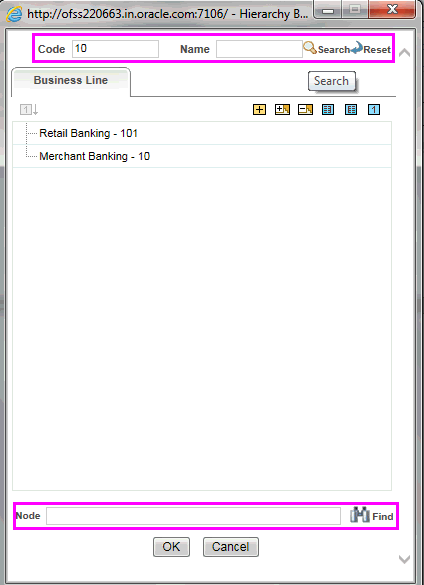
DB Search (Top search container): It will search the required node in database and displays the result as shown below. This search is performed on full hierarchy nodes.
Note:
In case hierarchy nodes are more than 50 and if it is a non-custom hierarchy, then the UI search will not show the required node in tree structure, until all the nodes are expanded and loaded manually in the UI.Custom hierarchies will be having the parameter configuration customQuery as shown below and the customized query will be taken from the HIERARCHY_FILTER_MASTER table.
<CONTROL ID="1003" TYPE="41">
<CONTROLPROPS>
<EXTRAPARAMETERS>
<PARAMETER NAME="customQuery" VALUE="Yes"/>
</EXTRAPARAMETERS>
</CONTROLPROPS>
</CONTROL>
For custom hierarchy, all the hierarchy nodes are loaded in UI without any limit.
So, even if the hierarchy nodes are more than 50, the UI search will show the required node in tree structure and ExpandAll and ExpandBranch images will be enabled.