Large Claims Flow
This guide clarifies the steps in the large claims process. On this page, a claim refers to a large claim.
The large claim flow is schematically depicted in the following figure:
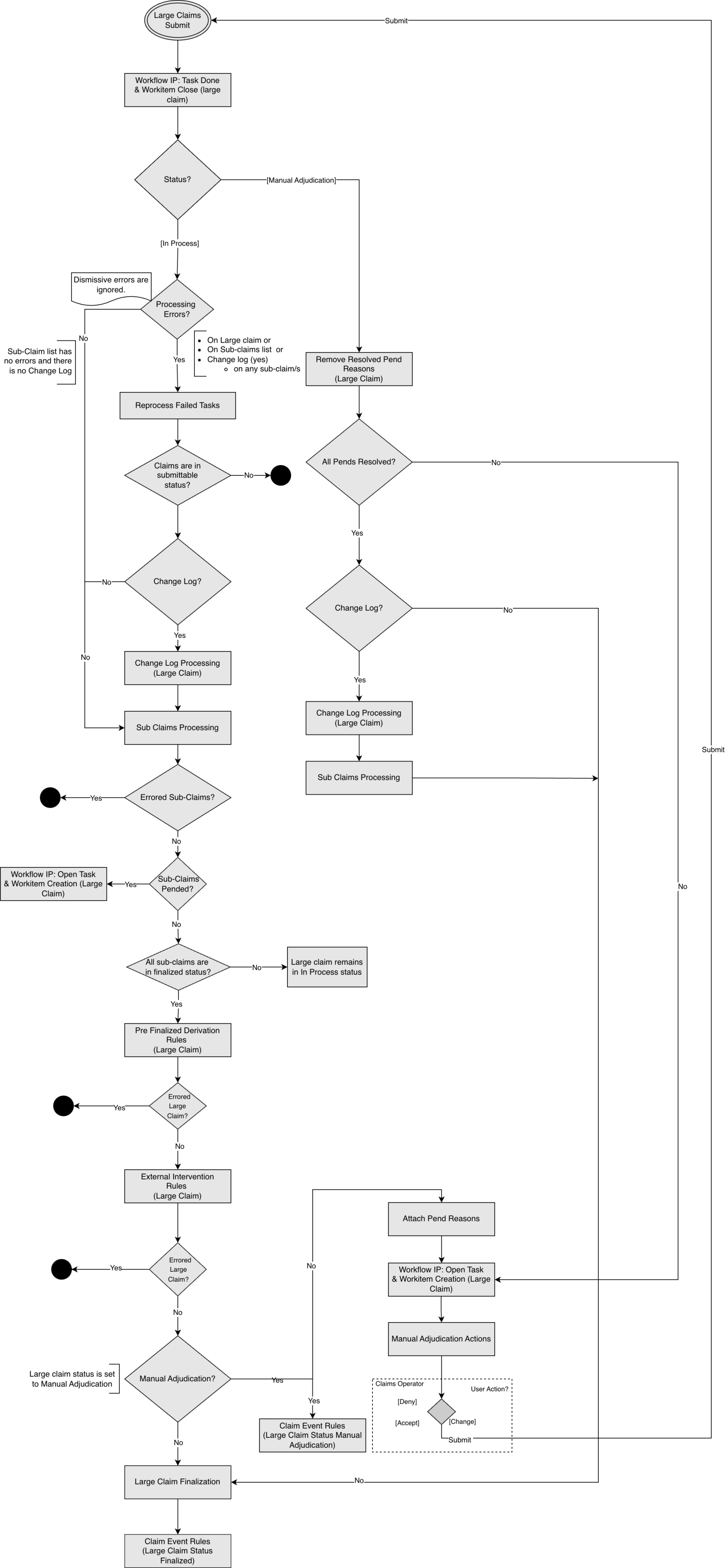
The status of a large claim indicates where it is in the claims flow. Only one status can be applied to a large claim at once. The following large claim statuses exist:
| Status | Description |
|---|---|
Entry |
If all the Sub-Claims are in the status ENTRY, then the large claim will be in status ENTRY. |
In-process |
For the In Process status of the large claim, a sub-claim can be in any of the following status:
|
Manual Adjudication |
If all the Sub-Claims are in the status FINALIZED, then the large claim will be in MANUAL ADJUDICATION status. A large claim attains this status when it pends due to a configured external intervention rule(s). This results in the suspension of the large claim process. A manual intervention of acceptance or rejection of the claim is required. |
Finalized |
If all the Sub-Claims are in the status FINALIZED, then the large claim will be in FINALIZED status. The large claim is processed, and the claim results are now visible to other claims. |
Large Claim Submit
A large claim may be a newly filed claim or one that is in the manual adjudication or in-process stages at the time of submission. In the event of a submission failure, the system provides an activity link.
Existing Claims
This is also the place where claims fields can be modified, as it is the initial stage of processing a claim. For instance, a claim that has been pending for manual action can need to have a field updated before it can be resubmitted. The claim is brought back to the beginning of the flow to implement that change. Additionally, un-finalizing a claim indicates that it is subject to revision and that, to be finalized again, it must go through the whole processing sequence.
Let us look into the following example scenarios to understand how the Submit works:
Scenario 1: Submit a Large Claim with No Changelog
-
The large claim is in In-Process status.
-
The request includes selected sub-claims.
Only the selected sub-claims are submitted on Submit.
Scenario 2: Submit a Large Claim with a Changelog on the Large Claim Header
-
The large claim is in In-Process status.
-
The request includes selected sub-claims.
In this scenario, the system selects every sub-claim, regardless of which sub-claims are selected. The sub-claims are all brought back to status CHANGE by the system. Sub-claims that have reached the finalized processing status are all un-finalized and returned to status CHANGE. An un-finalized reason for submission must be included with the large claim. The user must enter an un-finalized reason via the user interface before submitting; otherwise, a warning message will be displayed. Once every sub-claim is in the CHANGE status, the change log is applied to them in ascending order of creation date and time, and then the submit process occurs.
Scenario 3: Submit a Large Claim where any of the Sub-Claims is in Error Status with No Changelog
-
The large claim is in In-Process status.
-
The request includes selected sub-claims (any error).
In this scenario, only the errored sub-claims from the list are re-processed.
Scenario 4: Submit a Large Claim where none of the Sub-Claim is in Error Status and there is No Changelog
-
The large claim is in In-Process status.
-
The request includes selected sub-claims (any error).
In this scenario, the flow moves to the sub-claims processing step.
Scenario 5: Submit a Large Claim where any of the Sub-Claim is in Error Status and there is Changelog
-
The large claim is in In-Process status.
-
The request includes selected sub-claims (no error).
In this scenario, submit returns a _Business Error - CLA-IP-SUBLC-001 - A Large Claim cannot be submitted as one or more sub-claims have processing errors. See Submit a Large Claim for Processing for more information.
| Routing Slips do not apply to large claims. |
Workflow IP: Task Done (Large Claim)
This step is not relevant for newly submitted large claims. This is applicable for a large claim with the status Manual Adjudication or In-process. The workflow integration point initiates a <task> event to inform the workflow management system that the preceding task has been completed.
Work Item Creation for Large Claim
A large claim moves through sub-claim processing and large claim level pre-finalization checks. When pend reasons arise during this flow, the system creates a work item so an operator can resolve them.
The work item is always created at the large claim level. There are two distinct points in the flow where creation can occur, each with its own trigger and pend reason source.
-
One or more sub-claims pended during sub-claim processing.
-
External Intervention Rules attach pend reasons to the large claim header after all sub-claims have finalized.
This is applicable for a large claim with the status Manual Adjudication or In-process. See Work Item Creation.
Work Item Closure for Large Claim
Work item closure on a large claim occurs at a single defined point in the flow: at the start of every large claim submit, before any further processing. See Work Item Closure.
Remove Resolve Pend Reasons (Large Claim)
This step is not relevant for newly submitted large claims or large claims that are in the In-process status. All resolved pend reasons are removed from a claim while it is in the Manual Adjudication status. Note that these pend reasons are retained in the pend reason history.
Change-Log processing
When the large claim is saved, the changes made to the large claim header are stored in a changelog. These are the changes to fixed fields, dynamic fields, and sub-entities such as messages, except changes to claim pend reasons.
When a large claim is submitted, if changes are stored in the changelog, the system applies these changes to the sub-claims:
-
Unfinalize all finalized sub-claims and return them to the status CHANGE.
-
Return all sub-claims with a status other than finalized to the status CHANGE.
-
Apply the most recent changelog to all sub-claims.
-
Proceed to the flow’s next step, sub-claims processing.
| The system starts processing change logs only when a large claim is submitted and no sub-claims are in an error status. |
Sub-Claims Processing
In this step, all the sub-claims are processed. Processing large claims pauses until every sub-claim reaches an end status.
-
When a sub-claim finalizes, the system places a claim transaction repository (CTR) hold on it. The system handles the application of a CTR hold. The hold type is system type (FIN_FHTP_CLA_001). The system-type financial hold cannot be updated or deleted, but it can be used. The system automatically releases the CTR holds that were seeded upon large claim finalization.
-
If any sub-claim encounters a processing error, the user must resolve the error as a regular claim process. The large claim continues to be in the IN-PROCESS status.
-
If any sub-claim is pended, a workflow event is sent for all pended sub-claims as a single event at the large claim level when the pend reason has the publish indication checked.
-
If any sub-claim is pended, work item creation is initiated at the large claim level, not at the sub-claim level. A single work item is created for the large claim covering all pended sub-claims. See Work Item Creation.
-
The following section provides a detailed explanation of workflow event notification.
-
If all sub-claims are finalized, CTR and financial transactions for sub-claims are regular claims, and the LARGE CLAIM PRE-FINALIZATION checks begin.
| When the sub-level claim is un-finalized, the large claim status is updated to In Process. |
Workflow
If any sub-claims remain un-finalized due to pend reasons, the workflow integration point initiates a <task> event to alert the workflow management system that a new task is available at the large claim level. The Fields dynamic logic is invoked for every sub-claim, including the claim lines with publish.
If a claim has more than one pend reason, then for each unresolved pend reason with a checked publish? indicator:
-
At the claim level, the
Claim fields functionis applied to large claims and sub-claims as a regular claim. -
At the claim line level, the
Claim line fields functionand theClaim fields functionare applied. The claim here refers to a sub-claim.
|
Large Claim Pre-Finalized Checks
As soon as every sub-claim has been finalized, the large claim pre-finalization checks start. Pre Finalized Derivation Rules and External Intervention Rules are executed at the level of the large claim header as part of this.
Pre-Finalized Derivation Rules
A derivation rule sets the value of specific fields on a claim. There are two types of derivation rules:
-
Dynamic and native fields.
-
Process fields.
At this point in the flow, derivation rules are executed for which the step field has the value pre finalization (large claim),
and the claim level has the value Large claim, which means no process field derivation rules.
Pre finalization derivation rules are evaluated even if a fatal message is attached to the claim. If multiple derivation rules exist, they are executed in the order of the configured sequence (sequence null is evaluated last).
External Intervention Rules (Large Claim)
In this step, the system evaluates all external intervention rules for the claim types Large Claim and Manual Adjudication subtypes. If the large claim meets all criteria set by the rule, the rule is triggered.
For each triggered external intervention rule, the specified pend reason is checked: If the re-attach indicator is unchecked and the pend reason history indicates that the same pend reason has been previously attached on the same level (large claim), the pend reason is not attached and the claim does not pend because of this external intervention rule. Otherwise, the specified pend reason is attached to the large claim and added to the claim pend reason history.
The claim moves to the Large Claim Finalization step if the external intervention rule review results in no pend reasons. Otherwise, MANUAL ADJUDICATION is the claim status. For additional information about configuring external intervention rules, see the Claims Flow chapter in the Operations Guide.
Manual Adjudication
This step identifies large claims that require manual review. Claims that require manual review are pended by executing the external intervention. The large claim is pended if it meets the conditions set by at least one external intervention rule.
-
If the large claim has at least one pend reason attached, the system creates a work item at the large claim level. See Queue Resolution and Work Item Creation.
-
If the large claim has at least one pend reason with a checked publish message indicator, the workflow integration point sends out a <task> event to notify a workflow management system that a new task is ready. The event contains all pend reasons that are configured to be published. For more information, see the chapter on the workflow integration point in the implementation guide on claims flow configuration.
-
The assumption is that the external workflow management system assigns a manual adjudication task to a user. The user can choose one of the following actions:
-
Accept the large claim as processed by Claims.
-
Deny the entire claim.
-
Change the large claim back to In Process status.
-
-
Change Claim
The large claim returns to the In Process status when the claim is changed. The change log is triggered when the header is updated and submitted.
Accept Claim
When a user accepts the claim and no pend reasons remain, the following events occur:
-
Workflow IP: Task Done is sent.
-
Submit processing closes any open work item. See Work Item Closure.
-
Remove resolved pend reasons.
-
The large claim is finalized.
Deny Claim
Denial is the presence of a fatal message on the large claim. A fatal message added by a user to a large claim and then submitted propagates to all sub-claims. The sub-claims are then submitted but eventually denied due to the fatal message on the large claim header.
When a user denies the claim and no pend reasons remain, the following events occur:
-
Workflow IP: Task Done is sent.
-
Submit processing closes any open work item. See Work Item Closure.
-
Remove all pend reasons.
-
Apply the change log.
-
Both the large claim and sub-claims are finalized.
| For more information about adding a fatal message, see Adding a Fatal Claim Message. |
Submitting Claim
When the claim is submitted, it returns to the beginning of the flow to implement the change.
On submit, the current open work item on the large claim is closed. If pend reasons remain after the submit cycle, a new work item is created for the large claim. See Work Item Closure.
Claim Event Rules (Large Claim Status: Manual Adjudication)
The system evaluates the Claim Event Rules for a large claim. Depending on how the Claim Event Rules are configured for large claims, this may lead to the generation of one or more Claim Events. The Claim Event Rule applies to a large claim in the Manual Adjudication and Finalized statuses.
Large Claim Finalization
A claim attains this status when all the sub-claims have been finalized and passed Adjudication logic. A snapshot of a claim or a claim transaction is kept in the CTR. Note that no financial transaction is created for a large claim. The application releases the financial hold on the sub-claims CTR transaction that was put in place as part of the sub-claims processing upon the finalization of the large claim.
Finalized claims can be un-finalized through the user interface or an integration point. Un-finalizing a claim means that the claim is open for changes, but the claim must go through the entire processing flow to be finalized again. When a large claim is un-finalized, it gets a status In-process, and all the sub-claims are un-finalized and brought back to a status CHANGE.
A user can un-finalize a group of sub-claims without having to un-finalize each sub-claim using a large claim un-finalization.
Mapping Tables
Let us look into the following scenarios to understand how a CTR mapping table works for a large claim:
Consider a large claim that gets finalized the first time, assuming sub-claims 1 and 2 are on version 1 and sub-claim 3 is on version 2. In this scenario, the CTR mapping table holds the following information.
Large claim CTR version 1 |
Sub-claim 1 Version 1 |
Large claim CTR version 1 |
Sub-claim 2 Version 1 |
Large claim CTR version 1 |
Sub-claim 3 Version 1 |
Large claim CTR version 1 |
Sub-claim 3 Version 1R |
Large claim CTR version 1 |
Sub-claim 3 Version 2 |
Consider the large claim is now un-finalized and re-finalized. In this scenario, when the large claim is un-finalized, all sub-claims also get un-finalized to maintain reversal consistency. In this case, the CTR mapping table holds the following information.
Large claim CTR version 1 |
Sub-claim 1 Version 1 |
Large claim CTR version 1 |
Sub-claim 2 Version 1 |
Large claim CTR version 1 |
Sub-claim 3 Version 1 |
Large claim CTR version 1 |
Sub-claim 3 Version 1R |
Large claim CTR version 1 |
Sub-claim 3 Version 2 |
Large claim CTR version 1R |
Sub-claim 1 Version 1R |
Large claim CTR version 1R |
Sub-claim 2 Version 1R |
Large claim CTR version 1R |
Sub-claim 3 Version 2R |
Large claim CTR version 2 |
Sub-claim 1 Version 2 |
Large claim CTR version 2 |
Sub-claim 2 Version 2 |
Large claim CTR version 2 |
Sub-claim 3 Version 3 |
For claims-out response on a large claim, see Claims Out Integration Point for changes related to Large Claim.
Claim Event Rules (Large Claim Status: Finalized)
The system evaluates the Claim Event Rules for a large claim. Depending on how the Claim Event Rules are configured for large claims, this may lead to the generation of one or more Claim Events. The Claim Event Rule applies to a large claim in the Manual Adjudication and Finalized statuses.
| Deleting a large claim or a sub-claim is not supported. Error message CLA-CLAI-056 is returned on delete operation. |