Introduction
The Worklist pages help users manage policies that require manual review before processing can continue.
When a policy cannot be processed automatically because information is missing, validation fails, or manual review is required, the system creates a work item and routes it to the appropriate queue. A user with access to that queue can fetch or be assigned the work item, review the pend reason, take the required action, and submit the policy again.
How It Works
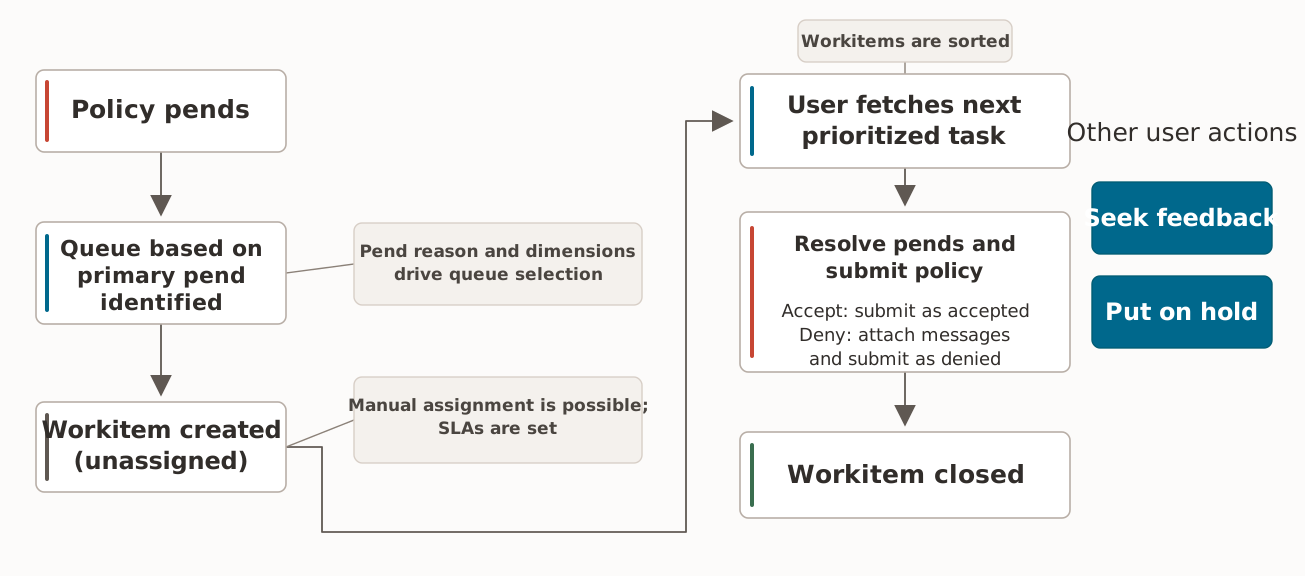
When a policy is pended, the system checks whether the worklist feature is enabled. The feature is controlled by a system property. If the feature is enabled, the system starts the work item creation process.
Queue Resolution
The system performs the following steps to determine the appropriate queue:
-
Identifies the primary pend reason.
-
Evaluates the configured queue dimensions and conditions.
-
Selects the winning queue for the work item.
-
Creates the work item in the selected queue.
When the work item is first created, it is unassigned. It is available in the queue, but no user owns it.
Work Item Assignment
A work item can be assigned in either of the following ways:
-
Users do not manually select a work item from the queue. Instead, they use Fetch Next, which automatically selects the highest-priority assigned or unassigned work item available to them based on queue user role access and the configured sort order.
-
A queue administrator can manually assign or reassign a work item to an eligible user.
Work Item Resolution
After reviewing the work item and making the required corrections, the user resolves the pend and submits the policy for further processing.
Work Item Closure
When the policy is submitted for processing, the system evaluates whether any pend reasons remain:
-
No pend reasons remain: The system closes the current open work item.
-
Pend reasons remain or new pend reasons are added: The system closes the current open work item and creates a new work item for the remaining pend reasons.
-
When a policy is canceled, the system closes any linked open work item that is not already in
Donestatus.
Worklist Views
Use the Worklist pages based on your role and the type of work you need to review:
-
My Work Items: Work on assigned work items, respond to feedback requests, view SLA status, resolve work items, place work items on hold, release holds, request feedback, and add notes.
-
Assigned Work Items: Review and manage active work items that are already assigned to users. This view is available to queue administrators.
-
Unassigned Work Items: Review and assign work items that are waiting in a queue without an owner. This view is available to queue administrators.
-
Closed Work Items: Review completed work items and their notes.
Available Actions
The actions available for a work item depend on the user’s role, the selected Worklist view, the work item status, and the user’s access privileges.
Common actions include:
-
Fetch Next: Select the next best work item for the user.
-
Resolve: Resolve the work item and submit the policy.
-
Hold: Place the work item on hold when active work cannot continue.
-
Release: Release the hold and return the work item to active processing.
-
Request Feedback: Ask another user for input before continuing.
-
Provide Feedback: Respond to an open feedback request.
-
Assign or Reassign: Assign work items to eligible queue users. This action is available to queue administrators.
-
Update Priority or Escalate: Change the work item priority or mark it for special attention. This action is available to queue administrators.
-
Notes: Add or view notes for the work item’s associated policy.