Queue Resolution
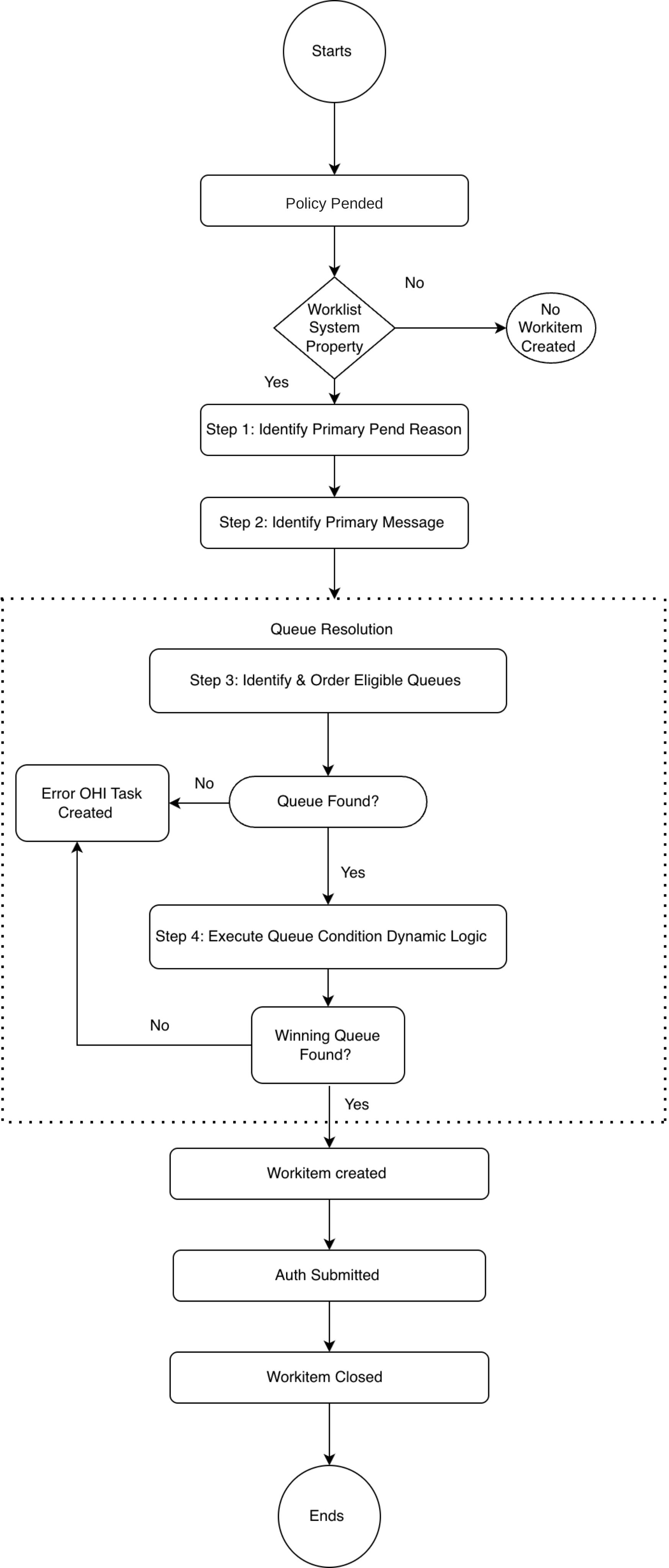
Queue resolution is the process that the system uses to determine the queue for a work item when a policy is pended.
-
Trigger: A policy enters a pended state.
-
Output: A winning queue is identified and a work item is created against it.
-
Failure path: If no queue is identified, an error task is raised in the OHI Task Framework.
Worklist System Property
Before starting queue resolution, the system checks the following system property to determine whether work item creation is enabled.
| Property | Value |
|---|---|
|
Queue resolution proceeds and a work item is created. |
|
Queue resolution is skipped. No work item is created. |
Resolution Steps
Step 1: Identify the Primary Pend Reason
The system collects all pend reasons from the policy. The collected pend reasons are ordered using the following sequence:
-
Priority, in ascending order
-
Pend reason code, in ascending order
The first pend reason in the ordered list becomes the primary pend reason.
Step 2: Identify and Order Eligible Queues
A queue is considered eligible if all the following conditions are met:
-
The queue’s configured dimension values match the corresponding attributes of the policy, or the queue has no dimension value specified for a given attribute.
-
The queue contains the primary pend, or the queue has no pend reason configured.
-
Any message attached to the policy belongs to the queue’s configured message group, or the queue has no message group configured.
For policy fields, see Queue Definition.
Order Eligible Queues
The system orders the eligible queues using the following sequence:
-
Queue contains the primary pend reason (queues containing it first, null last)
-
Queue priority (ascending)
-
Queue code (ascending)
The output of this stage is the ordered eligible queue list, which is passed to Step 3.
Step 3: Execute Condition Dynamic Logic
The system evaluates the dynamic logic condition configured on each queue, working through the ordered eligible queue list from top to bottom.
| Rule | Result |
|---|---|
No dynamic logic configured |
The queue automatically passes evaluation and is selected as the winning queue. |
Dynamic logic evaluates to true |
The queue is selected as the winning queue. Evaluation stops immediately; remaining queues are not evaluated. |
Dynamic logic evaluates to false |
The system moves to the next queue in the ordered list. |
|
Work Item Initial Attributes
A work item is created when queue resolution identifies the winning queue. The system links the work item to both the winning queue and the associated policy, and appends the following initial attribute values.
-
Status set to Open.
-
Hold indicator set to N.
-
Escalate indicator set to N.
-
Primary pend added.
Work Item Default SLA Calculation
After the winning queue is identified, the system computes default SLA timestamps for the work item. The system reads the SLA configuration from the winning queue and calculates the default work item and global SLA datetime.
Work Item SLA
Read from winning queue
| Field | Description |
|---|---|
SLA UOM |
Unit of measure enum, for example, Minutes or Days. |
SLA Due Time Value |
Numeric value representing the due threshold. |
SLA Risk Time Value |
Numeric value representing the risk warning threshold. |
Compute
| Output Field | Formula | Output Type |
|---|---|---|
Work Item SLA Due Time Value |
Work Item creation datetime + SLA Due Time Value (in SLA Time UOM) |
Datetime stamp |
Work Item SLA Risk Time Value |
Work Item creation datetime + SLA Risk Time Value (in SLA Time UOM) |
Datetime stamp |
| If the queue SLA due or risk time value is null, the queue has no work item SLA threshold configured. No work item SLA datetime stamps are computed. |
Global SLA
The system reads the linked global SLA definition from the winning queue and resolves the SLA clock start date from the latest version of the policy.
Read from winning queue
| Field | Description |
|---|---|
Referenced SLA Definition |
The global SLA definition linked to the winning queue. |
Compute
| Output Field | Formula | Output Type |
|---|---|---|
Global SLA Due Time Value |
SLA Clock Start Date + Global SLA Due Time Value (in Global SLA Time UOM) |
Datetime stamp |
Global SLA Risk Time Value |
SLA Clock Start Date + Global SLA Risk Time Value (in Global SLA Time UOM) |
Datetime stamp |
SLA clock start date = policy latest version creation date.
| If no SLA definition is referenced on the winning queue, or the SLA definition value is null, the queue has no global SLA threshold configured. No global SLA datetime stamps are computed. |
Execute Function Dynamic Logic
This step runs only if a dynamic logic function is configured on the winning queue. The function can optionally set the following values on the work item. For more information, see Queue Parameter Dynamic Logic.
-
Set dynamic fields.
-
Set priority.
-
Set work item SLA due time value.
-
Set global SLA due time value.
Work Item Creation and Closure
This section applies to policy processing.
Policy Work Item Creation
When a policy is submitted and pended, the system initiates queue resolution and creates a work item for the submitted policy.
The queue resolution process described earlier on this page determines the winning queue.
Work Item Closure
When a policy is submitted, the system checks for an open work item on the policy.
-
If an open work item exists, the system closes the work item and updates its status history.
-
If the open work item is on hold (
ind_hold = Y), the system performs the following actions before closing it:-
Releases the hold.
-
Updates the hold history.
-
Sets the hold indicator to N.
-
Closes the work item.
-
Updates the work item status history.
-
Work Item Closure on Policy Cancellation
When a policy is canceled, the system checks for an open work item linked to the policy. If an open work item is found in any status other than Done, the system closes it and updates the work item history.
If the open work item is on hold (ind_hold = Y), the system performs the following actions before closing it:
-
Releases the hold.
-
Updates the hold history.
-
Sets the hold indicator to N.
-
Closes the work item.
-
Updates the work item status history.