7 LPO Rules and Strategies
Use this chapter to understand how LPO applies pricing rules and strategies to Promotion, Markdown, and Regular Pricing runs. Targeted Offer Optimization uses separate customer targeting and offer inputs.
Rules and strategies are created and maintained in the Control and Tactical Center (CTC). For shared procedures to create, build, copy, and attach rules to a strategy, see the "Control and Tactical Center" chapter in the Oracle Retail AI Foundation Cloud Services: AI Foundation User Guide. This chapter explains how LPO applies those rules.
To access these features, open Control and Tactical Center from the Oracle Home Experience and use the available rule and strategy management tasks. Return to LPO Run Overview to select a strategy and review the rules applied to a run.
Role-Based Access to Rules
In Control and Tactical Center, rule access depends on the LPO role assigned to the user:
- Promotion users can view and manage Promotion rules only.
- Markdown users can view and manage Markdown rules only.
- Users assigned both roles can view and manage both Promotion and Markdown rules.
- Regular Pricing users can view and manage Regular Pricing rules only.
- A user cannot view or manage a rule type unless they have the corresponding role.
Manage Rules
An LPO rule combines criteria that define where the rule applies with values that define the policy, target, or limit. Rules can be broad or specific based on the merchandise and location scope.
Use Manage Rules in the CTC to create, copy, edit, and maintain the pricing rules used by LPO. Each rule combines criteria that identify the applicable merchandise and location scope with values that define a pricing policy, target, or limit.
The following sections explain how rules are categorized, how rule criteria determine applicability, how rule values are configured, and how LPO resolves competing rules for the same business scope.
Rule Category
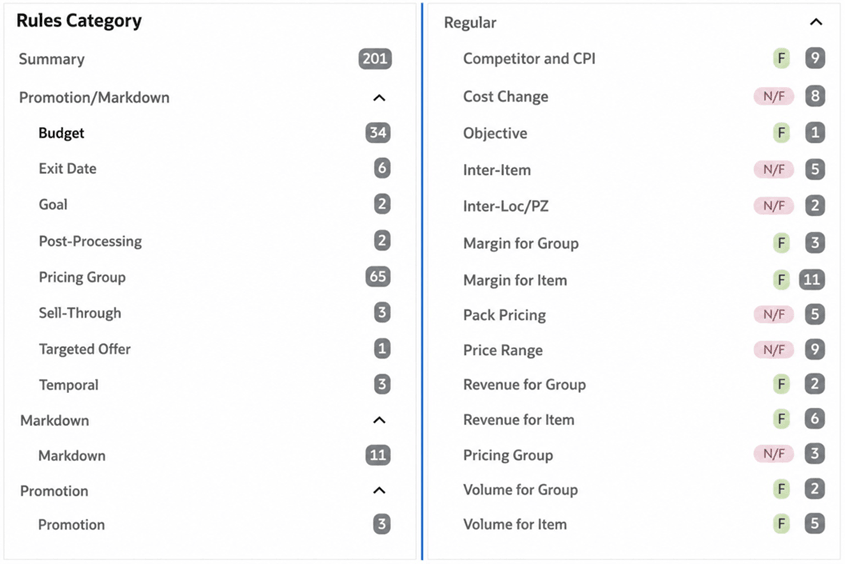
LPO organizes rules into Promotion/Markdown and Regular Pricing categories. Promotion/Markdown rules govern areas such as budgets, timing, planned events, discount limits, and sell-through. Regular Pricing rules govern price, cost and margin, competitor relationships, pricing groups, pack pricing, and relationships across items, locations, and price zones.
Regular Pricing rules can also be grouped as self-rules, inter item rules, and inter location or price-zone rules. Self-rules apply within a single item and location context. Inter item rules define relationships between two sets of items, while inter location rules define relationships for the same item across two locations, price zones, or price-zone groups.
Regular Pricing rules are further classified as Forecast-Based (F) or Non-Forecast-Based (N/F). Forecast-Based Regular Pricing can evaluate both F and N/F rules. Rules-Based Regular Pricing evaluates only N/F rules; F rules included in the selected strategy are ignored for that run.
For the complete list of Promotion and Markdown rules and strategies, see Appendix C, Promotion and Markdown Pricing Optimization Rules. For Regular Pricing rules and strategies, seeAppendix D, Regular Pricing Optimization Rules.
Figure 7-1 Manage Pricing Optimization Rules - Promotion/Markdown and Regular Rule Categories
Figure 7-1 Manage Pricing Optimization Rules - Promotion/Markdown and Regular Rule Categories
Rule Criteria
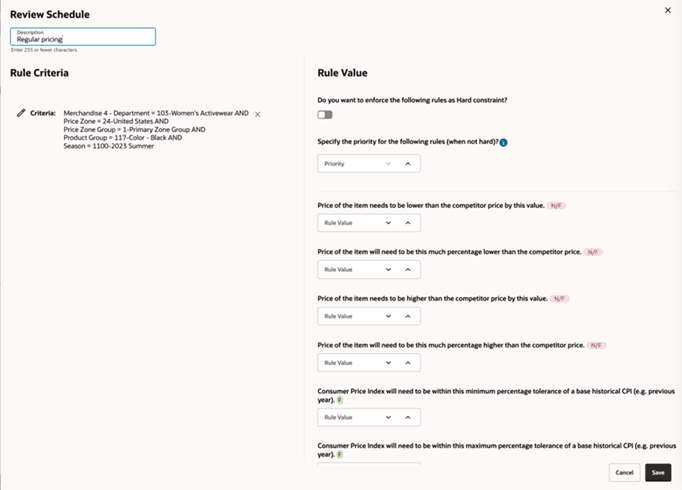
Rule criteria define the merchandise, location, season, pricing-group, or other business scope in which a rule applies.
Available criteria depend on the rule category and configuration. Promotion/Markdown rules can use merchandise, price-zone, and price-zone-group criteria. Inter item and inter location rules require criteria for two item or location sets, respectively.
Note:
To display Price Zones while creating business rule criteria, set RSE_CONFIG.PRO_RULES_STRATEGY_LOC_SCOPE_LVL to PriceZoneGroup.A rule value defines the action, target, or threshold that LPO applies within the rule scope. Examples include a minimum margin, a total budget, an exit date, a permitted promotion range, a maximum price change, or a price relationship. Regular Pricing values are identified as F or N/F to show whether forecast data is required.
The following example shows how criteria and values combine in a promotion rule. For the shared CTC procedure used to create the rule, see the Oracle Retail AI Foundation Cloud Services: AI Foundation User Guide.
Figure 7-2 Rule Criteria and Value - Markdown and Promotion
Creating a Pricing Optimization Rule
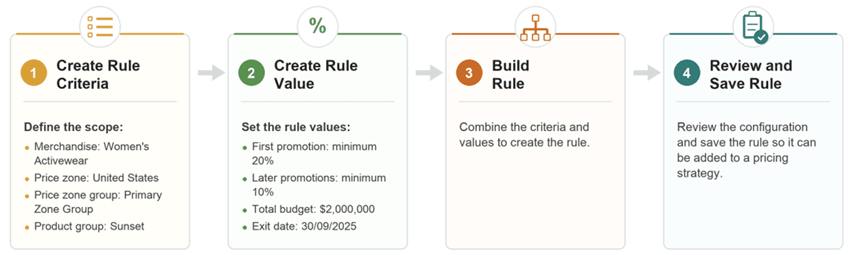
Example rule: A retailer wants to increase in-season sell-through while protecting profitability. The rule uses the following criteria and values:
-
Apply a minimum 20% discount for the first promotion and 10% for any subsequent promotions
-
Within a budget of $2,000,000
-
Targeting the Women's Activewear brand Sunset in the United States zone
-
Valid through 30/09/2025
Figure 7-3 Steps to Create a Pricing Optimization Rule
Manage Strategy
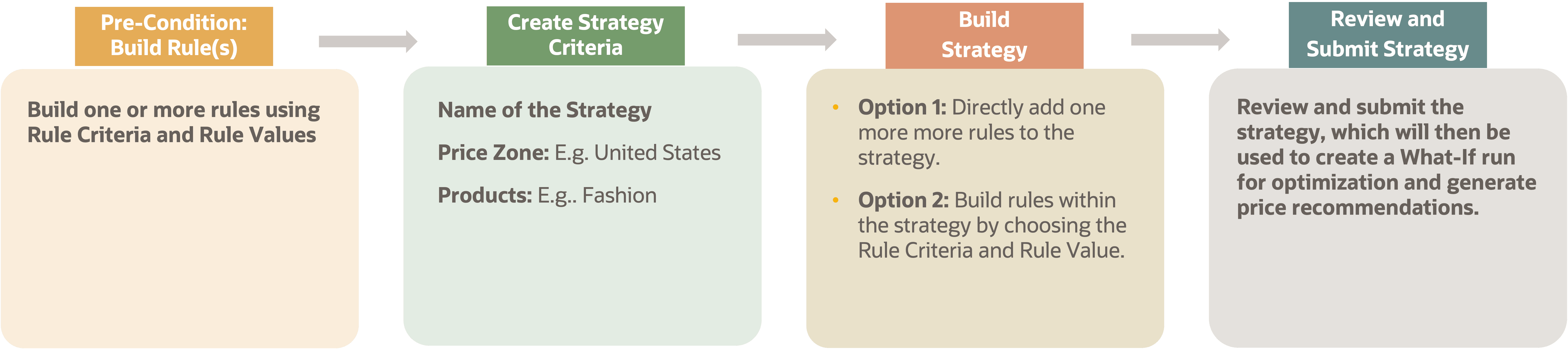
A pricing strategy combines one or more rules for a defined merchandise and location scope. LPO applies the rules together to generate recommendations for the selected business objective.
For example, a regular pricing strategy may combine:
- Competitor matching to align prices with key competitors.
- A margin floor to protect profitability.
- Price rounding to support customer-friendly prices.
A markdown strategy may include:
- Markdown phases that control cadence over time.
- A minimum price threshold that prevents prices from falling below a set value.
- A sell-through target that influences markdown depth.
Figure 7-4 Pricing Strategy Overview
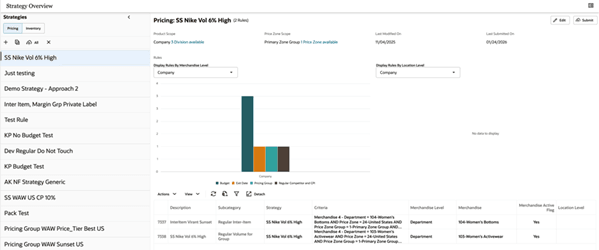
Figure 7-5 Creating a Pricing Strategy
Default Strategy
The default strategy, identified as DEFAULT_SET, is the baseline pricing framework applied automatically in scheduled batch runs. Changes to DEFAULT_SET take effect in the next scheduled batch run. Follow your organization's change-control process before modifying DEFAULT_SET because the change can affect batch run recommendations within its scope.
What-If Strategy
A What-If strategy tests an alternate pricing approach without changing the active recommendation set. Select it when creating an ad hoc scenario, compare the results with the relevant batch run, and finalize the run only when the new recommendations should replace the active set for that scope and effective period.
Example: Use a What-If strategy to test a deeper promotion, a different markdown cadence, or an alternative competitor-price relationship, then compare the results with the batch run before deciding whether to finalize it.
Rule Precedence in a Run
Configure DEFAULT_SET to cover every applicable item-location-season combination in the batch run scope. When a run is created, LPO populates rules from the selected strategy and DEFAULT_SET. For a given combination and rule category, an applicable rule from the selected strategy takes precedence. If that category is not defined in the selected strategy, LPO uses the applicable rule from DEFAULT_SET.
Escalation Path for Conflicting Rules
More than one rule can match the same item when rules are defined at different merchandise and location levels. LPO uses the configured escalation path to select the most specific applicable rule.
Figure 7-6 Rule Escalation Path (for each Rule + Item)
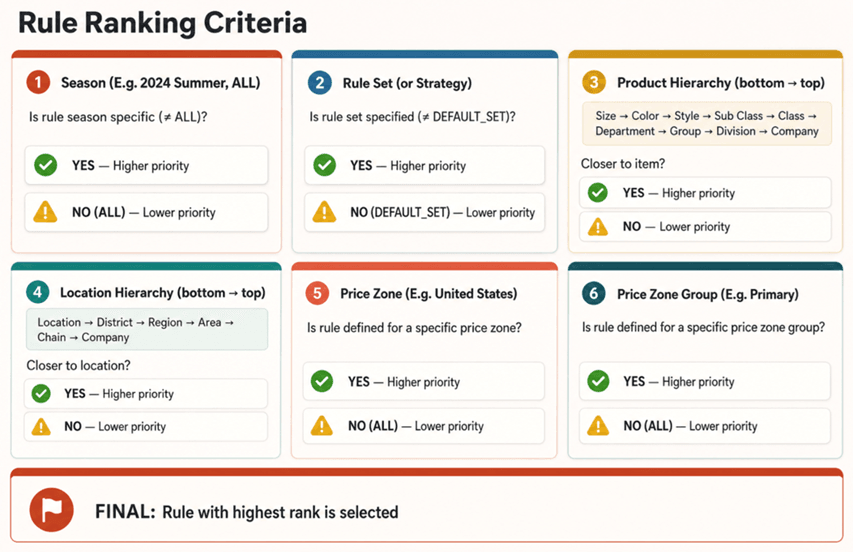
LPO ranks matches by season, strategy, merchandise, location, price zone, and price-zonegroup specificity. For a given product level, it moves up the location hierarchy until it finds an applicable rule; the most specific match is selected.
Example: If a minimum first-markdown rule of 10 percent applies to Women's Activewear across all locations and a rule of 20 percent applies to Women's Activewear Tops across all locations, an item in Women's Activewear Tops uses the 20 percent rule. Other items in Women's Activewear use the 10 percent rule.
Exit Date Rules
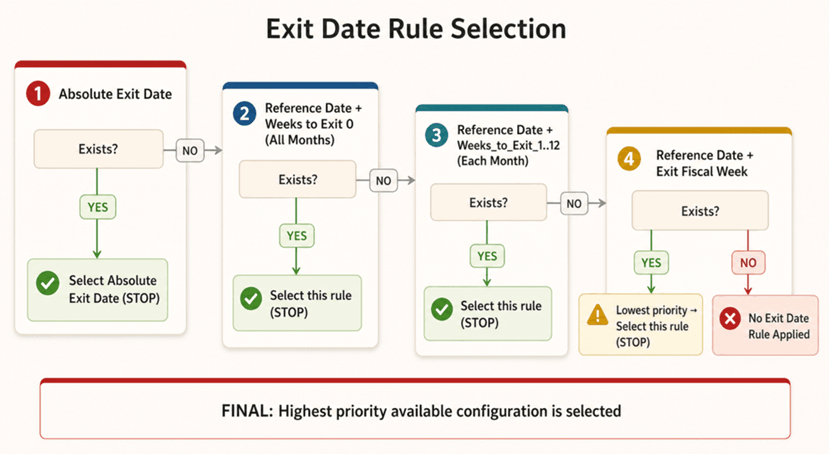
Exit-date selection follows the standard escalation path and uses additional priority-based ranking when more than one exit-date configuration matches at the same hierarchy level. LPO selects the highest-priority configuration; it does not compare dates across matching rules to select the earliest or latest date.
Figure 7-7 Exit Date Ranking (for each Rule + Item)
Regular Pricing Conflicting Rules
Regular Pricing uses hard and soft constraints to resolve competing requirements. Hard constraints cannot be violated. Soft constraints express preferences that LPO attempts to satisfy, but it can relax lower-priority soft constraints when necessary to obtain a feasible recommendation while preserving all hard constraints.
- Hard constraint: A price-ladder or minimum-margin requirement that must be honored.
- Soft constraint: A competitor-price objective that can be relaxed when it conflicts with a higher-priority margin or pricing relationship objective.
When applicable soft constraints conflict, LPO can return the Best Feasible Solution: a price that preserves all hard constraints while minimizing weighted soft-rule violations. In the Results stage of a Regular Pricing run, select a recommendation and review the Rules panel to understand the applicable rules and outcomes.
Soft-rule priorities range from 1 to 100, with 100 representing the highest priority. Assign priorities to reflect the relative importance of business objectives. For example, a retailer can give margin protection a higher priority than competitor matching when profitability must take precedence.
How Rule Change Affects Runs
When a run is created, LPO captures the currently submitted rule values and uses them throughout that run. Editing and submitting a rule after the run is created does not affect its existing results, recalculation, or re-optimization; those actions continue to use the values captured at run creation. To apply updated rule values, submit the changes first and then create a new scenario.