Demand Response Event Journey
This section describes the demand response event journey and the setup required in Oracle Utilities Customer Program Management Cloud Service and Oracle Utilities Grid Edge Distributed Energy Resources Management System.
This section includes the following:
• Actors
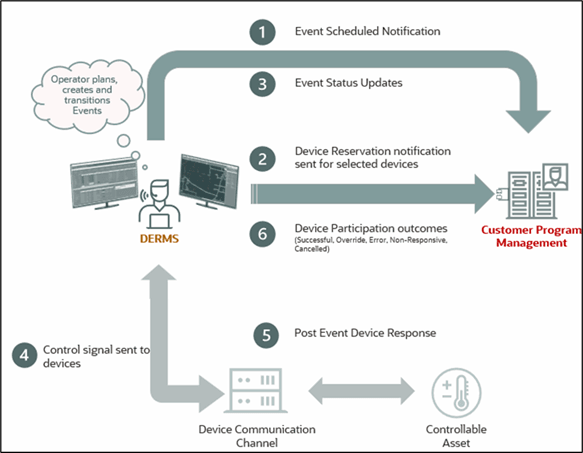
Actors
The following users are involved in the demand response event journey:
• Oracle Utilities Grid Edge Distributed Energy Resources Management System Operator
• Utility Program Manager or User
Prerequisites
Before starting a demand response event, ensure that the following requirements are met:
• Enrollment, unenrollment, and device replacement information has been successfully synchronized to Oracle Utilities Grid Edge Distributed Energy Resources Management System.
• Forecast data is available in Oracle Utilities Grid Edge Distributed Energy Resources Management System.
• The required configuration has been completed in Oracle Utilities Customer Program Management Cloud Service.
For more information, refer to Chapter 3: Configuring Oracle Utilities Customer Program Management Cloud Service in the Oracle Utilities Customer Program Management Cloud Service Integration to Oracle Utilities Edge DERMS Configuration Guide.
Refer to the latest Oracle Utilities Customer Program Management Cloud Service documentation on Oracle Help Center.
• The required configuration has been completed in Oracle Utilities Grid Edge Distributed Energy Resources Management System.
For more information, refer to Chapter 4: Configuring Oracle Utilities Grid Edge Distributed Energy Resources Management System in the Oracle Utilities Customer Program Management Cloud Service Integration to Oracle Utilities Edge DERMS Configuration Guide.
Use Cases
This section describes the key use cases supported by the application, outlining how users and systems interact to accomplish specific tasks.
Create Event and Reserve Devices
1. Login to Oracle Utilities Grid Edge Distributed Energy Resources Management System.
2. Navigate to Tools Selection menu > DERMS Events > + New Event.
3. Select a strategy and create an event. Enter the event details.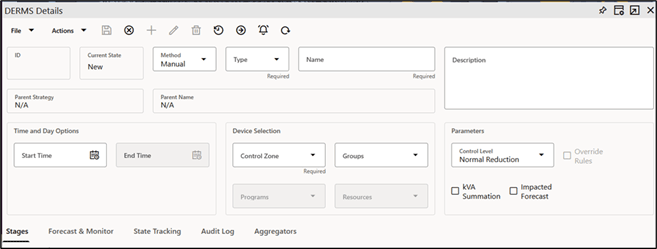
4. Add a Stage or Multiple Stages to accomplish the desired reduction.
5. Once the event has been through the approval process and transitioned to Scheduled status, the event and stage information are sent to Oracle Utilities Customer Program Management Cloud Service and Oracle Utilities Live Energy Connect.
6. In Oracle Utilities Customer Program Management Cloud Service:
• On the Program Event page, verify if the program event is created.
• On the Event Participation page, verify if the event participation for each device is created and the reservation flag is set to Yes.
7. Oracle Utilities Live Energy Connect will execute the event at the scheduled time. Once the event starts to execute, the state will change to “In Progress”, and then eventually to “Completed”. These event stage status updates are also sent to Oracle Utilities Customer Program Management Cloud Service.
For information about strategies, events, and stages, refer to the latest Oracle Utilities Network Management System and Oracle Utilities Integrations documentation on Oracle Help Center.
Event Cancellation
1. Login to Oracle Utilities Grid Edge Distributed Energy Resources Management System.
2. Navigate to Tools Selection menu > DERMS Events and search for the event to cancel.
3. Select the checkbox for the event.
4. On the Actions menu, select Edit.
5. In the State Tracking section, click Cancel. This will also cancel all the stages associated with the event.
6. After the event has been canceled, the status update is sent to Oracle Utilities Customer Program Management Cloud Service.
Send Device Outcome
1. After the events are complete, Oracle Utilities Grid Edge Distributed Energy Resources Management System receives the actual device participation outcome of all devices called to participate in an event or events from Oracle Utilities Live Energy Connect.
2. Oracle Utilities Grid Edge Distributed Energy Resources Management System aggregates the information and sends the device outcome per event-stage to Oracle Utilities Customer Program Management Cloud Service through a file extract.
3. In Oracle Utilities Customer Program Management Cloud Service:
a. The event participation record for each device is updated.
b. The Status is “Closed” and the Outcome field value is updated depending on the device’s participation.
c. Verify it on the Event Participation page.
Customer Unavailability
1. In the Customer Program Summary portal, navigate to the Current Enrollment section.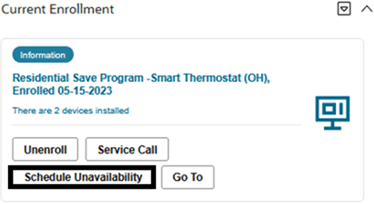
2. Search for the program enrollment for which the customer wants to schedule unavailability.
3. Click Schedule Unavailability.
4. Navigate to Customer’s Program Subscription > Device Location to enter the customer’s unavailability details.
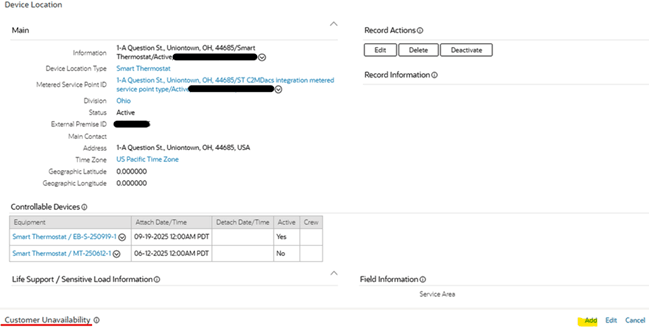
5. Enter the device(s) and time unavailability period, and click Save.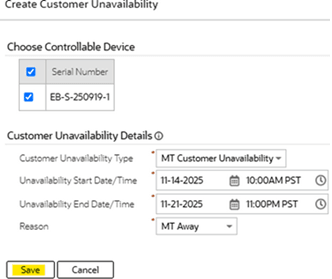
Oracle Utilities Customer Program Management Cloud Service sends this information to Oracle Utilities Grid Edge Distributed Energy Resources Management System.
6. In Oracle Utilities Grid Edge Distributed Energy Resources Management System, the devices selected for unavailability must not be selected for any events for that unavailability period.
Note: On the Program Configuration page, set the Allow Customer Unavailability flag to “Yes” to be able to display Schedule Unavailability in the Customer Program Summary portal.
Customer Opt Out From A Program Event
1. Customer gets a notification when the device is reserved for a program event.
2. The customer calls or emails the utility company to opt out from participating in the program event.
3. CSR finds the customer.
4. Navigate to the Customer Program Summary portal. In the Current Enrollment section, click Opt Out to opt out from participating in an event.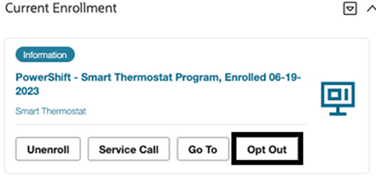
5. The utility company’s CSR goes to the Event Participation record for that customer’s device and changes the Preemptive Opt-Out value to “Yes”.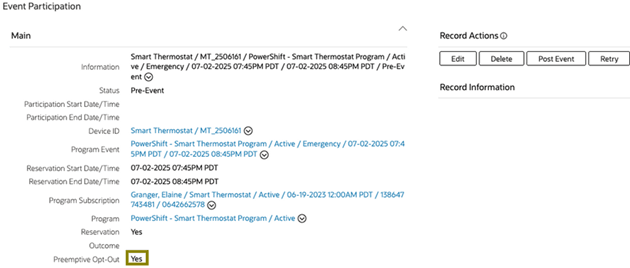
6. Save the changes. Oracle Utilities Customer Program Management Cloud Service sends this information to Oracle Utilities Grid Edge Distributed Energy Resources Management System.
7. Oracle Utilities Grid Edge Distributed Energy Resources Management System removes that device from the event-stage and updates Oracle Utilities Live Energy Connect that should not call the device to participate in the event.
8. When Oracle Utilities Live Energy Connect executes the event at the scheduled time, it should not call the device that was opted out.
Note: Navigate to Event Opt Out Parameters > Program Type Configuration. Set the Allow To Opt Out flag to “Yes” to allow customers to opt out from programs associated to this program type.