Personal Tracker
The Personal Tracker is an optional module that compares a customer's current energy usage to the previous year, covering up to a full year of data. Depending on available data, it can display as few as three billing periods or as many as two full years. The module includes an evaluative statement summarizing the customer's performance, a bar chart for visualization, seasonal context, and insights explaining why energy use may have increased, decreased, or remained consistent. Its goal is to provide clear, actionable insights that help customers better understand their energy use and make informed decisions to improve efficiency.
Appears in: Progress Report, Usage Lookback Report
Requirements
Utility Requirements
| Category | Description |
|---|---|
| Required Cloud Service | Oracle Utilities Opower Energy Efficiency Cloud Service |
| Scale | Not applicable. |
Customer Requirements
| Category | Description |
|---|---|
| Billing Frequency | Monthly, bi-monthly, or quarterly. |
| Data Delivery Frequency | Monthly, bi-monthly, or quarterly. |
| Data Requirements | Billed usage data. |
| Data History | A minimum of one historical bill. |
| Data Coverage | Not applicable. |
| Supported Fuels | Progress Reports: Electric-only, gas-only, dual fuel. |
User Experience
Progress Report
This section describes the Progress Report user experience for an electric-only customer.
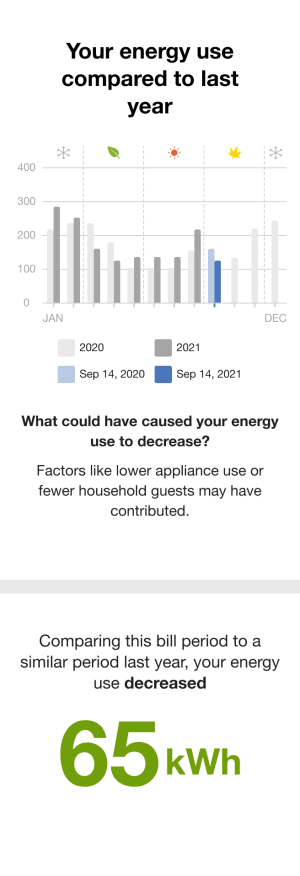
Header: Informs the customer that the module compares their current energy use to the previous year.
Bar chart: Displays the customer's energy usage over time and, when sufficient data is available, compares it to the previous year. The chart supports different billing cycles, including monthly, bimonthly, and quarterly periods, and typically shows usage month over month back to the start of the prior year.
- Unit of Measure: Varies by fuel type, such as kWh, therms, or units.
- Legend: Distinguishes between current and previous year data, as well as the current billing period and the corresponding period from the previous year.
- Seasonal Icons: Appear above the chart to indicate the season for each billing period.
Insight: Appear above the chart to indicate the season for each billing period.
Secondary Insight: Provides additional context for changes in energy use, often related to temperature differences between billing periods. Using weather-based calculations, the module explains whether higher or lower average temperatures may have influenced the increase or decrease and offers relevant guidance.
Usage Lookback Report
The Personal Tracker module for the Usage Lookback Report provides customers with a comparison of their current gas and heating season's usage to the previous season.
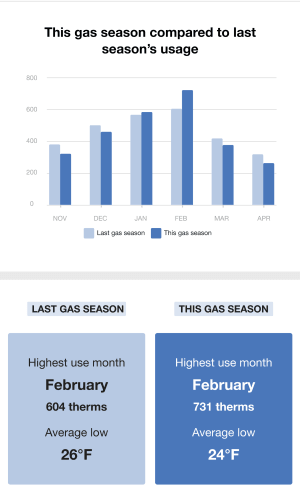
Header: Informs the customer that the module compares the current gas and heating season to the previous year's season.
Bar chart: Displays the customer's gas usage over the current heating season and compares it to the same period from the previous year. The module supports monthly and bimonthly billing periods. An algorithm aligns billing data across years to calendar months, ensuring an accurate year-over-year comparison.
- Unit of Measure: Gas usage is displayed in therms.
- X-axis: Each bar is labeled by the month containing the majority of days in the billing period. For example, a bill from January 29 to February 28 would appear under February.
- Legend: Distinguishes between data from the current season and the previous season.
- Insight: Appears below the chart and highlights the highest-usage month for both the current and previous heating seasons, including
- Highest use month
- Number of therms used
- Average low temperature
User Experience Variations
The user experience of the feature may vary for customers and utilities depending on their service types (gas, electricity, dual fuel, and so on), available data, costs, locale, and other factors.
Fuel Type
The module varies by customer fuel type:
Dual Fuel: For dual-fuel customers, "energy use" is used in the module title and insights. The measurements are in units.
Gas: For gas customers, gas-specific language us used in the title and insight. The measurements are in therms.
Energy States
The copy of the first and second insight varies depending on the customer's energy state and fuel type.
| Energy State | Primary Insight | Secondary Insight |
|---|---|---|
| Energy use decreased compared to last billing period |
What could have caused your [gas/energy/net energy] use to decrease? Changes in your household this period, like using less hot water than usual or fewer people at home, may have lowered your [gas/energy/net energy] use. |
Comparing this bill period to a similar period last year, your [gas use/energy/net energy] use decreased XX [therms/units/kWh] |
| Energy use increased compared to last billing period |
What could have caused your [gas/energy net energy] use to increase? Changes in your household this period like using more hot water than usual or a long-term guest may have contributed. |
Comparing this bill period to a similar period last year, your [gas/energy/ net energy] use increased XX [therms/units/kWh] |
| Energy use is similar to last billing period | How could you lower your [gas/energy use/net energy] use? Upgrade to water-efficient appliances. If your appliances use less water, you won't be spending as much on water heating. | Comparing this bill period to a similar period last year, your [gas/energy/net energy] use was XX [therms/units/kWh] |
Bi-Monthly or Quarterly Billing
Customers with bimonthly billing: Each energy use bar is plotted at the end of the two-month billing period, resulting in fewer data points than monthly billing. In this case, the seasonal icons above the chart are replaced with a short explanatory message: "We report energy use based on the end of your bimonthly bill period."
Customers with quarterly billing: Each energy use bar is plotted at the end of the three-month billing period, resulting in fewer data points than monthly or bimonthly billing. Similarly, the seasonal icons are replaced with the message: "We report energy use based on the end of your quarterly bill period."
Available Data
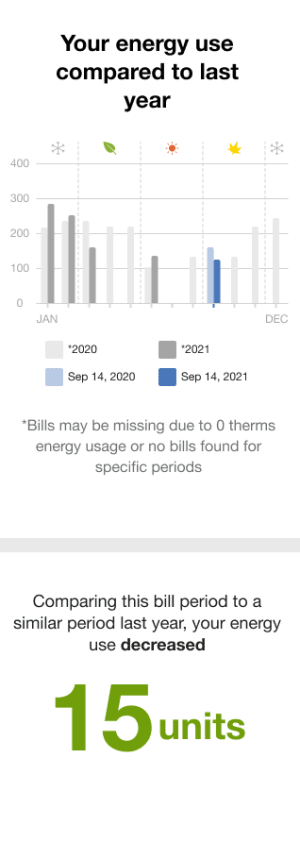
Fewer than 13 months of data are available
The header changes to "Track your progress." If data is missing for either the current year or the previous year, a single bar is centered on the corresponding x-axis position. A message below the graph explains possible reasons for the missing data, and asterisks in the legend indicate which years have incomplete data.
More than 13 months of data are available but a year-over-year comparison is not possible
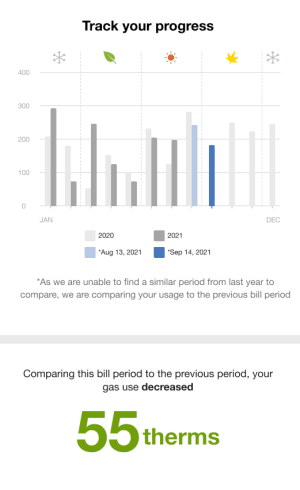
More than 13 months of data are available but a year-over-year comparison is not possible due to missing data from the same billing period in the previous year, the module instead compares the current period to the most recent prior billing period.
For example, if data for September 2020 is missing, the module compares September 2021 usage to August 2021. The primary insight clarifies that this comparison is used because a matching period from the previous year is unavailable. The secondary insight then indicates whether the customer's usage increased or decreased relative to that prior period.
Module failure
The module fails if comparison when the last year's similar billing period and previous bill period is not possible.