Using ojModule Binding
Many of the Oracle JET Cookbook and sample applications use ojModule to manage the Knockout binding. With ojModule, you can store your HTML content for a page section in an HTML fragment or template file and the JavaScript functions that contain your viewModel in a viewModel file.
The new oj-module element is the preferred method to work with modules in current JET applications. However, this section is provided as a reference to a supported legacy model that uses the ojModule Knockout binding. The legacy model also uses the data-bind attribute to bind text and create a for-each loop.
Note:
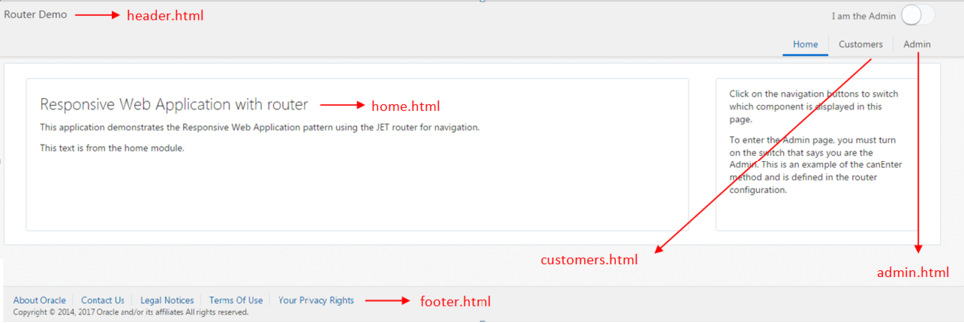
The Customers tab also uses templates to display details of a single customer, list of customers, orders for a customer, and details of a specific order.The home view template is shown below. In the highlighted code, the first data-bind definition uses Knockout's text binding to set the h2 element's content to a text node containing the value of title. The second data-bind definition uses Knockout's foreach binding to iterate through the content, and the list items display the text defined in line.
<div class="oj-flex oj-flex-items-pad">
  <div class="oj-xl-9 oj-lg-9 oj-md-9 oj-sm-12 oj-flex-item">
    <div role="main" class="oj-panel demo-page-content-area">
      <h2 data-bind="text: title"></h2>
      <!-- ko foreach: description -->
        <p data-bind="text: line"></p>
      <!-- /ko -->
    </div>
  </div>
  <div class="oj-xl-3 oj-lg-3 oj-md-3 oj-sm-12 oj-flex-item">
    <div class="oj-panel oj-panel-alt2 demo-page-content-area">
      <p>Click on the navigation buttons to switch which component is displayed in this page.</p>
          <p>To enter the Admin page, you must turn on the switch that says you are the Admin.
             This is an example of the canEnter method and is defined in the router configuration.</p>
    </div>
  </div>
</div>
The code that defines the title and line is contained in the viewModel for the home section's content, stored in the home.js viewModel.
/* Home content module, example of singleton view model object. */
define(['knockout'], function(ko) {
  var viewModel = {
    title: 'Responsive Web Application with router',
    description:[{
               line: 'This application demonstrates the Responsive Web Application pattern using the \
JET router for navigation.'
      },{
        line: 'This text is from the home module.'
      }]
  };
  return viewModel;
});
To use ojModule in your Oracle JET application:
If needed, create the application that will house your main HTML5 page and supporting JavaScript. For additional information, see Getting Started with Oracle JET Web Application Development.
-
To modify the default location of the application’s view templates and viewModel scripts, add code to the application's main script that initializes the location of the viewModels and view templates and defines the suffix for the view templates.
The
ojModulebinding namespace contains the default location and names of managed view templates and viewModels.Property Description viewPathDefines the path to the view templates. Defaults to
text!views/viewSuffixDefines the suffix for view templates. Defaults to
.html.modelPathDefines the location of the viewModel scripts. Defaults to
viewModels/The Oracle JET SPA-ojModule-ojRouter sample application uses the default locations and paths for its view templates and viewModels. If you want to modify the paths, you can add the following code to your main application script, substituting the paths appropriate for your application.
oj.ModuleBinding.defaults.modelPath = 'viewModels/';
oj.ModuleBinding.defaults.viewPath = 'text!views/';
oj.ModuleBinding.defaults.viewSuffix = '.html';
-
In your RequireJS bootstrap file (typically
main.js) addojs/ojmoduleto the list of RequireJS modules, along with any other modules that your application uses.require(['ojs/ojcore', 'knockout', 'jquery', 'ojs/ojknockout', 'ojs/ojbutton', 'ojs/ojmenu', 'ojs/ojtoolbar', 'ojs/ojnavigationlist', 'ojs/ojoffcanvas', 'ojs/ojarraydataprovider', 'ojs/ojmodule', 'ojs/ojrouter', 'text', 'ojs/ojcheckboxset', 'ojs/ojswitch'], -
If needed, create a
viewsfolder in the default location or in theviewPathif you defined one in a previous step. -
Create your view templates and add them to the
viewPathfolder.Use the default
viewSuffixor the value you set for theviewSuffixin Step 1. -
If needed, create a folder for your viewModels in the default location or in the
modelPathyou specified in Step 1. -
As needed, create your viewModel scripts and add them to the
modelPathfolder.Use the same name for the module that you used for the template in Step 4. For example, if your template is named
customers.html, usecustomers.jsfor the viewModel's name. -
Add code to the application's HTML page to reference the view template or viewModel in the
ojModulebinding.If the page section contains only a view template, use
ojModulewith theviewNameoption:<header id="headerWrapper" role="banner"
data-bind="ojModule: { viewName: 'sampleView'}"></div>To reference a viewModel with a view template, use
ojModulewith thenameoption:<header id="headerWrapper" role="banner"
data-bind="ojModule: { name: 'sampleViewModel'}"></div>If you're using
oj.Router, useojModulewith therouter.moduleConfigoption.<div id="content" role="main" class="oj-panel" style="padding-bottom:30px" data-bind="ojModule: router.moduleConfig"></div>
For more information about oj.Router and ojModule, see the Oracle JET oj.Router and ojModule API documentation.
Tip:
ojModule is not specific to single-page applications, and you can also use it to reuse content in multi-page applications. However, if you plan to reuse or share your content across multiple applications, consider creating Oracle JET composite components instead of using ojModule. Oracle JET composite components also contain reusable pieces of user interface code, and they offer the following additional features to facilitate sharing and reuse.
-
Composite components, also known as CCAs, have a contract. The API for a CCA is well defined by its
component.json, which describes its supported properties, methods, and events in a standard, universal, and self-documenting way. Providing a standardized contract makes it easier for external tools or other applications to consume composite components. -
CCAs include version and dependency metadata, making it clear which versions of Oracle JET they support and what other components they may require for operation.
-
CCAs are self-contained. A CCA definition can contain all the libraries, styles, images, and translations that it needs to work.
To learn more about composite component features, see Working with Oracle JET Composite Components.
Working with ojModule’s ViewModel Lifecycle
The ojModule binding provides lifecycle listeners that allow you to specify actions to take place at defined places in the ViewModel’s lifecycle.
For example, you can specify actions to take place when the ViewModel is about to be used for the View transition, after its associated View is inserted into the document DOM, and after its View and ViewModel are inactive.
The following table lists the available methods with a description of their usage.
| Method Name | Description |
|---|---|
|
|
Use to perform tasks when the View is about to use the ViewModel. This method is typically used to fetch data before the View transitions. For an example, see the Oracle JET Cookbook at: Dynamic Data Fetch. |
|
|
Use to perform tasks after the View is inserted into the DOM. |
|
|
Use to perform tasks after the bindings are applied on the View. If the current View is retrieved from cache, the bindings will not be re-applied, and this callback will not be invoked. |
|
|
Use to perform tasks after the View and ViewModel become inactive. |
|
|
Use to perform tasks after the View is removed from the DOM. |
|
|
Use to perform tasks after a new View is complete, including any possible animation between the old and new View. |
|
|
Use to perform cleanup tasks before all binding references to the ViewModel are released. Note that this method will be invoked only once. |
|
|
Use to perform tasks when the ViewModel is created. This method will only be called if the ViewModel factory or the AMD module returns a ViewModel instance instead of a constructor function. This method will be invoked only once when the ViewModel is created and will not be called when the View is retrieved from cache. |
You can also find stub methods for using the ojModule lifecycle methods in some of the Oracle JET templates. For example, the navbar template, available as a template when you Scaffold a Hybrid Mobile Application with the Oracle JET CLI, defines stub methods for handleActivated(), handleAttached(), handleBindingsApplied(), and handleDetached(). Comments describe the expected parameters and use cases.
function DashboardViewModel() {
  var self = this;
  // Below are a subset of the ViewModel methods invoked by the ojModule binding
  // Please reference the ojModule jsDoc for additional available methods.

  /**
   * Optional ViewModel method invoked when this ViewModel is about to be
   * used for the View transition.  The application can put data fetch logic
   * here that can return a Promise which will delay the handleAttached function
   * call below until the Promise is resolved.
   * @param {Object} info - An object with the following key-value pairs:
   * @param {Node} info.element - DOM element or where the binding is attached. This may be a 'virtual' element (comment node).
   * @param {Function} info.valueAccessor - The binding's value accessor.
   * @return {Promise|undefined} - If the callback returns a Promise, the next phase (attaching DOM) will be delayed until
   * the promise is resolved
   */
  self.handleActivated = function(info) {
    // Implement if needed
  };

  /**
   * Optional ViewModel method invoked after the View is inserted into the
   * document DOM.  The application can put logic that requires the DOM being
   * attached here.
   * @param {Object} info - An object with the following key-value pairs:
   * @param {Node} info.element - DOM element or where the binding is attached. This may be a 'virtual' element (comment node).
   * @param {Function} info.valueAccessor - The binding's value accessor.
   * @param {boolean} info.fromCache - A boolean indicating whether the module was retrieved from cache.
   */
  self.handleAttached = function(info) {
    // Implement if needed
  };

  /**
   * Optional ViewModel method invoked after the bindings are applied on this View.
   * If the current View is retrieved from cache, the bindings will not be re-applied
   * and this callback will not be invoked.
   * @param {Object} info - An object with the following key-value pairs:
   * @param {Node} info.element - DOM element or where the binding is attached. This may be a 'virtual' element (comment node).
   * @param {Function} info.valueAccessor - The binding's value accessor.
   */
  self.handleBindingsApplied = function(info) {
    // Implement if needed
  };

  /*
   * Optional ViewModel method invoked after the View is removed from the
   * document DOM.
   * @param {Object} info - An object with the following key-value pairs:
   * @param {Node} info.element - DOM element or where the binding is attached. This may be a 'virtual' element (comment node).
   * @param {Function} info.valueAccessor - The binding's value accessor.
   * @param {Array} info.cachedNodes - An Array containing cached nodes for the View if the cache is enabled.
   */
  self.handleDetached = function(info) {
    // Implement if needed
  };
}
For more information about ojModule, see ojModule.