Using Oracle JET Validators
Oracle JET validators provide properties that allow callers to customize the validator instance. The properties are documented as part of the validators’ API. Unlike converters where only one instance of a converter can be set on an element, page authors can associate one or more validators with an element.
When a user interacts with the element to change its value, the validators associated with the element are run in order. When the value violates a validation rule, the value attribute is not populated, and the validator highlights the element with an error.
You can use the validators with an Oracle JET element or instantiate and use them directly on the page.
Topics:
Using Oracle JET Validators with Oracle JET components
Oracle JET editable elements, such as oj-input-text and oj-input-date, set up validators both implicitly, based on certain attributes they support such as required, min, max, and so on, and explicitly by providing a means to set up one or more validators using the component's validators attribute. As with the Oracle JET converters, the validators attribute can be specified either using JSON array notation or can be an array of actual validator instances.
For example, the following code sample shows a portion of a form containing an oj-input-date element that uses the default validator supplied by the component implicitly. The highlighted code shows the HTML5 attribute set on the oj-input-date element. When the oj-input-date reads the min attribute, it creates the implicit oj.DateTimeRangeValidator.
<div id="validator-example" class="oj-form oj-md-odd-cols-4 oj-md-labels-inline oj-sm-odd-cols-12">
  <div class="oj-flex">
    <div class="oj-flex-item">
      <oj-label for="dateTimeRange1">'min' attribute and 'max' option</oj-label>
    </div>
    <div class="oj-flex-item">
      <oj-input-date id="dateTimeRange1" name="dateTimeRange1" value="{{dateValue1}}"
             min="2000-01-01T08:00:00.000"
             help.instruction="enter a date that falls in the current millenium and not greater than today's date."
             max= '[[todayIsoDate]]'></oj-input-date>
    </div>
  </div>
</div>
The script to create the view model for this example is shown below.
require(['ojs/ojcore', 'knockout', 'jquery', 'ojs/ojknockout', 'ojs/ojinputnumber',
    'ojs/ojinputtext', 'ojs/ojdatetimepicker', 'ojs/ojvalidation-datetime', 'ojs/ojlabel'],
    function(oj, ko, $)
    {
      function DemoViewModel()
      {
        var self = this;
        self.dateValue1 = ko.observable();
        self.dateValue2 = ko.observable();
        self.todayIsoDate = ko.observable(oj.IntlConverterUtils.dateToLocalIso(new Date()));
        self.milleniumStartIsoDate = ko.observable(oj.IntlConverterUtils.dateToLocalIso(new Date(2000, 00, 01)));
        self.validators = ko.computed(function()
        {
          return [{
            type: 'dateTimeRange',
            options: {
              max: self.todayIsoDate(),
              min: self.milleniumStartIsoDate(),
              hint: {
                'inRange': 'Enter a date that falls in the current millennium.'}}}];
        });
      };

      $(
        function()
        {
          ko.applyBindings(new DemoViewModel(), document.getElementById('validator-example'));
        }
      );
    });
When the user runs the page, the oj-input-date element displays an input field with the expected date format. The help.instruction attribute set on the element displays as a tooltip upon hovering. When the user clicks on the field, the validator hint provided by the implicitly created oj.DateTimeRangeValidator is shown in a note window, along with a calendar popup. If the user inputs data that is not within the expected range, the built-in validator displays an error message with the expected range.

The error thrown by the Oracle JET validator when validation fails is represented by the oj.ValidatorError object, and the error message is represented by an object that duck-types oj.Message. The messages and hints that Oracle JET validators use when they throw an error are resources that are defined in the translation bundle included with Oracle JET. For more information about messaging in Oracle JET, see Working with User Assistance.
You can also specify the validator on the element's validators attribute, if it exists. The code sample below adds another oj-input-date element to the sample form and calls a function which specifies the oj.DateTimeRangeValidator validator (dateTimeRange) in the validators attribute.
<div class="oj-flex">
  <div class="oj-flex-item">
    <oj-label for="dateTimeRange2">'dateTimeRange' type in 'validators' option</oj-label>
  </div>
  <div class="oj-flex-item">
    <oj-input-date id="dateTimeRange2" name="dateTimeRange2" value="{{dateValue2}}"
                  validators="[[validators]]"
                  help.instruction="enter a date that falls in the current millenium and not greater than today's date.></oj-input-date>
  </div>
</div>
The highlighted code below shows the additions to the viewModel, including the defined function, with options that set the valid minimum and maximum dates and a hint that displays when the user sets the focus in the field.
require(['ojs/ojcore', 'knockout', 'jquery', 'ojs/ojknockout', 'ojs/ojinputnumber',
    'ojs/ojinputtext', 'ojs/ojdatetimepicker', 'ojs/ojvalidation-datetime', 'ojs/ojlabel'],
    function(oj, ko, $)
    {
      function DemoViewModel()
      {
        var self = this;
        self.dateValue1 = ko.observable();
        self.dateValue2 = ko.observable();
        self.todayIsoDate = ko.observable(oj.IntlConverterUtils.dateToLocalIso(new Date()));
        self.milleniumStartIsoDate = ko.observable(oj.IntlConverterUtils.dateToLocalIso(new Date(2000, 00, 01)));
        self.validators = ko.computed(function()
        {
          return [{
            type: 'dateTimeRange',
            options: {
              max: self.todayIsoDate(),
              min: self.milleniumStartIsoDate(),
              hint: {
                'inRange': 'Enter a date that falls in the current millennium.'}}}];
        });
      };

      $(
        function()
        {
          ko.applyBindings(new DemoViewModel(), document.getElementById('validator-example'));
        }
      );
    });
When the user runs the page for the en-US locale, the oj-input-date element displays an input field that expects the user's input date to be between 01/01/00 and the current date. When entering a date value into the field, the date converter will accept alternate input as long as it can parse it unambiguously. This offers end users a great deal of leniency when entering date values.
For example, typing 1-2-3 will convert to a Date that falls on the 2nd day of January, 2003. If the Date value also happens to fall in the expected Date range set in the validator, then the value is accepted. If validation fails, the component will display an error.
The options that each validator accepts are specified in JavaScript API Reference for Oracle® JavaScript Extension Toolkit (JET).
The Oracle JET Cookbook contains the complete example used in this section as well as examples that show the built-in validators for date restrictions, length, number range, regular expression, and required fields. For details, see Validators.
For more information about Oracle JET component validation, see Understanding How Validation and Messaging Works in Oracle JET Editable Components.
Using Custom Validators in Oracle JET
You can create custom validators in Oracle JET by extending oj.Validator or by duck typing it.
Custom validators can be used with Oracle JET components, provided they don't violate the integrity of the component. As with the built-in Oracle JET validators, you can also use them directly on the page. For information about messaging in Oracle JET, see Using the messages-custom Attribute.
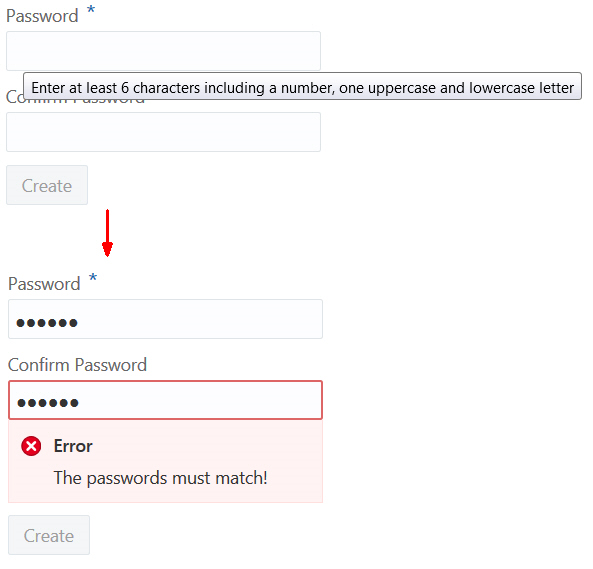
The figure below shows an example of a custom validator used to validate password entries. If the user's password doesn't match, the validator displays an error message.
To create and use a custom validator in Oracle JET:
What are Asynchronous Validators?
Oracle JET input components support asynchronous server-side validation via the async-validators attribute. That means you can check input values against server data without the need to submit a form or refresh a page.
For example, in a form that collects new user data, you can have a validator on the e-mail field to check if the input value has been registered previously.
You can also set number range validators that check against volatile data. For example, on an e-commerce website, you can check the user’s cart against the available inventory, and inform the user if the goods are unavailable without them submitting the cart for checkout.
The Oracle JET Cookbook has a sample that uses the async-validators attribute and dummy data to simulate server-side validation.
The following code shows an oj-input-text element with both the validators and async-validators attributes set to objects in the JavaScript code. The async-validators attribute must duck-type oj.AsyncValidator to fulfill the API contract required to create the asynchronous validator.
<oj-form-layout id="fl2" label-edge="top">
    <oj-input-text id="text-input" required
        label-hint="Quantity Limit"
        on-valid-changed="[[validChangedListener]]"
        validators="[[validators]]"
        async-validators="[[[asyncValidator]]]"
        value="{{quantityLimit}}"
        converter= '{
              "type":"number",
              "options": {"style": "currency", "currency": "USD",
              "currencyDisplay": "code", "pattern": "¤ ##,##0.00"}}'>
     </oj-input-text>
</oj-form-layout>
The following JavaScript code shows the number range validator created in the asyncvalidator object that returns a Promise.
self.asyncValidator = {
        // 'validate' is a required method
        'validate' : function(value) {
          var converterOption =
          {type:"number",
            options: {style: "currency", currency: "USD",
            currencyDisplay: "code", pattern: "¤ ##,##0.00"}};

                   //This is a sample numberRange validator for demonstration
          var validatorHigh =
                oj.Validation.validatorFactory("numberrange")
                .createValidator({max:10000, converter: converterOption});

          return new Promise(function(resolve, reject) {
                  // We could go to the server and check the user's credit score and
                  // based on that credit score, use a specific number range validator.
                  // We mock a server-side delay
            setTimeout(function () {
                try {
                  validatorHigh.validate(value);
                  resolve(true);
                } catch(e) {
                  var converterInstance =
                    oj.IntlConverterUtils.
                    getConverterInstance(converterOption);
                  reject(new Error(e.message +
                    ' Your value is ' +
                    converterInstance.format(value) + '.'));
                }
            }, 1000);
          });
        },
        // 'hint' is an optional field that returns a Promise
        'hint': new Promise(function(resolve, reject) {
          ...
        })
      };
Note:
A Promise object in JavaScript represents a value that may not be available yet, but will be resolved at some point in the future. In asynchronous validation, theoj.AsyncValidator.validate() function returns a Promise that evaluates to Boolean true if validation passes and if validation fails, it returns an Error. For more, see the async-validators attribute section of ojInputText or see Promise (MDN).
For the full Cookbook sample, see Async Validators.