Working with the Oracle JET Starter Templates
The Oracle JET Starter Templates provide everything you need to start working with code immediately. Use them as the starting point for your own application or to familiarize yourself with the JET components and basic structure of an Oracle JET application.
Each template is designed to work with the Oracle JET Cookbook examples and follows current best practice for application design.
Topics:
You can also view a video that shows how to work with the Oracle JET Starter Templates in the Oracle JET Videos collection.
About the Starter Templates
Each template in the Starter Template collection is a single page application that is structured for modular development using RequireJS, Knockout templates, and the Oracle JET ojModule binding.
Instead of storing all the application markup in the index.html file, the application uses the oj-module component to bind either a view template containing the HTML markup for the section or both the view template and JavaScript file that contains the viewModel for any components defined in the section.
The following code shows a portion of the index.html file in the Web Nav Drawer Starter Template that highlights the oj-module component definition. For the sake of brevity, most of the code and comments are omitted. Comments describe the purpose of each section, and you should review the full source code for accessibility and usage tips.
<!DOCTYPE html>
<html lang="en-us">
  <head>
    <title>Oracle JET Starter Template - Web Nav Drawer</title>
       ... contents omitted
  </head>
  <body class="oj-web-applayout-body">

    ... contents omitted

     <oj-module role="main" class="oj-web-applayout-max-width oj-web-applayout-content" config="[[moduleConfig]]">
     </oj-module>

     ... contents omitted

         <script type="text/javascript" src="js/libs/require/require.js"></script>
         <script type="text/javascript" src="js/main.js"></script>
  </body>
</html>
The main page’s content area uses the Oracle JET oj-web-applayout-* CSS classes to manage the responsive layout. The main page’s content uses the HTML oj-module element with its role defined as main (role="main") for accessibility.
The oj-module component’s config.view attribute tells Oracle JET that the section is only defining a view template, and the view will be bound to the existing viewModel. When the oj-module element’s config.view-model attribute is defined, the application will load both the viewModel and view template with the name corresponding to the value of the config.view-model attribute.
oj-module element’s view and view-model attributes are missing, as in this example, the behavior will depend on the parameter specified in the config attribute’s definition.
-
If the parameter is an Oracle JET router’s
moduleConfigobject as in the above example, thenoj-modulewill automatically load and render the content of the viewModel script and view template corresponding to the router’s current state.The Web Nav Drawer Starter Template uses
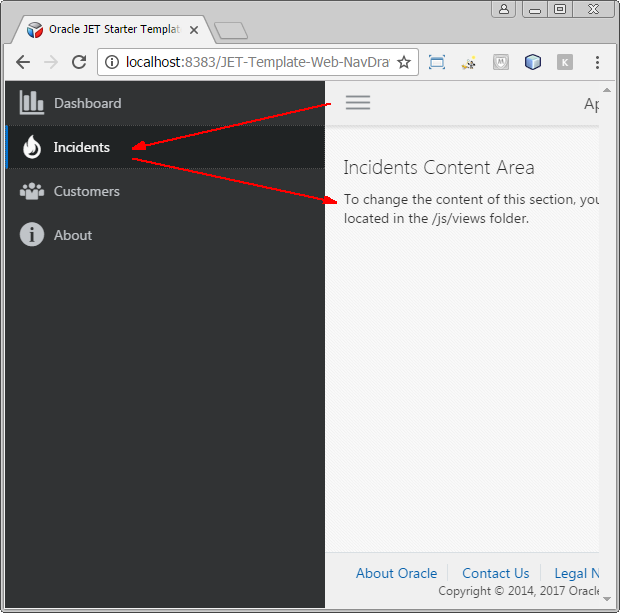
oj.Routerto manage navigation when the user clicks one of the application’s navigation items. The router states includedashboard,incidents.customers, , andabout. If the user clicks Incidents, for example, the main content area changes to display the content in theincidentsview template. -
If the parameter is a Knockout observable containing the name of the viewModel, the application will load both the viewModel and view template with the indicated name.
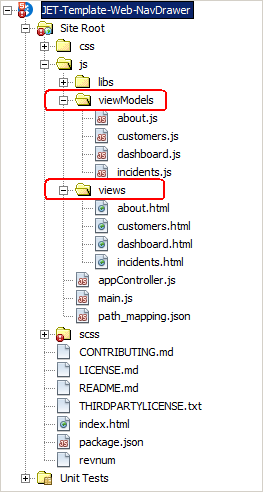
The site_root/js/views folder contains the view templates for the application. site_root/js/viewModels contains the viewModel scripts. The image below shows the Web Nav Drawer Starter Template file structure in the NetBeans IDE.
For additional information about working with single page applications, oj-module, oj.Router, and Knockout templates, see Creating Single-Page Applications.
For details about the oj-web-applayout-* CSS classes, see Web Application Patterns. For additional information about working with responsive design, see Designing Responsive Applications.
Modifying Starter Template Content
To add content, modify the appropriate view template and ViewModel script (if it exists) for the section that you want to update. Add any needed RequireJS modules to the ViewModel’s define() definition, along with functions to define your ViewModel.
If you add content to a section that changes its role, then be sure to change the role associated with that section. Oracle JET uses the role definitions for accessibility, specifically WAI-ARIA landmarks. For additional information about Oracle JET and accessibility, see Developing Accessible Applications.
-
Create your Oracle JET application using one of the following methods:
-
Load the starter template into your favorite IDE, or extract the zip file into a development folder.
The example in the procedure below uses the Web Nav Drawer Starter Template, but you can use the same process on any of the Starter Templates.
Tip:
If you used the command line tooling to scaffold your application, you can still use an IDE like NetBeans for editing. For example, in the NetBeans IDE, choose File –> Open Project and select the folder containing the application you created. Edit your application as needed, but use the tooling commands in a terminal window to build and serve your application.
To modify the Starter Template content:
- Verify the changes in your favorite browser.
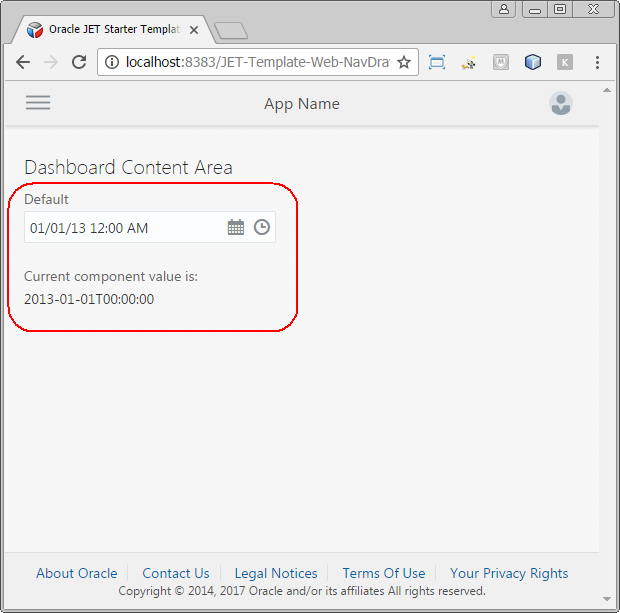
The following image shows the runtime view of the Web Nav Drawer Starter Template with the new Dashboard Content Area content showing
oj-input-date-timewith its current value.