1 Understanding WebLogic JMS
This chapter assumes familiarity with Java programming and the basic concepts of Jakarta Messaging. WebLogic JMS supports the Jakarta Messaging 3.1 API in the jakarta.jms package. This guide uses JMS as shorthand for the messaging API and for WebLogic JMS.
Overview of Jakarta Messaging and WebLogic JMS
WebLogic JMS is an enterprise-class messaging system that is tightly integrated into the WebLogic Server platform.
WebLogic JMS implements Jakarta Messaging 3.1 and provides WebLogic JMS extensions in addition to the standard API. See the Jakarta Messaging 3.1 specification and the WebLogic JMS Extensions API reference.
What Is Jakarta Messaging?
An enterprise messaging system enables applications to communicate with one another through the exchange of messages. A message is a request, report, and/or event that contains information needed to coordinate communication between different applications. A message provides a level of abstraction between application code and the underlying messaging system.
Jakarta Messaging is the standard Java API for enterprise messaging. It continues the Java Message Service (JMS) API and provides interfaces for creating, sending, and receiving messages. Specifically, Jakarta Messaging:
-
Enables Java applications sharing a messaging system to exchange messages
-
Simplifies application development by providing a standard interface for creating, sending, and receiving messages
The Figure 1-1 illustrates WebLogic JMS messaging.
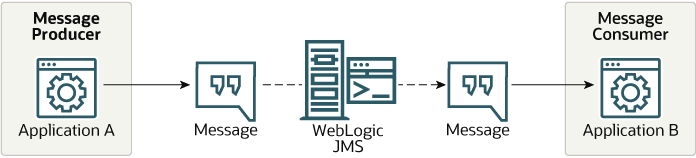
As shown in the figure, WebLogic JMS accepts messages from producer applications and delivers them to consumer applications.
Messaging Specification and API Version
This release uses Jakarta Messaging 3.1. Its jakarta.jms package includes the classic API, the simplified API, and the legacy queue-specific and topic-specific interfaces. Historical references to JMS 1.1 and JMS 2.0 explain the origins of these programming models; they do not change the API namespace used by this release.
See the Jakarta Messaging 3.1 specification.
WebLogic JMS Architecture
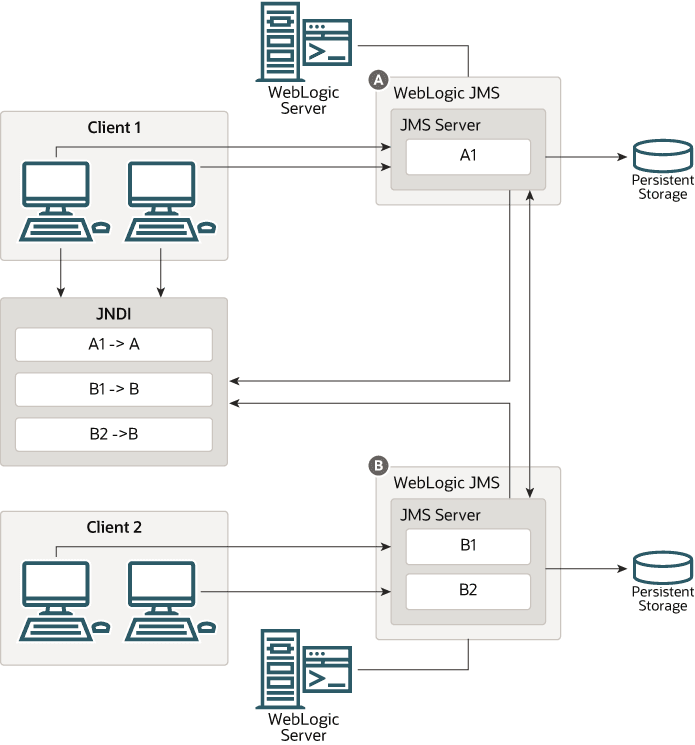
The Figure 1-2 illustrates the WebLogic JMS architecture.
-
JMS server: a service that hosts queue and topic destinations and manages their messages and durable-subscription state. Destination configuration is defined in JMS modules. A module can contain resources with different deployment targets, subject to the targeting rules for each resource type. A WebLogic Server instance can host multiple JMS server instances. When persistence is enabled, a JMS server uses its configured persistent store or, where applicable, the hosting server instance's default store.
- JMS connection hosts and connection factories: any WebLogic server in a cluster can act as a JMS connection host for JMS applications. A JMS application gains access to WebLogic JMS by (a) obtaining a connection factory reference from JNDI, (b) obtaining a connection from this factory, and finally (c) using the connection to send or receive messages. JMS messages flow from an application, through its connection host, and then to any destination on a JMS server that is in the same cluster as the connection host. An application can use either default connection factories or custom connection factories that are configured using a JMS module.
- JMS destinations: hold JMS messages and are hosted on JMS servers. WebLogic JMS applications typically obtain JMS destination references via JNDI and then send and receive messages to these destinations using their respective JMS connections. A single logical WebLogic destination can be configured to be distributed across multiple JMS servers within the same cluster. A WebLogic JMS client can transparently communicate with any WebLogic JMS destination that is hosted in the same cluster as the client's connection host.
- JMS modules: contain configuration resources,
such as standalone queue and topic destinations,
distributed destinations, and connection
factories, and are defined by XML documents that
conform to the
http://xmlns.oracle.com/weblogic/weblogic-jms/1.8/weblogic-jms.xsdschema. - Client JMS applications: either produce messages to destinations or consume messages from destinations.
- JNDI (Java Naming and Directory Interface): provides a lookup facility for JMS connection factories and destinations.
- WebLogic persistent storage: a server instance's default store, a user-defined file store, or a user-defined JDBC-accessible store for storing persistent message data.
Understanding the Messaging Models
JMS supports two messaging models: point-to-point (PTP) and publish/subscribe.
The messaging models are similar, except for the following differences:
-
Point-to-point messaging sends messages to a queue. Each delivery goes to one eligible consumer of that queue.
-
Publish/subscribe messaging sends messages to a topic. Each eligible subscription can receive its own copy of a message.
The jakarta.jms.Queue and jakarta.jms.Topic interfaces both extend jakarta.jms.Destination. They identify the queue or topic used by the messaging API.
Note:
The terms producer and consumer are used as generic descriptions of applications that send and receive messages, respectively, in either messaging model. For each specific messaging model, however, unique terms specific to that model are used when referring to producers and consumers.
Point-to-Point Messaging
The point-to-point (PTP) messaging model enables one application to send a message to another. PTP messaging applications send and receive messages using named queues. A queue sender (producer) sends a message to a specific queue. A queue receiver (consumer) receives messages from a specific queue.
The Figure 1-3 illustrates PTP messaging.
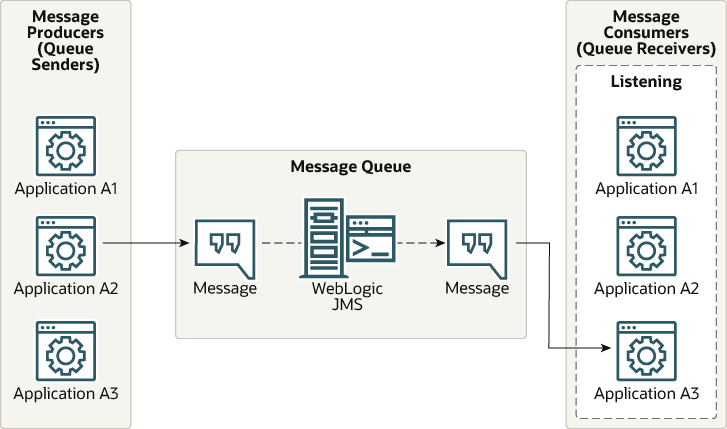
A queue can have multiple producers and consumers. WebLogic JMS selects an eligible consumer for each delivery, taking account of message selectors, consumer capacity, and applicable message-group rules. Applications must not rely on a fixed first-come-first-served order among consumers.
If no eligible consumer is available, a message can wait on the queue, subject to expiration, administrative removal, and the failure-recovery guarantees of its delivery mode. An unacknowledged message can be redelivered, including to a different eligible consumer.
Publish/Subscribe Messaging
In publish/subscribe messaging, producers publish messages to a topic. Consumers receive messages through subscriptions to that topic. A producer does not need to create a subscription to publish messages.
The Figure 1-4 illustrates publish/subscribe messaging.
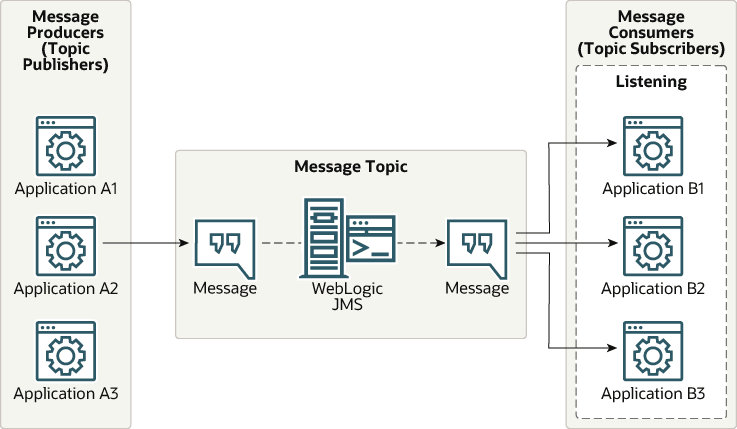
Each eligible subscription receives its own copy of a topic message, subject to its message selector and applicable options. A shared subscription can have multiple consumers, but each message in that subscription is delivered to one consumer at a time.
A durable subscription can retain eligible messages while its consumers are inactive. A nondurable subscription does not provide that offline-retention guarantee. Message retention also depends on acknowledgement, transaction completion, expiration, and delivery-mode guarantees. See Using Durable Subscriptions.
Message Persistence
A message's delivery mode determines the provider-failure protection requested for that message. It does not guarantee that application processing occurs only once. See Message Delivery Mode in the Jakarta Messaging 3.1 specification.
-
PERSISTENT: With persistence enabled, WebLogic JMS uses persistent storage to protect pending messages against provider failure, subject to the messaging contract. Configure the JMS server's persistent store and applicable targeting requirements. If no custom store is configured, the hosting WebLogic Server instance's default store is used where that configuration is supported.
-
NON_PERSISTENT: Messages do not have the same provider-failure recovery guarantee and can be lost on failure. WebLogic JMS can page message data to disk to manage memory; paging does not make a nonpersistent message durable.
Acknowledgement and transaction completion govern removal and redelivery. Recovery or rollback can cause an unacknowledged message to be delivered again. Closing a connection does not guarantee retention for a nondurable topic subscription. Expiration and administrative removal also apply.
For information about configuring persistent stores, see Administering the WebLogic Persistent Store.
Understanding the JMS API
The jakarta.jms API provides interfaces for connecting to a messaging provider and sending and receiving messages.
Jakarta Messaging provides a classic API based on Connection and Session and a simplified API based on JMSContext, JMSProducer, and JMSConsumer. It also retains the legacy queue-specific and topic-specific interfaces. See the Jakarta Messaging 3.1 API reference for the standard interfaces and WebLogic JMS Extensions for the WebLogic-specific APIs.
The following table introduces the APIs discussed in this chapter.
Table 1-1 JMS APIs
| API | Description |
|---|---|
|
Creates Connection objects for the classic API and JMSContext objects for the simplified API. Applications commonly obtain a connection factory through JNDI. |
|
|
Encapsulates the functionality of two objects, Connection and Session, in a single object. |
|
|
Represents an open communication channel to the messaging system. A connection is used to create sessions. |
|
|
Provides a single-threaded context for creating, sending, and receiving messages, with acknowledgement and transaction semantics. |
|
|
Identifies the queue or topic used by messaging operations. |
|
|
Provides the interface for sending and receiving messages. Message producers send messages to a queue or topic. Message consumers receive messages from a queue or topic. |
|
|
Encapsulates information to be sent or received. |
|
|
Encapsulates configuration information for a server-managed pool of message consumers. The server session pool factory is used to create server session pools. |
|
|
Provides a pool of server sessions that can be used to process messages concurrently for connection consumers. |
|
|
Associates a thread with a JMS session. |
|
|
Specifies a consumer that retrieves server sessions to process messages concurrently. |
Footnote 1
WebLogic-specific factory interface for the legacy server-session-pool facility.
Footnote 2
Supports an optional JMS interface for processing multiple messages concurrently.
Footnote 3
Supports an optional JMS interface for processing multiple messages concurrently.
Footnote 4
Supports an optional JMS interface for processing multiple messages concurrently.
For information about configuring JMS resources, see Configuring Basic JMS System Resources in Administering JMS Resources for Oracle WebLogic Server. The procedure for setting up a JMS application is presented in Setting Up a JMS Application.
ConnectionFactory
ConnectionFactory encapsulates connection configuration information and enables applications to create a Connection or JMSContext. A connection factory supports concurrent use, enabling multiple threads to access the object simultaneously. You can use the pre configured default connection factories provided by WebLogic JMS, or you can configure one or more connection factories to create connections with predefined attributes that suit your application.
Using the Default Connection Factories
WebLogic Server provides the Jakarta EE default JMS connection factory at java:comp/DefaultJMSConnectionFactory. See Using the Default JMS Connection Factory in Administering JMS Resources for Oracle WebLogic Server.
WebLogic JMS defines two default connection factories, which you can look up using the following JNDI names:
-
weblogic.jms.ConnectionFactory -
weblogic.jms.XAConnectionFactory
You only need to create a user-defined connection factory if the settings of the default factories are not suitable for your application. The main difference between the preconfigured settings for the default connection factories is the default value for the "XA Connection Factory Enabled" attribute which is used to enable JTA transactions, as shown in the following table.
Table 1-2 XA Transaction Settings for Default Connection Factories
| Default Connection Factory | XA Connection Factory Enabled setting is |
|---|---|
weblogic.jms.ConnectionFactory |
False |
weblogic.jms.XAConnectionFactory |
True |
An XA factory is required for JMS applications to use JTA user transactions, but is not required for transacted sessions. For more information about using transactions with WebLogic JMS, see Using Transactions with WebLogic JMS.
All other default factory configuration attributes are set to the same default values as a user-defined connection factory.
The WebLogic default connection factories are deployed by the server rather than targeted individually. You can disable these WebLogic defaults on a per-server basis with the JMS Default Connection Factories Enabled setting. The Jakarta EE default connection factory at java:comp/DefaultJMSConnectionFactory remains available when the WebLogic defaults are disabled.
To deploy a connection factory on specific independent servers, on specific servers within a cluster, or on an entire cluster, you must configure a new connection factory and specify the appropriate target, as explained in Connection Factory Configuration in Administering JMS Resources for Oracle WebLogic Server.
Note:
For backward compatibility, WebLogic JMS still supports two deprecated default connection factories. The JNDI names for these factories are jakarta.jms.QueueConnectionFactory and jakarta.jms.TopicConnectionFactory.
Configuring and Deploying Connection Factories
A system administrator can define and configure one or more connection factories to create connections with predefined attributes and WebLogic Server will add them to the JNDI space during startup. The application then retrieves a connection factory using WebLogic JNDI. Any user-defined connection factories must be uniquely named.
For information about configuring connection factories, see Configure Resources for JMS System Modules in the Oracle WebLogic Remote Console Online Help.
A system administrator establishes cluster-wide, transparent access to JMS destinations from any server in the cluster by targeting to the cluster or by targeting to one or more server instances in the cluster. This way, each connection factory can be deployed on multiple WebLogic Server instances. For more information about JMS clustering, refer to Configuring Advanced WebLogic JMS Resources in Administering JMS Resources for Oracle WebLogic Server.
The ConnectionFactory Interface
The ConnectionFactory interface defines methods that create Connection objects for the classic API and JMSContext objects for the simplified API. Both APIs support queue and topic messaging. A connection factory supports concurrent use by multiple threads. The domain-specific QueueConnectionFactory and TopicConnectionFactory interfaces remain available for compatibility.
The following table describes the domain-specific connection factory interfaces.
Table 1-3 Domain-Specific ConnectionFactory Interfaces
| Interface | In Messaging Model | Is Used to Create |
|---|---|---|
QueueConnectionFactory |
PTP |
|
TopicConnectionFactory |
Publish/Subscribe |
|
To learn how to use the ConnectionFactory interface within an application, see Developing a Basic JMS Application, or the jakarta.jms.ConnectionFactory Javadoc at jakarta.jms.ConnectionFactory.
JMSContext
JMSContext is the main interface introduced in the simplified API for JMS 2.0. For more information about this interface, see New Interfaces in the Simplified JMS API.
Connection
A Connection represents an open communication channel between an application and the messaging system, and is used to create a Session (see Session) for producing and consuming messages. A connection creates server-side and client-side objects that manage the messaging activity between an application and JMS. A connection may also provide user authentication.
A Connection is created by ConnectionFactory (see ConnectionFactory), obtained through a JNDI lookup.
Due to the resource overhead associated with authenticating users and setting up communications, most applications establish a single connection for all messaging. WebLogic can multiplex JMS traffic over shared T3 or T3S transport connections, so each JMS Connection does not require a separate TCP/IP connection. Additional transport connections can be created as needed when contacting other servers, using different network channels or protocols, or reestablishing a failed transport connection. Servlets and other server-side objects can also obtain JMS Connections.
By default, a connection is created in stopped mode. For information about how and when to start a stopped connection, see Starting, Stopping, and Closing a Connection.
Connections support concurrent use, enabling multiple threads to access the object simultaneously.
Note:
Use Connection for both queue and topic messaging. The domain-specific QueueConnection and TopicConnection interfaces remain available for compatibility.
The following table describes the domain-specific connection interfaces.
Table 1-4 Domain-Specific Connection Interfaces
| Interface | In Messaging Model | Is Used to Create |
|---|---|---|
QueueConnection |
PTP |
|
TopicConnection |
Pub/sub |
|
To learn how to use the Connection interface within an application, see Developing a Basic JMS Application, or the jakarta.jms.Connection Javadoc at jakarta.jms.Connection.
Session
A Session object defines a serial order for the messages produced and consumed, and can create multiple message producers and message consumers. The same thread can be used for producing and consuming messages. If you want an application to have a separate thread for producing and consuming messages, then the application should create a separate session for each function.
A Session is created by Connection (see Connection).
WebLogic JMS Session Guidelines
A generic Session can create producers and consumers for both queues and topics, subject to the restrictions of the destination and acknowledgement mode. The domain-specific QueueSession and TopicSession interfaces retain their queue-only and topic-only restrictions.
Use a separate session for each thread that performs messaging concurrently. Once the connection is started, a session with registered message listeners and its producers and consumers must not be used by other application threads; this restriction also applies between callbacks. The permitted concurrent Session.close() and MessageConsumer.close() operations are exceptions. See the jakarta.jms.Session API documentation for the complete threading rules.
Domain-Specific Session Interfaces
The following table describes the domain-specific session interfaces.
Table 1-5 Domain-Specific Session Interfaces
| Interface | In Messaging Model | Provides a Context for |
|---|---|---|
QueueSession |
PTP |
Producing and consuming messages for a JMS PTP provider. Created by |
TopicSession |
Pub/sub |
Producing and consuming messages for a JMS publish/subscribe provider. Created by |
To learn how to use the Session interface within an application, see Developing a Basic JMS Application, or the jakarta.jms.Session at jakarta.jms.Session, and the weblogic.jms.extensions.WLSession Javadoc.
Non-Transacted Sessions
For a non-transacted session, Jakarta Messaging defines AUTO_ACKNOWLEDGE, CLIENT_ACKNOWLEDGE, and DUPS_OK_ACKNOWLEDGE. WebLogic JMS additionally provides WLSession.NO_ACKNOWLEDGE and WLSession.MULTICAST_NO_ACKNOWLEDGE. The following table describes these modes.
Table 1-6 Acknowledge Modes Used for Non-Transacted Sessions
| Acknowledge Mode | Description |
|---|---|
AUTO_ACKNOWLEDGE |
The session acknowledges a message when a synchronous receive call successfully returns, or when the message listener's |
CLIENT_ACKNOWLEDGE |
The This mode allows an application to receive, process, and acknowledge a batch of messages with one call. |
DUPS_OK_ACKNOWLEDGE |
The session acknowledges message delivery lazily, which can reduce acknowledgement overhead. A provider failure can cause messages to be delivered again, so applications using this mode must tolerate duplicate messages. |
NO_ACKNOWLEDGE |
No acknowledgement is required. Messages sent to a This mode is supported for applications that do not require the quality of service provided by session acknowledge, and that do not want to incur the associated overhead. Note: You should avoid using this mode if your application cannot handle lost or duplicate messages. Duplicate messages may be sent if an initial attempt to deliver a message fails. |
MULTICAST_NO_ACKNOWLEDGE |
Multicast mode with no acknowledge required. Messages sent to a This mode is supported for applications that want to support multicasting, and that do not require the quality of service provided by session acknowledge. For more information on multicasting, see Using Multicasting with WebLogic JMS. Note: Use only with topics. You should avoid using this mode if your application cannot handle lost or duplicate messages. Duplicate messages may be sent if an initial attempt to deliver a message fails. |
Transacted Sessions
In a locally transacted session, only one local transaction is active at a time. Any number of messages sent or received during a transaction are treated as an atomic unit.
When you create a transacted session, the acknowledge mode is ignored. When an application commits a transaction, all the messages that the application received during the transaction are acknowledged by the messaging system and messages it sent are accepted for delivery. If an application rolls back a transaction, then the messages that the application received during the transaction are not acknowledged and messages it sent are discarded.
A local session transaction groups only that session's messaging work. To coordinate JMS operations with other transactional resources, use WebLogic Server's JTA integration. In a Jakarta EE web or EJB container, session transaction behavior follows the container's transaction rules; the application does not complete a JTA transaction by calling Session.commit() or Session.rollback(). See Using JTA User Transactions.
Destination
A Destination object can be either a queue or topic, encapsulating the address syntax for a specific provider. The JMS specification does not define a standard address syntax due to the variations in syntax between providers.
Similar to a connection factory, an administrator defines and configures the destination, and WebLogic Server adds it to the JNDI space during startup. Applications can also create temporary destinations that exist only for the duration of the JMS connection in which they are created.
Note:
Administrators can also configure a distributed destination, which is a single set of destinations (queues or topics) that are accessible as a single, logical destination to a client. For more information, see Distributed Destinations.
On the client side, Queue and Topic objects are handles to the object on the server. Their methods only return their names. To access them for messaging, you create message producers and consumers that attach to them.
Destination objects support concurrent use. The Queue and Topic interfaces extend jakarta.jms.Destination; TemporaryQueue extends Queue, and TemporaryTopic extends Topic.
The following table describes the destination interfaces.
Table 1-7 Destination Interfaces
| Interface | Messaging Model | Manages Messages for |
|---|---|---|
Queue |
PTP |
JMS point-to-point provider. |
TemporaryQueue |
PTP |
A temporary queue owned by the connection that created it. Only consumers created by that connection can consume from the queue. The queue is deleted when the connection closes, or earlier when the application successfully calls |
Topic |
Pub/sub |
JMS publish/subscribe provider |
TemporaryTopic |
Pub/sub |
A temporary topic owned by the connection that created it. Only consumers created by that connection can consume from the topic. The topic is deleted when the connection closes, or earlier when the application successfully calls |
Note:
An application can inspect queue messages without consuming them by creating a QueueBrowser from a Session or QueueSession. In WebLogic JMS, each call to getEnumeration() captures a snapshot of the currently visible messages that match the browser's selector. Creating the browser alone does not capture that snapshot. Browsing does not acknowledge or remove the messages. See Setting and Browsing Message Header and Property Fields.
To learn how to use the Destination interface within an application, see Developing a Basic JMS Application, or the jakarta.jms.Destination Javadoc at jakarta.jms.Destination.
Distributed Destinations
A distributed destination resource is a single set of destinations (queues or topics) that are accessible as a single, logical destination to a client (for example, a distributed topic has its own JNDI name). The members of the set are typically distributed across multiple servers within a cluster, with each member belonging to a separate JMS server. Distributed destinations can improve scalability and availability by distributing work across eligible members. Availability also depends on the configured JMS services, persistent stores, migration policies, and application recovery behavior. Routing to another member does not by itself make an unavailable member's retained messages accessible.
-
For more information about using a distributed destination with your applications, see Using Distributed Destinations.
MessageProducer and MessageConsumer
A MessageProducer sends messages to a queue or topic. A MessageConsumer receives messages from a queue or topic. Message producers and consumers operate independently of one another. Message producers generate and send messages regardless of whether a message consumer has been created and is waiting for a message, and vice versa.
A Session (see Session) creates the MessageProducers and MessageConsumers that are attached to queues and topics.
The QueueSender and TopicPublisher interfaces extend MessageProducer, and QueueReceiver and TopicSubscriber extend MessageConsumer. These domain-specific interfaces remain available for compatibility; MessageProducer and MessageConsumer support both queues and topics.
The following table describes the domain-specific producer and consumer interfaces.
Table 1-8 Domain-Specific Producer and Consumer Interfaces
| Interface | In Messaging Model | Performs this Function |
|---|---|---|
QueueSender |
PTP |
Sends messages for a JMS point-to-point provider. |
QueueReceiver |
PTP |
Receives messages for a JMS point-to-point provider |
TopicPublisher |
Publish/subscribe |
Sends messages for a JMS Publish/subscribe provider |
TopicSubscriber |
Publish/subscribe |
Receives messages for a JMS Publish/subscribe provider |
The point-to-point model allows multiple sessions to consume from the same queue. Each message is delivered to one eligible consumer at a time. WebLogic JMS selects among consumers according to message selectors, available consumer capacity, and ordering constraints; applications must not depend on a fixed consumer-selection order. See the Figure 1-3.
In the publish/subscribe model, each eligible subscription receives a copy of a message. An unshared subscription can have at most one active consumer; a shared subscription can have multiple consumers that share its messages. Subscriptions can be durable or nondurable. See the Figure 1-4 and the subscription discussion.
An application can publish and subscribe using the same connection and can receive its own publications. For subscription-creation methods that support noLocal, set it to true to exclude messages published by that connection. Shared-subscription creation methods do not provide a noLocal argument. See the discussion of creating topic consumers.
To learn how to use the MessageProducer and MessageConsumer interfacees within an application, see Setting Up a JMS Application, or the jakarta.jms.MessageProducer (at jakarta.jms.MessageProducer), and jakarta.jms.MessageConsumer (at jakarta.jms.MessageConsumer) Javadoc.
Messages
A Message encapsulates the information exchanged by applications. This information includes three components:
Message Header Fields
Every JMS message contains a standard set of header fields that is included by default and available to message consumers. Some fields can be set by the message producers.
For information about setting message header fields, see Setting and Browsing Message Header and Property Fields, or to the jakarta.jms.Message Javadoc at jakarta.jms.Message.
The Table 1-9 describes the fields in the message headers and shows how values are defined for each field.
Table 1-9 Message Header Fields
| Field | Description | Defined by |
|---|---|---|
JMSCorrelationID |
Specifies one of the following: a WebLogic There are two common applications for this field. The first application is to link messages by setting up a request/response scheme, as follows:
The second application is to use the |
Application |
JMSDeliveryMode |
Specifies With persistence enabled, persistent delivery uses persistent storage to support recovery after a server failure. Nonpersistent delivery does not provide that recovery guarantee, and messages may be lost after a failure. Message retention, acknowledgement, transactions, expiration and configured delivery policies also affect delivery and redelivery. Delivery mode alone does not guarantee that an application processes a message exactly once. See Message Persistence. |
|
JMSDeliveryTime |
Specifies the earliest time at which the message is eligible for delivery. WebLogic JMS sets this header during send processing according to the effective delivery delay, including any configured destination override. An effective delivery delay of zero makes the message eligible for immediate delivery. Configure the delay on the producer with This field can be used to sort messages in a destination and to select messages. For purposes of data type conversion, the |
|
JMSDestination |
Specifies the destination (queue or topic) to which the message is to be delivered. This field is set when creating producer or as parameter sent by the application before This value is overwritten by a call to |
|
JMSExpiration |
Contains the message's absolute expiration time, expressed in milliseconds since January 1, 1970 UTC. WebLogic JMS determines expiration during send processing from the effective time-to-live, including any configured destination override. A Expiration handling follows the destination's configured expiration policy: an expired message can be discarded, logged and discarded, or redirected to an error destination. |
|
JMSMessageID |
Contains a string value that uniquely identifies each message sent by a JMS Provider. This field is set internally by All This value is overwritten by a call to |
|
JMSPriority |
Specifies the priority level. This field is set on the producer or as parameter sent by the application before JMS defines ten priority levels, 0 to 9, 0 being the lowest priority. Levels 0-4 indicate gradations of normal priority, and level 5-9 indicate gradations of expedited priority. When the message is received, it contains the value specified by the method sending the message. |
|
JMSRedelivered |
Specifies a flag set when a message is redelivered because no acknowledge was received. This flag is of interest to a receiving application. If set, the flag indicates that JMS may have delivered the message previously because one of the following is true:
|
WebLogic JMS |
JMSReplyTo |
Specifies a queue or topic to which reply messages should be sent. This field is set directly on the message by the application before This feature can be used with the Setting the |
Application |
JMSTimestamp |
Contains the time at which the message was sent. WebLogic JMS writes the timestamp in the message when it accepts the message for delivery, not when the application sends the message. When the message is received, it contains the timestamp. The value stored in the field is a Java millis time value. |
WebLogic JMS |
JMSType |
Specifies the message type identifier (String) set directly on the message by the application before The JMS specification allows some flexibility with this field to accommodate diverse JMS providers. Some messaging systems allow application-specific message types to be used. For such systems, the WebLogic JMS does not restrict the use of this field. |
Application |
Message Property Fields
The property fields of a message contain header fields added by the sending application. The properties are standard Java name/value pairs. Property names must conform to the message selector syntax specifications defined in the jakarta.jms.Message Javadoc at jakarta.jms.Message. The following values are valid: boolean, byte, double, float, int, long, short, and String.
WebLogic Server supports the use of the following JMS (JMSX) defined properties as defined in the JMS Specification, at Jakarta Messaging 3.1 specification:
Table 1-10 JMSX Property
| Type | Description |
|---|---|
|
JMSXUserID |
System generated property that identifies the user sending the message. See Using the JMSXUserID Property. |
|
JMSXDeliveryCount |
System generated property that specifies the number of message delivery attempts where first attempt is 1 |
|
JMSXGroupID |
Identity of the message group |
|
JMSXGroupSeq |
Sequence number of a message within a group |
Although message property fields may be used for application-specific purposes, JMS provides them primarily for use in message selectors. You determine how the JMS properties are used in your environment. You can include them in some messages and omit them from others depending upon your processing criteria. For more information, see:
-
JMS Specification, described at Jakarta Messaging 3.1 specification
Message Body
A message body contains the content being delivered from the producer to the consumer.
The following table summarizes standard JMS message types and the WebLogic XMLMessage extension. All message types extend jakarta.jms.Message, at jakarta.jms.Message, which consists of message headers and properties, but no message body.
Table 1-11 JMS Message Types
| Type | Description |
|---|---|
jakarta.jms.BytesMessage |
Stream of uninterpreted bytes, which must be understood by the sender and receiver. The access methods for this message type are stream-oriented readers and writers based on |
jakarta.jms.MapMessage |
A set of named values whose supported types include Java primitive types, |
jakarta.jms.ObjectMessage |
Single serializable Java object. See |
jakarta.jms.StreamMessage |
A sequential stream of typed values, including Java primitive types, |
jakarta.jms.TextMessage |
Single String. The TextMessage can also contain XML content. See |
weblogic.jms.extensions.XMLMessage |
A WebLogic extension of |
For more information, see the jakarta.jms.Message Javadoc at jakarta.jms.Message. For more information about the access methods and, if applicable, the conversion charts associated with a particular message type, see the Javadoc for that message type.
ServerSessionPoolFactory
Note:
Session pool and connection consumer configuration objects are deprecated. They are not a required part of the Jakarta EE specification, do not support JTA user transactions, and are largely superseded by message driven beans (MDBs), which are simpler, easier to manage, and more capable. For more information about designing MDBs, see Message-Driven EJBs in Developing Jakarta Enterprise Beans Using Deployment Descriptors.
A jakarta.jms.ServerSessionPool provides server sessions for concurrent message processing. WebLogic JMS supplies the weblogic.jms.extensions.ServerSessionPoolFactory extension to create a server-side pool.
WebLogic JMS binds each factory in JNDI under weblogic.jms.ServerSessionPoolFactory:<jms-server-runtime-name>, where the suffix is the name of the JMS server runtime instance. Applications retrieve the factory through JNDI and use it to create a server session pool.
For information about the WebLogic server session pool factory extension, see weblogic.jms.extensions.ServerSessionPoolFactory in Java API Reference for Oracle WebLogic Server.
ServerSessionPool
A ServerSessionPool application server object provides a pool of server sessions that connection consumers can retrieve in order to process messages concurrently.
A ServerSessionPool is created by the ServerSessionPoolFactory object (see ServerSessionPoolFactory) obtained through a JNDI lookup.
For information about the ServerSessionPool interface, see jakarta.jms.ServerSessionPool in the Jakarta Messaging 3.1 API documentation.
ServerSession
A ServerSession application server object enables you to associate a thread with a JMS session by providing a context for creating, sending, and receiving messages.
A ServerSession application is created by a ServerSessionPool object, described in ServerSessionPool.
For information about the ServerSession interface, see jakarta.jms.ServerSession in the Jakarta Messaging 3.1 API documentation.
ConnectionConsumer
A ConnectionConsumer object uses a server session to process received messages. If message traffic is heavy, then the connection consumer can load each server session with multiple messages to minimize thread context switching. A ConnectionConsumer is created by a Connection object, described in Connection.
For information about the ConnectionConsumer interface, see jakarta.jms.ConnectionConsumer in the Jakarta Messaging 3.1 API documentation.
Note:
Connection consumer listeners run on the same JVM as the server.
Value-Added Public JMS API Extensions
WebLogic JMS is tightly integrated into the WebLogic Server platform, enabling you to build highly secure Jakarta EE applications that can be easily monitored and administered through the WebLogic Remote Console.
WebLogic JMS supports XA transactions and provides high-availability mechanisms through clustering and service migration. Cross-version communication and integration with third-party messaging providers are subject to the applicable compatibility requirements and supported integration mechanisms.
For a detailed listing of these value-added features, see WebLogic Server Value-Added JMS Features in Administering JMS Resources for Oracle WebLogic Server.
WebLogic Server Value-Added JMS Features
In addition to the standard JMS APIs specified by the JMS Specification, WebLogic Server provides numerous weblogic.jms.extensions APIs, which include the classes and methods described in the Table 1-12. For more information about these APIs, see Java API Reference for Oracle WebLogic Server.
Table 1-12 WebLogic JMS Public API Extensions
| Interface/Class | Function |
|---|---|
|
Provides consumer and destination information to management clients in CompositeData format. |
|
|
Provides a factory and methods to:
|
|
|
Represents a JMS message and associated management metadata in the CompositeData format used by message-management APIs. |
|
|
JMSModuleHelper locates JMS runtime MBeans and manages JMS module configuration entities. JMSNamedEntityModifier supplies a callback for modifying a named configuration entity through JMSModuleHelper. |
|
|
Monitors JMS runtime JMX MBeans |
|
|
Associates a message delivered to a MDB (message-driven bean) with a transaction |
|
|
Determines if a destination is a queue or a topic |
|
|
Provides WebLogic-specific message information, including the Unit-of-Order name, distributed-destination forwarding status, and an XML DOM representation of the message. |
|
|
Configures producer extension options, including time-to-deliver, redelivery limits, send timeouts, and Unit-of-Order names. |
|
|
Provides additional fields and methods that are not supported by |
|
|
Provides additional methods that are not supported by |
|
|
Provides additional fields and methods that are not supported by |
|
|
Represents XML message content and provides DOM Document accessors. |
|
|
Computes the next time matching a schedule, or the interval until that time. |
|
|
Legacy helper for JMS runtime and configuration MBeans and destination management. Deprecated since WebLogic Server 9.0; use JMSModuleHelper. |
|
|
Provides interfaces for creating server session pools and message listeners Note: Session pool configuration objects are deprecated. They are not a required part of the Jakarta EE specification, do not support JTA user transactions, and are largely superseded by message-driven beans (MDBs), which are a required part of Jakarta EE. For more information on designing MDBs, see Developing Message-Driven Beans for Oracle WebLogic Server. |
This API also supports NO_ACKNOWLEDGE and MULTICAST_NO_ACKNOWLEDGE acknowledge modes, and extended exceptions, including throwing an exception:
-
To the session exception listener (if set), when one of its consumers has been closed by the server as a result of a server failure or administrative intervention.
-
From a multicast session when the number of messages received by the session, but not yet delivered to the message listener, exceeds the maximum number of messages allowed for that session.
-
From a multicast consumer when it detects a sequence gap (message received out of sequence) in the data stream.