 JD Edwards EnterpriseOne Capital Asset Management Overview
This chapter discusses:
JD Edwards EnterpriseOne Capital Asset Management overview.
JD Edwards EnterpriseOne Capital Asset Management business processes.
JD Edwards EnterpriseOne Capital Asset Management integrations.
JD Edwards EnterpriseOne Capital Asset Management implementation.
JD Edwards EnterpriseOne Capital Asset Management Overview
The JD Edwards EnterpriseOne Capital Asset Management (CAM) system from Oracle enables you to maintain and service equipment to reduce downtime and repair costs, increase productivity, and improve product quality. You can track the revenue, cost, and use of the assets, and you can use workflow alerts to plan and resolve issues before they become emergencies.
You can use the maintenance features of JD Edwards EnterpriseOne CAM to manage all aspects of equipment and machinery maintenance in the organization, such as:
Creating equipment register and information.
Scheduling preventive maintenance.
Receiving and responding to cases.
Planning of parts and labor.
Purchasing parts and materials.
Assigning resources.
Tracking the status of preventive and corrective tasks.
JD Edwards EnterpriseOne Capital Asset Management Business Processes
This diagram illustrates the JD Edwards EnterpriseOne CAM business process flow:
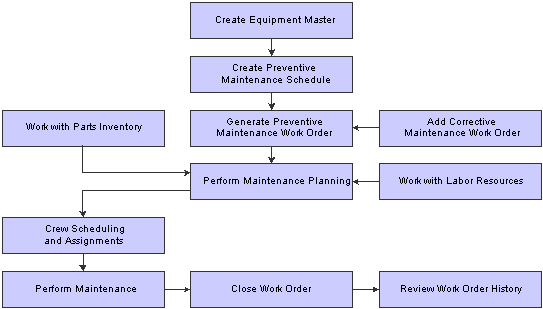
Process flow for Capital Asset Management
JD Edwards EnterpriseOne Capital Asset Management Integrations
The JD Edwards EnterpriseOne CAM system integrates with these JD Edwards EnterpriseOne systems:
JD Edwards EnterpriseOne Foundation - Address Book.
JD Edwards EnterpriseOne General Ledger.
JD Edwards EnterpriseOne Job Cost.
JD Edwards EnterpriseOne Accounts Payable.
JD Edwards EnterpriseOne Payroll.
JD Edwards EnterpriseOne Fixed Assets.
JD Edwards EnterpriseOne Foundation - Work Order.
JD Edwards EnterpriseOne Inventory Management.
JD Edwards EnterpriseOne Procurement.
JD Edwards EnterpriseOne Product Data Management.
JD Edwards EnterpriseOne Shop Floor Management.
JD Edwards EnterpriseOne Requirements Planning.
JD Edwards EnterpriseOne Resource Assignments.
JD Edwards EnterpriseOne Customer Relationship Management.
JD Edwards EnterpriseOne CAM also integrates with this third-party system: Intelligent Graphic Solution (IGS).
Note. Your company might not have licensed all of these systems. Check with the system administrator to verify which systems have been purchased and installed.
Because JD Edwards EnterpriseOne systems are integrated, you need to enter the vital information about a piece of equipment only one time. When you create equipment masters and supplemental information for a piece of equipment, the system stores the information in the Asset Master table (F1201) and the Equipment Master Extension table (F1217). Many JD Edwards EnterpriseOne systems that you use can then access the information.
System integration also helps ensure that equipment information is consistent throughout the organization. This consistency saves considerable time and money, especially when you need to update or revise equipment information.
JD Edwards EnterpriseOne Foundation - Address Book
Every JD Edwards EnterpriseOne system from Oracle works with JD Edwards EnterpriseOne Foundation - Address Book from Oracle to retrieve up-to-date employee, supplier, and other applicable name and address information.
JD Edwards EnterpriseOne General Ledger
When you enter equipment transactions (including billing transactions), you must process them through the general ledger.
You enter all statistical values, such as miles, gallons, and hours into the general ledger.
When you charge a job for equipment use, the system searches the Account Master for the appropriate rate and account to bill.
JD Edwards EnterpriseOne Job Cost
You can manage projects and jobs, and monitor the costs and revenues that are associated with them.
JD Edwards EnterpriseOne Accounts Payable
You can enter equipment charges. When you process equipment parts orders through the JD Edwards EnterpriseOne Procurement system, the system automatically enters the equipment number from the purchase order to the accounts payable voucher.
JD Edwards EnterpriseOne Payroll
You can:
Enter equipment time for billing purposes.
Charge for labor that is associated with operating or repairing equipment.
Charge to a work order or a work order labor routing step depending on level of detail required by using a specific labor routing step.
JD Edwards EnterpriseOne Fixed Assets
JD Edwards EnterpriseOne Fixed Assets system shares many tables with JD Edwards EnterpriseOne Plant and Equipment Management, such as:
Asset Master table (F1201) - Stores equipment master information
Asset Account Balances File table (F1202) - Stores equipment account balance information
JD Edwards EnterpriseOne Plant and Equipment Management also uses automatic accounting instructions (AAIs) from JD Edwards EnterpriseOne Fixed Assets.
JD Edwards EnterpriseOne Foundation - Work Order Processing
You can track, schedule, and report on preventive and corrective equipment maintenance activities.
You can attach parts lists and labor detail steps to the work order to assist in planning the work requirements.
JD Edwards EnterpriseOne Inventory Management
You can:
Track and take inventory of repair parts.
Attach parts lists to work orders.
JD Edwards EnterpriseOne Procurement
You can create purchase orders directly from the work order parts list and from other maintenance planning functions within JD Edwards EnterpriseOne Plant and Equipment Management.
A purchase order includes the equipment number, which the system automatically enters in related forms and tables, such as:
Accounts payable entry
General ledger
Equipment ledger
JD Edwards EnterpriseOne Product Data Management
You can create bills of materials, work centers, and routings. You can also access information about bills of material, work centers, routing instructions, and work center costs.
JD Edwards EnterpriseOne Shop Floor Management
You can use the bills of material and routing instructions to plan and schedule work, and to commit and track usage of labor and materials within the plant. JD Edwards EnterpriseOne CAM and JD Edwards EnterpriseOne Shop Floor Management share the same tables and the majority of the business logic.
JD Edwards EnterpriseOne Requirements Planning
You can plan labor and the material needed for parts, for both forecasted work orders and for actual work orders. The system enables you to manage the supply and demand of inventory parts to ensure that the necessary stock is available to fulfill work orders.
JD Edwards EnterpriseOne Resource Assignments
You can assign a crew or individual resources to a work order or to specific labor detail steps while checking the current availability and assignments of the resources. Resource requirements planning supports time dependant material and capacity plans based on forecasted and actual work order requirements.
JD Edwards EnterpriseOne Customer Relationship Management
Within the support applications of JD Edwards EnterpriseOne Customer Relationship Management (CRM), you can use the JD Edwards EnterpriseOne Case Management module to record and track customer issues, such as equipment failures, and convert them to work orders for repair.
Intelligent Graphic Solution
Intelligent Graphic Solution (IGS) is a third-party product that you can purchase separately from JD Edwards EnterpriseOne CAM. It is not a requirement of JD Edwards EnterpriseOne CAM.
IGS is a graphical tool that can illustrate equipment, buildings, and inventory item assemblies. You can see each item or part in picture format, and in relation to its parents or other components. You can see an entire assembly, select parts from the graphic, and return the item number to the parts list in JD Edwards EnterpriseOne.
JD Edwards EnterpriseOne Capital Asset Management Implementation
This section provides an overview of the steps that are required to implement the JD Edwards EnterpriseOne CAM system.
In the planning phase of the implementation, take advantage of all JD Edwards EnterpriseOne sources of information, including the installation guides and troubleshooting information. A complete list of these resources appears in the preface in About This Documentation with information about where to find the most current version of each.
When determining which electronic software updates (ESUs) to install for JD Edwards EnterpriseOne CAM, use the EnterpriseOne and World Change Assistant. EnterpriseOne and World Change Assistant, a Java-based tool, reduces the time required to search and download ESUs by 75 percent or more and enables you to install multiple ESUs at one time.
See JD Edwards EnterpriseOne Tools 8.98 Software Update Guide
 Global Implementation Steps
This table lists the suggested global implementation steps for JD Edwards EnterpriseOne CAM:
|
Step |
Reference |
|
1. Set up global user-defined codes (UDCs). |
See JD Edwards EnterpriseOne Tools 8.98 Foundation Guide. |
|
2. Set up companies, fiscal date patterns, and business units. |
|
|
3. Set up next numbers. |
See JD Edwards EnterpriseOne Tools 8.98 Foundation Guide. |
|
4. Set up accounts, and the chart of accounts. |
See Setting Up Bank Accounts, Creating the Chart of Accounts. |
|
5. Set up the General Accounting constants. |
|
|
6. Set up multicurrency processing, including currency codes and exchange rates. |
See Setting Up General Accounting for Multicurrency Processing, Setting Up Exchange Rates. |
|
7. Set up ledger type rules. |
|
|
8. Enter address book records. |
|
|
9. Set up inventory information such as branch/plant constants, default locations and printers, manufacturing and distribution AAIs, and document types. |
|
|
10. Set up shop floor calendars. |
|
|
11. Set up manufacturing constants. |
Capital Asset Management Implementation Steps
This table lists the suggested application-specific implementation steps for JD Edwards EnterpriseOne CAM:
|
Step |
Reference |
|
1. Set up constants for work orders. |
|
|
2. Set up Service and Warranty Management (SWM) constants. |
See Setting Up Constants. |
|
3. Set up UDCs for CAM. |
|
|
4. Set up UDCs for resource planning. |
|
|
5. Set up UDCs for parts planning. |
|
|
6. Set up default locations and printers. |
|
|
7. Set up equipment billing information. |
|
|
8. Set up failure analysis information. |
|
|
9. Set up general planning information. |
|
|
10. Set up inventory in the Item Master. |
|
|
11. Set up inventory management and procurement. |
See Setting Up Inventory Management and Procurement for CAM Users. |
|
12. Set up next numbers for equipment and work orders. |
See Setting Up Next Numbers for Equipment, Setting Up Next Numbers for Work Orders. |
|
13. Set up product model and family combinations. |
|
|
14. Set up record type formats. |
|
|
15. Set up resource planning. |
|
|
16. Set up specification data for equipment. |
|
|
17. Set up supplemental data for equipment. |
|
|
18. Set up equipment locations. |
|
|
19. Set up supply and demand inclusion rules. |
|
|
20. Set up work order default codes. |
|
|
21. Set up work order history. |
|
|
22. Set up work orders for unscheduled maintenance. |
|
|
23. Set up work order activity rules. |
|
|
24. Set up standard parts lists and work order instructions. |
See Setting Up Standard Parts Lists and Work Order Instructions. |
|
25. Set up preventive maintenance schedules. |
|
|
26. Set up maintenance rules. |
|
|
27. Set up model work orders. |