
Defining Approval Options for a Business Unit
To define approval options for business units, use the General Ledger Definition component (BUS_UNIT_TBL_GL).
This section discusses how to define approval options for a business unit.
Page Used to Define Approval Options for a Business Unit
|
Page Name |
Definition Name |
Navigation |
Usage |
|---|---|---|---|
|
Approval Options |
BUS_UNIT_TBL_GL4 |
|
Specify journal entry approval options for a business unit. |
General Ledger Definition - Approval Options Page
Use the General Ledger Definition - Approval Options page (BUS_UNIT_TBL_GL4) to specify journal entry approval options for a business unit.
Image: Approval Options page
This example illustrates the fields and controls on the Approval Options page. You can find definitions for the fields and controls later on this page.
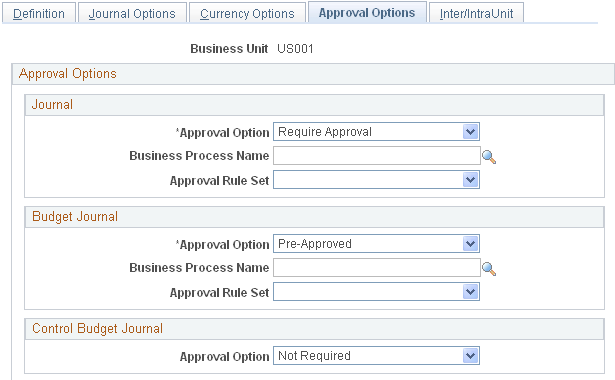
You have the option to use either the Virtual Approver method or Approval Framework method for the journal approval process. You select the approval methodology for journal approval on the Installation Options - General Ledger page. The selection choices on the Approval Options page depend upon which methodology that you select to use in Installation Options. When using the Virtual Approver method, the Business Process Name and Approval Rule Set fields appear on the page. When using the Approval Framework method, these fields are not visible since the Approval Framework provides its own Business Process and Approval Rule Set to communicate with PeopleTools.
| Journal |
Select an option for transaction journals. Values are: Pre-Approved: Allows journal entry without approval through PeopleSoft Workflow. The Post Journal option is available on the Journal Entry - Lines page. Require Approval: Requires approval through PeopleSoft Workflow. If you select this option and the approval methodology on the Installation Options - General Ledger page is Virtual Approver, you must select a Business Process Name and associated Approval Rule Set. The Business Process Name and Approval Rule Set fields are not visible when the approval methodology is Approval Framework in Installation Options. |
| Budget Journal |
Select a journal approval option for standard budget journals. Values are: Pre-Approved: Allows journal entry without budget approval through PeopleSoft Workflow. The Post Journal option is available on the Journal Entry - Lines page. Require Approval: Requires budget approval through PeopleSoft Workflow. If you select this option and the approval methodology on the Installation Options - General Ledger page is Virtual Approver, you must select a Business Process Name and associated Approval Rule Set. The Business Process Name and Approval Rule Set fields are not visible when the approval methodology in Installation Options is Approval Framework. |
| Control Budget Journal |
Select the Required approval option to enable Commitment Control budget journal approval (using Approval Framework) for the entire business unit. The default value is Not Required. See Approving Control Budget Journals Using Approval Framework. See also, PeopleSoft General Ledger Documentation Update: Commitment Control Budget Journal Approval. Visit My Oracle Support website - Article ID 1369486.1. |
Note: When you define approval options at the source level, they override any approval handling that you specify at the business unit or ledger levels for journals using that source only.
Defining Interunit and Intraunit Options for a Business Unit
The Inter/IntraUnit page is used to select interunit and intraunit templates and to enter the legal entity to which the business unit belongs. You can also specify options for interunit billing and interunit transfer transactions. The page is presented in the context of the components, other pages and information necessary to implement interunit and intraunit accounting.