Developing with Oracle Radio
Understand the REST and WebSocket operations used by supported Oracle Radio clients.
Current authentication support is limited to the supplied Radio browser application and Radio mobile clients. Command-line, custom-browser, and server authentication contracts are not supported. The browser application manages its session and CSRF state; bearer authentication is for mobile clients. API examples do not authorize a new client or customer-created OAuth application. See supported authentication.
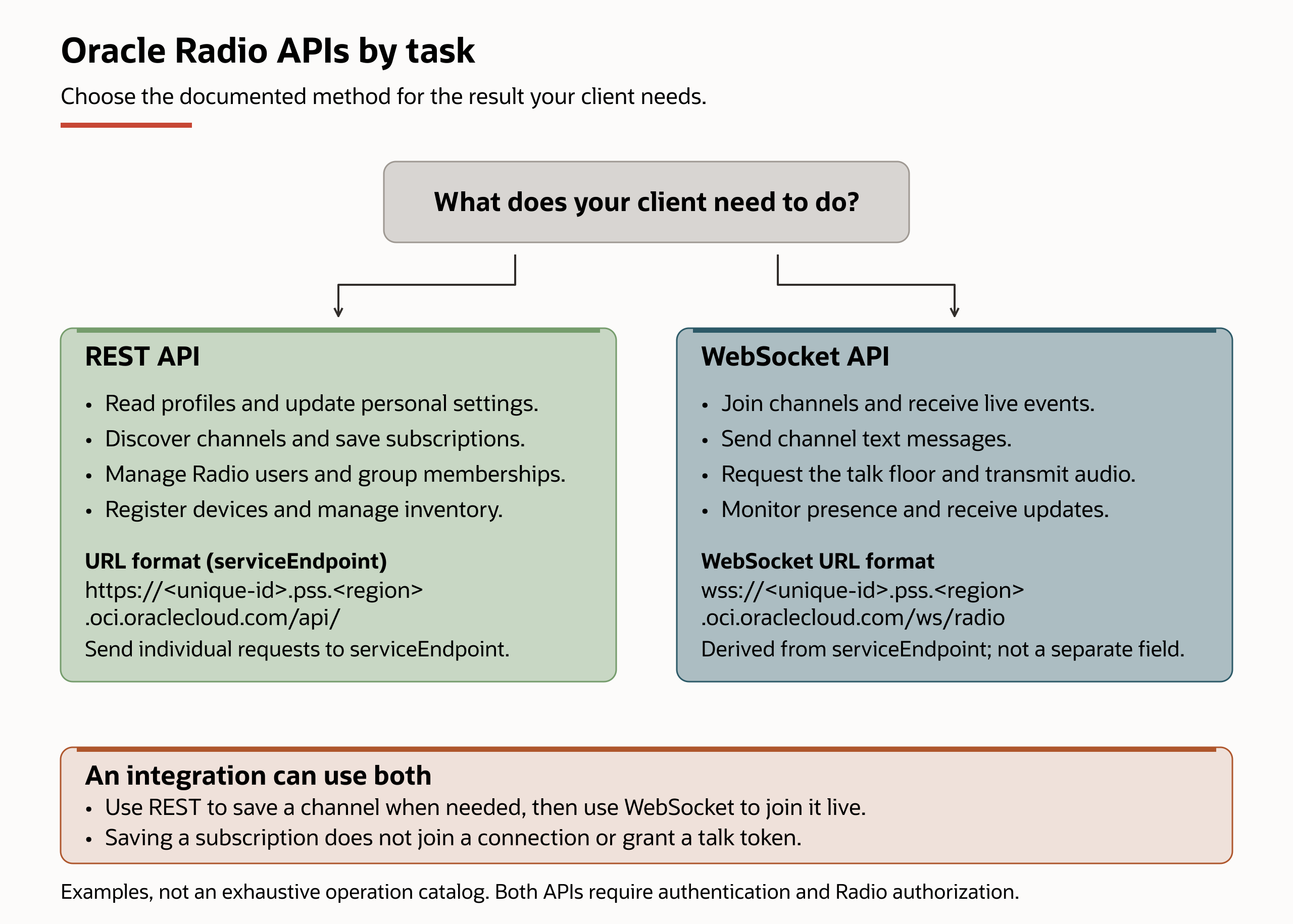
The diagram groups common tasks by their documented API method; it isn't a complete operation catalog. Its URL formats use the same instance hostname: REST uses https with /api/, and WebSocket uses wss with /ws/radio. Copy your returned instance endpoint values as described in the Overview's instance endpoints. Follow the REST subscription workflow or the WebSocket workflows for ordered steps.
Use REST for individual requests and saved application state, and WebSocket for live channel communication and server events. An integration can use both, but each operation is available only through its documented methods. See the Overview's API comparison.
The Public Safety and Security instance-management API and Oracle Radio APIs are separate contracts. Use the Public Safety and Security API to manage an instance and obtain its serviceEndpoint and uiEndpoint. Use serviceEndpoint for instance-hosted Radio REST requests and uiEndpoint to open Oracle Radio.
Contract Surfaces
- The REST API provides request-response operations for discovery, settings, subscriptions, floor control, messages, history, and approved administration.
- The WebSocket API provides live channel state, floor-control messages, real-time text events, presence events, and audio transport.
- The published REST and WebSocket references describe operations used by supported Oracle Radio clients. No supported Oracle Radio SDK is currently distributed. OCI SDK and CLI clients manage Public Safety and Security instances and work requests; they don't provide a Radio REST or WebSocket client. Don't treat an unpublished or previously generated Radio client as a supported SDK.
Supported Client Request Sequence
- Get the active Public Safety and Security instance details, to find its API and user-interface endpoints.Radio App UI:
uiEndpoint:
REST API:https://<unique-id>.pss.<region>.oci.oraclecloud.com/ui/serviceEndpoint, stored inPSS_SERVICE_ENDPOINT
Radio WebSocket URL:https://<unique-id>.pss.<region>.oci.oraclecloud.com/api/wss://<unique-id>.pss.<region>.oci.oraclecloud.com/ws/radio - Choose an authentication path documented for the release. Public Safety and Security provisions the public OAuth client used by the supported Radio mobile application.
- Enable the principal as a Radio user and assign least-privilege Radio permissions.
- Authenticate using the supported browser-session or bearer-token path.
- Use REST for discovery and durable operations and WebSocket for live communication.
- Handle authorization changes, disconnects, retries, and contract-version changes.
For the confirmed Radio mobile client sequence, see Getting Started with Oracle Radio APIs.
Oracle Radio Application and API Workflows
A workflow is an ordered set of steps for completing a task, with prerequisites, expected results, and recovery guidance. These documentation workflows aren't a Scenarios menu or a separate feature in the application. Follow the workflow for your task and use the available method tabs; REST and WebSocket aren't interchangeable for every step.
Mobile setup and recovery
- Mobile enrollment: prepare registration, sign in, register the installation, send a heartbeat, and establish an authenticated connection.
- Mobile re-enrollment: restore registration after an application reset, reinstallation, or loss of saved Radio device state. For an ordinary sign-in or refresh failure, first follow session recovery.
Saved channel selections
- Saved subscriptions: discover a channel, check the current selection, save it, and verify the result using Radio App or REST API tabs. Saving the selection doesn't join a live WebSocket connection.
Live WebSocket communication
- Session management: establish, maintain, and recover an authenticated connection.
- Joining channels: discover a channel, subscribe the current connection, and verify membership.
- Transmitting audio: request the talk floor, wait for the grant, transmit audio, and release the floor.
- Receiving audio: process transmission events and incoming binary audio.
- Sending messages: send normal or critical text and handle the result.
- Monitoring presence: subscribe to changes and reconcile the initial snapshot with live updates.
- User subscriptions: change live channel subscriptions for another connected user with the required permission.
Related Radio App procedures
- Operator workflow: follow the supplied browser application's sign-in, channel, talk, and messaging sequence.
- Mobile Inbox: review messages and manage their local read or deleted state.
- Critical Alert: follow the Android or iOS procedure for priority voice and an eligible location update.